DonationCoder.com forum
 
Read-only archive. This is a static copy of the DonationCoder.com forum. Reading and searching work as before; logging in, posting and private messages do not.
Archive of 2026-10-21 · About this archive · Main site

Author Topic: Nothing working to get FUBAR PC to boot  (Read 17,060 times)

kyrathaba

  • N.A.N.Y. Organizer
  • Honorary Member
  • Joined in 2006
  • **
  • Posts: 3,200
    • Participated in NANY Challenge Eight Times
    • Programming School - Deluxe Bonus Medal
    • Programming School - Stage 1 Medal
    • Coding Snacks
    • Military Service Badge - US Army
    • Writer
Nothing working to get FUBAR PC to boot
« on: August 01, 2015, 06:37 PM »
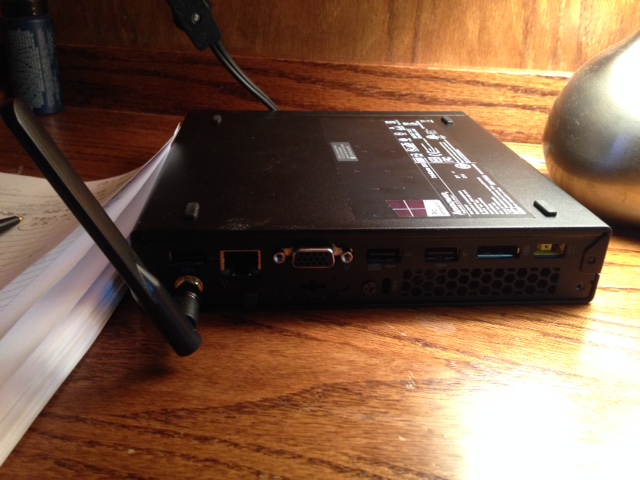
I inherited a little mini-PC. No CD drive. Just has a small SSD. Problem is: won't boot. I've tried manipulating BIOS. Got it to look at USB keys first in boot order. And I have a USB key with WinXP Pro 64x installation files (which would be fine, for this little PC, though naturally I prefer Win7 which I don't have an installation disc for). It obviously tries to access the USB key. I see the key light up and flash, but I get a Missing Boot Manager screen. I take it the Win7 installation that was originally on the SSD is dorked. It's a Lenovo ThinkCentre M53 Tiny. The OEM Lenovo Restore software runs from the Recovery partition, but is unable to fix the problem. And when I try to access a 500Gb USB removable drive (on which I have a backup image), Lenovo Recovery won't detect the removable drive.

Any ideas on how I might restore this little machine? Never again will I fool with a PC that doesn't have a CD drive...

IMG_0503.JPG
Win 10 Pro running on a 3.2 GHz CPU and 12 Gb RAM
__________________________________________

Proofreading Service: http://williammillerservices.com/proofreading

Shades

  • Member
  • Joined in 2006
  • **
  • Posts: 2,954
Re: Nothing working to get FUBAR PC to boot
« Reply #1 on: August 01, 2015, 06:54 PM »
Stoic Joker has a suggestion to try: this DC thread

This very likely enables the repair option (that comes with the device at sounds) to complete.
The easy path is usually downhill...

kyrathaba

  • N.A.N.Y. Organizer
  • Honorary Member
  • Joined in 2006
  • **
  • Posts: 3,200
    • Participated in NANY Challenge Eight Times
    • Programming School - Deluxe Bonus Medal
    • Programming School - Stage 1 Medal
    • Coding Snacks
    • Military Service Badge - US Army
    • Writer
Re: Nothing working to get FUBAR PC to boot
« Reply #2 on: August 01, 2015, 06:58 PM »
Thanks for the link, Shades.

Unfortunately, I cannot even reach Step 1 in SJ's post:

Quote
1.  Boot from appropriate OS media.

Nothing I've tried has allowed me to boot from a bootable USB stick, and the PC has no CD drive.
Win 10 Pro running on a 3.2 GHz CPU and 12 Gb RAM
__________________________________________

Proofreading Service: http://williammillerservices.com/proofreading

tomos

  • Charter Member
  • Joined in 2006
  • ***
  • Posts: 11,970
    • Gathering Badge
    • Participated in NANY Challenge Once
Re: Nothing working to get FUBAR PC to boot
« Reply #3 on: August 01, 2015, 08:26 PM »
have you tried a windows 7 recovery disc (on usb of course) ?
(FWIW, I made an ISO of the CD and used Rufus to 'burn' it to usb-stick)

EDIT// I guess it probably wont work if the installation disc wont work - but I did have some success in repairing a MBR (that could not find the OS install) lately with it
Tom

kyrathaba

  • N.A.N.Y. Organizer
  • Honorary Member
  • Joined in 2006
  • **
  • Posts: 3,200
    • Participated in NANY Challenge Eight Times
    • Programming School - Deluxe Bonus Medal
    • Programming School - Stage 1 Medal
    • Coding Snacks
    • Military Service Badge - US Army
    • Writer
Re: Nothing working to get FUBAR PC to boot
« Reply #4 on: August 01, 2015, 08:27 PM »
Hmm, I'll try that, tomos, and let you know... thanks!
Win 10 Pro running on a 3.2 GHz CPU and 12 Gb RAM
__________________________________________

Proofreading Service: http://williammillerservices.com/proofreading

kyrathaba

  • N.A.N.Y. Organizer
  • Honorary Member
  • Joined in 2006
  • **
  • Posts: 3,200
    • Participated in NANY Challenge Eight Times
    • Programming School - Deluxe Bonus Medal
    • Programming School - Stage 1 Medal
    • Coding Snacks
    • Military Service Badge - US Army
    • Writer
Re: Nothing working to get FUBAR PC to boot
« Reply #5 on: August 01, 2015, 11:33 PM »
Thanks again, tomos, THAT worked! Course I still have to download and install drivers but there's a fresh copy of Win 7 Ultimate on the little box :D
Win 10 Pro running on a 3.2 GHz CPU and 12 Gb RAM
__________________________________________

Proofreading Service: http://williammillerservices.com/proofreading

tomos

  • Charter Member
  • Joined in 2006
  • ***
  • Posts: 11,970
    • Gathering Badge
    • Participated in NANY Challenge Once
Re: Nothing working to get FUBAR PC to boot
« Reply #6 on: August 01, 2015, 11:45 PM »
Thanks again, tomos, THAT worked! Course I still have to download and install drivers but there's a fresh copy of Win 7 Ultimate on the little box :D

great :Thmbsup:
Tom

kyrathaba

  • N.A.N.Y. Organizer
  • Honorary Member
  • Joined in 2006
  • **
  • Posts: 3,200
    • Participated in NANY Challenge Eight Times
    • Programming School - Deluxe Bonus Medal
    • Programming School - Stage 1 Medal
    • Coding Snacks
    • Military Service Badge - US Army
    • Writer
Re: Nothing working to get FUBAR PC to boot
« Reply #7 on: August 02, 2015, 01:06 AM »
So, I've got a nice, shiny new installation of Win 7 Ultimate x64, but no software came with the unit. I went to Lenovo's website to get drivers, and naturally they aren't available currently:

http://support.lenovo.com/us/en/products/desktops-and-all-in-ones/thinkcentre-m-series-desktops/thinkcentre-m53

Anyone know where device drivers for the Lenovo ThinkCentre M53 Tiny might be obtained?
Win 10 Pro running on a 3.2 GHz CPU and 12 Gb RAM
__________________________________________

Proofreading Service: http://williammillerservices.com/proofreading

4wd

  • Pedantic Old Bastard
  • Supporting Member
  • Joined in 2006
  • **
  • Posts: 5,652
    • Coding Snacks
Re: Nothing working to get FUBAR PC to boot
« Reply #8 on: August 02, 2015, 01:53 AM »
^That website has something strange with it, I can't see the drivers in Pale Moon on my desktop but I downloaded both the chipset and graphic drivers using Chrome on my android tablet.

So, something to try.

Otherwise, my one shop stop for driver installation these days if I can't find them, is DriverPack Solution (which you can install to a flash drive to run).  I usually download the ISO (~10GB) but the online version might get you what you want, assuming you have net access on it.
"I will not follow where the path may lead, but I will go where there is no path, and I will leave a trail." - Muriel Strode, 1903

Deozaan

  • Charter Member
  • Joined in 2006
  • ***
  • Posts: 9,827
    • Participated in NANY Challenge Eight Times
    • Cody Award
Re: Nothing working to get FUBAR PC to boot
« Reply #9 on: August 02, 2015, 03:33 AM »
I went looking on Archive.org and it didn't have anything useful. But I also looked with archive.is and it seems to have links:

https://archive.is/MEFpY

I think it has something to do with adblock/scriptblockers. The content is there. But if your browser won't let the Javascript load it in (is that still being called AJAX?) it will just say "currently unavailable" and be totally unhelpful.
« Last Edit: August 03, 2015, 06:15 AM by Deozaan »

4wd

  • Pedantic Old Bastard
  • Supporting Member
  • Joined in 2006
  • **
  • Posts: 5,652
    • Coding Snacks
Re: Nothing working to get FUBAR PC to boot
« Reply #10 on: August 02, 2015, 04:28 AM »
I think it has something to do with adblock/scriptblockers.

Yep, looks like it, all downloads show up under K-Meleon.
"I will not follow where the path may lead, but I will go where there is no path, and I will leave a trail." - Muriel Strode, 1903

kyrathaba

  • N.A.N.Y. Organizer
  • Honorary Member
  • Joined in 2006
  • **
  • Posts: 3,200
    • Participated in NANY Challenge Eight Times
    • Programming School - Deluxe Bonus Medal
    • Programming School - Stage 1 Medal
    • Coding Snacks
    • Military Service Badge - US Army
    • Writer
Re: Nothing working to get FUBAR PC to boot
« Reply #11 on: August 02, 2015, 12:26 PM »
Thanks, guys. Got some downloads from there, and hopefully will get LAN driver successfully installed.
Win 10 Pro running on a 3.2 GHz CPU and 12 Gb RAM
__________________________________________

Proofreading Service: http://williammillerservices.com/proofreading

kyrathaba

  • N.A.N.Y. Organizer
  • Honorary Member
  • Joined in 2006
  • **
  • Posts: 3,200
    • Participated in NANY Challenge Eight Times
    • Programming School - Deluxe Bonus Medal
    • Programming School - Stage 1 Medal
    • Coding Snacks
    • Military Service Badge - US Army
    • Writer
Re: Nothing working to get FUBAR PC to boot
« Reply #12 on: August 03, 2015, 12:55 AM »
Just an update. Got chipset driver, wireless and LAN drivers installed and this machine is <i>humming</i> with Win 7 Ultimate, running on 8GB RAM on a SSD.
Win 10 Pro running on a 3.2 GHz CPU and 12 Gb RAM
__________________________________________

Proofreading Service: http://williammillerservices.com/proofreading

Shades

  • Member
  • Joined in 2006
  • **
  • Posts: 2,954
Re: Nothing working to get FUBAR PC to boot
« Reply #13 on: August 03, 2015, 01:38 AM »
DC knows best... :D
The easy path is usually downhill...

Original address: https://www.donationcoder.com/forum/index.php?topic=41361.0