DonationCoder.com forum
 
Read-only archive. This is a static copy of the DonationCoder.com forum. Reading and searching work as before; logging in, posting and private messages do not.
Archive of 2026-10-21 · About this archive · Main site

Author Topic: Software wanted: warn when free RAM falls below xxx MB  (Read 20,896 times)

brotherS

  • Master of Good Ideas
  • Honorary Member
  • Joined in 2005
  • **
  • Posts: 2,261
Software wanted: warn when free RAM falls below xxx MB
« on: July 16, 2015, 02:30 PM »
Hi,

I'm looking for a small program that can alert me in some unobstrusive way* when the free RAM (as shown in the Windows task manager) drops below a certain level. Is there something like that out there?

*for example by changing its 'system tray' area icon from blue to red
Thank you.

MilesAhead

  • Supporting Member
  • Joined in 2009
  • **
  • Posts: 7,736
    • Coding Snacks
Re: Software wanted: warn when free RAM falls below xxx MB
« Reply #1 on: July 16, 2015, 02:45 PM »
A few monitor utilities are described here:

http://lifehacker.com/5846468/the-best-system-monitor-for-windows

skwire

  • I eat Coding Snacks for breakfast...
  • Global Moderator
  • Joined in 2005
  • *****
  • Posts: 5,297
    • Participated in NANY Challenge Seventeen Times
    • Coding Snacks
    • Superboy Coder
    • Cody Award
    • Volunteers/Staff
    • Gathering Badge
Re: Software wanted: warn when free RAM falls below xxx MB
« Reply #2 on: July 16, 2015, 02:50 PM »
Give me a few minutes and I can have something written for you.  What kind of icon design were you thinking of?  Simple squares of colour?  Something else?

brotherS

  • Master of Good Ideas
  • Honorary Member
  • Joined in 2005
  • **
  • Posts: 2,261
Re: Software wanted: warn when free RAM falls below xxx MB
« Reply #3 on: July 16, 2015, 03:18 PM »
Give me a few minutes and I can have something written for you.  What kind of icon design were you thinking of?  Simple squares of colour?  Something else?

That would be awesome! :D Hmm... maybe just the letters "RAM" on a unicolor background which changes according to (customizable) available RAM levels? Red, yellow and green.

And thank you, MilesAhead.
Thank you.

mouser

  • First Author
  • Administrator
  • Joined in 2005
  • *****
  • Posts: 40,931
    • Gathering Badge
    • Plugin Coding Medal
    • Participated in NANY Challenge Seventeen Times
    • Cody Award
    • Coding Snacks
    • Volunteers/Staff
Re: Software wanted: warn when free RAM falls below xxx MB
« Reply #4 on: July 16, 2015, 03:27 PM »
That sounds like a great feature idea to add to my Process Piglet tool  :up:


I'll add it asap.

brotherS

  • Master of Good Ideas
  • Honorary Member
  • Joined in 2005
  • **
  • Posts: 2,261
Re: Software wanted: warn when free RAM falls below xxx MB
« Reply #5 on: July 16, 2015, 03:45 PM »
That sounds like a great feature idea to add to my Process Piglet tool  :up: I'll add it asap.

Oh, didn't even know about that one. :)
Thank you.

MilesAhead

  • Supporting Member
  • Joined in 2009
  • **
  • Posts: 7,736
    • Coding Snacks
Re: Software wanted: warn when free RAM falls below xxx MB
« Reply #6 on: July 16, 2015, 04:44 PM »
That sounds like a great feature idea to add to my Process Piglet tool  :up: I'll add it asap.

Oh, didn't even know about that one. :)

Me either.  Looking forward to the update.

TaoPhoenix

  • 0 - 60 ... then back to 0 again!
  • Supporting Member
  • Joined in 2011
  • **
  • Posts: 4,642
    • Participated in NANY Challenge Three Times
Re: Software wanted: warn when free RAM falls below xxx MB
« Reply #7 on: July 16, 2015, 05:07 PM »
... What kind of icon design were you thinking of?  Simple squares of colour?  Something else?

I like the idea of something like the way Task Manager sits there with a square with a dark background and a solid color rises and falls showing Cpu usage. Task Manager's is green. You could do the same look with blue and it would be a great pair because at least for my daily use, Cpu use and memory use are far from the same, and I don't currently have anything fancy installed that dynamically monitors memory.

And as Miles has remarked elsewhere, the number one culprit for me too about memory is when the browsers start to hog it, typically with Flash videos.

Heh I knew about ProcessPiglet, but I had forgotten about it! I'll put a note in my DC personal space to think about it sometime later.

Use attachthumb=# to show an attached image as an expandable thumbnail, or attach=# to show full size. (With Brackets)

IainB

  • @Slartibartfarst
  • Supporting Member
  • Joined in 2008
  • **
  • Posts: 7,544
Re: Software wanted: warn when free RAM falls below xxx MB
« Reply #8 on: July 16, 2015, 05:08 PM »
I had completely forgotten about, or had not noticed that - NANY 2014 Release: Process Piglet.
Looks quite handy anyway.
By the way, that's an interesting introductory video you made for it @mouser - thanks.
I'd be keen to see it merged with Process Tamer like you suggest though.

skwire

  • I eat Coding Snacks for breakfast...
  • Global Moderator
  • Joined in 2005
  • *****
  • Posts: 5,297
    • Participated in NANY Challenge Seventeen Times
    • Coding Snacks
    • Superboy Coder
    • Cody Award
    • Volunteers/Staff
    • Gathering Badge
Re: Software wanted: warn when free RAM falls below xxx MB
« Reply #9 on: July 16, 2015, 05:10 PM »
Give this a try, please: http://skwire.dcmembers.com/apps/snacks/brotherSTrayMem.zip

Notes:
  1. There are a few values in the INI file you can modify.  By default, the application checks the RAM every second, the yellow level is set at 2/3 of available RAM, and the red level is set at 1/3 of available RAM.
  2. The icons it uses are in the /icons folder.  I included two sets I made so feel free to use whichever you want (or make your own and share).
  3. Hovering over the tray icon will show a tooltip with the available RAM on your computer.

I've done some basic testing with it but let me know if you have any issues.

image.png

skwire

  • I eat Coding Snacks for breakfast...
  • Global Moderator
  • Joined in 2005
  • *****
  • Posts: 5,297
    • Participated in NANY Challenge Seventeen Times
    • Coding Snacks
    • Superboy Coder
    • Cody Award
    • Volunteers/Staff
    • Gathering Badge
Re: Software wanted: warn when free RAM falls below xxx MB
« Reply #10 on: July 16, 2015, 05:12 PM »
I like the idea of something like the way Task Manager sits there with a square with a dark background and a solid color rises and falls showing Cpu usage. Task Manager's is green. You could do the same look with blue and it would be a great pair because at least for my daily use, Cpu use and memory use are far from the same, and I don't currently have anything fancy installed that dynamically monitors memory.

Process Explorer does what you're asking.  Launch it and look under Options > Tray Icons.

brotherS

  • Master of Good Ideas
  • Honorary Member
  • Joined in 2005
  • **
  • Posts: 2,261
Re: Software wanted: warn when free RAM falls below xxx MB
« Reply #11 on: July 16, 2015, 08:43 PM »
Give this a try, please:

You are quick! :) Thanks! Is it possible for you to base the code on the "free" RAM instead on the "available" RAM? For me, free RAM is a much better indicator: things tend to slow down when all free RAM is used up (probably because of increased pagefile usage).
Thank you.

brotherS

  • Master of Good Ideas
  • Honorary Member
  • Joined in 2005
  • **
  • Posts: 2,261
Re: Software wanted: warn when free RAM falls below xxx MB
« Reply #12 on: July 16, 2015, 08:51 PM »
http://www.donationcoder.com/Software/Mouser/ProcessPiglet/

Just one more thing (ok, two): You could put your nice video demo of it on http://www.donationcoder.com/Software/Mouser/ProcessPiglet/ . And the "Click _here_ to forcefully restart this process" could also include an option to just kill the process (that would be one use scenario for me).
Thank you.

skwire

  • I eat Coding Snacks for breakfast...
  • Global Moderator
  • Joined in 2005
  • *****
  • Posts: 5,297
    • Participated in NANY Challenge Seventeen Times
    • Coding Snacks
    • Superboy Coder
    • Cody Award
    • Volunteers/Staff
    • Gathering Badge
Re: Software wanted: warn when free RAM falls below xxx MB
« Reply #13 on: July 16, 2015, 09:36 PM »
s it possible for you to base the code on the "free" RAM instead on the "available" RAM? For me, free RAM is a much better indicator: things tend to slow down when all free RAM is used up (probably because of increased pagefile usage).

AFAIK, Free is (roughly) the value of Available minus Cached.  However, the data in Cached is not written to disk, i.e., it's not swapped to disk.  Windows just holds it in memory in case it needs to be used again and it's immediately overwritten, in RAM, by new data if the system needs the RAM.  That is, this all happens in RAM, not the HDD/SSD.  In other words, your system should release that cached RAM immediately when it's needed and your system shouldn't slow down.

At any rate, I can't seem to find an MSDN article on how to retrieve those Free and/or Cached values anyway.   :(  Maybe somebody else can point me to one.

brotherS

  • Master of Good Ideas
  • Honorary Member
  • Joined in 2005
  • **
  • Posts: 2,261
Re: Software wanted: warn when free RAM falls below xxx MB
« Reply #14 on: July 16, 2015, 10:02 PM »
Thanks for the explanation, I'll play around with different values and see how it works!  8)
Thank you.

Ath

  • Supporting Member
  • Joined in 2006
  • **
  • Posts: 3,649
    • Participated in NANY Challenge Eleven Times
    • Coding Snacks
    • Linux User
    • Hardware Hacker
Re: Software wanted: warn when free RAM falls below xxx MB
« Reply #15 on: July 17, 2015, 06:36 AM »
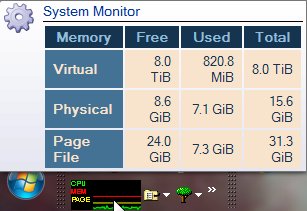
For a continues display of memory and CPU load I'm using True Launch Bar (shareware), with the System Monitor plugin set for "History (line) 16". When hovered with the mouse it shows a lot of relevant information:
Screenshot - 17-07-2015 , 08_28_45.png

The Page(file) info I hardly ever user, but the CPU and memory lines (green & red) sometimes give me a clue why my system reacts a little slow (i7 4800MQ @ 2.7 GHz with 16 GB :P).
/Ton
Ath's software collection, Quote: "A problem well stated is a problem half-solved." (Charles Kettering)

Original address: https://www.donationcoder.com/forum/index.php?topic=41274.0