Process Piglet is a tool that lives down in your system tray and monitors the memory use of running processes.
When it first sees a new application, it spends about 30 seconds observing its average memory use. This establishes a baseline memory use pattern for the application.
After that, Process Piglet will alert you if/when the application starts to consume large amounts of additional memory.
Frequently such behavior indicates a problem with the application, such as a memory leak.
When such an alert is shown you may ignore it -- you will be alerted later if memory usage continues to increase. Or you may ask Process Piglet to forcibly terminate and restart the application.
Web page and download: http://www.donationcoder.com/Software/Mouser/ProcessPiglet/
Watch a video demo: here.
Or on YouTube:
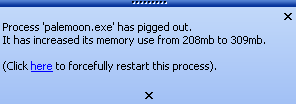
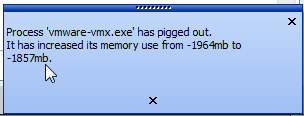
Screenshot, minimized in tray and alerting on bad behavior:

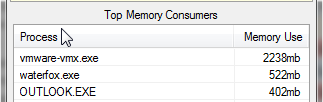
Screenshot, main window listing top memory hogs with quick actions to terminate or restart:

When it first sees a new application, it spends about 30 seconds observing its average memory use. This establishes a baseline memory use pattern for the application.
After that, Process Piglet will alert you if/when the application starts to consume large amounts of additional memory.
Frequently such behavior indicates a problem with the application, such as a memory leak.
When such an alert is shown you may ignore it -- you will be alerted later if memory usage continues to increase. Or you may ask Process Piglet to forcibly terminate and restart the application.
Web page and download: http://www.donationcoder.com/Software/Mouser/ProcessPiglet/
Watch a video demo: here.
Or on YouTube:
Screenshot, minimized in tray and alerting on bad behavior:
Screenshot, main window listing top memory hogs with quick actions to terminate or restart: