DonationCoder.com forum
 
Read-only archive. This is a static copy of the DonationCoder.com forum. Reading and searching work as before; logging in, posting and private messages do not.
Archive of 2026-10-21 · About this archive · Main site

Author Topic: DSLR Camera Simulator  (Read 11,564 times)

KynloStephen66515

  • Animated Giffer in Chief
  • Honorary Member
  • Joined in 2010
  • **
  • Posts: 3,772
    • Participated in NANY Challenge Three Times
    • Cody Award
    • Coding Snacks
    • Official Forum Clown
    • Volunteers/Staff
    • Writer
    • Hardware Hacker
    • DJ Badge - DJ
    • Linux User
DSLR Camera Simulator
« on: June 03, 2015, 11:06 AM »
I was going through my "Looking Back - Memories" thing on Facebook which shows you what you posted "On this day in previous years" and I came across this link from 2011.

http://camerasim.com/apps/camera-simulator/

Evidently, the site is still active and it still looks pretty cool!
DSLR Camera Simulator.png

I would embed the actual thing here but since I can't use HTML tags, I can't :P

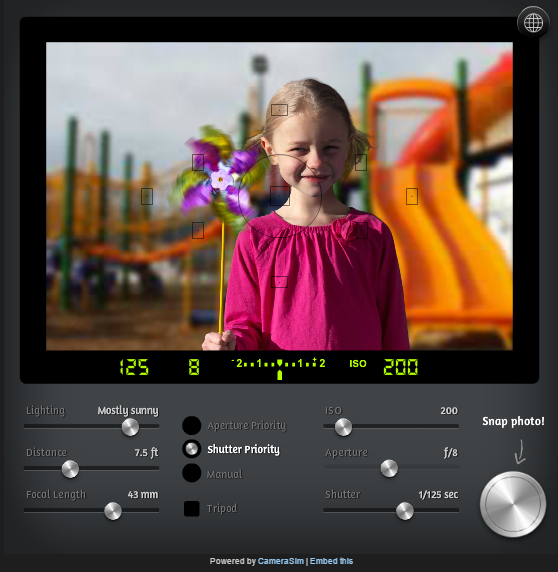
Certainly worth a look if you want to know more about what sort of functions each option does :) - They give you some snippets of info on each control:

Quote
DSLR sim controls:
Lighting

Lighting is the single biggest determinant of how your camera needs to be set. With only a few exceptions, you can never have too much light. Use this slider to experiment with different indoor and outdoor lighting conditions.

Distance

Use this slider to simulate how close or far you are in relation to the subject.

Focal length

Moving this slider is the same as zooming in and out with your lens. A wide, zoomed out setting creates the greatest depth of field (more things are in focus) while zooming in creates a shallower depth-of-field (typically just the subject will be in focus).

Mode

The exposure modes of an SLR let you control one setting while the camera automatically adjusts the others. In Shutter Priority mode, you to set the shutter speed while the camera sets the aperture/f-stop. In Aperture Priority mode, you set the aperture/f-stop while the camera sets the shutter speed. Manual mode is fully manual—you’re on your own! Refer to the camera’s light meter to help get the proper exposure. Although every real SLR camera has a “fully automatic” mode, there is not one here—what’s the fun in that?

mouser

  • First Author
  • Administrator
  • Joined in 2005
  • *****
  • Posts: 40,931
    • Gathering Badge
    • Plugin Coding Medal
    • Participated in NANY Challenge Seventeen Times
    • Cody Award
    • Coding Snacks
    • Volunteers/Staff
Re: DSLR Camera Simulator
« Reply #1 on: June 03, 2015, 11:38 AM »
Very useful  :up:

ayryq

  • Supporting Member
  • Joined in 2009
  • **
  • Posts: 292
Re: DSLR Camera Simulator
« Reply #2 on: June 03, 2015, 01:50 PM »
I think the "exposure compensation" sim is pretty cool, but the general SLR one - the one with the girl with the pinwheel, isn't. There's no possible way to expose correctly if the ambient light is reduced to, say, bright indoors, and it's got out-of-date profiles for high-ISO noise. A modern DSLR would do much better at high ISO. It'd be nice to have multiple example images, and if I paid for it I'd want different lenses and flashes.

tomos

  • Charter Member
  • Joined in 2006
  • ***
  • Posts: 11,970
    • Gathering Badge
    • Participated in NANY Challenge Once
Re: DSLR Camera Simulator
« Reply #3 on: June 03, 2015, 03:41 PM »
I think the "exposure compensation" sim is pretty cool
where's that one? (do you mean the -2 to +2 scale?)

There's no possible way to expose correctly if the ambient light is reduced to, say, bright indoors, and it's got out-of-date profiles for high-ISO noise. A modern DSLR would do much better at high ISO. It'd be nice to have multiple example images, and if I paid for it I'd want different lenses and flashes.

It doesnt seem to show noise at all as a factor in the result (?)
I think it's just meant as a basic learn about how ISO, shutter, & aperature interact with each other - and as such is quite good I find.

For a PC though, as you say, you'd definitely want more for your 10 dollars.
Tom

KynloStephen66515

  • Animated Giffer in Chief
  • Honorary Member
  • Joined in 2010
  • **
  • Posts: 3,772
    • Participated in NANY Challenge Three Times
    • Cody Award
    • Coding Snacks
    • Official Forum Clown
    • Volunteers/Staff
    • Writer
    • Hardware Hacker
    • DJ Badge - DJ
    • Linux User
Re: DSLR Camera Simulator
« Reply #4 on: June 03, 2015, 06:31 PM »
I think the "exposure compensation" sim is pretty cool
where's that one? (do you mean the -2 to +2 scale?)

There's no possible way to expose correctly if the ambient light is reduced to, say, bright indoors, and it's got out-of-date profiles for high-ISO noise. A modern DSLR would do much better at high ISO. It'd be nice to have multiple example images, and if I paid for it I'd want different lenses and flashes.

It doesnt seem to show noise at all as a factor in the result (?)
I think it's just meant as a basic learn about how ISO, shutter, & aperature interact with each other - and as such is quite good I find.

For a PC though, as you say, you'd definitely want more for your 10 dollars.

Lol, shows how much attention I paid to it...I didn't even realize it costs anything!  ;D

tomos

  • Charter Member
  • Joined in 2006
  • ***
  • Posts: 11,970
    • Gathering Badge
    • Participated in NANY Challenge Once
Re: DSLR Camera Simulator
« Reply #5 on: June 03, 2015, 10:16 PM »
^
it's well hidden actually -
I only found it on a second look after reading ayryq's post.
http://camerasim.com/apps/
Tom

Original address: https://www.donationcoder.com/forum/index.php?topic=41030.0