


Thanks to FARR and TicTocTitle, I rarely need to access my taskbar, so it stays autohidden, and I gain the extra bit of space for full screen apps.
There are two problems keeping me from a super-slick, full-screen world of wonder:
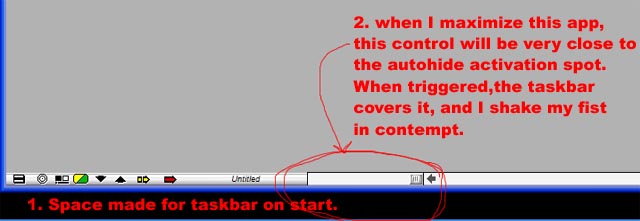
1 (a little annoying). Autohide still makes space for the taskbar when an app opens. This is annoying, but I could live with it.
2 (the painful, evil part). I don't want to lose access to the taskbar completely, but I also don't want it being triggered when I go to use some of the controls that are located at the bottom/top/side of the apps I use. When I maximize the app after problem #1, it puts some controls very close to the triggering point for the autohide to unhide.
What I'd love is similar to CloseFence, but basically reversed. It would make a very small (or configurable-sized?) spot on the autohidden taskbar available for triggering. Otherwise, it would ignore the mouse. For me, if it only popped up when I moused into the very corner, it would be ideal.
The other issue, that of the taskbar getting space made for it, I have no idea about. It's just annoying.
Thank you very much for considering this.
There are two problems keeping me from a super-slick, full-screen world of wonder:
1 (a little annoying). Autohide still makes space for the taskbar when an app opens. This is annoying, but I could live with it.
2 (the painful, evil part). I don't want to lose access to the taskbar completely, but I also don't want it being triggered when I go to use some of the controls that are located at the bottom/top/side of the apps I use. When I maximize the app after problem #1, it puts some controls very close to the triggering point for the autohide to unhide.
What I'd love is similar to CloseFence, but basically reversed. It would make a very small (or configurable-sized?) spot on the autohidden taskbar available for triggering. Otherwise, it would ignore the mouse. For me, if it only popped up when I moused into the very corner, it would be ideal.
The other issue, that of the taskbar getting space made for it, I have no idea about. It's just annoying.
Thank you very much for considering this.


 Yes, FadingTaskbar does support activation when the mouse is over a given region of the screen. Look at the second tab, Activation, in the Settings. To make it work, try unchecking Taskbar transparency when maximized window exist, and also try disabling Windows' taskbar autohiding option.