DonationCoder.com forum
 
Read-only archive. This is a static copy of the DonationCoder.com forum. Reading and searching work as before; logging in, posting and private messages do not.
Archive of 2026-10-21 · About this archive · Main site

Author Topic: Move files to folders named after part of filename  (Read 12,551 times)

dcwul62

  • Supporting Member
  • Joined in 2013
  • **
  • Posts: 336
Move files to folders named after part of filename
« on: November 25, 2014, 10:34 AM »

Hi Folks,

I need to move a lot (i mean a LOT) of files that all look like these:

Some FileName 1888-0010 31121888.pdf
Some FileName 1888-0009 31121888.pdf
Some FileName 1888-0008 31121888.pdf
Some FileName 1888-0007 31121888.pdf
Some FileName 1888-0006 31121888.pdf
Some FileName 1888-0005 31121888.pdf
Some FileName 1888-0004 31121888.pdf
Some FileName 1974-0360 31121974.pdf
Some FileName 1974-0361 31121974.pdf
Some FileName 1975-0001 31121975.pdf
Some FileName 1975-0002 31121975.pdf
Some FileName 1975-0003 31121975.pdf

to subfolders named after the first 3 words, like these


Some FileName 1888
Some FileName 1974
Some FileName 1975

Any suggestions??

thanks
-

tomos

  • Charter Member
  • Joined in 2006
  • ***
  • Posts: 11,970
    • Gathering Badge
    • Participated in NANY Challenge Once
Re: Move files to folders named after part of filename
« Reply #1 on: November 25, 2014, 11:34 AM »
(just for the record) something comparable was requested lately:

Hello. Would it be possible to add a feature to find common text between files and use that as an name for the folder?
eg we have  files
[Chemistry] Workbook 01.rar
[Chemistry] Workbook 02.rar
[Chemistry] Workbook 03.rar
So the new folder is named [Chemistry] Workbook.

This is doable.  However, in your example, technically, the common text would be "[Chemistry] Workbook 0" right?
Tom

4wd

  • Pedantic Old Bastard
  • Supporting Member
  • Joined in 2006
  • **
  • Posts: 5,652
    • Coding Snacks
Re: Move files to folders named after part of filename
« Reply #2 on: November 25, 2014, 12:08 PM »
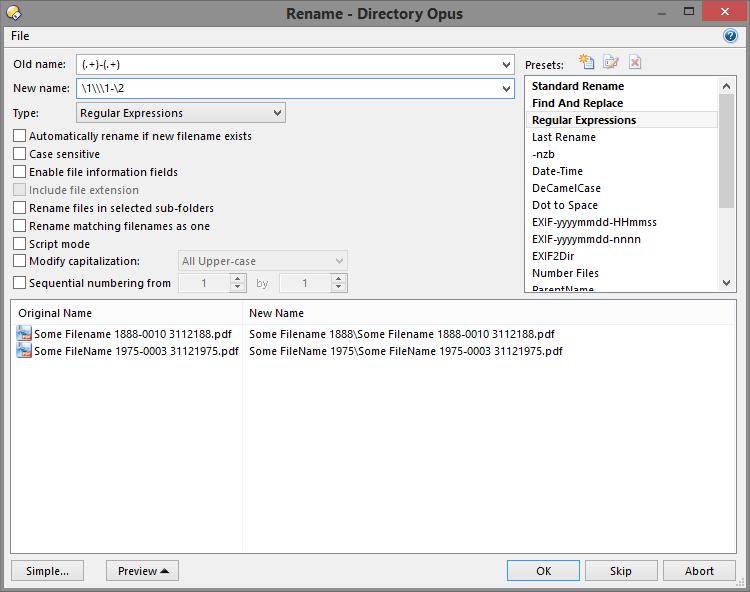
Um, you have DOpus why don't you just rename them into the folders?

2014-11-25 23_07_57.png
"I will not follow where the path may lead, but I will go where there is no path, and I will leave a trail." - Muriel Strode, 1903

dcwul62

  • Supporting Member
  • Joined in 2013
  • **
  • Posts: 336
Re: Move files to folders named after part of filename
« Reply #3 on: November 25, 2014, 01:09 PM »
Wonderful!!

I have been puzzling about this whole morning!
Really, I could not figure this out.

Thank you so much. This way is soo much easier indeed.

After trying this that and I don't what (even went as far as to download the drag and drop utility from this site, but left that, cud not figure out how it works)
I just now figured out a context menu item like this Rename REGEXP PATTERN "(.+\d{4})-(\d{4})(\s)(\d{8})\.(.+)" TO \1\\\0
which is much more complicated.


Regretfully the setfoldate would not work here.

Some FileName 1888-0010 31121888.pdf
Some FileName 1888-0009 31121888.pdf
Some FileName 1888-0008 31121888.pdf

results in folder
Some filename  (without year)

So I had to try and figure out something else.

Thanks
-

4wd

  • Pedantic Old Bastard
  • Supporting Member
  • Joined in 2006
  • **
  • Posts: 5,652
    • Coding Snacks
Re: Move files to folders named after part of filename
« Reply #4 on: November 25, 2014, 04:57 PM »
I just now figured out a context menu item like this Rename REGEXP PATTERN "(.+\d{4})-(\d{4})(\s)(\d{8})\.(.+)" TO \1\\\0
which is much more complicated.

Why did you make it so complicated?

Quote
Regretfully the setfoldate would not work here.

Why would it, they're files not folders.
"I will not follow where the path may lead, but I will go where there is no path, and I will leave a trail." - Muriel Strode, 1903

c.gingerich

  • Supporting Member
  • Joined in 2011
  • **
  • Posts: 748
    • Participated in NANY Challenge Six Times
    • Coding Snacks
Re: Move files to folders named after part of filename
« Reply #5 on: November 25, 2014, 08:40 PM »
I made a quick app called Folder by Filename - See if it would work for what you are asking.

It took this - http://f.cl.ly/items/0u463N1g1B452M3a280r/Screenshot_112514_033551_PM.jpg
and made this - http://f.cl.ly/items/0j462T3x2H2b053Q3L1W/Screenshot_112514_033652_PM.jpg


If that looks like what you are asking for let me know and I'll shine it up so you can use it.

skwire

  • I eat Coding Snacks for breakfast...
  • Global Moderator
  • Joined in 2005
  • *****
  • Posts: 5,297
    • Participated in NANY Challenge Seventeen Times
    • Coding Snacks
    • Superboy Coder
    • Cody Award
    • Volunteers/Staff
    • Gathering Badge
Re: Move files to folders named after part of filename
« Reply #6 on: November 29, 2014, 06:27 AM »
I need to move a lot (i mean a LOT) of files that all look like these:
[...]
Any suggestions??

My File Punter app was made for stuff like this.

dcwul62

  • Supporting Member
  • Joined in 2013
  • **
  • Posts: 336
Re: Move files to folders named after part of filename
« Reply #7 on: January 14, 2016, 01:22 PM »
@4wd
ref pm
attached files
=

=

DonL

  • Member
  • Joined in 2006
  • **
  • Posts: 171
Re: Move files to folders named after part of filename
« Reply #8 on: January 14, 2016, 01:45 PM »
The latest XYplorer (16.10) has something brand-new to offer along these lines: Batch Move

http://www.xyplorer.com/release_16.10.php#BatchMove

Can move heaps of files to new folders by much more properties than just parts of the filename.

Just saying. :)

dcwul62

  • Supporting Member
  • Joined in 2013
  • **
  • Posts: 336
Re: Move files to folders named after part of filename
« Reply #9 on: January 16, 2016, 01:36 PM »
These are some filenames-01-07012016 064756.png
These are some filenames-02-07012016 064901.png
These are some filenames-03-07012016 064916.png
to be moved to a folder named: These are some filenames


These are some filenames 1999-01-07012016 064756.png
These are some filenames 1999-02-07012016 064901.png
These are some filenames 1999-03-07012016 064916.png
These are some filenames 1999-04-07012016 064921.png
to be moved to a folder named: These are some filenames 1999


Yet some other filenames with year 2013-07012016 064756.png
Yet some other filenames with year 2013-07012016 064901.png
Yet some other filenames with year 2013-07012016 064916.png
to be moved to a folder named: Yet some other filenames with year 2013


Yet some other filenames without year-07012016 064756.png
Yet some other filenames without year-07012016 064901.png
Yet some other filenames without year-07012016 064916.png
Yet some other filenames without year-07012016 064921.png
To be moved to a folder named: Yet some other filenames without year

--> This be covered by 1 regex.

I did look at FilePunter but I am afraid it is pretty complex.

XYplorer: I have Opus, thanks for the tip.
Frankly I don't want to use another file explorer.

Original address: https://www.donationcoder.com/forum/index.php?topic=39651.0