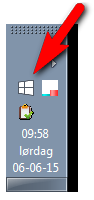
Today the update advert ^ was installed on my laptop (and it won't exit),
Have you tried this? How to block Windows 10 Upgrade notifications in earlier versions of Windows
I have followed this instruction:
Wasn't Windows 10 supposed to be free?
http://www.techsupportalert.com/content/all-about-windows-10-upgrade-offer-including-how-get-rid-it.htm (regarding KB3035583) "All About the Windows 10 Upgrade App Including How to Get Rid of it"
Uninstall KB3035583. The next time Windows Update will promote KB3035583, just hide it.
It came as a chock to me, but it seems Real Life can be different from what the teacher said!

I removed KB3035583 all right, but somehow the
icon from
Windows 10 Upgrade App is still showing up in my "notification area" (Win 7):
[attachimg=#]
- but will disappear when my mouse comes close! Weird, isn't it?
It's not "comes and goes", but it stays away until next time Windows has booted.
Do "you" know where I can expect to find (and delete) this icon? this icon that really isn't there? that isn't there until next time I start up Windows?

-----------
Modified several times:
in "Control Panel\All Control Panel Items\Notification Area Icons" I clicked
hide, and at first the icon went away, but after re-boot, it was back (and goes away when the mouse pointer gets close). So, the icon is hidden, but is still visible, without being there. This is getting confusing!