DonationCoder.com forum
 
Read-only archive. This is a static copy of the DonationCoder.com forum. Reading and searching work as before; logging in, posting and private messages do not.
Archive of 2026-10-21 · About this archive · Main site

Author Topic: Can't work out how to get more than 4 suggestions  (Read 7,727 times)

beethoven

  • Supporting Member
  • Joined in 2006
  • **
  • Posts: 46
Can't work out how to get more than 4 suggestions
« on: July 22, 2014, 07:16 AM »
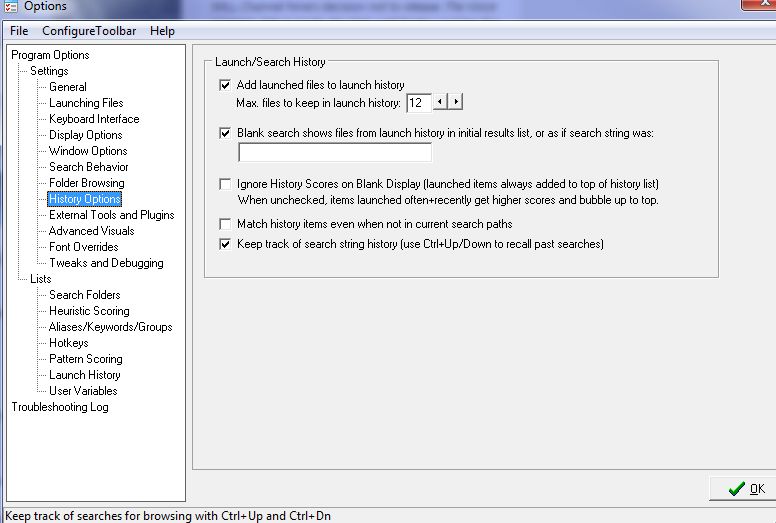
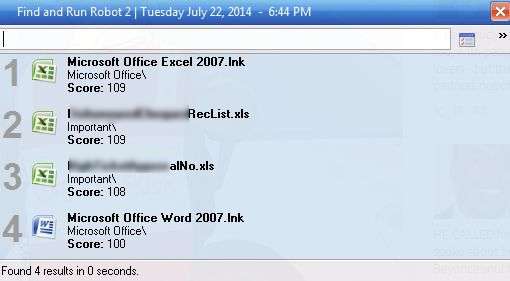
Hitting the Pause/Break button brings up my Farr and it always shows 4 links. While these are frequently used files, I would like to see more (10-15). Also, these 4 files all have a score of 100. I have other files that I set to higher scores, why don't they show up? Once I enter something into the blank field, Farr does populate with more and shows also higher scores. Am I misunderstanding what should show up before you type? I played around with the settings under Launch/Search History but don't quite understand how to use History Options / Blank Searches and Ignore History Scores.

tomos

  • Charter Member
  • Joined in 2006
  • ***
  • Posts: 11,970
    • Gathering Badge
    • Participated in NANY Challenge Once
Re: Can't work out how to get more than 4 suggestions
« Reply #1 on: July 22, 2014, 08:24 AM »
I'm a basic FARR user.
When you open FARR first it will show files/shortcuts that were launched via FARR. If it's newly installed it will only show a couple, but this does sound different...

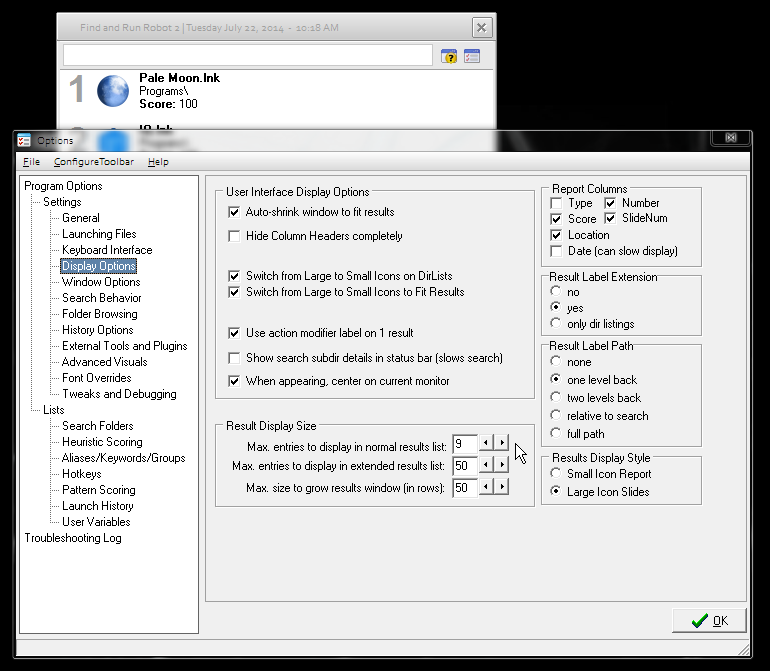
Have a look at display settings - see the mouse point in below screenshot:

[attachthumb=#]

that might help (?)

PS the 'score' varies according to what you're searching for - as I type e.g. p a l e - Pale Moon gets a higher score after each letter typed.
If the entry field is empty, all listed are @ 100
Tom

beethoven

  • Supporting Member
  • Joined in 2006
  • **
  • Posts: 46
Re: Can't work out how to get more than 4 suggestions
« Reply #2 on: July 22, 2014, 08:50 AM »
tomos,

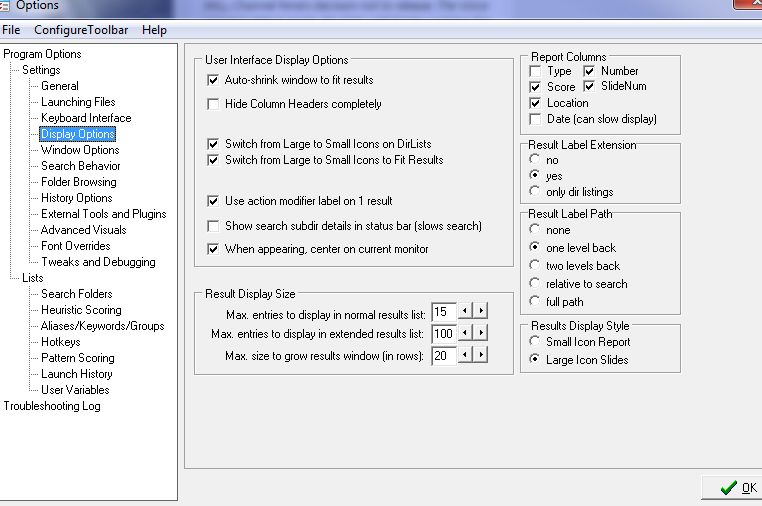
thanks for your help.  My settings under Display Options is more or less the same as yours (Farr1) - I think History Options is the issue (Farr2) . My aim is to have more than 4 files show when I bring Farr to the foreground (Farr 3).

mouser

  • First Author
  • Administrator
  • Joined in 2005
  • *****
  • Posts: 40,931
    • Gathering Badge
    • Plugin Coding Medal
    • Participated in NANY Challenge Seventeen Times
    • Cody Award
    • Coding Snacks
    • Volunteers/Staff
Re: Can't work out how to get more than 4 suggestions
« Reply #3 on: July 22, 2014, 09:19 AM »
Are you sure you have more than 4 items in your launch history?
Check the "Launch History" tab in options, near bottom.

beethoven

  • Supporting Member
  • Joined in 2006
  • **
  • Posts: 46
Re: Can't work out how to get more than 4 suggestions
« Reply #4 on: July 22, 2014, 11:25 AM »
Mouser,
you are correct of course (and why wouldn't you as this is your baby  :Thmbsup:) - the 4 files/programs from the screenshot show up plus another four programs that I must have unticked a long time ago because I don't want them to clutter the view.
However, why are other searches that resulted in files being clicked/chosen not added to these 4?

mouser

  • First Author
  • Administrator
  • Joined in 2005
  • *****
  • Posts: 40,931
    • Gathering Badge
    • Plugin Coding Medal
    • Participated in NANY Challenge Seventeen Times
    • Cody Award
    • Coding Snacks
    • Volunteers/Staff
Re: Can't work out how to get more than 4 suggestions
« Reply #5 on: July 22, 2014, 11:36 AM »
Quote
why are other searches that resulted in files being clicked/chosen not added to these 4?
they certainly should be.

however, there are cases where they wouldn't be.  there is a setting to disable adding new items to the launch history you may have enabled, or if they are items on a network drive there is an option to not add those.
also note that non-file items are not added to the launch history list.

beethoven

  • Supporting Member
  • Joined in 2006
  • **
  • Posts: 46
Re: Can't work out how to get more than 4 suggestions
« Reply #6 on: July 23, 2014, 12:41 AM »
hmmm, just did some more testing and now I have 5 files there, so 1 of the the new files "stuck". I also opened "pattern scoring" and notice that 2 files I regularly use are listed there with high scores. Would a record in here prevent them from showing up in the initial blank search?
This would indicate that giving a high score to a file or search means that once I start typing it will show up more quickly but before doing any typing it will not be considered as an option?

Original address: https://www.donationcoder.com/forum/index.php?topic=38496.0