i'm about to describe something that has 'probably' been done already elsewhere - if so can someone please let me know what the program is called...
if not, then i think this is another autohotkey task - i'd have a go myself but i much prefer to dish out the DC credits to someone that can save me the headache.
anyway, this is my request:
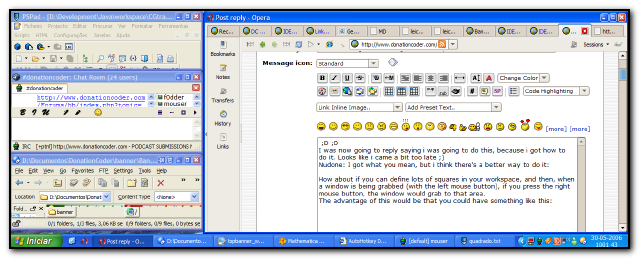
i've a 24" widescreen monitor (which i seem to keep telling everyone) and i'd really like to make full use of it, well, as it's so wide i'd like to use it like a dual monitor layout sometimes.
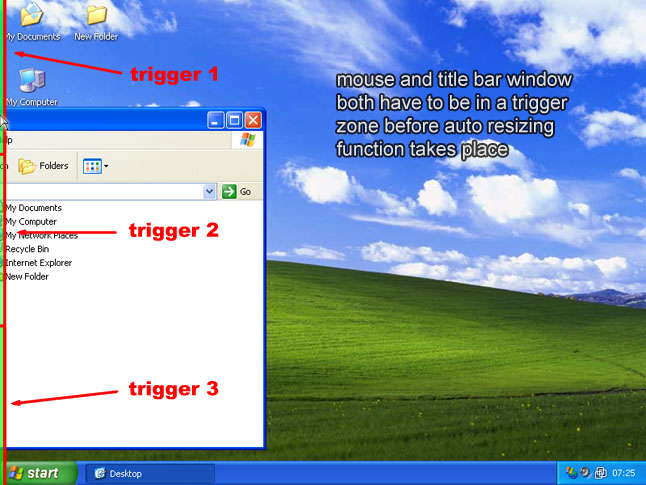
i'd like to be able to drag a window to the left or right edge of the screen and after a short pause the window would resize itself to fit the right half or the left half of the monitor.
this could be extended so if i drag a window the the bottom edge it will resize to fit the bottom half OR some other resize.
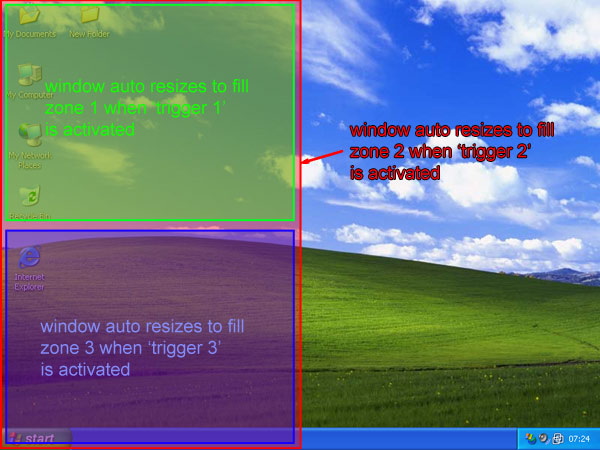
this type of drag window auto resize could be extended further so that there would be specific areas along the left and right and bottom edges of my screen (NOTE HOW I SAY BOTTOM - that's just because i have the system taskbar and system tray at the top of my screen), these specific areas would act as the triggers to auto resize the window to preset window sizes and locations.
so, as an example, i'd drag my web browser to the left of the screen - when the mouse cursor reaches the edge of the screen i pause and hold the window title a bar a second or two then it auto resizes to fit just the left part of my monitor.
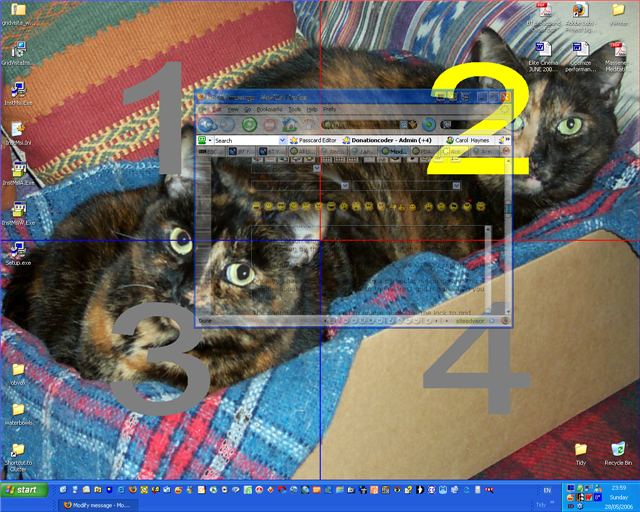
if i drag to the window and pause on LOWER left side of the screen then the window auto resizes to fit the lower left quarter - a similar thing would happen on the right hand side of course if i dragged it there.
the bottom and top edges of the screen could trigger several other window sizes and positions, say, drag to the top middle and the window centers and resizes to 1024x768 or whatever.
i think this idea could be extended further - these are just the things that occur to me straight away.
i know there are keyboard shortcuts for this sort of the thing that have been done before - which is great - i'd really like to have both features really: user definable keyboard shortcuts for the main auto resizes and mouse drag trigger borders too.
thanks for listening.
if not, then i think this is another autohotkey task - i'd have a go myself but i much prefer to dish out the DC credits to someone that can save me the headache.
anyway, this is my request:
i've a 24" widescreen monitor (which i seem to keep telling everyone) and i'd really like to make full use of it, well, as it's so wide i'd like to use it like a dual monitor layout sometimes.
i'd like to be able to drag a window to the left or right edge of the screen and after a short pause the window would resize itself to fit the right half or the left half of the monitor.
this could be extended so if i drag a window the the bottom edge it will resize to fit the bottom half OR some other resize.
this type of drag window auto resize could be extended further so that there would be specific areas along the left and right and bottom edges of my screen (NOTE HOW I SAY BOTTOM - that's just because i have the system taskbar and system tray at the top of my screen), these specific areas would act as the triggers to auto resize the window to preset window sizes and locations.
so, as an example, i'd drag my web browser to the left of the screen - when the mouse cursor reaches the edge of the screen i pause and hold the window title a bar a second or two then it auto resizes to fit just the left part of my monitor.
if i drag to the window and pause on LOWER left side of the screen then the window auto resizes to fit the lower left quarter - a similar thing would happen on the right hand side of course if i dragged it there.
the bottom and top edges of the screen could trigger several other window sizes and positions, say, drag to the top middle and the window centers and resizes to 1024x768 or whatever.
i think this idea could be extended further - these are just the things that occur to me straight away.
i know there are keyboard shortcuts for this sort of the thing that have been done before - which is great - i'd really like to have both features really: user definable keyboard shortcuts for the main auto resizes and mouse drag trigger borders too.
thanks for listening.


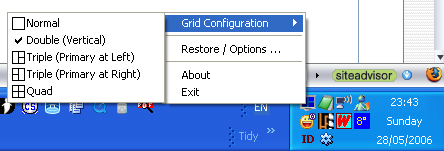




 i think this is the perfect project for you, jgpaiva.