DonationCoder.com forum
 
Read-only archive. This is a static copy of the DonationCoder.com forum. Reading and searching work as before; logging in, posting and private messages do not.
Archive of 2026-10-21 · About this archive · Main site

Author Topic: Restoring an Acronis Image  (Read 7,903 times)

CleverCat

  • Cat's Are Fun!
  • Supporting Member
  • Joined in 2006
  • **
  • Posts: 1,164
Restoring an Acronis Image
« on: April 18, 2014, 11:01 AM »
Me again!  ;D

Can you believe it's 2 years since this occurred?

http://www.donationcoder.com/forum/index.php?topic=30012.0

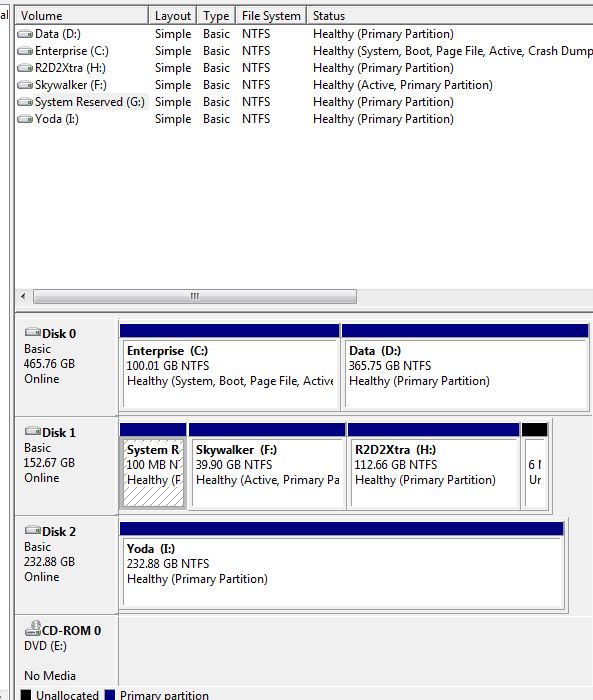
I'm planning to recover an Acronis Image - need fresh start again! Do I need to unplug my second drive (now empty and waiting for Ubuntu) before recovery? There's no Boot Record on 2nd drive, except that strange 100mb partition left from old Win7 install.

Help needed:  :feedback:  :D
If you need help - JUST ASK!

mouser

  • First Author
  • Administrator
  • Joined in 2005
  • *****
  • Posts: 40,931
    • Gathering Badge
    • Plugin Coding Medal
    • Participated in NANY Challenge Seventeen Times
    • Cody Award
    • Coding Snacks
    • Volunteers/Staff
Re: Restoring an Acronis Image
« Reply #1 on: April 18, 2014, 11:08 AM »
One good reason to remove any drive that is unrelated to the restore is to avoid the horror story you hear too often where people restore to the wrong drive, wiping out there existing data.

tomos

  • Charter Member
  • Joined in 2006
  • ***
  • Posts: 11,970
    • Gathering Badge
    • Participated in NANY Challenge Once
Re: Restoring an Acronis Image
« Reply #2 on: April 18, 2014, 01:13 PM »
I'm no expert here, but you've definitely got to be careful with that 100mb partition. (It's a boot partition.)
Tom

Stoic Joker

  • Honorary Member
  • Joined in 2008
  • **
  • Posts: 6,652
    • Cody Award
    • Participated in NANY Challenge Five Times
Re: Restoring an Acronis Image
« Reply #3 on: April 18, 2014, 06:22 PM »
I'm no expert here, but you've definitely got to be careful with that 100mb partition. (It's a boot partition.)

If the 100MB Boot partition is on the 2nd drive, it's probably already in the wrong place. The OS may not boot with the 2nd drive disconnected, but if the configuration will tolerate it *Shrug* what works...works.

This will probably look like hell because it is getting pasted out of a .doc file (but I'm a bit pressed for time):

MS Boot Configuration Data Editor
For When Boot Fails Because the OS is Missing!
The following procedure is used to completely rebuild the Windows Vista, 7, 2008 boot configuration when it has either been badly damaged, or when restoring the OS to different hardware with a different disk/partition configuration.
1. Boot from appropriate OS media.
2. Select the current Windows installation if available.
3. Choose Command Prompt and run the below commands (some may be optional):
bootrec.exe /fixmbr
bootrec.exe /fixboot
bootsect.exe /nt60 all /force
attrib -s -h -r C:\boot\BDC
del C:\boot\BCD
bootrec.exe /RebuildBcd
bcdboot.exe C:\Windows /S C: /L en-us


Diskpart can also be used to mark a partition as active from the Windows RE.
Diskpart
LIST DISK
SELECT DISK (followed by the number of the disk – most likely 0)
LIST PARTITION
SELECT PARTITION (followed by the partition number – most likely 0)
ACTIVE
EXIT
                        Windows startup recovery should now work.

CleverCat

  • Cat's Are Fun!
  • Supporting Member
  • Joined in 2006
  • **
  • Posts: 1,164
Re: Restoring an Acronis Image
« Reply #4 on: April 19, 2014, 09:18 AM »
When I installed he new Sata drive (2Years ago) and reinstalled Win 7 on it, the old IDE drive was unplugged! The 100b partition was left over when I wiped the system from it. I have no 100mb partition on new install?

Perhaps this will help:

[attach=#]

If you need help - JUST ASK!

CleverCat

  • Cat's Are Fun!
  • Supporting Member
  • Joined in 2006
  • **
  • Posts: 1,164
Re: Restoring an Acronis Image
« Reply #5 on: April 19, 2014, 09:20 AM »
One good reason to remove any drive that is unrelated to the restore is to avoid the horror story you hear too often where people restore to the wrong drive, wiping out there existing data.
Other ATA drive is empty - waiting for Ubuntu lol
If you need help - JUST ASK!

Stoic Joker

  • Honorary Member
  • Joined in 2008
  • **
  • Posts: 6,652
    • Cody Award
    • Participated in NANY Challenge Five Times
Re: Restoring an Acronis Image
« Reply #6 on: April 19, 2014, 12:10 PM »
One good reason to remove any drive that is unrelated to the restore is to avoid the horror story you hear too often where people restore to the wrong drive, wiping out there existing data.
Other ATA drive is empty - waiting for Ubuntu lol

All the more reason to keep the drive unplugged so Windows doesn't decide to use it while sorting itself out on a first boot attempt. The 100MB system partition isn't mandatory, it's just a strictly enforced highly recommended option.

CleverCat

  • Cat's Are Fun!
  • Supporting Member
  • Joined in 2006
  • **
  • Posts: 1,164
Re: Restoring an Acronis Image
« Reply #7 on: April 20, 2014, 06:38 AM »
Okay - thanks for input - will unplug just in case! More work for Mum lol

I've made a Bootable Acronis Rescue Media....
If you need help - JUST ASK!

Original address: https://www.donationcoder.com/forum/index.php?topic=37759.0