For single topic clipboard saving I prefer Skwire's Clipboard Trap. One long string of 'snippets' is created, in a single text file.
Presently, though, I'm researching an area with several sub-topics. Perhaps a super-high-powered clipboard manager would be the best approach, one with configurable direction where items are to be saved.
Let's assume 5 sub-topics. We cruise the Internet reading this and that. We come across an item we want to save to Sub-topic 1. Copy and save it to a Sub-topic 1 file. Then we come across an item that belongs in Sub-topic 3. Copy and save to a Sub-topic 3 file. Etc. regarding Sub-topic 5, Sub-topic 2, Sub-topic 4. So... five different files, as appropriate, are created and saved, with the relevant information in each.
I'm curious to hear views as to what might be the very best such research saving software presently available in the realm of clipboard managers.
Greatly appreciate your input.
Nicholas Kormanik
Presently, though, I'm researching an area with several sub-topics. Perhaps a super-high-powered clipboard manager would be the best approach, one with configurable direction where items are to be saved.
Let's assume 5 sub-topics. We cruise the Internet reading this and that. We come across an item we want to save to Sub-topic 1. Copy and save it to a Sub-topic 1 file. Then we come across an item that belongs in Sub-topic 3. Copy and save to a Sub-topic 3 file. Etc. regarding Sub-topic 5, Sub-topic 2, Sub-topic 4. So... five different files, as appropriate, are created and saved, with the relevant information in each.
I'm curious to hear views as to what might be the very best such research saving software presently available in the realm of clipboard managers.
Greatly appreciate your input.
Nicholas Kormanik






 ).
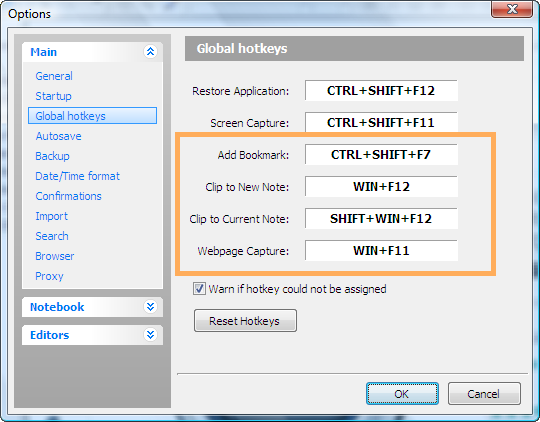
). I wasn't clear enough. I'm less interested in a note organizer than in a note keeper, something to replace EverNote 2.2 but that is likely to have a future, with particular reference to capturing, storing and finding information from the Web. EverNote and CintaNotes are particularly convenient for that. Here's a screenshot of the capture hotkeys I have set in RN to help clarify what I mean: