DonationCoder.com forum
 
Read-only archive. This is a static copy of the DonationCoder.com forum. Reading and searching work as before; logging in, posting and private messages do not.
Archive of 2026-10-21 · About this archive · Main site

Author Topic: Capture Delay!?  (Read 5,573 times)

TaoPhoenix

  • 0 - 60 ... then back to 0 again!
  • Supporting Member
  • Joined in 2011
  • **
  • Posts: 4,642
    • Participated in NANY Challenge Three Times
Capture Delay!?
« on: December 13, 2013, 07:01 AM »

Unless this was fixed in V 4.8 or higher,

There seems to be a delay when I can click the SC icon vs when it "wants to" capture the screen. In a key movie scene, that's important because a 3 second delay kills a .5 second scene! This leads me to "guess" the scene about 17 times to get the "screen capture right". Any advice?

Use attachthumb=# to show an attached image as an expandable thumbnail, or attach=# to show full size. (With Brackets)

tomos

  • Charter Member
  • Joined in 2006
  • ***
  • Posts: 11,970
    • Gathering Badge
    • Participated in NANY Challenge Once
Re: Capture Delay!?
« Reply #1 on: December 13, 2013, 09:51 AM »
Questions:
  • 1) do you mean you are using an older version?
  • 2) when you say click on the SC icon - which icon do you mean?

My advice would be to use a shortcut to take a screenshot - even then there is slight delay, but only a fraction of a second.
Or pause the film?

Tom

cmpm

  • Charter Member
  • Joined in 2006
  • ***
  • Posts: 2,026
Re: Capture Delay!?
« Reply #2 on: December 13, 2013, 11:41 AM »
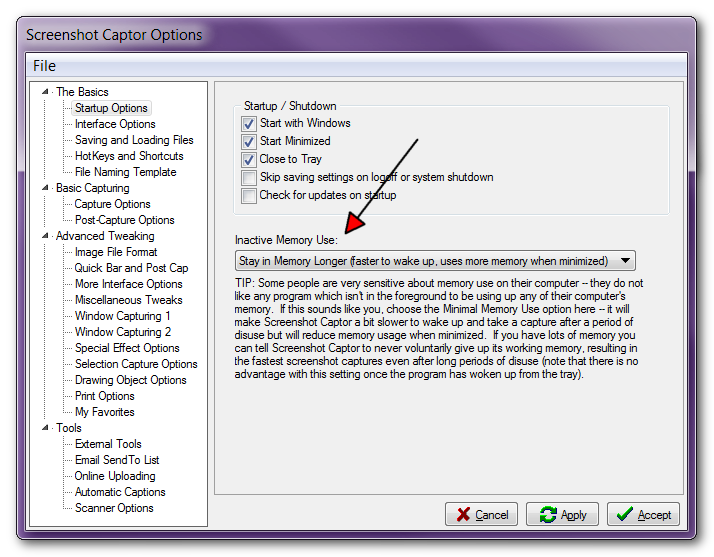
Set the memory use higher.
See if that helps.
+ maybe don't show the quick capture bar
or use it, as it seems to capture quicker then the tray icon, i think...
i use quick capture bar for last active window and it's pretty quick...

mouser

  • First Author
  • Administrator
  • Joined in 2005
  • *****
  • Posts: 40,931
    • Gathering Badge
    • Plugin Coding Medal
    • Participated in NANY Challenge Seventeen Times
    • Cody Award
    • Coding Snacks
    • Volunteers/Staff
Re: Capture Delay!?
« Reply #3 on: December 13, 2013, 03:16 PM »
First, check to make sure you don't actually have the delay option enabled.
You can find that in the tray menu under Capture Options -> Use Delay.

Assuming not, see if it's only the FIRST capture that is slow, after not having used SC in a long time, with subsequent captures being fast.  If so, you should try the option that cmpm mentioned about changing the "Inactive Memory Use".  In this case it could also be a hard disk that's sleeping, for which there is no easy fix.

Original address: https://www.donationcoder.com/forum/index.php?topic=36761.0