


NANY 2014 Entry Information
| Application Name | ImgFloat |
| Short Description | Overlay the Desktop with a recently taken screenshot |
| Supported OSes | Windows XP/7 (Should work in Vista/8 also, but untested) |
| Web Page | http://thinkshui.net/software/imgfloat/ |
| Setup File | Portable Version |
| Description | I’ve used Screenshot Captor on Windows to great effect for years, and it contains a ton of features. But one feature that I didn’t even realize that it was mssing until recently was the ability to float the screenshot after it was taken. Lately, I’ve been using my MacBook more, and came across an application ScreenFloat. It’s not a full featured as Screenshot Captor, but the ability to float the section that you’ve just taken a screenshot of in a transparent window has a multitude of uses. So, for NANY 2014, I’ve decided to create a tool that can be called by Screenshot Captor to float the just taken image in a transparent window. I’ve done much of the research into what I’m doing with the recently announced Reference Overlay Tool, so the two should be very similar. |
| Features |
|
| Screenshots |  Doesn't adequately explain, looking back at it. But I'll leave it. |
| Screencast | |
| Documentation | http://www.thinkshui.net/docs/imgfloat/ |
| Installation |
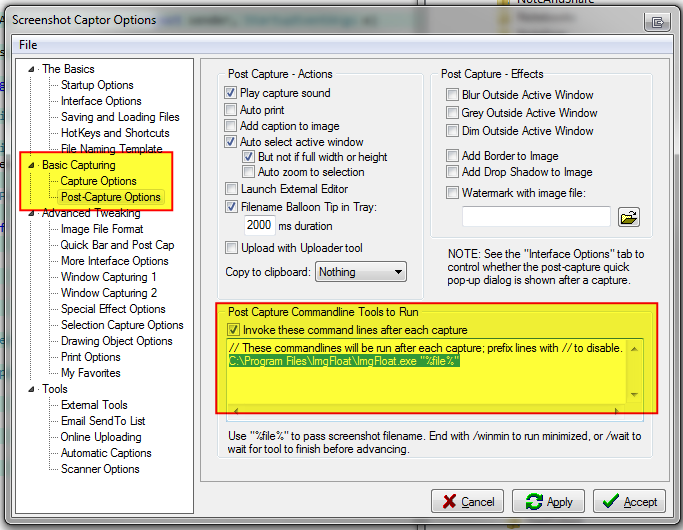 |
| Uninstalling | Delete application install location and remove command from screenshot captor preferences dialog. |
| Notes | Requires .NET 4.0. |







