DonationCoder.com forum
 
Read-only archive. This is a static copy of the DonationCoder.com forum. Reading and searching work as before; logging in, posting and private messages do not.
Archive of 2026-10-21 · About this archive · Main site

Author Topic: comma remover and name order changer  (Read 7,159 times)

questorfla

  • Fighting Slime all the Time
  • Supporting Member
  • Joined in 2012
  • **
  • Posts: 570
comma remover and name order changer
« on: October 16, 2013, 10:39 PM »
I don't know a better way to explain it but I have a folder of about 200 jpg files.
I need to change the file names from "last name," "first name" "middle initial.".  The program that creates the photo display uses the actual name of the jpeg as the title of the photo which makes sense.  But the person who created the list was obviously someone is used to working in a large office and filing by last name.
I found some utilities that can reverse alphabetize etc and I feel sure that if I asked Google the right question someone has already written such a script.
So that the comma would trigger deleting everything in front of it and the space after it and adding what it deleted to the end of the name.
Instead of "Abbott, John B.jpg  I would have "John B. Abbott.jpg"

This is probably a perfect task for Excel using the comma delimiter but I never use Excel for anything much,  Just thought I would ask if anyone has ever seen such a tool before I write my own. I hate to try to reinvent the wheel. 
Thanks

4wd

  • Pedantic Old Bastard
  • Supporting Member
  • Joined in 2006
  • **
  • Posts: 5,652
    • Coding Snacks
Re: comma remover and name order changer
« Reply #1 on: October 17, 2013, 01:03 AM »
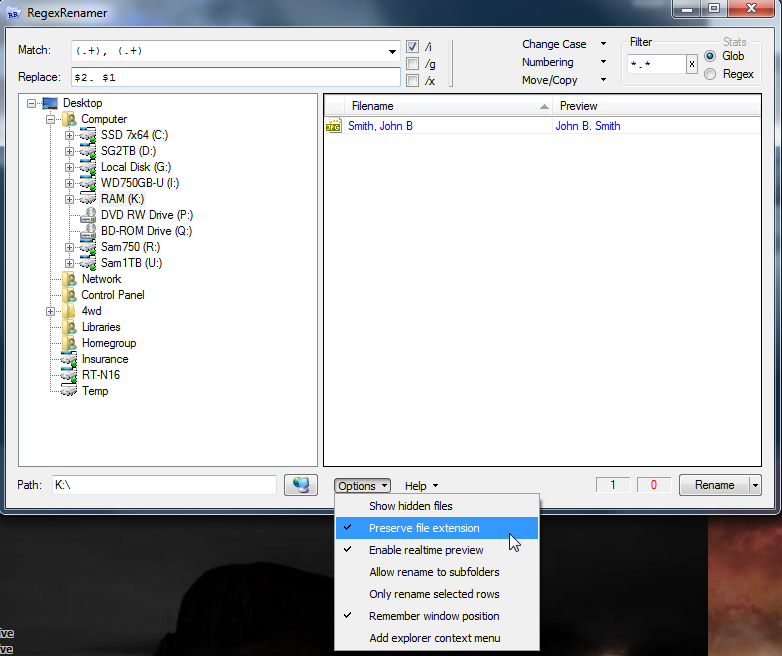
RegexRenamer that I mention here should do the job easily.


A picture and all that ...

2013-10-17 12_25_18-Program Manager.png

Or for the low-tech non-recursive, non-error checking version:

Code: (generic)
@echo off
rem NameMunge.cmd
rem
rem Call as: NameMunge.cmd <path>
rem
rem eg. NameMunge.cmd .

pushd %1
for /f "tokens=1,2,3,4 usebackq delims=,." %%a in (`dir /b *.jpg`) do (call :Getnames %%a %%b %%c %%d)

goto :Exit

:Getnames
set sname=%1
for /f "tokens=* delims= " %%a in ("%2") do set fname=%%a
set ext=%4
set oldname=%sname%, %fname% %3.%ext%
set newname=%fname% %3. %sname%.%ext%
echo.Old name="%oldname%"
echo.New name="%newname%"
ren "%oldname%" "%newname%"
goto :EOF
    
:Exit
"I will not follow where the path may lead, but I will go where there is no path, and I will leave a trail." - Muriel Strode, 1903
« Last Edit: October 17, 2013, 02:56 AM by 4wd »

Renegade

  • Tell me something you don't know...
  • Charter Member
  • Joined in 2005
  • ***
  • Posts: 13,291
    • Participated in NANY Challenge Three Times
    • Furry Fandom Badge - Furry Fandom
    • Linux User
Re: comma remover and name order changer
« Reply #2 on: October 17, 2013, 03:18 AM »
This is what I use for those kinds of things:

http://www.bulkrenameutility.co.uk/

So for what you're looking for:

Find:
([^,]+), (.+)\.jpg

Replace:
$2 $1.jpg

Or maybe:
\2 \1

I forget which syntax it uses for replacements at the moment.
Slow Down Music - Where I commit thought crimes...

Freedom is the right to be wrong, not the right to do wrong. - John Diefenbaker

TaoPhoenix

  • 0 - 60 ... then back to 0 again!
  • Supporting Member
  • Joined in 2011
  • **
  • Posts: 4,642
    • Participated in NANY Challenge Three Times
Re: comma remover and name order changer
« Reply #3 on: October 17, 2013, 04:33 AM »
Instead of "Abbott, John B.jpg  I would have "John B. Abbott.jpg"

I'll just add some random advice that "John B. Abbott.jpg" is maybe not the best file name, just for cosmetic reasons.

1. A few edge cases get grumpy at dots anywhere else in the filename except the extension
2. Even though you don't use Excel, a trick I found is that "John-B Abbott"  and "Billy Crystal-4th" are exactly two terms, so that programs (including Excel) can count the number of terms in a string, and then so things so for example the next term after that is maybe date taken, and you don't have an "Abott" date just because not all names have middle initials etc.


Use attachthumb=# to show an attached image as an expandable thumbnail, or attach=# to show full size. (With Brackets)

BigVent

  • Member
  • Joined in 2013
  • **
  • Posts: 36
    • Participated in NANY Challenge Once
Re: comma remover and name order changer
« Reply #4 on: October 24, 2013, 05:09 PM »
Assuming all your file_names have "Lastname, Firstname Middle_init.ext" this should work for your purposes.  However, it WILL NOT work if they do not have a middle initial.  I based this upon your example above... "Abbott, John B.jpg"

Here's an easy example of what you need.  I know that this can be done via RegEx & other various ways, but I wanted to keep it simple. 
I felt it was easier to understand if you modified the code yourself. 

Feel free use as needed.

Enjoy!

Code: (autohotkey)
#SingleInstance, force

FileSelectFolder, WhichFolder  ; Ask the user to pick a folder.
Loop, %WhichFolder%\*.*, , 1
{
	file_name := A_LoopFileName

	StringReplace, file_name, file_name, `, , ,All    ;//removes the commas
	StringReplace, file_name, file_name, ., %A_Space%, All     ;//changes the period to space
	
	name_array := StrSplit(file_name, A_Space)   ;//break it apart using the spaces & put into array
	
	final_name := name_array[2] " " name_array[3] " " name_array[1] "." name_array[4]    ;//combine array to new file struct
	
	FileMove, %WhichFolder%\%A_LoopfileName%, %WhichFolder%\%final_name%  ;//renames a single file
}

msgbox, File Name(s) have been changed!

exitapp

Esc::	;//panic button
	critical
exitapp
~BigVent

Original address: https://www.donationcoder.com/forum/index.php?topic=36349.0