DonationCoder.com forum
 
Read-only archive. This is a static copy of the DonationCoder.com forum. Reading and searching work as before; logging in, posting and private messages do not.
Archive of 2026-10-21 · About this archive · Main site

Author Topic: name.lnk.lnk.lnk.lnk.lnk forever ?  (Read 8,481 times)

Contro

  • Supporting Member
  • Joined in 2007
  • **
  • Posts: 3,947
name.lnk.lnk.lnk.lnk.lnk forever ?
« on: January 02, 2013, 03:10 AM »
I use a splendid program to create automatically shortcuts of the files selected from one folder to another.
Each month I close the month copying the links to a new folder.

But this month I observed that each month the extension is larger because the new one use a double, triple,..... lnk extension

I would like a simple utility to depure this behaviour and convert

name.lnk.lnk....lnk (n times ) into name.lnk

Best Regards
:-*

4wd

  • Pedantic Old Bastard
  • Supporting Member
  • Joined in 2006
  • **
  • Posts: 5,652
    • Coding Snacks
Re: name.lnk.lnk.lnk.lnk.lnk forever ?
« Reply #1 on: January 03, 2013, 12:35 AM »
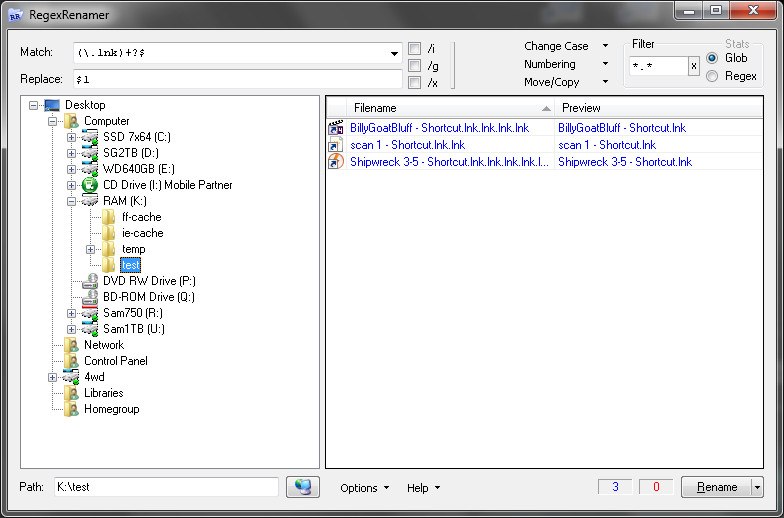
RegexRenamer

2013-01-03_11-33-00.png

PS. I haven't the foggiest idea why it works, just that it does.
"I will not follow where the path may lead, but I will go where there is no path, and I will leave a trail." - Muriel Strode, 1903
« Last Edit: January 03, 2013, 12:48 AM by 4wd »

Contro

  • Supporting Member
  • Joined in 2007
  • **
  • Posts: 3,947
Re: name.lnk.lnk.lnk.lnk.lnk forever ?
« Reply #2 on: January 03, 2013, 02:12 AM »
;D
Simply perfect.
I have a little problema with this
thumbs.db.lnk
thumbs.db.lnk.lnk
and so on
and also a couple of pdf with .lnk extension and the the same file name.

The program don't let execute the renaming while double renaming exists.
And is possible to rename manually until certain point, but is not possible delete files from inside the program window.

But works very well.

Regular expressions ? a pending subject to learn because I think is difficult to memorize things you don't apply everyday....
:-[

4wd

  • Pedantic Old Bastard
  • Supporting Member
  • Joined in 2006
  • **
  • Posts: 5,652
    • Coding Snacks
Re: name.lnk.lnk.lnk.lnk.lnk forever ?
« Reply #3 on: January 03, 2013, 02:59 AM »
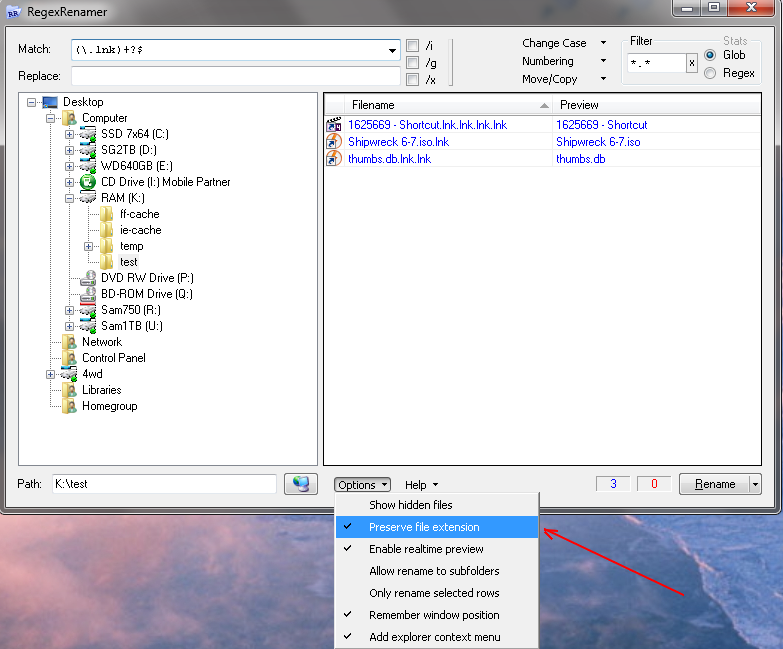
2013-01-03_13-58-04.png
"I will not follow where the path may lead, but I will go where there is no path, and I will leave a trail." - Muriel Strode, 1903

Tuxman

  • OMG not him again!
  • Supporting Member
  • Joined in 2006
  • **
  • Posts: 2,522
    • Participated in NANY Challenge Seven Times
Re: name.lnk.lnk.lnk.lnk.lnk forever ?
« Reply #4 on: January 03, 2013, 03:02 AM »
Regular expressions ? a pending subject to learn because I think is difficult to memorize things you don't apply everyday....
:-[
The better you know them, the more you'll use them.

(Anyway, remember: "When faced with a problem, some people think 'I'll use regular expressions.' Now they have two problems.")
I bet when Cheetahs race and one of them cheats, the other one goes "Man, you're such a Cheetah!" and they laugh & eat a zebra or whatever.

Contro

  • Supporting Member
  • Joined in 2007
  • **
  • Posts: 3,947
Re: name.lnk.lnk.lnk.lnk.lnk forever ?
« Reply #5 on: January 03, 2013, 03:58 AM »
(see attachment in previous post)

:-*
I have several thumbs.db . Three or four and then is problematic because the program don't know which one must remain.....
So don't rename until that problem is solved.
So I go to the folder and deleted the innecesary ones.
But the program don't refresh , so I have to close first, and open after.....

:)

4wd

  • Pedantic Old Bastard
  • Supporting Member
  • Joined in 2006
  • **
  • Posts: 5,652
    • Coding Snacks
Re: name.lnk.lnk.lnk.lnk.lnk forever ?
« Reply #6 on: January 03, 2013, 04:33 AM »
Delete all thumbs.db - they are a semi-useless file that just carries ephemeral data, (ala. pagefile).

Better yet, don't back them up in the first place, most decent file backup programs just ignore them.

To refresh the display, click on another folder than back again or hit F5.
"I will not follow where the path may lead, but I will go where there is no path, and I will leave a trail." - Muriel Strode, 1903
« Last Edit: January 03, 2013, 04:39 AM by 4wd »

Contro

  • Supporting Member
  • Joined in 2007
  • **
  • Posts: 3,947
Re: name.lnk.lnk.lnk.lnk.lnk forever ?
« Reply #7 on: January 03, 2013, 04:35 AM »
Understood.

Best Regards

Curt

  • Supporting Member
  • Joined in 2006
  • **
  • Posts: 7,565
Re: name.lnk.lnk.lnk.lnk.lnk forever ?
« Reply #8 on: January 03, 2013, 04:36 AM »
But the program don't refresh , so I have to close first, and open after.....

yes, the program will refresh. Just place the cursor in the right window and press F5.

barney

  • Charter Member
  • Joined in 2006
  • ***
  • Posts: 1,294
Re: name.lnk.lnk.lnk.lnk.lnk forever ?
« Reply #9 on: January 03, 2013, 04:40 AM »
I have several thumbs.db . Three or four and then is problematic because the program don't know which one must remain.....

Why rename them?  Just delete them.  Next time you access one of those folders in Explorer, it'll take just a bit longer as Explorer rebuilds a local thumbs.db.  And, to the best of my knowledge, only Windows - specifically Explorer - uses a thumbs.db file.

<addendum>
I see a couple of folk got ahead of me on this.  Oh, well, I'll post anyway - reinforcement  ;).
</addendum>
Make a good day ... barn

4wd

  • Pedantic Old Bastard
  • Supporting Member
  • Joined in 2006
  • **
  • Posts: 5,652
    • Coding Snacks
Re: name.lnk.lnk.lnk.lnk.lnk forever ?
« Reply #10 on: January 03, 2013, 04:55 AM »
Used to be able to turn it off in XP under Folder Options->View, in Windows 7 it's a bit different, see here.

One of the first things I did on any new install since I don't use Explorer anyway - one, (or more), less files cluttering up the place :)

At least MS learnt to stop spreading them all over the drives.
"I will not follow where the path may lead, but I will go where there is no path, and I will leave a trail." - Muriel Strode, 1903

Original address: https://www.donationcoder.com/forum/index.php?topic=33511.0