DonationCoder.com forum
 
Read-only archive. This is a static copy of the DonationCoder.com forum. Reading and searching work as before; logging in, posting and private messages do not.
Archive of 2026-10-21 · About this archive · Main site

Author Topic: Quick Ways to Start Programs in X11 Environments  (Read 17,483 times)

ewemoa

  • Honorary Member
  • Joined in 2008
  • **
  • Posts: 2,922
    • Plugin Coding Medal
    • Participated in NANY Challenge Three Times
Quick Ways to Start Programs in X11 Environments
« on: September 01, 2013, 11:15 AM »
I didn't quite get FARR working via WINE (though it seemed remarkably close to working), so I've been trying out a few alternatives:

kupfer - very similar to QuickSilver -- used this one for a while but am taking a break from it
fbrun - similar to the "Run..." dialog, comes with fluxbox
dmenu-launch - dmenu-based launcher

Anyone else have favorites or things worth pointing out?

Gothi[c]

  • DC Server Admin
  • Charter Honorary Member
  • Joined in 2006
  • ***
  • Posts: 873
    • Gathering Badge
    • Coding Snacks
Re: Quick Ways to Start Programs in X11 Environments
« Reply #1 on: September 01, 2013, 03:31 PM »
I personally bind keys to launch my most used applications. (It helps I have a keyboard with extra keys)

For anything else I use dmenu-launch which for me is good enough.

For other search specific thingies I prefer small utilities I can fire off in a terminal and pipe to whatever I need rather than a monolithic gui app anyway :)

ewemoa

  • Honorary Member
  • Joined in 2008
  • **
  • Posts: 2,922
    • Plugin Coding Medal
    • Participated in NANY Challenge Three Times
Re: Quick Ways to Start Programs in X11 Environments
« Reply #2 on: September 02, 2013, 01:51 AM »
Just a standard keyboard here :)

According to the local ~/.fluxbox/keys, I've been using Exec for two things -- launching a terminal and dmenu-launch.

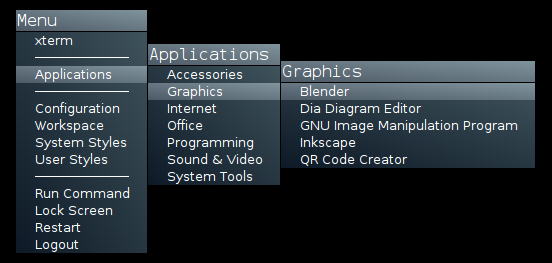
That works ok for the most part here -- until I forget the name of something...sometimes searching my shell's history helps, but this is a situation where I've been helped by hierarchical menus (rediscovery).  I used xdg-menu to generate some menus per the instructions here:

fluxbox-menu.png

Gothi[c]

  • DC Server Admin
  • Charter Honorary Member
  • Joined in 2006
  • ***
  • Posts: 873
    • Gathering Badge
    • Coding Snacks
Re: Quick Ways to Start Programs in X11 Environments
« Reply #3 on: September 02, 2013, 03:39 PM »
If you're interested in rediscovery:

On Gentoo you can do something like this to find all binaries in all installed packages

Code
for pkg in `eix -I --only-names`; do echo -e "$pkg : \n"; (equery files $pkg | grep -i 'bin/'); done 

It produces something like:

Code
app-accessibility/espeak : 
/usr/bin/espeak

app-accessibility/festival : 
/usr/bin/audsp
/usr/bin/festival

app-accessibility/flite : 
/usr/bin/build_flite
/usr/bin/dump_cst_regexes
/usr/bin/dump_us_regexes
/usr/bin/find_sts
/usr/bin/flite
/usr/bin/flite_sort
/usr/bin/flite_time
/usr/bin/huff_table
/usr/bin/regexcomp
/usr/bin/setup_flite
/usr/bin/t2p

I imagine other package managers have similar ways of doing stuff like that.
You can get pretty creative with these things in order to produce something searchable or generate menu's.
« Last Edit: September 02, 2013, 03:39 PM by Gothi[c] »

ewemoa

  • Honorary Member
  • Joined in 2008
  • **
  • Posts: 2,922
    • Plugin Coding Medal
    • Participated in NANY Challenge Three Times
Re: Quick Ways to Start Programs in X11 Environments
« Reply #4 on: September 03, 2013, 12:42 AM »
Here is something that's not quite as nice, but similar for Arch:

Quote
for pkg in `pacman -Q | awk '{print $1}'`; do echo -e "$pkg:"; pacman -Q -l $pkg|grep bin/ | awk '{print $2}'; echo; done

Automatically generating things to provide a basis for something does seem like it could be helpful.

I wish though that certain kinds of things in my shell history would be "sticky" (i.e. not get deleted).  Hmm, perhaps I can take notes containing specific invocations along with descriptions in org-mode and generate part of my shell history...

Edvard

  • Coding Snacks Author
  • Charter Honorary Member
  • Joined in 2005
  • ***
  • Posts: 3,027
    • Participated in NANY Challenge Once
    • Coding Snacks
    • Linux User
Re: Quick Ways to Start Programs in X11 Environments
« Reply #5 on: September 04, 2013, 03:56 AM »
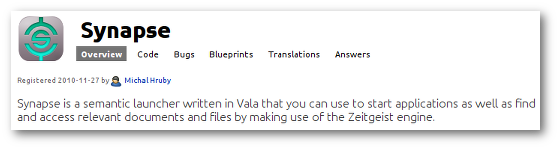
Have you tried Synapse?  No way it's even in the same ballpark as FARR, but it has a bunch of snazzy plugins, and is pretty darn snappy.
https://launchpad.net/synapse-project
synapse.png
All children left unattended will be given a mocha and a puppy.
« Last Edit: September 04, 2013, 04:02 AM by Edvard »

ewemoa

  • Honorary Member
  • Joined in 2008
  • **
  • Posts: 2,922
    • Plugin Coding Medal
    • Participated in NANY Challenge Three Times
Re: Quick Ways to Start Programs in X11 Environments
« Reply #6 on: September 04, 2013, 04:19 AM »
Thanks for the suggestion.  I haven't tried it recently and there are two things about it that lead me to be wary: 1. Zeigeist and 2. Number of dependencies.

May be I will try it again anyway :)

Edvard

  • Coding Snacks Author
  • Charter Honorary Member
  • Joined in 2005
  • ***
  • Posts: 3,027
    • Participated in NANY Challenge Once
    • Coding Snacks
    • Linux User
Re: Quick Ways to Start Programs in X11 Environments
« Reply #7 on: September 04, 2013, 12:22 PM »
Holy Schmoly! NEVER MIND!!

Quote
Zeitgeist is a service which logs the users's activities and events, anywhere from files opened to websites visited and conversations. It makes this information readily available for other applications to use in the form of timelines and statistics. It is able to establish relationships between items based on similarity and usage patterns by applying data association algorithms such as "Winepi" and "A Priori"

Yipes!
All children left unattended will be given a mocha and a puppy.

ewemoa

  • Honorary Member
  • Joined in 2008
  • **
  • Posts: 2,922
    • Plugin Coding Medal
    • Participated in NANY Challenge Three Times
Re: Quick Ways to Start Programs in X11 Environments
« Reply #8 on: September 04, 2013, 12:26 PM »
Well, lucky for me, the package installation didn't work out anyway :)

Tuxman

  • OMG not him again!
  • Supporting Member
  • Joined in 2006
  • **
  • Posts: 2,522
    • Participated in NANY Challenge Seven Times
Re: Quick Ways to Start Programs in X11 Environments
« Reply #9 on: September 05, 2013, 11:49 PM »
I tried Synapse when I had a Mint box (for testing purposes). While Zeitgeist leaves be a bit confused, it's probably one of the best launchers out there. Right after the terminal, that is.
I bet when Cheetahs race and one of them cheats, the other one goes "Man, you're such a Cheetah!" and they laugh & eat a zebra or whatever.

Edvard

  • Coding Snacks Author
  • Charter Honorary Member
  • Joined in 2005
  • ***
  • Posts: 3,027
    • Participated in NANY Challenge Once
    • Coding Snacks
    • Linux User
Re: Quick Ways to Start Programs in X11 Environments
« Reply #10 on: September 06, 2013, 11:40 PM »
I can report it IS quite snappy.  Zeitgeist is just kinda creepy.
All children left unattended will be given a mocha and a puppy.

Tuxman

  • OMG not him again!
  • Supporting Member
  • Joined in 2006
  • **
  • Posts: 2,522
    • Participated in NANY Challenge Seven Times
Re: Quick Ways to Start Programs in X11 Environments
« Reply #11 on: September 06, 2013, 11:49 PM »
Can't you just configure it to a less creepy extent?
I bet when Cheetahs race and one of them cheats, the other one goes "Man, you're such a Cheetah!" and they laugh & eat a zebra or whatever.

Original address: https://www.donationcoder.com/forum/index.php?topic=35981.0