DonationCoder.com forum
 
Read-only archive. This is a static copy of the DonationCoder.com forum. Reading and searching work as before; logging in, posting and private messages do not.
Archive of 2026-10-21 · About this archive · Main site

Author Topic: Showing CPU core temperature(s) in system tray  (Read 54,624 times)

mouser

  • First Author
  • Administrator
  • Joined in 2005
  • *****
  • Posts: 40,931
    • Gathering Badge
    • Plugin Coding Medal
    • Participated in NANY Challenge Seventeen Times
    • Cody Award
    • Coding Snacks
    • Volunteers/Staff
Showing CPU core temperature(s) in system tray
« on: August 29, 2013, 01:56 AM »
In this thread we talked about freeware tools to show multiple hard drive temperatures in the system tray (I settled on Crystal DiskInfo).

In that thread, the utility "RealTemp" was mentioned.  While it doesn't display hard drive temperatures, I recently came across it again while looking for a tool to show cpu temperatures in the system tray.

RealTemp does a very nice job of showing cpu core temperatures in the system tray and is free.

One nice feature is it can show a separate tray icon listing the temperature of each cpu core, OR it can show the max temp of all cores -- a nice alternative.

I find Monitoring the temperatures of hds and cpu can be quite useful if you are worried about overheating.

nosh

  • Supporting Member
  • Joined in 2007
  • **
  • Posts: 1,441
Re: Showing CPU core temperature(s) in system tray
« Reply #1 on: August 29, 2013, 04:37 AM »
I don't monitor CPU temps much these days but when I did I found it useful to take a screenshot of the window displaying all the temps esp. on a new (idling) machine. That way I could tell how things were holding up a few months down the line.

Renegade

  • Tell me something you don't know...
  • Charter Member
  • Joined in 2005
  • ***
  • Posts: 13,291
    • Participated in NANY Challenge Three Times
    • Furry Fandom Badge - Furry Fandom
    • Linux User
Re: Showing CPU core temperature(s) in system tray
« Reply #2 on: August 29, 2013, 11:03 AM »
I've been using Open Hardware Monitor. It's not in the tray, but is pretty good.

http://openhardwaremonitor.org/
Slow Down Music - Where I commit thought crimes...

Freedom is the right to be wrong, not the right to do wrong. - John Diefenbaker

4wd

  • Pedantic Old Bastard
  • Supporting Member
  • Joined in 2006
  • **
  • Posts: 5,652
    • Coding Snacks
Re: Showing CPU core temperature(s) in system tray
« Reply #3 on: August 29, 2013, 11:54 AM »
I've got Core Temp running on a 24/7 machine.

_2013-08-29_21-51-18.png

The three readings are: Load, Frequency, Temperature

They also have an Android app so you can monitor it from anywhere.
"I will not follow where the path may lead, but I will go where there is no path, and I will leave a trail." - Muriel Strode, 1903

Stoic Joker

  • Honorary Member
  • Joined in 2008
  • **
  • Posts: 6,652
    • Cody Award
    • Participated in NANY Challenge Five Times
Re: Showing CPU core temperature(s) in system tray
« Reply #4 on: August 29, 2013, 11:56 AM »
I've been using Open Hardware Monitor. It's not in the tray, but is pretty good.

http://openhardwaremonitor.org/

Damn! ...And no install required - Me Like!

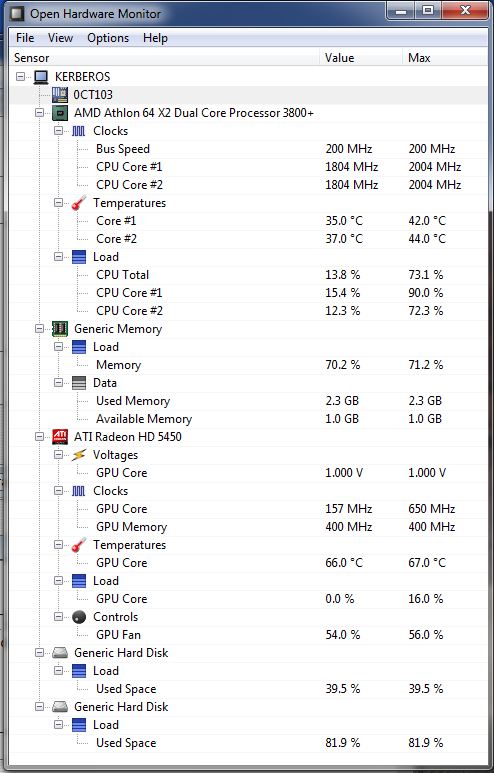
But what is the 0CT103 trying to tell me? It says I can rename it, but I've not a clue what it is.

OHM.jpg

Vurbal

  • Mostly harmless
  • Supporting Member
  • Joined in 2012
  • **
  • Posts: 653
    • Writer
Re: Showing CPU core temperature(s) in system tray
« Reply #5 on: August 29, 2013, 12:06 PM »
Judging from the icon it looks like it's supposed to represent your motherboard. Is this a Dell computer? That appears to be a model designation for one of their motherboards.
I learned to say the pledge of allegiance
Before they beat me bloody down at the station
They haven't got a word out of me since
I got a billion years probation
- The MC5

Follow the path of the unsafe, independent thinker. Expose your ideas to the danger of controversy. Speak your mind and fear less the label of ''crackpot'' than the stigma of conformity.
- Thomas J. Watson, Sr

It's not rocket surgery.
- Me


I recommend reading through my Bio before responding to any of my posts. It could save both of us a lot of time and frustration.
« Last Edit: August 29, 2013, 12:14 PM by Vurbal »

MilesAhead

  • Supporting Member
  • Joined in 2009
  • **
  • Posts: 7,736
    • Coding Snacks
Re: Showing CPU core temperature(s) in system tray
« Reply #6 on: August 29, 2013, 02:41 PM »
I also like Core Temp.  Although I tend to use the last version before the "feature creep."

Another nice app that shows temps and fan speeds without any tweaking(at least it did on all my AMD cpu PCs) is HWMonitor

A nice freebie.

Renegade

  • Tell me something you don't know...
  • Charter Member
  • Joined in 2005
  • ***
  • Posts: 13,291
    • Participated in NANY Challenge Three Times
    • Furry Fandom Badge - Furry Fandom
    • Linux User
Re: Showing CPU core temperature(s) in system tray
« Reply #7 on: August 29, 2013, 04:08 PM »
Judging from the icon it looks like it's supposed to represent your motherboard. Is this a Dell computer? That appears to be a model designation for one of their motherboards.

Ditto.

The primary nodes under the computer are all discrete pieces of hardware. But I don't know why you don't have a + there to expand it. Odd.
Slow Down Music - Where I commit thought crimes...

Freedom is the right to be wrong, not the right to do wrong. - John Diefenbaker

Vurbal

  • Mostly harmless
  • Supporting Member
  • Joined in 2012
  • **
  • Posts: 653
    • Writer
Re: Showing CPU core temperature(s) in system tray
« Reply #8 on: August 29, 2013, 04:33 PM »
Judging from the icon it looks like it's supposed to represent your motherboard. Is this a Dell computer? That appears to be a model designation for one of their motherboards.

Ditto.

The primary nodes under the computer are all discrete pieces of hardware. But I don't know why you don't have a + there to expand it. Odd.

Judging from the documentation (and screenshot) on the website that would appear to indicate it didn't find one of these chips:

Quote from: Supported Mainboard Sensors

  • ITE IT8705F, IT8712F, IT8716F, IT8718F, IT8720F, IT8721F, IT8726F, IT8728F, IT8771E, IT8772E
  • Fintek F71808E, F71858, F71862, F71868AD, F71869, F71869A, F71882, F71889ED, F71889AD, F71889F
  • Nuvoton NCT6771F, NCT6772F, NCT6775F, NCT6776F, NCT6779D
  • Winbond W83627DHG, W83627DHG-P, W83627EHF, W83627HF, W83627THF, W83667HG, W83667HG-B, W83687THF
I learned to say the pledge of allegiance
Before they beat me bloody down at the station
They haven't got a word out of me since
I got a billion years probation
- The MC5

Follow the path of the unsafe, independent thinker. Expose your ideas to the danger of controversy. Speak your mind and fear less the label of ''crackpot'' than the stigma of conformity.
- Thomas J. Watson, Sr

It's not rocket surgery.
- Me


I recommend reading through my Bio before responding to any of my posts. It could save both of us a lot of time and frustration.

antekgla

  • Participant
  • Joined in 2011
  • *
  • Posts: 75
    • Participated in NANY Challenge Once
Re: Showing CPU core temperature(s) in system tray
« Reply #9 on: February 12, 2014, 04:35 AM »
Hi I am using Perfgraph... is not in the tray, it is better they add a graph in the taskbar.
like this:


Quick description:
Quote
Perfgraph is a CPU / memory / network / hardware monitor. It is implemented as an Explorer toolbar so it does not necessarily take up space from your desktop.

A quick overview of its features:

    CPU utilization display for up to 8 cores
    Memory utilization indicator
    Network throughput monitoring via SNMP
    Network performance & reliability monitoring by pinging remote hosts
    Hardware monitoring
        CPU temperatures
        Chipset temperatures & fan speeds
        HDD temperature
        Gigabyte Odin PSU support (voltage, current, power, etc.)
    Very lightweight: minimal CPU and memory utilization

Perfgraph will run on both x86 and x64 versions of Windows XP or later.
SRTFilter Automatic Subtitle Editor & Renamer
Dualcopy If you use Teracopy or Fastcopy this can be interesting   - My N.A.N.Y 2018 Entry

Curt

  • Supporting Member
  • Joined in 2006
  • **
  • Posts: 7,565
Re: Showing CPU core temperature(s) in system tray
« Reply #10 on: February 12, 2014, 10:27 PM »
I am using Perfgraph... is not in the tray, it is better ...

While it may be quite good, Pergraph is merely a version of an old CPUID, and hasn't been updated since November 2008. I think that is one of the reasons the site is called "Code from the 70s".

antekgla

  • Participant
  • Joined in 2011
  • *
  • Posts: 75
    • Participated in NANY Challenge Once
Re: Showing CPU core temperature(s) in system tray
« Reply #11 on: February 14, 2014, 04:21 AM »

While it may be quite good, Pergraph is merely a version of an old CPUID, and hasn't been updated since November 2008. I think that is one of the reasons the site is called "Code from the 70s".

...could be.
But I'm using it in Windows 7 64 without a problem....
SRTFilter Automatic Subtitle Editor & Renamer
Dualcopy If you use Teracopy or Fastcopy this can be interesting   - My N.A.N.Y 2018 Entry

Curt

  • Supporting Member
  • Joined in 2006
  • **
  • Posts: 7,565
Re: Showing CPU core temperature(s) in system tray
« Reply #12 on: February 27, 2014, 10:01 PM »
I've got Core Temp running
I also like Core Temp.

^thank you, guys!  :up:

I have it set to merely show the highest temperature. Works fine!

On the homepage my advice is, to first click "More downloads..."
- or you will get a InstallQ™ adware installer.

Original address: https://www.donationcoder.com/forum/index.php?topic=35943.0