I have set up someone's TP-Link TD-8950ND 150Mbps Wireless N ADSL2+ Modem Router.
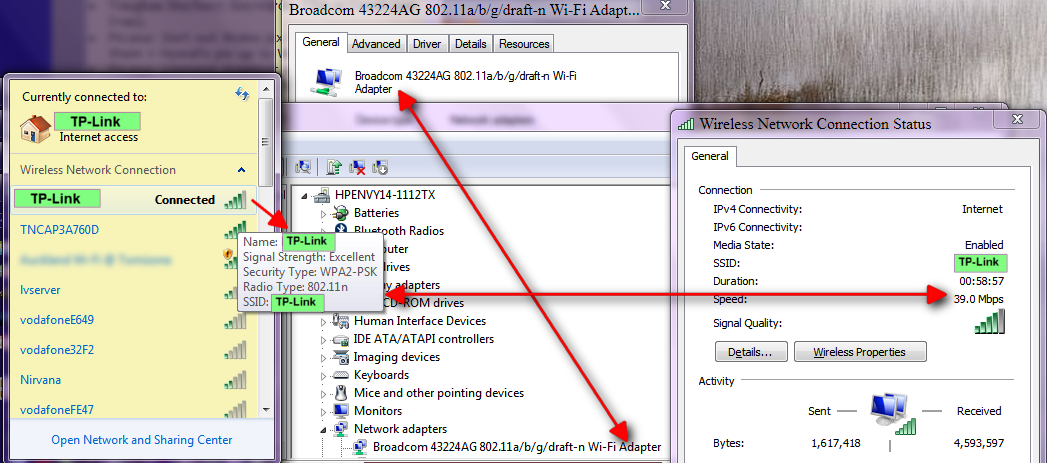
It all seems to be running fine, except that the laptop I am using is only making 30-58mbps connections (rated as being "Good" to "Excellent", respectively). This is currently with just the 1 laptop connected to the network.
The complex screenshot below should explain all. (Thankyou @Mouser/Screenshot Captor.)
What I am wanting to figure out is how I can get the laptop performance to be (say) 100mbps or more.
The TP-Link router/modem seems to have the latest firmware (I checked):
The Broadcom WiFi device has the latest driver version (I checked).
I suspect the problem may be to do with a lack of draft-n standardisation:
Any ideas please?
[attachthumb=#]
It all seems to be running fine, except that the laptop I am using is only making 30-58mbps connections (rated as being "Good" to "Excellent", respectively). This is currently with just the 1 laptop connected to the network.
The complex screenshot below should explain all. (Thankyou @Mouser/Screenshot Captor.)
What I am wanting to figure out is how I can get the laptop performance to be (say) 100mbps or more.
The TP-Link router/modem seems to have the latest firmware (I checked):
- Firmware Version: 1.2.6 build 101206 Rel.68715n
- Hardware Version: W8950ND vi 00000001
The Broadcom WiFi device has the latest driver version (I checked).
I suspect the problem may be to do with a lack of draft-n standardisation:
- On the cardboard box the TP-Link device came in, it says it is "Wireless Lite N".
- The Broadcom WiFi device driver says it is "802.11 a/b/g/draft-n"
Any ideas please?
[attachthumb=#]