DonationCoder.com forum
 
Read-only archive. This is a static copy of the DonationCoder.com forum. Reading and searching work as before; logging in, posting and private messages do not.
Archive of 2026-10-21 · About this archive · Main site

Last post Author Topic: Screenshot Captor - New Quick Capture Bar  (Read 35,744 times)

mouser

  • First Author
  • Administrator
  • Joined in 2005
  • *****
  • Posts: 40,931
    • Gathering Badge
    • Plugin Coding Medal
    • Participated in NANY Challenge Seventeen Times
    • Cody Award
    • Coding Snacks
    • Volunteers/Staff
Screenshot Captor - New Quick Capture Bar
« on: November 21, 2012, 10:48 PM »
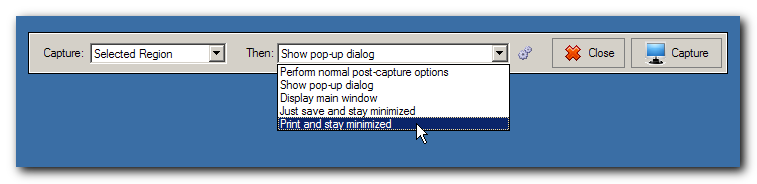
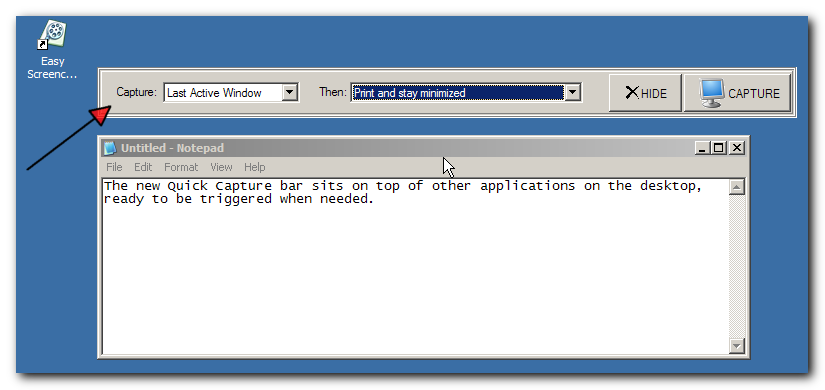
Just a screenshot showing the draft look of the new (OPTIONAL) quick capture bar.  It floats on the desktop on top of other apps and you can drag it around.  I may make an option for it to dock at top of screen too.
quickcapturebar.png

The idea is that this might be a more friendly interface for people who have trouble remembering hotkeys.  It also has the advantage of letting you quickly change what to do with the image after it's captured.

Obviously I need to improve the look of it substantially (better buttons, etc.)
« Last Edit: November 21, 2012, 10:50 PM by mouser »

kunkel321

  • Supporting Member
  • Joined in 2009
  • **
  • Posts: 626
    • Participated in NANY Challenge Once
Re: Screenshot Captor - New Quick Capture Bar
« Reply #1 on: November 21, 2012, 11:23 PM »
Pretty cool.  Any chance of making this a front-end for the Screencaster too?   :P :-*

mouser

  • First Author
  • Administrator
  • Joined in 2005
  • *****
  • Posts: 40,931
    • Gathering Badge
    • Plugin Coding Medal
    • Participated in NANY Challenge Seventeen Times
    • Cody Award
    • Coding Snacks
    • Volunteers/Staff
Re: Screenshot Captor - New Quick Capture Bar
« Reply #2 on: November 21, 2012, 11:30 PM »
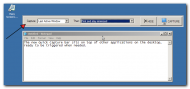
The screencaster already has a very similar front end, at least in spirit if not in dialog dimensions:
Screenshot - 11_21_2012 , 5_29_18 PM.png


Having said that, eventuallyThe SC Quick Capture Bar will also have options in "what to capture" list to start a screencast, so you'll be able to initiate a screencast from it (as well as from a hotkey in SC, etc.).

tomos

  • Charter Member
  • Joined in 2006
  • ***
  • Posts: 11,970
    • Gathering Badge
    • Participated in NANY Challenge Once
Re: Screenshot Captor - New Quick Capture Bar
« Reply #3 on: November 22, 2012, 11:17 AM »
Great to see -
I think it doesnt need much - a nicer monitor image, maybe remove that outer frame-line and your off ;-)
Tom

mouser

  • First Author
  • Administrator
  • Joined in 2005
  • *****
  • Posts: 40,931
    • Gathering Badge
    • Plugin Coding Medal
    • Participated in NANY Challenge Seventeen Times
    • Cody Award
    • Coding Snacks
    • Volunteers/Staff
Re: Screenshot Captor - New Quick Capture Bar
« Reply #4 on: November 22, 2012, 08:21 PM »
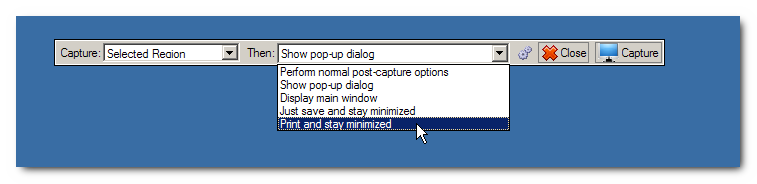
Updated screenshot:
qcb2.png

Docking is also now implemented -- so you can dock the bar to the top of the screen and it will slide hidden out of the way until you mouse over it.

mouser

  • First Author
  • Administrator
  • Joined in 2005
  • *****
  • Posts: 40,931
    • Gathering Badge
    • Plugin Coding Medal
    • Participated in NANY Challenge Seventeen Times
    • Cody Award
    • Coding Snacks
    • Volunteers/Staff
Re: Screenshot Captor - New Quick Capture Bar
« Reply #5 on: November 22, 2012, 08:35 PM »
As a side note, because Screenshot Captor will refuse to capture an image of the Quick Capture Bar, I had to use the new Easy Screencast Recorder tool to capture a movie of using it and extract the image above from that  :Thmbsup:

tomos

  • Charter Member
  • Joined in 2006
  • ***
  • Posts: 11,970
    • Gathering Badge
    • Participated in NANY Challenge Once
Re: Screenshot Captor - New Quick Capture Bar
« Reply #6 on: November 22, 2012, 09:09 PM »
As a side note, because Screenshot Captor will refuse to capture an image of the Quick Capture Bar, I had to use the new Easy Screencast Recorder tool to capture a movie of using it and extract the image above from that  :Thmbsup:

that sounds convoluted - for you 8)

looks very nice :up:
Tom

mouser

  • First Author
  • Administrator
  • Joined in 2005
  • *****
  • Posts: 40,931
    • Gathering Badge
    • Plugin Coding Medal
    • Participated in NANY Challenge Seventeen Times
    • Cody Award
    • Coding Snacks
    • Volunteers/Staff
Re: Screenshot Captor - New Quick Capture Bar
« Reply #7 on: November 22, 2012, 09:16 PM »
I've been told it's much too big to be useful.. so perhaps i will try to make a collapse toggle button that will toggle the bar between normal wide mode and a compact mode that hides everything but the Capture button.

tomos

  • Charter Member
  • Joined in 2006
  • ***
  • Posts: 11,970
    • Gathering Badge
    • Participated in NANY Challenge Once
Re: Screenshot Captor - New Quick Capture Bar
« Reply #8 on: November 22, 2012, 09:34 PM »
You could thin it down & reduce the width - would help when docking

[attachimg=#]

(would need smaller icons)
Tom

mouser

  • First Author
  • Administrator
  • Joined in 2005
  • *****
  • Posts: 40,931
    • Gathering Badge
    • Plugin Coding Medal
    • Participated in NANY Challenge Seventeen Times
    • Cody Award
    • Coding Snacks
    • Volunteers/Staff
Re: Screenshot Captor - New Quick Capture Bar
« Reply #9 on: November 22, 2012, 09:46 PM »
yeah, i might do that.

though note that unlike my LBC this docking bar does not have a mode to dock and reserve screen space -- it docks and then slides out of the way without moving any other maximized windows.  so it doesn't actually "take up" any screen real-estate when docked.

tomos

  • Charter Member
  • Joined in 2006
  • ***
  • Posts: 11,970
    • Gathering Badge
    • Participated in NANY Challenge Once
Re: Screenshot Captor - New Quick Capture Bar
« Reply #10 on: November 22, 2012, 09:46 PM »
^ Ah well then you're covered :)


I suspect I will use this - will make it easier to be flexible with SC :up:
Tom

kunkel321

  • Supporting Member
  • Joined in 2009
  • **
  • Posts: 626
    • Participated in NANY Challenge Once
Re: Screenshot Captor - New Quick Capture Bar
« Reply #11 on: November 22, 2012, 09:55 PM »
...Having said that, eventuallyThe SC Quick Capture Bar will also have options in "what to capture" list to start a screencast, so you'll be able to initiate a screencast from it (as well as from a hotkey in SC, etc.).
 Yup.  That's what I meant :)

Regarding collapsibility, how about having it live on the edge of the screen with only a few pixels showing, but always "on top" of other apps.  Clicking the (barely visible) edge causes the whole toolbar to slide onto the screen.
EDIT:  Ha!  I guess you already thought of that!


Another thought on the GUI: Have it so you can assign "pre-set" combinations of actions (for example "Selected Region" and "Display Main Window" would be a combination),  Then the user can optionally have buttons on the toolbar for the Presets.  

mouser

  • First Author
  • Administrator
  • Joined in 2005
  • *****
  • Posts: 40,931
    • Gathering Badge
    • Plugin Coding Medal
    • Participated in NANY Challenge Seventeen Times
    • Cody Award
    • Coding Snacks
    • Volunteers/Staff
Re: Screenshot Captor - New Quick Capture Bar
« Reply #12 on: November 22, 2012, 11:14 PM »
Ok what do you fellows think of this:

Expanded:
qcb_expanded.png

Collapsed:
qcb_collapsed.png

Josh

  • Charter Honorary Member
  • Joined in 2005
  • ***
  • Posts: 3,411
    • Gathering Badge
    • Official Forum Clown
    • Coding Snacks
    • Plugin Coding Medal
    • Volunteers/Staff
    • Military Service Badge - US Army
    • Furry Fandom Badge - Furry Fandom
    • Linux User
Re: Screenshot Captor - New Quick Capture Bar
« Reply #13 on: November 22, 2012, 11:19 PM »
You could thin it down & reduce the width - would help when docking
(see attachment in previous post)
(would need smaller icons)

Mouser,

I am with tomos on this one. I think the toolbar needs to be thinned out and perhaps have the "Then" drop down removed. When I use a tool like this in toolbar mode, I want it to occupy as little screen space as possible. The toolbar is still quite long and large.
Strength in Knowledge

Ath

  • Supporting Member
  • Joined in 2006
  • **
  • Posts: 3,649
    • Participated in NANY Challenge Eleven Times
    • Coding Snacks
    • Linux User
    • Hardware Hacker
Re: Screenshot Captor - New Quick Capture Bar
« Reply #14 on: November 22, 2012, 11:53 PM »
+1
and I think the bigger/smaller arrows are backward, aren't they supposed to point in the way the 'movement' goes?
/Ton
Ath's software collection, Quote: "A problem well stated is a problem half-solved." (Charles Kettering)

kilele

  • Charter Member
  • Joined in 2006
  • ***
  • Posts: 243
Re: Screenshot Captor - New Quick Capture Bar
« Reply #15 on: November 23, 2012, 01:47 AM »
The gui of this program may serve as an inspiration:
http://www.pointofix.de/

mouser

  • First Author
  • Administrator
  • Joined in 2005
  • *****
  • Posts: 40,931
    • Gathering Badge
    • Plugin Coding Medal
    • Participated in NANY Challenge Seventeen Times
    • Cody Award
    • Coding Snacks
    • Volunteers/Staff
Re: Screenshot Captor - New Quick Capture Bar
« Reply #16 on: November 23, 2012, 04:12 AM »
How about this for collapsed mode:
qcbcompact.png

mouser

  • First Author
  • Administrator
  • Joined in 2005
  • *****
  • Posts: 40,931
    • Gathering Badge
    • Plugin Coding Medal
    • Participated in NANY Challenge Seventeen Times
    • Cody Award
    • Coding Snacks
    • Volunteers/Staff
Re: Screenshot Captor - New Quick Capture Bar
« Reply #17 on: November 23, 2012, 04:21 AM »
personally i think using the bar in this small a collapse is silly once you see how the docking mode works, but whatever..

cmpm

  • Charter Member
  • Joined in 2006
  • ***
  • Posts: 2,026
Re: Screenshot Captor - New Quick Capture Bar
« Reply #18 on: November 23, 2012, 04:38 AM »
-it docks and then slides out of the way-

keep it a good size so i can see it!  :tellme:

tomos

  • Charter Member
  • Joined in 2006
  • ***
  • Posts: 11,970
    • Gathering Badge
    • Participated in NANY Challenge Once
Re: Screenshot Captor - New Quick Capture Bar
« Reply #19 on: November 23, 2012, 08:28 AM »
@cmpm -
the text isn't any smaller in the slim version (in my post above anyways)

FWIW, visually, slim is much nicer/neater looking. Just an opinion though ;)
Tom

panzer

  • Participant
  • Joined in 2008
  • *
  • Posts: 941
Re: Screenshot Captor - New Quick Capture Bar
« Reply #20 on: November 23, 2012, 10:14 AM »
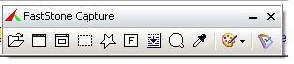
Mouser, download the FS Capture last free version and take a look at their floating bar ... Maybe this will give you some new ideas ...

Josh

  • Charter Honorary Member
  • Joined in 2005
  • ***
  • Posts: 3,411
    • Gathering Badge
    • Official Forum Clown
    • Coding Snacks
    • Plugin Coding Medal
    • Volunteers/Staff
    • Military Service Badge - US Army
    • Furry Fandom Badge - Furry Fandom
    • Linux User
Re: Screenshot Captor - New Quick Capture Bar
« Reply #21 on: November 23, 2012, 01:47 PM »
Mouser, do you have a screenshot of the thinner toolbar in expanded mode?

I think this version of the toolbar looks much cleaner, much more visually appealing, and will fit in nicely regardless of where it is placed on the screen.
Strength in Knowledge

kunkel321

  • Supporting Member
  • Joined in 2009
  • **
  • Posts: 626
    • Participated in NANY Challenge Once
Re: Screenshot Captor - New Quick Capture Bar
« Reply #22 on: November 23, 2012, 03:18 PM »
I also agree that slimmer is nicer looking.  
Also, as Ath says, the arrow should point in the "desired" direction, not the "current" direction... (IMHO)

howardb

  • Supporting Member
  • Joined in 2007
  • **
  • Posts: 24
New Quick Capture Bar - Simple with options for Complex?
« Reply #23 on: December 28, 2012, 08:56 PM »
At the risk of touting the competition, I find the capture bar of FScapture to be by far the easiest to use. It has a (configurable) row of easy to understand icons for each type of capture (e.g., entire desktop, active/current screen, user defined region, scrolling, - - -).  Using a drop down menu for these options adds an extra step.

I notice a general tendency of programmers that is increasingly frustrating for me, as a user: Packing more and more options into an application. Each user interface is always a little different. So for each new app., I must learn to navagate a new set of menus, hotspots, hotkeys, settings - - -.

This had been solved for a time when Apple and Microsoft adapted a relatively standard menu interface for everything whatsoever. But this seems to have broken down. Now, so many new whatevers seem to have new looks and feels.

cmpm

  • Charter Member
  • Joined in 2006
  • ***
  • Posts: 2,026
Re: Screenshot Captor - New Quick Capture Bar
« Reply #24 on: December 29, 2012, 04:10 PM »
I like the drop down options, very nice.
If I want it to look like faststone, I will use faststone.
But I don't.

Original address: https://www.donationcoder.com/forum/index.php?topic=32949.0