DonationCoder.com forum
 
Read-only archive. This is a static copy of the DonationCoder.com forum. Reading and searching work as before; logging in, posting and private messages do not.
Archive of 2026-10-21 · About this archive · Main site

Author Topic: Feedback  (Read 6,681 times)

rIDcK1BZMu

  • Participant
  • Joined in 2012
  • *
  • Posts: 2
Feedback
« on: November 16, 2012, 01:30 PM »
I tried FARR as an alternative to Launchy, but I immediately noticed an issue which was a showstopper for me:

In Launchy, I can simply begin to type "network connections" to get to the Network Connections window.

I noticed I have to type "cpanel" in FARR to get to control panel items. This seems rather obtuse to me. Isn't the goal of these tools to let the user type/click less? (But even then, "Network Connections" isn't listed there.)

wjamoe

  • Supporting Member
  • Joined in 2010
  • **
  • Posts: 99
    • Participated in NANY Challenge Once
    • Plugin Coding Medal
Re: Feedback
« Reply #1 on: November 16, 2012, 07:30 PM »
it is possible to type

  cpanel network connections

or something shorter like

  cpanel nwc

IMHO the latter looks more compact than  'network connections',
it works because nwc matches network connections

rIDcK1BZMu

  • Participant
  • Joined in 2012
  • *
  • Posts: 2
Re: Feedback
« Reply #2 on: November 16, 2012, 07:32 PM »
The same trick works in Launchy. It doesn't change anything - if the program (FARR or Launchy) remembers what I chose when I typed either "nwc" or "net", either is good.

"net" is easier to type on Dvorak.

tomos

  • Charter Member
  • Joined in 2006
  • ***
  • Posts: 11,970
    • Gathering Badge
    • Participated in NANY Challenge Once
Re: Feedback
« Reply #3 on: November 16, 2012, 07:32 PM »
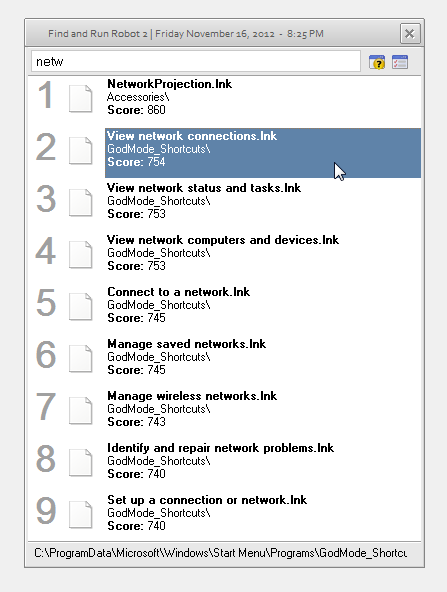
One workaround is to create a folder with the 'Godmode' shortcuts.
As you can see (bottom of the screenshot) I created it in the Start Menu\Programs folder where FARR automatically searches
(Win7)

[attachthumb=#]

there may be easier routes, see what the experts say (I'm not one!)
Tom

kilele

  • Charter Member
  • Joined in 2006
  • ***
  • Posts: 243
Re: Feedback
« Reply #4 on: November 16, 2012, 07:56 PM »
Here's a list of control panels you can launch on Windows Vista
and Windows 7:

http://msdn.microsoft.com/en-us/library/ee330741(VS.85).aspx

tomos

  • Charter Member
  • Joined in 2006
  • ***
  • Posts: 11,970
    • Gathering Badge
    • Participated in NANY Challenge Once
Re: Feedback
« Reply #5 on: November 16, 2012, 09:04 PM »
I thought this stuff was included automatically in FARR with Josh's recent work -
or does that still need the "cpanel" trigger ?

~~~~~~~~~~

Re the godmode shortcuts:

  • I created the GodMode folder (A) with the name "GodMode.{ED7BA470-8E54-465E-825C-99712043E01C}"
  • I created a folder (B) at C:\ProgramData\Microsoft\Windows\Start Menu\Programs\GODMode folder shortcuts.
  • I dragged all the 272 items in (A) and dropped them into (B), where they took the extension ".lnk".
  • Then added the (B) folder to FARR search list:

for some reason, Iain (and I, and others) created the godmode folder in [location of your choice] and then created shortcuts somewhere that FARR searches. I cant remember why that was, maybe something to do with the godmode thang.
Tom
« Last Edit: November 16, 2012, 11:29 PM by tomos »

Josh

  • Charter Honorary Member
  • Joined in 2005
  • ***
  • Posts: 3,411
    • Gathering Badge
    • Official Forum Clown
    • Coding Snacks
    • Plugin Coding Medal
    • Volunteers/Staff
    • Military Service Badge - US Army
    • Furry Fandom Badge - Furry Fandom
    • Linux User
Re: Feedback
« Reply #6 on: November 16, 2012, 09:38 PM »
God mode stuff was not added to FARR since it varies greatly with each OS (since Vista). Also, there is no direct way to call these links and this would require a set of shortcuts be developed for each OS (Vista, Vista SP1, Vista SP2, Vista x64, etc).

I am still looking at a way to accomplish the God Mode items. The CPanel shortcuts are for control panel namespace applets only, not God mode.
Strength in Knowledge

skajfes

  • Honorary Member
  • Joined in 2008
  • **
  • Posts: 267
Re: Feedback
« Reply #7 on: November 19, 2012, 10:39 AM »
There is a Network connections plugin that lists all your network connections. I can't find the link but I think that it can be installed through DcUpdater utility.

Alternatively you can modify your search folders settings not to use the modifier keyword for control panel shortcuts.
It is impossible to make anything foolproof because fools are so ingenious.

Original address: https://www.donationcoder.com/forum/index.php?topic=32895.0