DonationCoder.com forum
 
Read-only archive. This is a static copy of the DonationCoder.com forum. Reading and searching work as before; logging in, posting and private messages do not.
Archive of 2026-10-21 · About this archive · Main site

Author Topic: Include Windows 7 Start Button Search Results in FARR?  (Read 26,036 times)

David.P

  • Ergonomics Junkie
  • Supporting Member
  • Joined in 2008
  • **
  • Posts: 208
Include Windows 7 Start Button Search Results in FARR?
« on: April 19, 2012, 02:21 PM »
Hi mouser & forum,

is it possible for FARR to include the results of the Windows 7 Start Button/Start Menu search? (at least the ones that are in some way Windows/Control Panel related)

For example, if I start to type "Window M....." into the Start Button search box, Windows 7 gives me "change window colors and metrics" (which accidentally is exactly what I was looking for;)

So, can FARR do this as well? -- in order for not having to use FARR and the Start Button search box if looking for things where you are not sure if it might be a program, setting, control panel or whatever.

Thanks already
Cheers David.P

mouser

  • First Author
  • Administrator
  • Joined in 2005
  • *****
  • Posts: 40,931
    • Gathering Badge
    • Plugin Coding Medal
    • Participated in NANY Challenge Seventeen Times
    • Cody Award
    • Coding Snacks
    • Volunteers/Staff
Re: Include Windows 7 Start Button Search Results in FARR?
« Reply #1 on: April 22, 2012, 02:18 AM »
I really like this idea a lot.. Question is how easy would it be to grab those items automatically.. I wonder if anyone has looked into whether these entries are stored somewhere accessible?

Ath

  • Supporting Member
  • Joined in 2006
  • **
  • Posts: 3,649
    • Participated in NANY Challenge Eleven Times
    • Coding Snacks
    • Linux User
    • Hardware Hacker
Re: Include Windows 7 Start Button Search Results in FARR?
« Reply #2 on: April 22, 2012, 08:58 AM »
Wouldn't that be achieved by adding the All Users 'C:\Users\All Users\Microsoft\Windows\Start Menu' and Current User 'C:\Users\[Ath]\Microsoft\Windows\Start Menu' (ofc by using the proper variables, that I didn't investigate) into the Search Folders configuration?
/Ton
Ath's software collection, Quote: "A problem well stated is a problem half-solved." (Charles Kettering)

David.P

  • Ergonomics Junkie
  • Supporting Member
  • Joined in 2008
  • **
  • Posts: 208
Re: Include Windows 7 Start Button Search Results in FARR?
« Reply #3 on: April 22, 2012, 11:49 AM »
Mouser, I'm not sure where these entries actually are stored.

A first step however could be the behaviour of the Win7 god mode. If you install God Mode:
http://howto.cnet.com/8301-11310_39-10423985-285/understanding-windows-7s-godmode/  

...and then open it in Windows Explorer, when typing something into the Explorer window's search field (top right), what you get in the Explorer window are the same results as if you had typed your search into the Start Menu search.

Interestingly, the God-Mode Explorer Window also reveals the search keywords for every entry like in below screenshot:


Note that there even are lots and lots of misspelled keywords -- in order for people to find for example "Bildschirmschoner" (screen saver) when they wrongly type "Bidschirm". (FARR of course is much more intelligent in this respect, as it doesn't need "lists of misspellings").

Unfortunately, for example the (misspelled) entry "Bidschirm" is not to be found in the Registry, neither via full text search in the entire system partition....

Some but not all of the search strings seem to be contained in a file called "access.h1s" in the C:\Windows\Help\Windows\[language] folder.

That's all I could find out for the moment...

Regards
David

--
PS: This might be of interest as well:
The Control Panel search results understand common misspellings
« Last Edit: April 22, 2012, 11:58 AM by David.P »

daddydave

  • test
  • Supporting Member
  • Joined in 2008
  • **
  • Posts: 867
    • Participated in NANY Challenge Once
Re: Include Windows 7 Start Button Search Results in FARR?
« Reply #4 on: April 22, 2012, 12:16 PM »
Off-topic but FWIW, I personally have copied the God Mouser mode shortcuts to the FindAndRunRobot\Scripts\Control Panel (cpanel) folder, so I can get those.

Thus:

skajfes

  • Honorary Member
  • Joined in 2008
  • **
  • Posts: 267
Re: Include Windows 7 Start Button Search Results in FARR?
« Reply #5 on: April 23, 2012, 07:46 PM »
Off-topic but FWIW, I personally have copied the God Mouser mode shortcuts to the FindAndRunRobot\Scripts\Control Panel (cpanel) folder, so I can get those.

Thus:

:Thmbsup: Simple and effective. Not sure if it could be automated, so that it is included in FARR on install...
It is impossible to make anything foolproof because fools are so ingenious.

David.P

  • Ergonomics Junkie
  • Supporting Member
  • Joined in 2008
  • **
  • Posts: 208
Re: Include Windows 7 Start Button Search Results in FARR?
« Reply #6 on: May 02, 2012, 04:33 PM »
Off-topic but FWIW, I personally have copied the God Mouser mode shortcuts to the FindAndRunRobot\Scripts\Control Panel (cpanel) folder, so I can get those.

How did you to that? I have tried and copied the respective *.lnk files to this folder, but FARR doesn't give me results when typing any of those files' names (only the original ones with "cpanel" in their name still work).

daddydave

  • test
  • Supporting Member
  • Joined in 2008
  • **
  • Posts: 867
    • Participated in NANY Challenge Once
Re: Include Windows 7 Start Button Search Results in FARR?
« Reply #7 on: May 03, 2012, 10:15 AM »
Off-topic but FWIW, I personally have copied the God Mouser mode shortcuts to the FindAndRunRobot\Scripts\Control Panel (cpanel) folder, so I can get those.

How did you to that? I have tried and copied the respective *.lnk files to this folder, but FARR doesn't give me results when typing any of those files' names (only the original ones with "cpanel" in their name still work).

Hmmm. I wouldn't think this would matter, but I renamed the shortcuts so that they too had "(cpanel)" in the name (using a bulk renaming tool, I probably used PFRANK although any should do.)

David.P

  • Ergonomics Junkie
  • Supporting Member
  • Joined in 2008
  • **
  • Posts: 208
Re: Include Windows 7 Start Button Search Results in FARR?
« Reply #8 on: May 03, 2012, 10:36 AM »
I renamed the shortcuts so that they too had "(cpanel)" in the name

Hmmm, that didn't work for me...

It seems as if the target syntax (colons) is somewhat different between the original FARR cpanel shortcuts and the ones copied from the Godmode folder:


All shortcuts however work if simply double-clicked! Only FARR doesn't seem to see them  :redface:

Cheers David

tomos

  • Charter Member
  • Joined in 2006
  • ***
  • Posts: 11,970
    • Gathering Badge
    • Participated in NANY Challenge Once
Re: Include Windows 7 Start Button Search Results in FARR?
« Reply #9 on: May 03, 2012, 10:54 AM »
Are you sure FARR reads that folder?

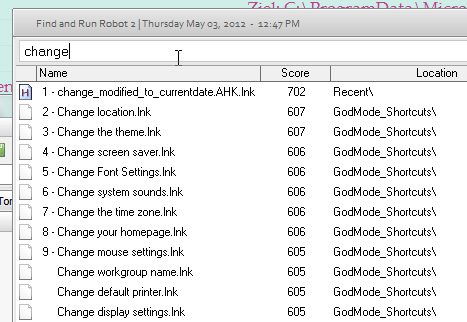
I made the "god folder",
then I made the shortcuts here (by alt dragging contents of god folder):
C:\ProgramData\Microsoft\Windows\Start Menu\Programs\GodMode_Shortcuts

FARR can read them

[attachimg=#]


Tom

David.P

  • Ergonomics Junkie
  • Supporting Member
  • Joined in 2008
  • **
  • Posts: 208
Re: Include Windows 7 Start Button Search Results in FARR?
« Reply #10 on: May 03, 2012, 11:13 AM »
Ah that worked -- thanks!

daddydave

  • test
  • Supporting Member
  • Joined in 2008
  • **
  • Posts: 867
    • Participated in NANY Challenge Once
Re: Include Windows 7 Start Button Search Results in FARR?
« Reply #11 on: May 03, 2012, 11:55 AM »
I renamed the shortcuts so that they too had "(cpanel)" in the name

Hmmm, that didn't work for me...

It seems as if the target syntax (colons) is somewhat different between the original FARR cpanel shortcuts and the ones copied from the Godmode folder:

All shortcuts however work if simply double-clicked! Only FARR doesn't seem to see them  :redface:

Cheers David

Hmm.. I should clarify that I don't have the bare Control Panel Tasks in  FindAndRunRobot\scripts\Control Panel (cpanel), I have those in another folder. I right-dragged and dropped to the FindAndRunRobot\scripts\Control Panel (cpanel) folder to create the shortcuts.

This is the same as tomos's way, just a different search folder. Glad you got it working!

And +1 for the suggestion to have FARR do this automatically.

daddydave

  • test
  • Supporting Member
  • Joined in 2008
  • **
  • Posts: 867
    • Participated in NANY Challenge Once
Re: Include Windows 7 Start Button Search Results in FARR?
« Reply #12 on: May 03, 2012, 12:04 PM »
I think my %FARRDIR%\scripts search folder (which houses the Control Panel shortcuts) originally required a cpanel modifier keyword but I removed the modifier:

Screenshot - 5_3_2012 , 8_03_13 AM.png

IainB

  • @Slartibartfarst
  • Supporting Member
  • Joined in 2008
  • **
  • Posts: 7,544
Re: Include Windows 7 Start Button Search Results in FARR?
« Reply #13 on: May 03, 2012, 01:34 PM »
I made the "god folder",
then I made the shortcuts here (by alt dragging contents of god folder):
C:\ProgramData\Microsoft\Windows\Start Menu\Programs\GodMode_Shortcuts
FARR can read them
(see attachment in previous post)

Thanks for asking the Q @David.P.
I had been wanting to do this for some time, and this discussion and @Tomos (thanks also) told me how.
So:
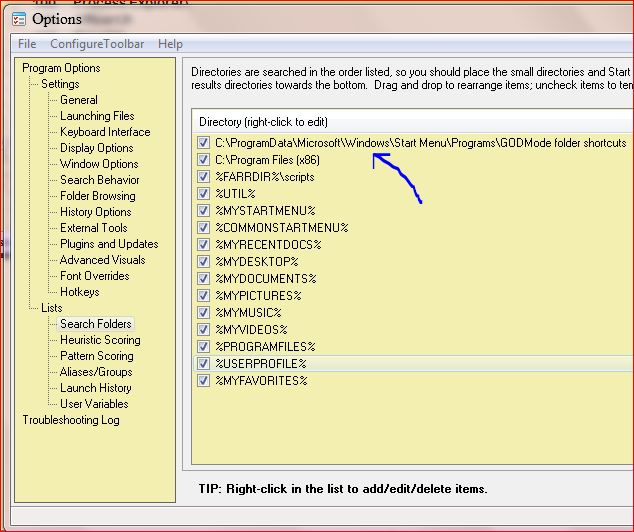
  • I created the GodMode folder (A) with the name "GodMode.{ED7BA470-8E54-465E-825C-99712043E01C}"
  • I created a folder (B) at C:\ProgramData\Microsoft\Windows\Start Menu\Programs\GODMode folder shortcuts.
  • I dragged all the 272 items in (A) and dropped them into (B), where they took the extension ".lnk".
  • Then added the (B) folder to FARR search list:
(Sorry about the colours, but for some time I have been experimenting with my Window colours in "Change window colors and metrics". Makes my eyeballs ache sometimes.)

[attach]
« Last Edit: May 04, 2012, 01:08 PM by IainB »

tomos

  • Charter Member
  • Joined in 2006
  • ***
  • Posts: 11,970
    • Gathering Badge
    • Participated in NANY Challenge Once
Re: Include Windows 7 Start Button Search Results in FARR?
« Reply #14 on: May 03, 2012, 02:17 PM »
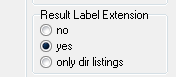
The FARR result is not perfect yet - does not show the .lnk name. How do I force that?

It does here - could that possibly depend on your Windows Explorer settings (hide file extension- or not) ?**

Icons are not shown here in FARR, dont know why, but it doesnt really bother me - I know where there coming from then...


** EDIT/  or maybe in FARR under display settings?
[attachimg=#]
Tom

David.P

  • Ergonomics Junkie
  • Supporting Member
  • Joined in 2008
  • **
  • Posts: 208
Re: Include Windows 7 Start Button Search Results in FARR?
« Reply #15 on: May 03, 2012, 02:47 PM »
Great stuff.

Now there is basically only one step more: find out how those Start Menu search keywords could be extracted/utilized by FARR.
« Last Edit: May 03, 2012, 03:05 PM by David.P »

IainB

  • @Slartibartfarst
  • Supporting Member
  • Joined in 2008
  • **
  • Posts: 7,544
Re: Include Windows 7 Start Button Search Results in FARR?
« Reply #16 on: May 04, 2012, 01:07 PM »
(Post deleted - duplication.)
« Last Edit: May 04, 2012, 01:16 PM by IainB »

IainB

  • @Slartibartfarst
  • Supporting Member
  • Joined in 2008
  • **
  • Posts: 7,544
Re: Include Windows 7 Start Button Search Results in FARR?
« Reply #17 on: May 04, 2012, 01:12 PM »
The FARR result is not perfect yet - does not show the .lnk name. How do I force that?
Oops, sorry. My mistuk. In my haste, I had not noticed that the Name column had closed.
It works fine. Have amended the post above.

David.P

  • Ergonomics Junkie
  • Supporting Member
  • Joined in 2008
  • **
  • Posts: 208
Re: Include Windows 7 Start Button Search Results in FARR?
« Reply #18 on: September 26, 2012, 07:58 AM »
Whoaa! What happened? Has this been included as a new feature?


For some reason, FARR now seems to give me all the Windows 7 Start Button search results (even the misspelled ones).

Only the icons are missing? :huh:

Josh

  • Charter Honorary Member
  • Joined in 2005
  • ***
  • Posts: 3,411
    • Gathering Badge
    • Official Forum Clown
    • Coding Snacks
    • Plugin Coding Medal
    • Volunteers/Staff
    • Military Service Badge - US Army
    • Furry Fandom Badge - Furry Fandom
    • Linux User
Re: Include Windows 7 Start Button Search Results in FARR?
« Reply #19 on: September 26, 2012, 12:04 PM »
All,

I have been trying to work on a solution to populate these results and have them appear in FARR search results (without using shortcuts).

If anyone is willing, I need a list of the GUIDs in order to begin this process. I am going to try and figure out a way to programmatically populate this list from the "God Mode" folder.

Anyone willing to help out? I will work with mouser to develop this as a plugin as it would be EXTREMELY useful.

Josh
Strength in Knowledge

Ath

  • Supporting Member
  • Joined in 2006
  • **
  • Posts: 3,649
    • Participated in NANY Challenge Eleven Times
    • Coding Snacks
    • Linux User
    • Hardware Hacker
/Ton
Ath's software collection, Quote: "A problem well stated is a problem half-solved." (Charles Kettering)

Josh

  • Charter Honorary Member
  • Joined in 2005
  • ***
  • Posts: 3,411
    • Gathering Badge
    • Official Forum Clown
    • Coding Snacks
    • Plugin Coding Medal
    • Volunteers/Staff
    • Military Service Badge - US Army
    • Furry Fandom Badge - Furry Fandom
    • Linux User
Re: Include Windows 7 Start Button Search Results in FARR?
« Reply #21 on: September 26, 2012, 12:40 PM »
Nah, I already have those in the new "cpanel" alias. What I am looking for is "God Mode" items vice control panel applets initiated from control.exe
Strength in Knowledge

IainB

  • @Slartibartfarst
  • Supporting Member
  • Joined in 2008
  • **
  • Posts: 7,544
Re: Include Windows 7 Start Button Search Results in FARR?
« Reply #22 on: August 07, 2014, 10:04 PM »
There is a text file containing all (262) paths in the list of GodMode functions that I get using GodMode.{ED7BA470-8E54-465E-825C-99712043E01C}
Refer here: Re: Godmode

Posting link in case it could be relevant/useful in this thread.

Original address: https://www.donationcoder.com/forum/index.php?topic=30726.0