DonationCoder.com forum
 
Read-only archive. This is a static copy of the DonationCoder.com forum. Reading and searching work as before; logging in, posting and private messages do not.
Archive of 2026-10-21 · About this archive · Main site

Last post Author Topic: Tips for Windows 8 (got any?)  (Read 90,644 times)

tomos

  • Charter Member
  • Joined in 2006
  • ***
  • Posts: 11,970
    • Gathering Badge
    • Participated in NANY Challenge Once
Re: Tips for Windows 8 (got any?)
« Reply #25 on: November 21, 2012, 11:59 AM »
thanks erikts -
I presume that's valid for all software used on 8 so I struck a line through Metro :-)

Tweaks / etc:
...
How to Delete Your Metro Application's Usage History in Windows 8 [howtogeek.com] (erikts #24)
Tom

fenixproductions

  • Honorary Member
  • Joined in 2006
  • **
  • Posts: 1,186
    • Participated in NANY Challenge Four Times
Re: Tips for Windows 8 (got any?)
« Reply #26 on: November 22, 2012, 05:39 PM »
Little spam for ya…

Free ebook: Introducing Windows 8: An Overview for IT Professionals (Final Edition)
http://blogs.msdn.com/b/microsoft_press/archive/2012/11/13/free-ebook-introducing-windows-8-an-overview-for-it-professionals-final-edition.aspx
Надо было учиться, а не камни в школу бросать...
--
f0dder is my personal hero :)

phitsc

  • Honorary Member
  • Joined in 2008
  • **
  • Posts: 1,198
    • Participated in NANY Challenge Seven Times
    • Plugin Coding Medal
Re: Tips for Windows 8 (got any?)
« Reply #27 on: November 23, 2012, 08:50 AM »
I followed these instructions to boot directly to desktop and it works:

http://winaero.com/blog/how-to-skip-start-screen-natively-without-using-any-third-party-tool/

(note that it's not the same as mentioned in comment #8, although also from winaero)

tomos

  • Charter Member
  • Joined in 2006
  • ***
  • Posts: 11,970
    • Gathering Badge
    • Participated in NANY Challenge Once
Re: Tips for Windows 8 (got any?)
« Reply #28 on: November 23, 2012, 09:50 AM »
^ sounds good :up:

I added it to first post
Tom

tomos

  • Charter Member
  • Joined in 2006
  • ***
  • Posts: 11,970
    • Gathering Badge
    • Participated in NANY Challenge Once
Re: Tips for Windows 8 (got any?)
« Reply #29 on: November 24, 2012, 06:32 PM »
I followed these instructions to boot directly to desktop and it works:

http://winaero.com/blog/how-to-skip-start-screen-natively-without-using-any-third-party-tool/

(note that it's not the same as mentioned in comment #8, although also from winaero)

all the options I've seen for boot-to-desktop are quite, eh, 'heavy' for want of a better term.

This one (from phitsc) where you have to re-activate the OS
The one that uses sheduler to change the setting on each reboot,
and then they have an app that does this - it has to start with windows (which also disables the popup edge panels on the desktop)

Seems MS have made it quite difficult to change - but it is good to know when they work :up:
Tom

tomos

  • Charter Member
  • Joined in 2006
  • ***
  • Posts: 11,970
    • Gathering Badge
    • Participated in NANY Challenge Once
Re: Tips for Windows 8 (got any?)
« Reply #30 on: November 24, 2012, 06:54 PM »
Added to "Tweaks" in post #1


How to disable the edge panels (Charms Bar and Switcher) - this is a registry tweak that disables the edge panels (Charms Bar and Switcher) - but still allows them to be called via hotkey.  (also from winaero.com)
[...]
Various Tweak Apps from winaero.com who seem in general to have a good reputation.
Tom

phitsc

  • Honorary Member
  • Joined in 2008
  • **
  • Posts: 1,198
    • Participated in NANY Challenge Seven Times
    • Plugin Coding Medal
Re: Tips for Windows 8 (got any?)
« Reply #31 on: November 24, 2012, 07:45 PM »
This one (from phitsc) where you have to re-activate the OS
It was really easy though. Download. Copy/Paste product key into supplied text file. double-click. Done. The script does everything, including the re-activation.

tomos

  • Charter Member
  • Joined in 2006
  • ***
  • Posts: 11,970
    • Gathering Badge
    • Participated in NANY Challenge Once
Re: Tips for Windows 8 (got any?)
« Reply #32 on: November 26, 2012, 06:27 PM »
This one (from phitsc) where you have to re-activate the OS
It was really easy though. Download. Copy/Paste product key into supplied text file. double-click. Done. The script does everything, including the re-activation.

this one took a bit more work for me because I have a pre-installed (OEM) Windows 8. The serial number is no longer accessible anywhere. (It's in the bios, but apparently even there it's hidden.)
I came across this little app (*not* a 'tiles' app - the word app is being stolen from us...)
Windows 8 WDP Product Key Viewer´
http://forums.mydigitallife.info/threads/30363-Windows-8-WDP-Product-Key-Viewer
(My Digital Life forums)

it seemed to have a lot of happy users so I tried it and added the key number to the winaero fix.
Rebooted and, yes :up: it went straight to desktop.
Tom

Stoic Joker

  • Honorary Member
  • Joined in 2008
  • **
  • Posts: 6,652
    • Cody Award
    • Participated in NANY Challenge Five Times
Re: Tips for Windows 8 (got any?)
« Reply #33 on: November 26, 2012, 07:41 PM »
this one took a bit more work for me because I have a pre-installed (OEM) Windows 8. The serial number is no longer accessible anywhere. (It's in the bios, but apparently even there it's hidden.)
I came across this little app (*not* a 'tiles' app - the word app is being stolen from us...)
Windows 8 WDP Product Key Viewer´
http://forums.mydigitallife.info/threads/30363-Windows-8-WDP-Product-Key-Viewer
(My Digital Life forums)

Cool little app man, thanks for sharing. But I gotta ask where you got the impression the product key was stored in the BIOS? I've never heard anything about that move, and there is nothing in the pkeyui.exe binaries import list that implies that it is accessing the BIOS to decode the key. I appears to be a straight registry query-->decode process.

tomos

  • Charter Member
  • Joined in 2006
  • ***
  • Posts: 11,970
    • Gathering Badge
    • Participated in NANY Challenge Once
Re: Tips for Windows 8 (got any?)
« Reply #34 on: November 26, 2012, 08:00 PM »
But I gotta ask where you got the impression the product key was stored in the BIOS? [...] It appears to be a straight registry query-->decode process.

maybe that's why people couldnt find it in the BIOS :)
It's something that was romoured at least - couldnt tell you where exactly, but I've read it a few places :-\
Tom

Arizona Hot

  • Supporting Member
  • Joined in 2007
  • **
  • Posts: 3,197
Re: Tips for Windows 8 (got any?)
« Reply #35 on: November 27, 2012, 05:45 PM »
Windows 8 is too young. It's probably still full of bugs.
It’s a little mad buying immediately a new OS. It’s wise instead waiting for some years before buying it, so in the meantime many bugs will be fixed.

+1(I presume). This is why I expect to get a Win 7 machine. Timing is everything.
"If you can't be a good example, then you'll just have to be a horrible warning"  - Catherine Aird

erikts

  • Supporting Member
  • Joined in 2007
  • **
  • Posts: 227
Re: Tips for Windows 8 (got any?)
« Reply #36 on: December 10, 2012, 09:40 AM »
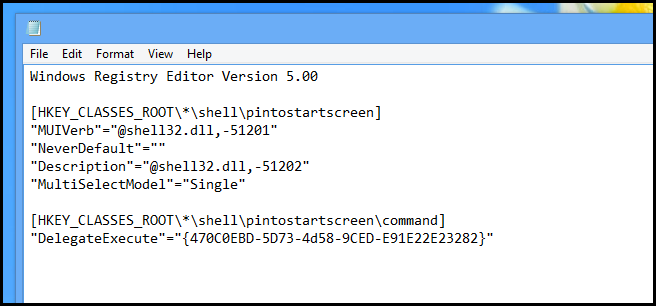
How to Pin Any File to the Start Screen in Windows 8
http://www.howtogeek.com/129493/how-to-pin-any-file-to-the-start-screen-in-windows-8/

Quote
By default Windows 8 only allows you to pin a few file types to the Start Screen. Read on to find out how you can change that by editing the registry.

[attachthumb=#]

erikts

  • Supporting Member
  • Joined in 2007
  • **
  • Posts: 227
Re: Tips for Windows 8 (got any?)
« Reply #37 on: December 11, 2012, 09:11 AM »
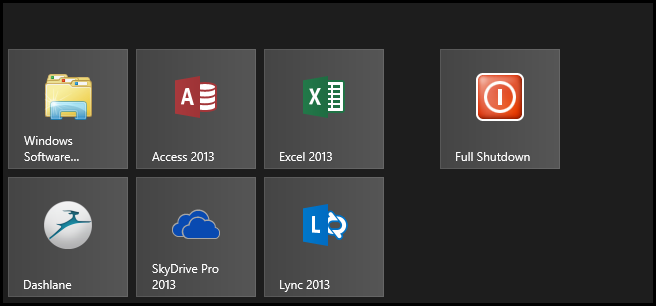
How to Do a Full Shutdown in Windows 8 Without Disabling Hybrid Boot
http://www.howtogeek.com/129021/how-to-do-a-full-shutdown-in-windows-8-without-disabling-hybrid-boot/

Quote
Windows 8 comes with a new Hybrid Boot feature, which decreases boot times. But from time to time you may find you need to do a classic, full shutdown. Here’s how to do just that without disabling Hybrid Boot.

[attachthumb=#]

In short: Shutdown using shutdown.exe /s /t 0

Curt

  • Supporting Member
  • Joined in 2006
  • **
  • Posts: 7,565
Re: Tips for Windows 8 (got any?)
« Reply #38 on: January 03, 2013, 03:12 AM »
https://windowssecrets.com/langalist-plus/with-windows-8-off-isnt-really-off/

Quote
With Windows 8, “off” isn’t really off

Win8′s default shutoff and startup processes are unlike those of any previous Windows version. Completely shutting Win8 down — or doing a truly cold boot — requires a few extra steps!

Windows 8 doesn’t really shut down when you click the shutdown icon (or go to Power via the Charms bar/Settings). Instead, Win8 goes into a sort of ‘deep sleep’ mode, similar to hibernate.

You must hold down the Shift key while clicking the shutdown icon — and continue to hold Shift until the machine fully powers off. Only then was I able to enter the BIOS during system startup.

phitsc

  • Honorary Member
  • Joined in 2008
  • **
  • Posts: 1,198
    • Participated in NANY Challenge Seven Times
    • Plugin Coding Medal
Re: Tips for Windows 8 (got any?)
« Reply #39 on: January 03, 2013, 09:59 PM »
I'm using the method described here to open the Windows Shutdown dialog from FARR.

Basically, you just have to put a shortcut to a text file called e.g. Shutdown.js with the following line

(new ActiveXObject("Shell.Application")).ShutdownWindows();

somewhere where FARR can find it.

Curt

  • Supporting Member
  • Joined in 2006
  • **
  • Posts: 7,565
Re: Tips for Windows 8 (got any?)
« Reply #40 on: January 19, 2013, 01:19 PM »
Thanks to Gizmo for telling about this free ebook from Microsoft on Windows 8:

http://blogs.msdn.com/b/microsoft_press/archive/2012/11/13/free-ebook-introducing-windows-8-an-overview-for-it-professionals-final-edition.aspx

[attachimg=#]

ewemoa

  • Honorary Member
  • Joined in 2008
  • **
  • Posts: 2,922
    • Plugin Coding Medal
    • Participated in NANY Challenge Three Times
Re: Tips for Windows 8 (got any?)
« Reply #41 on: January 20, 2013, 12:20 AM »
I'm using the method described here to open the Windows Shutdown dialog from FARR.

Basically, you just have to put a shortcut to a text file called e.g. Shutdown.js with the following line

(new ActiveXObject("Shell.Application")).ShutdownWindows();

somewhere where FARR can find it.

Nice tip :up:


On a side note, it appears to work in Windows 7.
« Last Edit: January 20, 2013, 12:28 AM by ewemoa »

Carol Haynes

  • Waffles for England (patent pending)
  • Global Moderator
  • Joined in 2005
  • *****
  • Posts: 8,073
    • Cody Award
    • Furry Fandom Badge - Furry Fandom
Re: Tips for Windows 8 (got any?)
« Reply #42 on: January 21, 2013, 06:47 PM »
CTRL + Shutdown does the same job too. Hold CTRL until the lights go off!

Josh

  • Charter Honorary Member
  • Joined in 2005
  • ***
  • Posts: 3,411
    • Gathering Badge
    • Official Forum Clown
    • Coding Snacks
    • Plugin Coding Medal
    • Volunteers/Staff
    • Military Service Badge - US Army
    • Furry Fandom Badge - Furry Fandom
    • Linux User
Re: Tips for Windows 8 (got any?)
« Reply #43 on: January 21, 2013, 06:56 PM »
Or you can add an alias (no javascript or batch files required) with the command: c:\windows\system32\shutdown.exe -s -t 0  which will shut the computer down immediately.
Strength in Knowledge

phitsc

  • Honorary Member
  • Joined in 2008
  • **
  • Posts: 1,198
    • Participated in NANY Challenge Seven Times
    • Plugin Coding Medal
Re: Tips for Windows 8 (got any?)
« Reply #44 on: January 21, 2013, 09:54 PM »
That will make a complete shutdown though, not a "Windows 8 Shutdown".

f0dder

  • [Well, THAT escalated quickly!]
  • Charter Honorary Member
  • Joined in 2005
  • ***
  • Posts: 9,153
    • Participated in NANY Challenge Once
Re: Tips for Windows 8 (got any?)
« Reply #45 on: January 21, 2013, 10:03 PM »
That will make a complete shutdown though, not a "Windows 8 Shutdown".
Doesn't that require adding "/hybrid"? (On my win7 workstation right now, so can't check shutdown.exe arguments :)).
- carpe noctem

Josh

  • Charter Honorary Member
  • Joined in 2005
  • ***
  • Posts: 3,411
    • Gathering Badge
    • Official Forum Clown
    • Coding Snacks
    • Plugin Coding Medal
    • Volunteers/Staff
    • Military Service Badge - US Army
    • Furry Fandom Badge - Furry Fandom
    • Linux User
Re: Tips for Windows 8 (got any?)
« Reply #46 on: January 21, 2013, 10:06 PM »
Yes, /hybrid will do it. Forgot that one! Thanks f0dder
Strength in Knowledge

erikts

  • Supporting Member
  • Joined in 2007
  • **
  • Posts: 227
Re: Tips for Windows 8 (got any?)
« Reply #47 on: October 31, 2013, 02:52 AM »
Why can't Windows 8 find the Startup Folder?
http://support.microsoft.com/kb/2806079

  • Win+R
  • Type the following text in Run dialog box and click OK: shell:startup

TaoPhoenix

  • 0 - 60 ... then back to 0 again!
  • Supporting Member
  • Joined in 2011
  • **
  • Posts: 4,642
    • Participated in NANY Challenge Three Times
Re: Tips for Windows 8 (got any?)
« Reply #48 on: October 31, 2013, 03:28 AM »
Why can't Windows 8 find the Startup Folder?
http://support.microsoft.com/kb/2806079

  • Win+R
  • Type the following text in Run dialog box and click OK: shell:startup

Can you make that into something like a desktop shortcut?

Use attachthumb=# to show an attached image as an expandable thumbnail, or attach=# to show full size. (With Brackets)

Vurbal

  • Mostly harmless
  • Supporting Member
  • Joined in 2012
  • **
  • Posts: 653
    • Writer
Re: Tips for Windows 8 (got any?)
« Reply #49 on: October 31, 2013, 04:04 AM »
Why can't Windows 8 find the Startup Folder?
http://support.microsoft.com/kb/2806079

  • Win+R
  • Type the following text in Run dialog box and click OK: shell:startup

Can you make that into something like a desktop shortcut?


That should be possible. Just remember you can't make shortcuts directly to shell locations. You have to make a shortcut to explorer.exe with the shell folder as an argument. Like this:

explorer.exe shell:startup
I learned to say the pledge of allegiance
Before they beat me bloody down at the station
They haven't got a word out of me since
I got a billion years probation
- The MC5

Follow the path of the unsafe, independent thinker. Expose your ideas to the danger of controversy. Speak your mind and fear less the label of ''crackpot'' than the stigma of conformity.
- Thomas J. Watson, Sr

It's not rocket surgery.
- Me


I recommend reading through my Bio before responding to any of my posts. It could save both of us a lot of time and frustration.

Original address: https://www.donationcoder.com/forum/index.php?topic=32883.0