DonationCoder.com forum
 
Read-only archive. This is a static copy of the DonationCoder.com forum. Reading and searching work as before; logging in, posting and private messages do not.
Archive of 2026-10-21 · About this archive · Main site

Last post Author Topic: Portable alternative for Cathy (cataloging freeware) that runs on Win7 64 bit?  (Read 53,665 times)

tomos

  • Charter Member
  • Joined in 2006
  • ***
  • Posts: 11,970
    • Gathering Badge
    • Participated in NANY Challenge Once
This might be of no help -but I'll post it just in case-
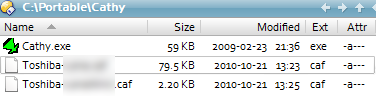
you can see the two catalogue files with .caf extension, stored in the same folder as the exe.

[attachthumb=#]

Win7 Pro 64bit
Admin a/c (as you say, uac seems to be irrelevant)
Tom

zzynx

  • Supporting Member
  • Joined in 2006
  • **
  • Posts: 46
@wraith808
Quote
Portable only means that it doesn't need a specific location present at run time, not that it doesn't use another location temporarily.
 
Right.

Quote
It's just that if it works for a different user, it seems that permissions is the right path to go down.
It looks like that, yeah.
It's just that I don't know where to start.

I downloaded ProcessMonitor and traced the operations of Cathy.exe. But at first sight I don't see anything that indicates it hasn't enough rights to write or read.
Moreover, when starting up, it should just read the .caf files that are in the same directory as the cathy.exe.

zzynx

  • Supporting Member
  • Joined in 2006
  • **
  • Posts: 46
@tomos
Sorry, but I don't know what you're trying to say in your latest post.

tomos

  • Charter Member
  • Joined in 2006
  • ***
  • Posts: 11,970
    • Gathering Badge
    • Participated in NANY Challenge Once
@tomos
Sorry, but I don't know what you're trying to say in your latest post.

nothing beyond giving the little bit of extra info: file extension & location - on the off-chance that something different was going on there.
Tom

ewemoa

  • Honorary Member
  • Joined in 2008
  • **
  • Posts: 2,922
    • Plugin Coding Medal
    • Participated in NANY Challenge Three Times
A couple more questions:

  Have you tried running Cathy.exe without any other files in the same folder?

and:

  If you hook up some external drive (or have some other partition) and place a folder there with Cathy.exe in it, do you still get the same results?

zzynx

  • Supporting Member
  • Joined in 2006
  • **
  • Posts: 46
Quote
Have you tried running Cathy.exe without any other files in the same folder?
Yes. Same problem.

Quote
If you hook up some external drive (or have some other partition) and place a folder there with Cathy.exe in it, do you still get the same results?
Yes I do. (I ran it from my USB-stick)

zzynx

  • Supporting Member
  • Joined in 2006
  • **
  • Posts: 46
Hooooooraaaaaaaay!!!! Cathy works again on my x64 Win7 machine!!!!  :Thmbsup:  :onfire: :eusa_dance:

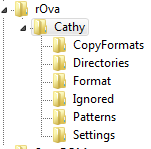
The solution: removing the registry entries created by Cathy (I deleted this HKEY_CURRENT_USER\Software\rOva and everything beneath)

That's why it did work when I logged in with another account. (HKEY_CURRENT_USER)

Many thanks to everyone here @ DC trying to help me.

ewemoa

  • Honorary Member
  • Joined in 2008
  • **
  • Posts: 2,922
    • Plugin Coding Medal
    • Participated in NANY Challenge Three Times
Congratulations :)

tomos

  • Charter Member
  • Joined in 2006
  • ***
  • Posts: 11,970
    • Gathering Badge
    • Participated in NANY Challenge Once
Tom

Ath

  • Supporting Member
  • Joined in 2006
  • **
  • Posts: 3,649
    • Participated in NANY Challenge Eleven Times
    • Coding Snacks
    • Linux User
    • Hardware Hacker
...removing the registry entries created by Cathy...
It would be interesting to know what was sitting there that blocked your friend Cathy from working as expected, but I guess we'll never know :huh:

And the key name also isn't very intuitive...
/Ton
Ath's software collection, Quote: "A problem well stated is a problem half-solved." (Charles Kettering)

zzynx

  • Supporting Member
  • Joined in 2006
  • **
  • Posts: 46
Quote
It would be interesting to know what was sitting there that blocked your friend Cathy from working as expected
Indeed.

Quote
but I guess we'll never know
I'm afraid not.

Quote
And the key name also isn't very intuitive...
I searched the registry for "cathy". Robert Vasicek is the name of Cathy's programmer, hence "rOva".

wraith808

  • Supporting Member
  • Joined in 2006
  • **
  • Posts: 11,205
    • Participated in NANY Challenge Fourteen Times
    • Coding Snacks
    • Writer
    • Hardware Hacker
Hooooooraaaaaaaay!!!! Cathy works again on my x64 Win7 machine!!!!  :Thmbsup:  :onfire: :eusa_dance:

The solution: removing the registry entries created by Cathy (I deleted this HKEY_CURRENT_USER\Software\rOva and everything beneath)

That's why it did work when I logged in with another account. (HKEY_CURRENT_USER)
D'oh!  I thought after you said that the permissions didn't work... then what about the registry?  But most portable apps don't use the registry, either, so I discarded that in favor of permissions. *headdesk*

Glad you got it working!

DerekHal

  • Supporting Member
  • Joined in 2011
  • **
  • Posts: 34
Congratulations. :Thmbsup:

It would be interesting to know which folder/folders caused the problem.

« Last Edit: May 10, 2013, 01:12 PM by DerekHal »

donationkoder

  • Participant
  • Joined in 2008
  • *
  • Posts: 1
For future reference:

In my case the problem was caused by:
Quote
HKEY_CURRENT_USER\Software\rOva\Cathy\Settings\WindowPos

If you delete that key or set it to 0 (zero), cathy works fine but only once!
When it runs again it overwrites the key with new values ("0,1,-1,-1,-1,-1,1919219912,1818552521,1919221352,1818553281" in my case)
and on the next run you get an empty interface again.

Solution:
I solved it by setting read only permissions on the Settings subkey for my user using regedit (even though I'm in the admin group).

Hope this helps.
m.

Curt

  • Supporting Member
  • Joined in 2006
  • **
  • Posts: 7,565
I am impressed how well and blazingly fast Cathy is working on my 64-bits Win 7  :)

question:
What is "Hit limit [512] < 10000"?
« Last Edit: May 09, 2013, 10:16 PM by Curt »

skwire

  • I eat Coding Snacks for breakfast...
  • Global Moderator
  • Joined in 2005
  • *****
  • Posts: 5,297
    • Participated in NANY Challenge Seventeen Times
    • Coding Snacks
    • Superboy Coder
    • Cody Award
    • Volunteers/Staff
    • Gathering Badge
I love Cathy's speed as well but, unless I'm mistaken, it does not handle Unicode.  At least, in my tests, it doesn't.

zzynx

  • Supporting Member
  • Joined in 2006
  • **
  • Posts: 46
I am impressed how well and blazingly fast Cathy is working on my 64-bits Win 7
That's exactly why I'm  :-* it sooo much.

question:
What is "Hit limit [512] < 10000"?
It means that Cathy will stop its searching for matching items after 512 matches. I use 5000 for that setting.
PS. Sorry for the very late answer  :-[
I just stumbled upon this thread again.

zzynx

  • Supporting Member
  • Joined in 2006
  • **
  • Posts: 46
I love Cathy's speed as well but, unless I'm mistaken, it does not handle Unicode.  At least, in my tests, it doesn't.
You're probably right. But that's no problem for me.

Nod5

  • Supporting Member
  • Joined in 2006
  • **
  • Posts: 1,175
    • Coding Snacks
    • Participated in NANY Challenge Three Times
    • Plugin Coding Medal
Everything now has support for File Lists. I haven't really tried that feature yet but from what I can grasp so far it could be used as a disc cataloger.

Original address: https://www.donationcoder.com/forum/index.php?topic=32517.0