DonationCoder.com forum
 
Read-only archive. This is a static copy of the DonationCoder.com forum. Reading and searching work as before; logging in, posting and private messages do not.
Archive of 2026-10-21 · About this archive · Main site

Last post Author Topic: Portable alternative for Cathy (cataloging freeware) that runs on Win7 64 bit?  (Read 53,665 times)

zzynx

  • Supporting Member
  • Joined in 2006
  • **
  • Posts: 46
Until now, I used the freeware program "Cathy" to catalog my quite huge music library.
It is small (50Kb), portable, lightening fast in cataloging ànd searching the catalogs and produces one file per catalog.
This way I could take my searchable music librabry on a USB stick.

Recently I switched to Windows 7 64-bit and found out Cathy doesn't run on it. :(

Does anyone has a good alternative cataloging freeware?
It should be:
1) portable (so I can "install" it on a USB stick or in my Dropbox folder)
2) fast (or very fast) when cataloging and searching
3) the catalog should be searchable (of course) easily

It should be something like "Everything" (www.voidtools.com) but then not rescanning the disks every time you start it up,
but remembering the results of its previous scan(s) and work with that until I ask it to rescan the specific drives/folders again.

I'm aware of Gentibus CD, Visual CD and DiscLib. None of them fit the three rules above.
Any other suggestions?

ewemoa

  • Honorary Member
  • Joined in 2008
  • **
  • Posts: 2,922
    • Plugin Coding Medal
    • Participated in NANY Challenge Three Times
I recently started using Virtual Volumes View.

I'm using a portable version (see links under News section at: http://vvvapp.sourceforge.net/download.html).

I don't have enough experience to speak about your points 2 and 3 though.

zzynx

  • Supporting Member
  • Joined in 2006
  • **
  • Posts: 46
Right. I forgot to mention that one (VVV)  :-[
I recently tried VVV, but imo it definitely fails on point 2) (in comparison with the speed I was used to using Cathy)

Moreover, updating a catalog also isn't that user friendly, since you always have to respecify the path.
I contacted the developer about that, but he answered that the main goal of VVV was cataloging disks (CD, DVD) which always are in your CD drive and hence remembering the path per catalog is not needed;
Only the last path.
So, I continued my search for a Cathy alternative.

Nevertheless, thanks for trying to help.

PS.
Currently I'm trying/testing "Index Your Files" (http://www.indexyourfiles.com/)
So far, it looks promising.

Ath

  • Supporting Member
  • Joined in 2006
  • **
  • Posts: 3,649
    • Participated in NANY Challenge Eleven Times
    • Coding Snacks
    • Linux User
    • Hardware Hacker
Recently I switched to Windows 7 64-bit and found out Cathy doesn't run on it.
What's not working about Cathy, in your situation? 99.9% of 32 bit apps work flawlessly on x64 Windows systems, but I haven't checked the details, so it could be a 16 bit app, and that's definitely not going to work on x64.
/Ton
Ath's software collection, Quote: "A problem well stated is a problem half-solved." (Charles Kettering)

zzynx

  • Supporting Member
  • Joined in 2006
  • **
  • Posts: 46
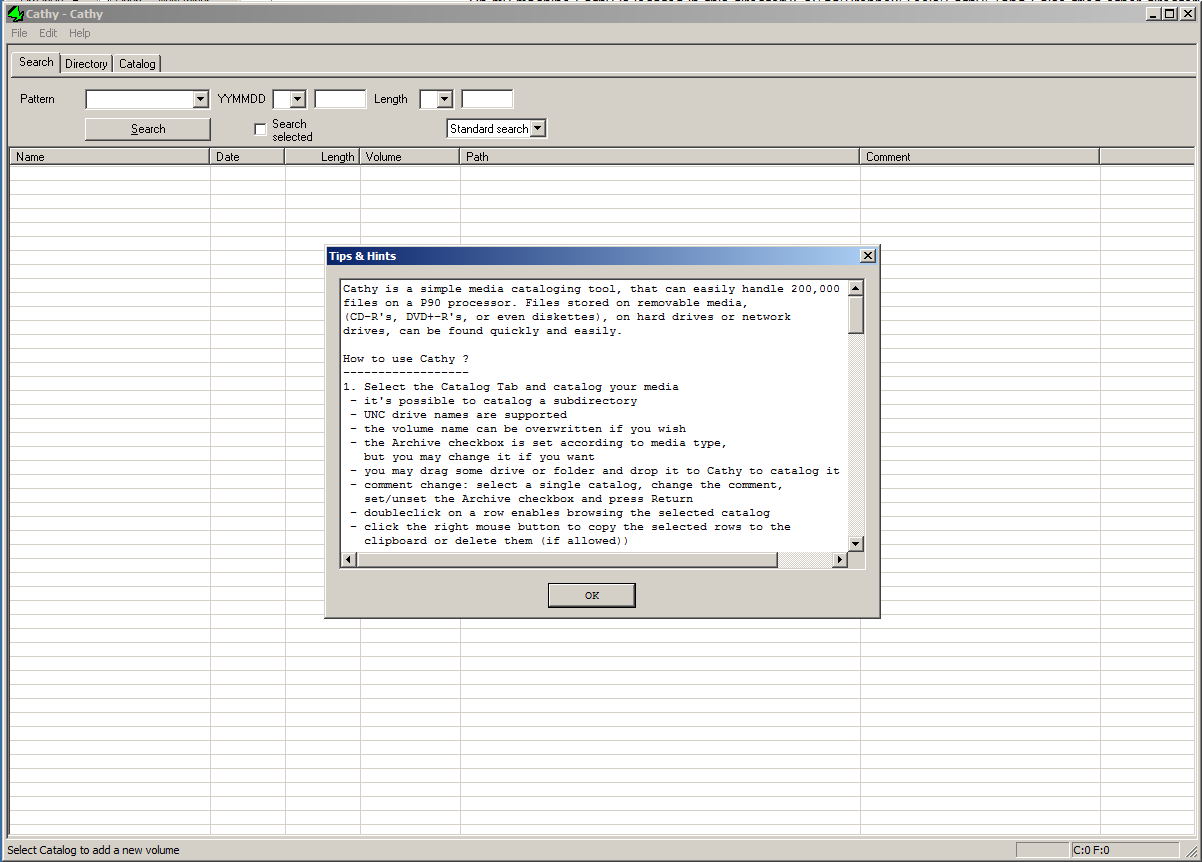
Cathy starts up but it shows an "empty document" interface.
And you can't do anything with it; like creating new catalogs.
It also doesn't show my already created catalogs.
So pretty useless. :(

Ath

  • Supporting Member
  • Joined in 2006
  • **
  • Posts: 3,649
    • Participated in NANY Challenge Eleven Times
    • Coding Snacks
    • Linux User
    • Hardware Hacker
It's working as expected, on my x64 Win7 system, but I'm running with UAC turned off :-[, and have explicitly not installed into Program Files, ofcourse. The catalog is saved to disk, and after I close and re-open, it's still working :up:
/Ton
Ath's software collection, Quote: "A problem well stated is a problem half-solved." (Charles Kettering)

zzynx

  • Supporting Member
  • Joined in 2006
  • **
  • Posts: 46
Really?  I wish I could say the same. :tellme:

- I don't get any UAC notification when I run Cathy. (So turning off the warnings won't make any difference I suppose)
- On my machine Cathy is located in this directory: c:\gd\Dropbox\Tools\Cathy\ (and I also tried other directories)
- This is what I get when running Cathy:

tomos

  • Charter Member
  • Joined in 2006
  • ***
  • Posts: 11,970
    • Gathering Badge
    • Participated in NANY Challenge Once
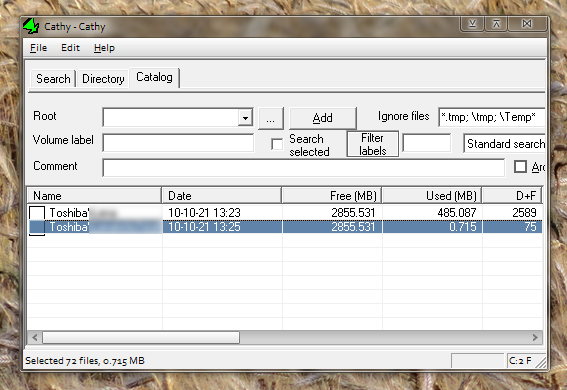
I've hardly used this app, but this info might help.
I have two catalogs, both were created a year before I upgraded to a windows 7 machine. They are both of (some of) the contents of a USB stick - I cant guarantee exactly under what OS they were made. Possibly Cathy was on the USB stick as well (it's now in my portable 'install' folder)

But the point is that I can read both of them no problem...

Win 7, 64 bit
UAC on highest level
Cathy in my portable 'install' folder on C drive

[attachthumb=#]
Tom

wraith808

  • Supporting Member
  • Joined in 2006
  • **
  • Posts: 11,205
    • Participated in NANY Challenge Fourteen Times
    • Coding Snacks
    • Writer
    • Hardware Hacker
you could also try the compatibility mode settings

wraith808

  • Supporting Member
  • Joined in 2006
  • **
  • Posts: 11,205
    • Participated in NANY Challenge Fourteen Times
    • Coding Snacks
    • Writer
    • Hardware Hacker

zzynx

  • Supporting Member
  • Joined in 2006
  • **
  • Posts: 46
Well guys, you make me jealous  ;) in being able to run Cathy on x64 Win 7.
I can't. Even with compatibility mode on.
I'm running win7 professional edition.

@wraith808
I know techsupportalert and saw their list. As I said, none of those apply.

Ath

  • Supporting Member
  • Joined in 2006
  • **
  • Posts: 3,649
    • Participated in NANY Challenge Eleven Times
    • Coding Snacks
    • Linux User
    • Hardware Hacker
in being able to run Cathy on x64 Win 7.
I can't. Even with compatibility mode on.
Got any specific AV or anti-spam software running? It might be interfering with Cathy.
/Ton
Ath's software collection, Quote: "A problem well stated is a problem half-solved." (Charles Kettering)

zzynx

  • Supporting Member
  • Joined in 2006
  • **
  • Posts: 46
Quote
Got any specific AV or anti-spam software running?
Nothing that I previously hadn't running on my x32 Win7 machine. On which I could run Cathy smoothly.  :(

DerekHal

  • Supporting Member
  • Joined in 2011
  • **
  • Posts: 34
I downloaded and started it. No problem.

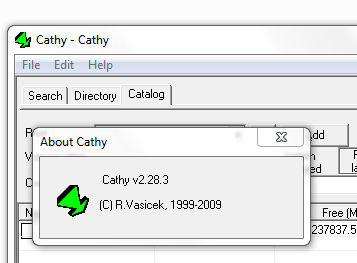
Are you using the latest version (ver 2.28.3)?

Under the top menu, you should have three tabs: Search | Directory | Catalog.

Cathy.PNG
« Last Edit: October 13, 2012, 05:50 PM by DerekHal »

MerleOne

  • 4D thinking
  • Supporting Member
  • Joined in 2006
  • **
  • Posts: 957
Hey, do you launch Cathy from Windows 7 from the icon on the Desktop or using a launcher like RecentX ?  It only runs fine on my Win7x64 when I launch it from the Desktop icon.
.merle1.

zzynx

  • Supporting Member
  • Joined in 2006
  • **
  • Posts: 46
@DerekHal
Quote
Are you using the latest version (ver 2.28.3)?
Yes, I am.
Quote
Under the top menu, you should have three tabs: Search | Directory | Catalog.
I know I should have that. But that's exactly my problem. And why I can't use Cathy.

@MerleOne
Quote
Hey, do you launch Cathy from Windows 7 from the icon on the Desktop or using a launcher like RecentX ?
I launch Cathy with a launcher (Executor). But double-clicking it in Windows Explorer or starting it via a link on the desktop doesn't help.
Quote
It only runs fine on my Win7x64 when I launch it from the Desktop icon.
That is strange. How did you create that desktop icon then? I did via drag and drop and holding the Ctrl-Shft keys.
If you don't start it via your desktop icon what do you see then?
Does it start or not? If it does, does it look like my screenshot?

Thanks to everyone so far trying to help me!

Curt

  • Supporting Member
  • Joined in 2006
  • **
  • Posts: 7,565
Cathy runs fine on my 64-bits Win 7.

Maybe you should delete both the folder and the shortcut,
and begin all over from a different location?

MerleOne

  • 4D thinking
  • Supporting Member
  • Joined in 2006
  • **
  • Posts: 957

@MerleOne
I launch Cathy with a launcher (Executor). But double-clicking it in Windows Explorer or starting it via a link on the desktop doesn't help.

Quote
It only runs fine on my Win7x64 when I launch it from the Desktop icon.

That is strange. How did you create that desktop icon then? I did via drag and drop and holding the Ctrl-Shft keys.
If you don't start it via your desktop icon what do you see then?
Does it start or not? If it does, does it look like my screenshot?

Hi.  I have installed Cathy on a data disk, D:, in D:\Tools\, then I right-clicked on Cathy.exe and chose send to DEsktop (create a shortcut to the desktop).  When I launch it with RecentX, the existing catalogs are not found, because  the current directory is not Cathy.exe's, but RecentX's.  And no, it's not like your screen capture.
.merle1.

zzynx

  • Supporting Member
  • Joined in 2006
  • **
  • Posts: 46
Quote
Maybe you should delete both the folder and the shortcut,
and begin all over from a different location?
Done that. No success.

Quote
Hi.  I have installed Cathy on a data disk, D:, in D:\Tools\, then I right-clicked on Cathy.exe and chose send to DEsktop (create a shortcut to the desktop).
Tried that. No success.
I also tried, right-click and "Run as Administrator". No success.

Cathy always starts up without any tabs.
This drives me crazy...
« Last Edit: October 13, 2012, 09:13 PM by zzynx »

ewemoa

  • Honorary Member
  • Joined in 2008
  • **
  • Posts: 2,922
    • Plugin Coding Medal
    • Participated in NANY Challenge Three Times
Have you tried making a new user account and testing from there?


For reference, the following is what I get when I start the application (2.28.3) up for the first time using Windows 7 Professional 64-bit:

Cathy.png
« Last Edit: October 14, 2012, 03:08 AM by ewemoa »

Stoic Joker

  • Honorary Member
  • Joined in 2008
  • **
  • Posts: 6,652
    • Cody Award
    • Participated in NANY Challenge Five Times
(Win7 x64 here also) Holy crap! That thing is fast!

No compatability mode settings required to run, however if dropping Cathy on the C: drive the default NTFS permissions may be giving you problems. Make sure the Users group has Read/Write/Modify permissions for the folder Cathy runs in and it should work.

Also make sure the shortcut you launch it from has the correct path in the "Start in" target.

Just thinkin' out loud,

Stoic Joker

zzynx

  • Supporting Member
  • Joined in 2006
  • **
  • Posts: 46
Quote
Make sure the Users group has Read/Write/Modify permissions for the folder Cathy runs in and it should work.
I know it should, but it doesn't. With all correct permissions.
Quote
Also make sure the shortcut you launch it from has the correct path in the "Start in" target
That's all OK.

Quote
Have you tried making a new user account and testing from there?
I have tried that and guess what: Cathy works as expected for that new user account. (location= C:\tools\catalog\cathy)
Of course that is no workable solution...

It proves - once again - that Cathy can work under Win7 x64 without problems.

Now, what does that mean?
And how could I make Cathy work under my own account?

wraith808

  • Supporting Member
  • Joined in 2006
  • **
  • Posts: 11,205
    • Participated in NANY Challenge Fourteen Times
    • Coding Snacks
    • Writer
    • Hardware Hacker
Quote
Have you tried making a new user account and testing from there?
I have tried that and guess what: Cathy works as expected for that new user account. (location= C:\tools\catalog\cathy)
Of course that is no workable solution...

It proves - once again - that Cathy can work under Win7 x64 without problems.

Now, what does that mean?
And how could I make Cathy work under my own account?

That does seem to point to permissions problems.  Does Cathy only write to the local folder?  Is there possibly another folder that you don't have access to?  I'd think not... just going over the possible problems.  If not, though, I'd suggest checking the security for the folder Cathy is running in, and set specific permissions for your user on that folder rather than depending on the default user permissions.  Also check to make sure what groups your user is in to make sure that your user groups are what you think they should be.

zzynx

  • Supporting Member
  • Joined in 2006
  • **
  • Posts: 46
Quote
Does Cathy only write to the local folder?
I would think so, since it is portable.

Quote
I'd suggest checking the security for the folder Cathy is running in, and set specific permissions for your user on that folder rather than depending on the default user permissions.
My account belongs to the Administrators group.
Nevertheless, I added my specific account and give it "Full Control" rights on my directory C:\tools\catalog\cathy.

The problem persists...

wraith808

  • Supporting Member
  • Joined in 2006
  • **
  • Posts: 11,205
    • Participated in NANY Challenge Fourteen Times
    • Coding Snacks
    • Writer
    • Hardware Hacker
Quote
Does Cathy only write to the local folder?
I would think so, since it is portable.

Portable only means that it doesn't need a specific location present at run time, not that it doesn't use another location temporarily.  It's just that if it works for a different user, it seems that permissions is the right path to go down.

Original address: https://www.donationcoder.com/forum/index.php?topic=32517.0