DonationCoder.com forum
 
Read-only archive. This is a static copy of the DonationCoder.com forum. Reading and searching work as before; logging in, posting and private messages do not.
Archive of 2026-10-21 · About this archive · Main site

Author Topic: Automatically move files around tip (use your synchronizer program)  (Read 13,216 times)

superboyac

  • Is your software in my list?
  • Charter Member
  • Joined in 2005
  • ***
  • Posts: 6,347
I have a few folders where files accumulate and I'm afraid to delete them, so I move them to a useless folder.  Now, I hate doing this as it's repetitive and not very productive other than satisfying my paranoia.  You know those programs that have good logging capabilities, and paranoid people like me will change the setting from "keep the last 5 files" to "keep unlimited files".  Stuff like that.

I searched for a while to find folder monitoring programs, there are probably a couple of threads here somewhere.  But I wasn't satisfied with them.  Now I found the perfect solution: just use your favorite file synchronizer program.  Mine is Syncrecovery (previously Super Flexible).  This is how you do it:
--set it up to MOVE files from one folder to another (instead of copying or normal synchronizing)
--set up the filter to ONLY include the stupid files you don't care for (*.log, *.bak, things like that)
--set up the schedule for REAL TIME (Syncrecovery has brilliant options for real time synchronization)

I just set it up and it works flawlessly.  Very nice and elegant solution.  No command line needed, all gui controlled, very powerful, very flexible, and for those of you that are cash strapped, it adds value to a good program that you have already paid money for.

I'd like to just showcase the real-time options in Syncrecovery (great work, Tobias!):
Screenshot - 9_14_2012 , 9_11_24 PM.png
Screenshot - 9_14_2012 , 9_12_19 PM.png
Screenshot - 9_14_2012 , 9_12_50 PM.png

tomos

  • Charter Member
  • Joined in 2006
  • ***
  • Posts: 11,970
    • Gathering Badge
    • Participated in NANY Challenge Once
Re: Automatically move files around tip (use your synchronizer program)
« Reply #1 on: September 15, 2012, 02:29 PM »
THanks superboyac!
nice to get all the settings too :up:
(I didnt know/had missed the 'minimum pause between actions' in the monitoring settings.)


Minor correction -
the new name is 'Syncovery'.
Tom

wraith808

  • Supporting Member
  • Joined in 2006
  • **
  • Posts: 11,205
    • Participated in NANY Challenge Fourteen Times
    • Coding Snacks
    • Writer
    • Hardware Hacker
Re: Automatically move files around tip (use your synchronizer program)
« Reply #2 on: September 15, 2012, 02:31 PM »
Another good choice is Belvedere. (on Github)

superboyac

  • Is your software in my list?
  • Charter Member
  • Joined in 2005
  • ***
  • Posts: 6,347
Re: Automatically move files around tip (use your synchronizer program)
« Reply #3 on: September 15, 2012, 05:26 PM »
Another good choice is Belvedere. (on Github)
Oh yeah!  This was one of the ones I was planning on trying out but never got around to it.  I was going to turn to it if the sync programs didn't work.  I'm still going to test this one out as it looks great.

The other one I tried that looks ok but not awesome is "Watch 4 Folders".

40hz

  • Supporting Member
  • Joined in 2007
  • **
  • Posts: 11,861
Re: Automatically move files around tip (use your synchronizer program)
« Reply #4 on: September 15, 2012, 07:11 PM »
I don't need automation so much as a convenient way to sort/send files to appropriate folders.

Normally, I'll keep a junk drawer folder on the desktop called "!SORT!" which I periodically go through deciding what to file away and what to get rid of. (Isn't it amazing how often something you thought you absolutely had to keep suddenly seemed a lot more like junk when you looked at it a few days later? ;D)

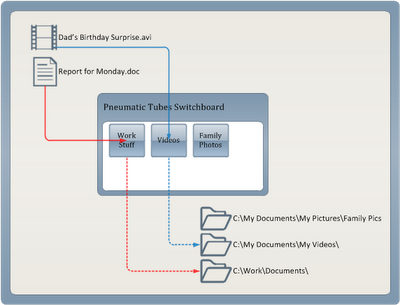
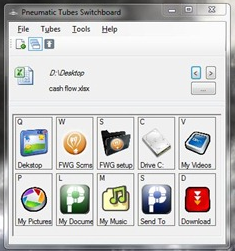
Fortunately, Freewaregenius found a nice little app that works like the sorting desk at an old fashioned message office. It's called Pneumatic Tubes File Router. The name they picked for this app is perfect because that's exactly how it works.

Quote
Pneumatic Tubes is a different kind of file management utility. The idea was inspired by the pneumatic tubes mail system used in corporate America in the middle of the 19th century.

This (below) is the entire "about" page. It says it all:

[attach]
« Last Edit: September 16, 2012, 02:49 AM by 40hz »

superboyac

  • Is your software in my list?
  • Charter Member
  • Joined in 2005
  • ***
  • Posts: 6,347
Re: Automatically move files around tip (use your synchronizer program)
« Reply #5 on: September 15, 2012, 10:58 PM »
^^Well thanks 40!!
This looks to have fantastic capabiltities.  And now you're adding experiments for me to work on on top of all the movie and book recs?  I need to figure out how to get all this on a resume..."Certification and expertise involving information processing and analysis in the 40Hz spectrum"

Yeah.

rjbull

  • Charter Member
  • Joined in 2005
  • ***
  • Posts: 3,217
Re: Automatically move files around tip (use your synchronizer program)
« Reply #6 on: September 16, 2012, 03:59 PM »
I searched for a while to find folder monitoring programs, there are probably a couple of threads here somewhere.

In Re: Recommend directory tracker?, patteo mentioned Log Monitor, which I believe mouser has used.  More details and suggestions here: Software to send email when a folder content changes and here: DONE: folder monitor with customizable action and here: Searching a "Filesystem based event trigger tool"

But the solution you found yourself seems elegant and effective, the more so for not entailing extra cost.
« Last Edit: September 16, 2012, 04:05 PM by rjbull »

tomos

  • Charter Member
  • Joined in 2006
  • ***
  • Posts: 11,970
    • Gathering Badge
    • Participated in NANY Challenge Once
Re: Automatically move files around tip (use your synchronizer program)
« Reply #7 on: September 16, 2012, 04:22 PM »
I searched for a while to find folder monitoring programs, there are probably a couple of threads here somewhere.

... the solution you found yourself seems elegant and effective, the more so for not entailing extra cost.

there was also a thread about Filehamster alternatives, but it's a bit dated. One that was mentioned there -it's freeware- and seems to have been updated quite a bit since (was only in beta then) is AutoVer (also has a forum). Never tried it myself so this is not a recommendation.
Tom

kyrathaba

  • N.A.N.Y. Organizer
  • Honorary Member
  • Joined in 2006
  • **
  • Posts: 3,200
    • Participated in NANY Challenge Eight Times
    • Programming School - Deluxe Bonus Medal
    • Programming School - Stage 1 Medal
    • Coding Snacks
    • Military Service Badge - US Army
    • Writer
Re: Automatically move files around tip (use your synchronizer program)
« Reply #8 on: September 21, 2012, 12:16 PM »
@40hz: thanks for the Pneumatic Tubes link. Awesome program!
Win 10 Pro running on a 3.2 GHz CPU and 12 Gb RAM
__________________________________________

Proofreading Service: http://williammillerservices.com/proofreading

superboyac

  • Is your software in my list?
  • Charter Member
  • Joined in 2005
  • ***
  • Posts: 6,347
Re: Automatically move files around tip (use your synchronizer program)
« Reply #9 on: September 21, 2012, 02:23 PM »
I searched for a while to find folder monitoring programs, there are probably a couple of threads here somewhere.

... the solution you found yourself seems elegant and effective, the more so for not entailing extra cost.

there was also a thread about Filehamster alternatives, but it's a bit dated. One that was mentioned there -it's freeware- and seems to have been updated quite a bit since (was only in beta then) is AutoVer (also has a forum). Never tried it myself so this is not a recommendation.
I use autover to backup my word docs that I work on.  not sure if it would be terribly convenient for this sort of function.

kyrathaba

  • N.A.N.Y. Organizer
  • Honorary Member
  • Joined in 2006
  • **
  • Posts: 3,200
    • Participated in NANY Challenge Eight Times
    • Programming School - Deluxe Bonus Medal
    • Programming School - Stage 1 Medal
    • Coding Snacks
    • Military Service Badge - US Army
    • Writer
Re: Automatically move files around tip (use your synchronizer program)
« Reply #10 on: September 22, 2012, 12:20 AM »
And, 40hz, I note that ptubes has quite a low memory footprint when idle:

ptubes_low_mem.png
Win 10 Pro running on a 3.2 GHz CPU and 12 Gb RAM
__________________________________________

Proofreading Service: http://williammillerservices.com/proofreading

nosh

  • Supporting Member
  • Joined in 2007
  • **
  • Posts: 1,441
Re: Automatically move files around tip (use your synchronizer program)
« Reply #11 on: September 24, 2012, 04:03 PM »
Just want to add Hygeia to the list of alternatives, it comes in two flavors and the "free for personal use" version is quite powerful. It lets you reuse actions, so you don't have to set everything up from scratch if you start monitoring a new batch of files. It has some other interesting features too, definitely deserves to be checked out.  :up:

Belvedere seems like something that was coded in a rush (and that's putting it politely). It has always plagued me with crashes, even when setting up the simplest of profiles.

superboyac

  • Is your software in my list?
  • Charter Member
  • Joined in 2005
  • ***
  • Posts: 6,347
Re: Automatically move files around tip (use your synchronizer program)
« Reply #12 on: September 24, 2012, 07:58 PM »
Just want to add Hygeia to the list of alternatives, it comes in two flavors and the "free for personal use" version is quite powerful. It lets you reuse actions, so you don't have to set everything up from scratch if you start monitoring a new batch of files. It has some other interesting features too, definitely deserves to be checked out.  :up:

Belvedere seems like something that was coded in a rush (and that's putting it politely). It has always plagued me with crashes, even when setting up the simplest of profiles.
Thanks!  Very helpful, I'll check it out.  If it works well, I'll gladly pay the $15.
I haven't tried belvedere yet, but I'm glad there's an alternative if it is indeed that buggy.

Original address: https://www.donationcoder.com/forum/index.php?topic=32245.0