DonationCoder.com forum
 
Read-only archive. This is a static copy of the DonationCoder.com forum. Reading and searching work as before; logging in, posting and private messages do not.
Archive of 2026-10-21 · About this archive · Main site

Author Topic: Change Folder Icon Color from context menu  (Read 16,205 times)

David.P

  • Ergonomics Junkie
  • Supporting Member
  • Joined in 2008
  • **
  • Posts: 208
Change Folder Icon Color from context menu
« on: May 09, 2012, 09:53 AM »
Hi forum,

I have been searching my ass off looking for a simple replacement for iColorfolder (because it doesn't work in Windows 7).

But I could not find ANY alternative that was free and actually did work!

I have tried all tools suggested here:
http://alternativeto.net/software/folder-marker/

Either they were not free, did not work at all (crashed), or would not allow to simply have like seven colors or so to choose from in the context menu (like below with the "Folder Colorizer" tool that would be great if it actually worked reliably which it however doesn't):


Thanks already for any other software hints
Cheers David.P

kunkel321

  • Supporting Member
  • Joined in 2009
  • **
  • Posts: 626
    • Participated in NANY Challenge Once
Re: Change Folder Icon Color from context menu
« Reply #1 on: May 09, 2012, 07:28 PM »
See if this is useful
http://netez.com/bbs/viewtopic.php?t=8816

David.P

  • Ergonomics Junkie
  • Supporting Member
  • Joined in 2008
  • **
  • Posts: 208
Re: Change Folder Icon Color from context menu
« Reply #2 on: May 09, 2012, 08:02 PM »
Thanks -- but hmmm, doesn't seem to work, only gives me a "wrong parameter" error when choosing some color from the context menu.

This (seemingly) bl**dy simple colored folder stuff seems totally bewitched to me......

Nothing that really works here...

David.P

  • Ergonomics Junkie
  • Supporting Member
  • Joined in 2008
  • **
  • Posts: 208
Re: Change Folder Icon Color from context menu
« Reply #3 on: May 10, 2012, 09:27 AM »
OK seems I found one that works really well: FolderHighlight. The folder colours also become permanent and "portable" (i.e. independent of the folder location and/or presence of the program).

Yeah, it's not free, but $9.95 for a lifetime license seems bearable -- when everything else just doesn't seem to work, or costs like $35 (Folder Marker).

Curt

  • Supporting Member
  • Joined in 2006
  • **
  • Posts: 7,565
Re: Change Folder Icon Color from context menu
« Reply #4 on: May 10, 2012, 10:00 PM »
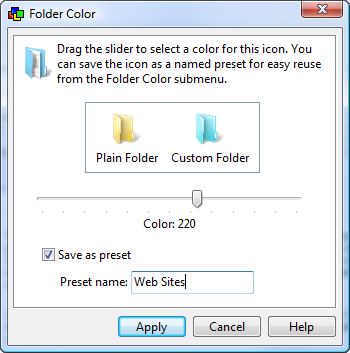
another payware option is the £20 CFi Shell Toys
right-click>Shell Toys>Folder Color


[attachimg=#]


Shell Toys are 53 shell extensions and 25 shell tools
- including Folder Color with approx 360 colors!
I use it on 64-bit Win 7.

kunkel321

  • Supporting Member
  • Joined in 2009
  • **
  • Posts: 626
    • Participated in NANY Challenge Once

c.gingerich

  • Supporting Member
  • Joined in 2011
  • **
  • Posts: 748
    • Participated in NANY Challenge Six Times
    • Coding Snacks
Re: Change Folder Icon Color from context menu
« Reply #6 on: May 13, 2012, 08:21 PM »
I wrote an app to do that. Has 9 folder colors, I haven't tried it on Win XP, but it works on Windows 7. It sometimes take a little for the icon to change, so I included a way to kill all explorer windows. The icon is changed then. I'll post it a little later.

David.P

  • Ergonomics Junkie
  • Supporting Member
  • Joined in 2008
  • **
  • Posts: 208
Re: Change Folder Icon Color from context menu
« Reply #7 on: May 13, 2012, 08:45 PM »
All Icon changers seem to have that delay at times. Open the folder and then "go back" usually helps  8)

c.gingerich

  • Supporting Member
  • Joined in 2011
  • **
  • Posts: 748
    • Participated in NANY Challenge Six Times
    • Coding Snacks

David.P

  • Ergonomics Junkie
  • Supporting Member
  • Joined in 2008
  • **
  • Posts: 208
Re: Change Folder Icon Color from context menu
« Reply #9 on: May 14, 2012, 07:58 AM »
Looks good to me, thank you!  :)

David.P

  • Ergonomics Junkie
  • Supporting Member
  • Joined in 2008
  • **
  • Posts: 208
Re: Change Folder Icon Color from context menu
« Reply #10 on: May 17, 2012, 11:49 AM »
OK, two more important requirements from my side:

a) Customization. Rather than having a green icon with the text "green" :huh: or a red icon with the text "red" :-\ besides it, I would need colored icons with custom text -- which in my case is, for example, "bill paid" (green icon) and "bill due" (red icon). Customization via *.ini file would be no problem in my view.
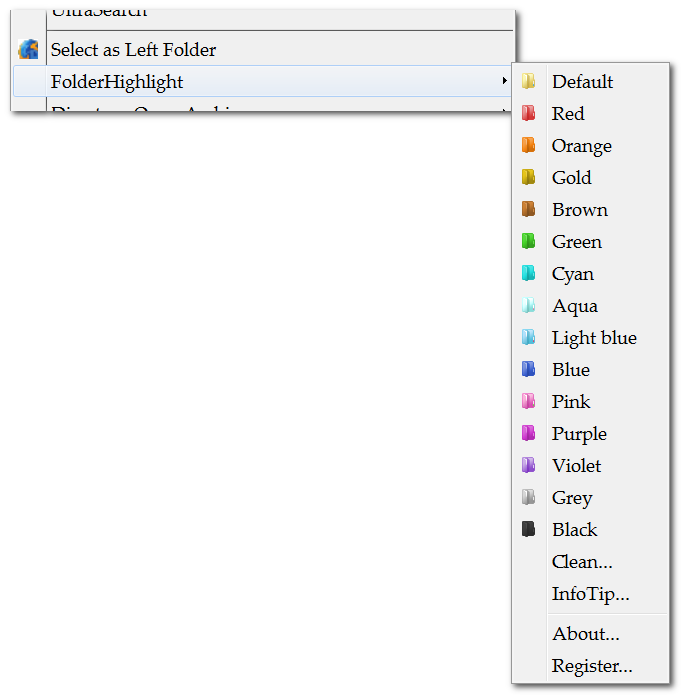
b) Minimize clicks. One right click plus hovering the Folder Color Tool's context menu entry should display the list of colors directly, without further click(s).

I'm prepared to donate because this would just make a Folder Color Tool perfect for me.

c.gingerich

  • Supporting Member
  • Joined in 2011
  • **
  • Posts: 748
    • Participated in NANY Challenge Six Times
    • Coding Snacks
Re: Change Folder Icon Color from context menu
« Reply #11 on: May 17, 2012, 12:12 PM »
Hmm, well I completely changed the interface. It is no longer a menu. It is a dialog that list the default folder colors available if that folder has no custom icon already, if there is a custom icon set it shows the icon or icon resource the icon is in and allows you to choose your own custom icon file (I was thinking about making it shareware since I put a lot more time into this and selecting a custom icon would be in the registered version, but not sure yet). So, I should be able to allow custom text under the icon on the dialog. Right now I use a number that corresponds to the icon number in the icon resource file.

I am not sure I completely understand your second request. Maybe since it is now on a dialog, that would not apply? See the screen shot attached for the new look as it stands now.

Screenshot - 5_17_2012 , 7_12_17 AM.png

David.P

  • Ergonomics Junkie
  • Supporting Member
  • Joined in 2008
  • **
  • Posts: 208
Re: Change Folder Icon Color from context menu
« Reply #12 on: May 17, 2012, 12:45 PM »
ad a) Custom text: great!

ad b) I mean I'd simply like a list of colors (with custom labels) in the second level of the context menu, like so:


(left side: Explorer context menu 1st level, right side: Explorer context menu 2nd level)

Thus, only 1 click to see the colors (well and of course 1 more to actually choose the color)

c.gingerich

  • Supporting Member
  • Joined in 2011
  • **
  • Posts: 748
    • Participated in NANY Challenge Six Times
    • Coding Snacks
Re: Change Folder Icon Color from context menu
« Reply #13 on: May 17, 2012, 01:26 PM »
That is a limitation of the language I use, I can add items, but not in a sub menu. Sorry. Wish I could, I would have done that with all my other apps as well.

David.P

  • Ergonomics Junkie
  • Supporting Member
  • Joined in 2008
  • **
  • Posts: 208
Re: Change Folder Icon Color from context menu
« Reply #14 on: May 17, 2012, 01:29 PM »
I see. What about showing the color/label list (or dialog) after the first click in the Explorer context menu (not after the second click, like with the present public version)?

c.gingerich

  • Supporting Member
  • Joined in 2011
  • **
  • Posts: 748
    • Participated in NANY Challenge Six Times
    • Coding Snacks
Re: Change Folder Icon Color from context menu
« Reply #15 on: May 17, 2012, 06:47 PM »
That is what I do now, RC on folder, select Color My Folder, then dialog opens and double click to set icon (w/ and option to single click to set)

David.P

  • Ergonomics Junkie
  • Supporting Member
  • Joined in 2008
  • **
  • Posts: 208
Re: Change Folder Icon Color from context menu
« Reply #16 on: May 17, 2012, 07:03 PM »
:Thmbsup:

c.gingerich

  • Supporting Member
  • Joined in 2011
  • **
  • Posts: 748
    • Participated in NANY Challenge Six Times
    • Coding Snacks

nogojoe

  • Charter Member
  • Joined in 2006
  • ***
  • Posts: 174
Often the most convincing people are those who have lost the plot so much they don't recognize the difference between fact and fantasy

c.gingerich

  • Supporting Member
  • Joined in 2011
  • **
  • Posts: 748
    • Participated in NANY Challenge Six Times
    • Coding Snacks
Re: Change Folder Icon Color from context menu
« Reply #19 on: May 18, 2012, 11:41 AM »
It should work on XP and higher... I have not been able test it though. Please let me know. There was a file missing from this setup, I fixed the problem and you can re-download.
« Last Edit: May 25, 2012, 12:45 PM by c.gingerich »

Original address: https://www.donationcoder.com/forum/index.php?topic=30934.0