DonationCoder.com forum
 
Read-only archive. This is a static copy of the DonationCoder.com forum. Reading and searching work as before; logging in, posting and private messages do not.
Archive of 2026-10-21 · About this archive · Main site

Author Topic: Color My Folder  (Read 20,311 times)

c.gingerich

  • Supporting Member
  • Joined in 2011
  • **
  • Posts: 748
    • Participated in NANY Challenge Six Times
    • Coding Snacks
Color My Folder
« on: May 13, 2012, 09:50 PM »
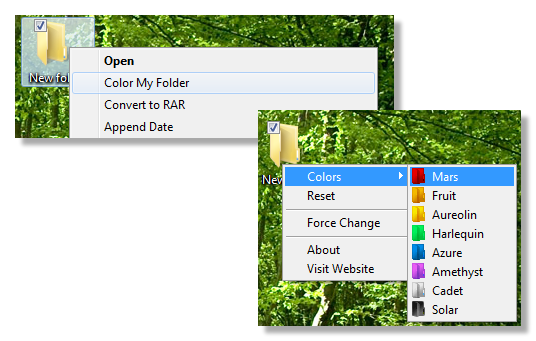
This is an app to change the color of a folder (just change the icon really). There are 9 colors to choose from. Adds a "Color My Folder" to the context menu of folders. See the ReadMe.txt file (Help File) for more info.

If there are any color requests, let me know and I'll see what I can do.
colormyfolder.png

[UPDATE]
See below.
« Last Edit: May 18, 2012, 03:50 AM by c.gingerich »

kunkel321

  • Supporting Member
  • Joined in 2009
  • **
  • Posts: 626
    • Participated in NANY Challenge Once
Re: Color My Folder
« Reply #1 on: May 14, 2012, 12:56 AM »
Awesome Chris!  Thanks for posting.  Your CMF works great on Vista.
I especially like the way it stays out of memory until you need it.  :Thmbsup:
Not sure if this is feasible, but it would be good if it could read the ICO files in a program folder and show those in the popup list.  Also, if it could read-and-display the ICOs in a DLL or ICL file it would be handy. 

c.gingerich

  • Supporting Member
  • Joined in 2011
  • **
  • Posts: 748
    • Participated in NANY Challenge Six Times
    • Coding Snacks
Re: Color My Folder
« Reply #2 on: May 14, 2012, 02:14 AM »
I'll look into adding these features. It may take a little while though.  ;)

c.gingerich

  • Supporting Member
  • Joined in 2011
  • **
  • Posts: 748
    • Participated in NANY Challenge Six Times
    • Coding Snacks
Re: Color My Folder
« Reply #3 on: May 18, 2012, 03:50 AM »
A new version of Color My Folder is available, but only on the DC board for now. I guess you could call it a beta. I changed the interface and added a dialog, added support for using custom icons (in the registered version), and made it shareware since I put a lot more time into it. I do plan on adding more icons later. Please read the help.pdf file (an icon is added to the start menu for this) and please let me know what you think. I would like to release an update to v1.x within the next day or so. Thanks!  :)

Screenshot - 5_17_2012 , 7_12_17 AM.png
« Last Edit: May 18, 2012, 11:36 AM by c.gingerich »

David.P

  • Ergonomics Junkie
  • Supporting Member
  • Joined in 2008
  • **
  • Posts: 208
Re: Color My Folder
« Reply #4 on: May 18, 2012, 07:45 AM »
:tellme:


(after uninstalling and reinstalling)
« Last Edit: May 18, 2012, 08:26 AM by David.P »

c.gingerich

  • Supporting Member
  • Joined in 2011
  • **
  • Posts: 748
    • Participated in NANY Challenge Six Times
    • Coding Snacks
Re: Color My Folder
« Reply #5 on: May 18, 2012, 11:37 AM »
Duh! It was late last night when I created the setup file. I missed a file. Sorry.  :-[  Fixed, please download again from the above post.

skwire

  • I eat Coding Snacks for breakfast...
  • Global Moderator
  • Joined in 2005
  • *****
  • Posts: 5,297
    • Participated in NANY Challenge Seventeen Times
    • Coding Snacks
    • Superboy Coder
    • Cody Award
    • Volunteers/Staff
    • Gathering Badge
Re: Color My Folder
« Reply #6 on: May 18, 2012, 04:05 PM »
Duh! It was late last night when I created the setup file. I missed a file. Sorry.  :-[  Fixed, please download again from the above post.

I don't know how many times mouser and I have discussed releasing an app/update, going to sleep directly afterward, and waking up to an, "Oh, sh!t, what have I done?" moment after reading the ensuing emails and/or forum posts.  :P

c.gingerich

  • Supporting Member
  • Joined in 2011
  • **
  • Posts: 748
    • Participated in NANY Challenge Six Times
    • Coding Snacks
Re: Color My Folder
« Reply #7 on: May 18, 2012, 04:08 PM »
Yeah, but makes for an interesting next day though.  :D

skwire

  • I eat Coding Snacks for breakfast...
  • Global Moderator
  • Joined in 2005
  • *****
  • Posts: 5,297
    • Participated in NANY Challenge Seventeen Times
    • Coding Snacks
    • Superboy Coder
    • Cody Award
    • Volunteers/Staff
    • Gathering Badge
Re: Color My Folder
« Reply #8 on: May 18, 2012, 04:21 PM »
Aye, that it does.  =]

David.P

  • Ergonomics Junkie
  • Supporting Member
  • Joined in 2008
  • **
  • Posts: 208
Re: Color My Folder
« Reply #9 on: May 24, 2012, 10:14 AM »
Great, thanks!

Is it already possible to edit the labels on the "pick color dialog"?

c.gingerich

  • Supporting Member
  • Joined in 2011
  • **
  • Posts: 748
    • Participated in NANY Challenge Six Times
    • Coding Snacks
Re: Color My Folder
« Reply #10 on: May 24, 2012, 12:00 PM »
Yes, see the Help.pdf file for more info, but you just right click on the icon and choose Change Icon Label. I have a new version on the way with more icons also.

David.P

  • Ergonomics Junkie
  • Supporting Member
  • Joined in 2008
  • **
  • Posts: 208
Re: Color My Folder
« Reply #11 on: May 24, 2012, 12:21 PM »
Ebsiflutely fabulous!

c.gingerich

  • Supporting Member
  • Joined in 2011
  • **
  • Posts: 748
    • Participated in NANY Challenge Six Times
    • Coding Snacks
Re: Color My Folder
« Reply #12 on: May 24, 2012, 04:29 PM »
Glad you like it. Let me know if you have any problems. I'm going to release an official update in a day or so.

kunkel321

  • Supporting Member
  • Joined in 2009
  • **
  • Posts: 626
    • Participated in NANY Challenge Once
Re: Color My Folder
« Reply #13 on: May 24, 2012, 05:20 PM »
Chris,
The app looks pretty cool.
I'll probably buy a copy eventually...  Just can't right at this moment.
What will your upgrade policy be?

c.gingerich

  • Supporting Member
  • Joined in 2011
  • **
  • Posts: 748
    • Participated in NANY Challenge Six Times
    • Coding Snacks
Re: Color My Folder
« Reply #14 on: May 24, 2012, 05:31 PM »
Ok, no prob. Lifetime upgrades for registering.

David.P

  • Ergonomics Junkie
  • Supporting Member
  • Joined in 2008
  • **
  • Posts: 208
Re: Color My Folder
« Reply #15 on: May 24, 2012, 07:43 PM »
This is exactly what I need, thanks!

Maybe the window can be made resizable or something, in order to allow somewhat more room for text labels?


Cheers David.P

c.gingerich

  • Supporting Member
  • Joined in 2011
  • **
  • Posts: 748
    • Participated in NANY Challenge Six Times
    • Coding Snacks
Re: Color My Folder
« Reply #16 on: May 24, 2012, 07:57 PM »
Well, I'll try and see what I can do about that, but for now that's the way it is. Not sure if you read the help file, but you can have 2 lines if you use the HTML code < br > to separate the lines, (no spaces) .
« Last Edit: May 24, 2012, 08:19 PM by c.gingerich »

David.P

  • Ergonomics Junkie
  • Supporting Member
  • Joined in 2008
  • **
  • Posts: 208
Re: Color My Folder
« Reply #17 on: May 24, 2012, 08:42 PM »
Ahh, that's perfect, thank you.


Quote
Not sure if you read the help file
8)

c.gingerich

  • Supporting Member
  • Joined in 2011
  • **
  • Posts: 748
    • Participated in NANY Challenge Six Times
    • Coding Snacks
Re: Color My Folder
« Reply #18 on: May 24, 2012, 10:11 PM »
I am not able to have the dialog resize and position the icons. They just don't move properly so I am going to leave it as is.

c.gingerich

  • Supporting Member
  • Joined in 2011
  • **
  • Posts: 748
    • Participated in NANY Challenge Six Times
    • Coding Snacks
Re: Color My Folder
« Reply #19 on: May 25, 2012, 01:24 AM »
Ok. I released the version 2.0.1.0 of Color My Folder. If you have the older menu version, you can go to your start menu, Programs, Color My Folder and Check for update. If you have the latest "beta" with the new dialog interface, go to Help > Check For Update, or you can download the new setup from the website http://starpunch.net

It is now shareware. The only difference is that to use your own icons or icon resources (EXE, DLL, ICL) you need to register. Normal registration is $15, but for members of DonationCoder.com you can register for $10 by clicking this link (PayPal) https://www.paypal.com/cgi-bin/webscr?cmd=_s-xclick&hosted_button_id=MUKFWW5JP77YU

Hope you guys like it.

Original address: https://www.donationcoder.com/forum/index.php?topic=30983.0