DonationCoder.com forum
 
Read-only archive. This is a static copy of the DonationCoder.com forum. Reading and searching work as before; logging in, posting and private messages do not.
Archive of 2026-10-21 · About this archive · Main site

Author Topic: System tray to be on the top:  (Read 7,606 times)

hulkbuster

  • Participant
  • Joined in 2009
  • *
  • Posts: 259
System tray to be on the top:
« on: March 17, 2012, 03:03 AM »
Hello Folks, recentlly i tried Ubuntu skin pack v3 and after that my system tray moved upward,the wallpaper and the default startup changed to Ubuntu 11.04: please see the snapshot, i really like this way, only if the system tray stays that way:(Exluding the wallpaper , icons and the text ) after uninstalling this the system tray moved to its default position, what i want to know is that is their any freeware software that can do this.


I hope my language is understandable
ClipDiary 5.3/ Smadav 2018/ Some Sense

lanux128

  • Global Moderator
  • Joined in 2005
  • *****
  • Posts: 6,277
    • Coding Snacks
    • Volunteers/Staff
    • Gathering Badge
    • Participated in NANY Challenge Once
    • Linux User
Re: System tray to be on the top:
« Reply #1 on: March 17, 2012, 03:13 AM »
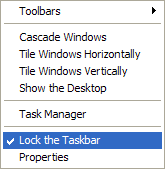
if you want the taskbar to be on top, you can simply drag it to the top and it will snap into position.

you may have to uncheck the 'Lock taskbar' option.

[attach=#]

steeladept

  • Fettucini alfredo is macaroni & cheese for adults
  • Supporting Member
  • Joined in 2006
  • **
  • Posts: 1,061
    • Linux User
    • Military Service Badge - US Air Force
Re: System tray to be on the top:
« Reply #2 on: March 17, 2012, 03:20 AM »
I may be mistaken, Lanux, but that looks like a windows menu.  The request was for in Ubuntu 11:04 - or is that what you used?

(If so, they have come a LONG way to mimicing windows menus - just in time for Windows 8 to change it all  :-\)

Curt

  • Supporting Member
  • Joined in 2006
  • **
  • Posts: 7,565
Re: System tray to be on the top:
« Reply #3 on: March 17, 2012, 03:58 PM »
-does Ubuntu use Windows 2000/XP Start button?

tomos

  • Charter Member
  • Joined in 2006
  • ***
  • Posts: 11,970
    • Gathering Badge
    • Participated in NANY Challenge Once
Re: System tray to be on the top:
« Reply #4 on: March 17, 2012, 04:52 PM »
@hulkbuster  you say "ubuntu skin pack" - is that something for windows?

drag the taskbar to the top should work in windows (you may have to unlock it first)
Tom

Steven Avery

  • Supporting Member
  • Joined in 2006
  • **
  • Posts: 1,039
Re: System tray to be on the top:
« Reply #5 on: March 17, 2012, 07:59 PM »
Hi,

Here are two system tray questions.

1) Right Click--> Show the Desktop...
Is there a 'put back the windows' key ?  Or another way to do this.

2) View system tray details, maybe in its own window. 
e.g. Show larger icons with text (and separate active from inactie).

Any such utility ?  I know Windows 7 changed this some, but anyway, why do
we have to puzzle over icons continually ?

Steven

hulkbuster

  • Participant
  • Joined in 2009
  • *
  • Posts: 259
Re: System tray to be on the top:
« Reply #6 on: March 18, 2012, 06:05 AM »
Thank you lanaux128 unlocking the systemtray made it possible to move in any four corners of the window. No other software required thanks for that.
tomos Ubuntu skin pack is just like any other custom skin packs made by user. Like vista and win 7 skin packs for Xp which are made to emulate the look and feel of other OS from startup to the fonts sounds and GUI .
The latest is Ubuntu 5 skin pack for Xp and win 7. 
ClipDiary 5.3/ Smadav 2018/ Some Sense

Original address: https://www.donationcoder.com/forum/index.php?topic=30330.0