DonationCoder.com forum
 
Read-only archive. This is a static copy of the DonationCoder.com forum. Reading and searching work as before; logging in, posting and private messages do not.
Archive of 2026-10-21 · About this archive · Main site

Author Topic: Independent ragged edges application  (Read 4,705 times)

PierrL

  • Participant
  • Joined in 2012
  • *
  • Posts: 3
Independent ragged edges application
« on: March 12, 2012, 01:37 PM »
Hi,

I'm new to the forum. I recently started using Screenshot Captor and donated for a license key. Lovely application that replaced FSCapture. I had two key requirements holding me with FSCapture and now met by Screenshot Captor: scroll long windows and the ragged edges effect.

That said Screenshot Captor is a large and complex application when it comes to this category of software. The simplicity and economy of a tool like Zizorz appeals to me too. I tried to find a way to add ragged edges through command line but came empty handed.

Therefore pleading for making this functionality available stand alone! I think this goes in the direction discussed here: http://www.donationcoder.com/forum/index.php?topic=21483.0.

Or any pointer on how to do it with external application or autohotkey?

Cheers
P.

PierrL

  • Participant
  • Joined in 2012
  • *
  • Posts: 3
Re: Independent ragged edges application
« Reply #1 on: March 13, 2012, 02:12 PM »
Hi

found that minicap is even closer to what I need. It already allows a shadow effect but I still would prefer a torn edge effect. If some functions of screenshot captor were made more modular, user could leverage them with minicap postrun option.

tomos

  • Charter Member
  • Joined in 2006
  • ***
  • Posts: 11,970
    • Gathering Badge
    • Participated in NANY Challenge Once
Re: Independent ragged edges application
« Reply #2 on: March 13, 2012, 05:40 PM »
PierrL, do you use mousres FARR launcher?
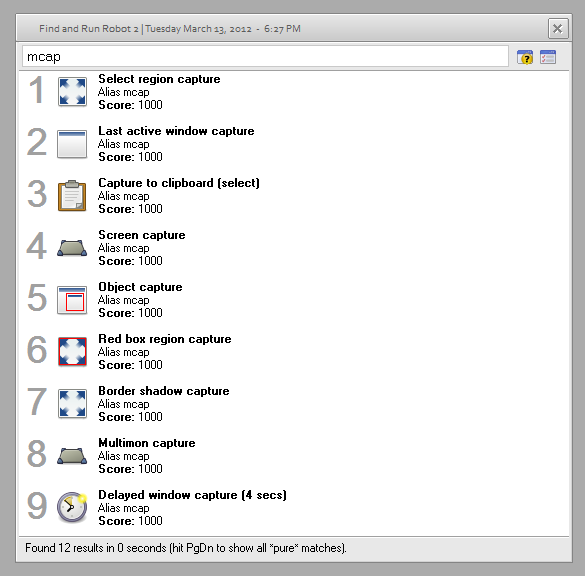
minicap can also be used from within FARR via an alias (I posted about it here lately)

[attachimg=#]

My favourite *easy* screen capture "programme" was minicap via FARR (as an alias). I lost track of it after my last hardware update. Was my favourite - would be nice if it came with FARR by default (dont know if that would cause other headaches). Just re-"installed" the alias, it came with an outdated minicap so I wont link to it (I replaced the minicap with up-to-date files, will see how I get on...)


Edit/ although I see there's an Alias only download that presumably works with an installed minicap
http://tuckndar.dcmembers.com/download.php?list.3

If you're lucky, mouser might be able to transfer the effect you want from SC programme to minicap...
Tom

PierrL

  • Participant
  • Joined in 2012
  • *
  • Posts: 3
Re: Independent ragged edges application
« Reply #3 on: March 13, 2012, 06:07 PM »
I use autohotkey shortcuts:
- one to trigger minicap and put the selected area in clipboard with shadow : MiniCap.exe -captureregselect -clipimage -bordershadow -exit
- one use irfan viewer in case I want to add text or such: i_view32.exe /capture=4

I'm now playing with ImageMagick to add a torn effect border to the image. If Ican get what I want I will use miniclip to capture to file, process that file with ImageMagick and put in clipboard ready to be pasted (case A) or open in Irfan for editing (case B)

I don't suggest to "bloat" minicap with extra effects. Just have an independent exe that can add the effect on command line.

Cheers

Original address: https://www.donationcoder.com/forum/index.php?topic=30268.0