DonationCoder.com forum
 
Read-only archive. This is a static copy of the DonationCoder.com forum. Reading and searching work as before; logging in, posting and private messages do not.
Archive of 2026-10-21 · About this archive · Main site

Author Topic: post-screenshot editor, torn edge in between, and highlight lines  (Read 14,408 times)

electronixtar

  • Member
  • Joined in 2007
  • **
  • Posts: 141
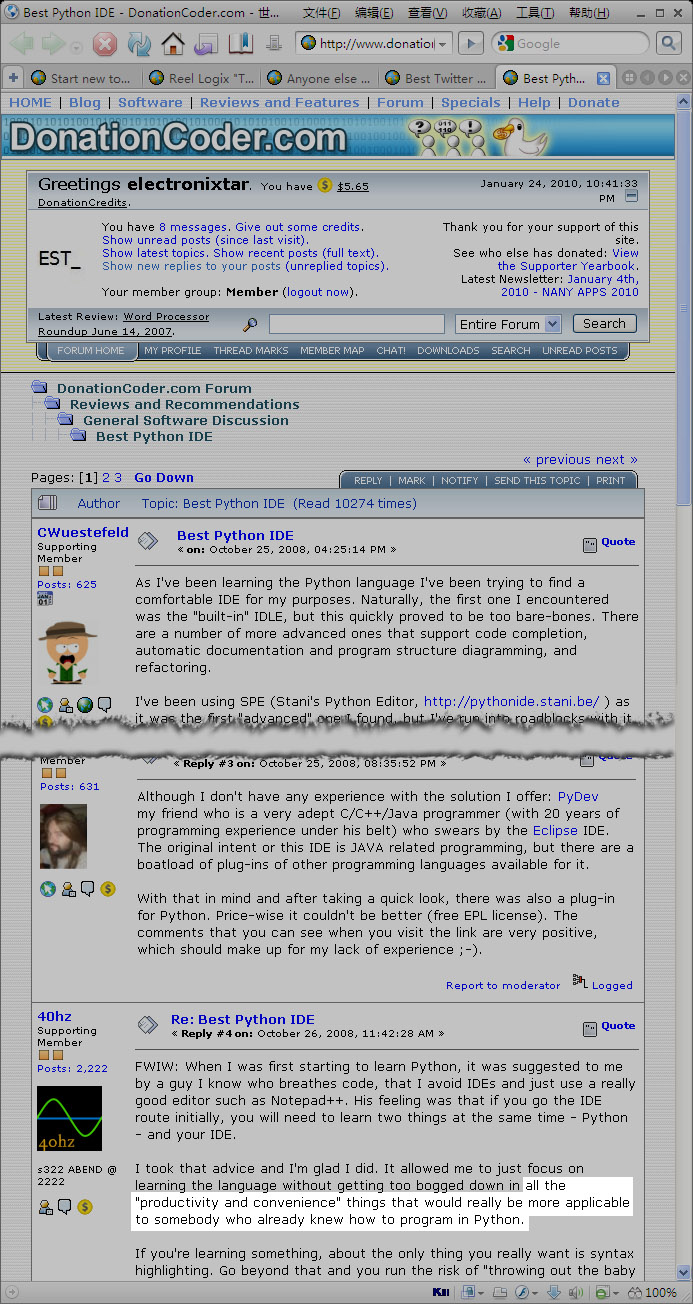
Hi guys, are there any free post-screenshot editor that can do this easily?  ;D


  • Auto scroll screenshot, but capture the scrolling page as well as the window frame
  • Torn edge effect in between to omit unnecessary content, but do not torn the scroll bar area
  • dim all areas, highlight a non-rectangle area

The picture is a lousy example I made in photoshop, it took me 20 minutes, I am n00b in Photoshop, so I desperately need some one-click tool for post screenshot processing.
« Last Edit: January 25, 2010, 05:19 AM by electronixtar »

Shades

  • Member
  • Joined in 2006
  • **
  • Posts: 2,954
Re: post-screenshot editor, torn edge in between, and highlight lines
« Reply #1 on: January 26, 2010, 02:19 AM »
Well, at least my content wasn't deemed as unnecessary... :P

The easy path is usually downhill...

Tuxman

  • OMG not him again!
  • Supporting Member
  • Joined in 2006
  • **
  • Posts: 2,522
    • Participated in NANY Challenge Seven Times
Re: post-screenshot editor, torn edge in between, and highlight lines
« Reply #2 on: January 27, 2010, 04:03 AM »
Hm, sophisticated screenshot taking and editing in one application? I actually doubt that.
I bet when Cheetahs race and one of them cheats, the other one goes "Man, you're such a Cheetah!" and they laugh & eat a zebra or whatever.

electronixtar

  • Member
  • Joined in 2007
  • **
  • Posts: 141
Re: post-screenshot editor, torn edge in between, and highlight lines
« Reply #3 on: January 27, 2010, 09:20 AM »
Hm, sophisticated screenshot taking and editing in one application? I actually doubt that.

;D Perhaps I was too demanding. Any toolkit can get this job done?

Tuxman

  • OMG not him again!
  • Supporting Member
  • Joined in 2006
  • **
  • Posts: 2,522
    • Participated in NANY Challenge Seven Times
Re: post-screenshot editor, torn edge in between, and highlight lines
« Reply #4 on: January 27, 2010, 02:56 PM »
For screenshot taking I usually use ZScreen which can pass them to an image editor, but AFAICS it doesn't have auto-scrolling yet...  :(
I bet when Cheetahs race and one of them cheats, the other one goes "Man, you're such a Cheetah!" and they laugh & eat a zebra or whatever.

mouser

  • First Author
  • Administrator
  • Joined in 2005
  • *****
  • Posts: 40,931
    • Gathering Badge
    • Plugin Coding Medal
    • Participated in NANY Challenge Seventeen Times
    • Cody Award
    • Coding Snacks
    • Volunteers/Staff
Re: post-screenshot editor, torn edge in between, and highlight lines
« Reply #5 on: January 27, 2010, 04:35 PM »
Quote
Any toolkit can get this job done?

i'd like to know that too.. it would actually be a useful feature.. splitting out some middle portion of an image with ragged edge between the sides.

steeladept

  • Fettucini alfredo is macaroni & cheese for adults
  • Supporting Member
  • Joined in 2006
  • **
  • Posts: 1,061
    • Linux User
    • Military Service Badge - US Air Force
Re: post-screenshot editor, torn edge in between, and highlight lines
« Reply #6 on: January 27, 2010, 04:42 PM »
Mouser, would this be a difficult effect to add to ScreenshotCaptor?  I mean you would make the capture, highlight the area to "cut", and replace it with an image of the torn edges, right?  I don't know what all would be involved, but it seems fairly straightforward to me.  SC does everything else already, so this would just be an edit effect it would add to it's repertoire, right?

mouser

  • First Author
  • Administrator
  • Joined in 2005
  • *****
  • Posts: 40,931
    • Gathering Badge
    • Plugin Coding Medal
    • Participated in NANY Challenge Seventeen Times
    • Cody Award
    • Coding Snacks
    • Volunteers/Staff
Re: post-screenshot editor, torn edge in between, and highlight lines
« Reply #7 on: January 27, 2010, 04:51 PM »
it wouldn't be hard to add, however Tuxman's comment reflects something i've been thinking myself.. which is that i can't help but wonder if it's a wise course to keep trying to add more and more image processing features to a screenshot tool as custom code, or whether it wouldn't be smarter to focus on improving the interfacing with other external (commandline) tools.. SC already is designed for this but i could improve it, by passing info about current selection and multiple files.

steeladept

  • Fettucini alfredo is macaroni & cheese for adults
  • Supporting Member
  • Joined in 2006
  • **
  • Posts: 1,061
    • Linux User
    • Military Service Badge - US Air Force
Re: post-screenshot editor, torn edge in between, and highlight lines
« Reply #8 on: January 27, 2010, 04:57 PM »
it wouldn't be hard to add, however Tuxman's comment reflects something i've been thinking myself.. which is that i can't help but wonder if it's a wise course to keep trying to add more and more image processing features to a screenshot tool as custom code, or whether it wouldn't be smarter to focus on improving the interfacing with other external (commandline) tools.. SC already is designed for this but i could improve it, by passing info about current selection and multiple files.

Understood, but I guess I was just thinking of your plugin model where all the post-processing could be moved to the plugin, and this added.  I know, I didn't say that, but I am amazed you can't read everyone's mind  :D

parkint

  • It's bad luck to be superstitious
  • Supporting Member
  • Joined in 2010
  • **
  • Posts: 119
Re: post-screenshot editor, torn edge in between, and highlight lines
« Reply #9 on: January 27, 2010, 07:38 PM »
I use screen capture a lot and have experimented with many.
SnagIt has an impressive number of features (including what you are asking) and a reasonable cost.
Of course, it is ONLY for Windows  :(

wraith808

  • Supporting Member
  • Joined in 2006
  • **
  • Posts: 11,205
    • Participated in NANY Challenge Fourteen Times
    • Coding Snacks
    • Writer
    • Hardware Hacker
Re: post-screenshot editor, torn edge in between, and highlight lines
« Reply #10 on: January 27, 2010, 08:44 PM »
Understood, but I guess I was just thinking of your plugin model where all the post-processing could be moved to the plugin, and this added.  I know, I didn't say that, but I am amazed you can't read everyone's mind  :D

Ooh... screenshot captor would be sooo much better then!  I love software I can extend! :)

mouser

  • First Author
  • Administrator
  • Joined in 2005
  • *****
  • Posts: 40,931
    • Gathering Badge
    • Plugin Coding Medal
    • Participated in NANY Challenge Seventeen Times
    • Cody Award
    • Coding Snacks
    • Volunteers/Staff
Re: post-screenshot editor, torn edge in between, and highlight lines
« Reply #11 on: January 28, 2010, 01:08 AM »
Screenshot Captor already has a good system for adding commandline tools which can modify files and SC will pick up on any saved modifications.
I gone this route rather than plugins mainly because there doesnt seem to be too much more a plugin would do.

wraith808

  • Supporting Member
  • Joined in 2006
  • **
  • Posts: 11,205
    • Participated in NANY Challenge Fourteen Times
    • Coding Snacks
    • Writer
    • Hardware Hacker
Re: post-screenshot editor, torn edge in between, and highlight lines
« Reply #12 on: January 28, 2010, 02:29 AM »
While cool that you have that, the reason that I as a developer like plug-in systems rather than the ability to add tools is the fact that I don't have to develop a whole framework around the function that I want to add.

electronixtar

  • Member
  • Joined in 2007
  • **
  • Posts: 141
Re: post-screenshot editor, torn edge in between, and highlight lines
« Reply #13 on: January 30, 2010, 11:57 AM »
it wouldn't be hard to add, however Tuxman's comment reflects something i've been thinking myself.. which is that i can't help but wonder if it's a wise course to keep trying to add more and more image processing features to a screenshot tool as custom code, or whether it wouldn't be smarter to focus on improving the interfacing with other external (commandline) tools.. SC already is designed for this but i could improve it, by passing info about current selection and multiple files.


Please add some plugin / commandline support for this kind of task :)

I sincerely hope SC is the first of its kind to provide a organic screen capture engine

I requested it before:

http://www.donationcoder.com/forum/index.php?topic=17445
http://www.donationcoder.com/forum/index.php?topic=16700

Some other idea to share with everyone:

* Layered screenshot for standard Windows desktop, even layered for each control

*generate 3D screenshots for standard Win32 controls:


* generate SVG screenshot for a window, with text actually copy-pastable (content aware & accessbility advantages), and the color of each control is defined by the system theme color from CSS
« Last Edit: January 30, 2010, 12:17 PM by electronixtar »

Original address: https://www.donationcoder.com/forum/index.php?topic=21483.0