DonationCoder.com forum
 
Read-only archive. This is a static copy of the DonationCoder.com forum. Reading and searching work as before; logging in, posting and private messages do not.
Archive of 2026-10-21 · About this archive · Main site

Author Topic: IDEA: Application memory limiter  (Read 17,855 times)

vbmark

  • Participant
  • Joined in 2005
  • *
  • Posts: 44
IDEA: Application memory limiter
« on: March 01, 2012, 03:39 PM »
Minimum requirement: Prevent any application from using more than X amount of memory.
Bonus: Apply different limits to different applications.

When limit reached options:
1) Automatically close the application.
2) Freeze the application (if possible) and popup notification.
3) Do nothing but notify.
4) Pop up message box asking what to do.

Thanks

kunkel321

  • Supporting Member
  • Joined in 2009
  • **
  • Posts: 626
    • Participated in NANY Challenge Once
Re: IDEA: Application memory limiter
« Reply #1 on: March 01, 2012, 05:15 PM »
I think ProcessTamer http://www.donationcoder.com/forum/index.php?board=16.0
might be designed for that(?)

vbmark

  • Participant
  • Joined in 2005
  • *
  • Posts: 44
Re: IDEA: Application memory limiter
« Reply #2 on: March 01, 2012, 05:26 PM »
ProcessTamer is for the CPU and I am looking for something similar but for memory.

Thanks, though.

rjbull

  • Charter Member
  • Joined in 2005
  • ***
  • Posts: 3,217
Re: IDEA: Application memory limiter
« Reply #3 on: March 01, 2012, 10:37 PM »
Looks like Chameleon Task Manager Pro does something of the sort; see screenshot.

vbmark

  • Participant
  • Joined in 2005
  • *
  • Posts: 44
Re: IDEA: Application memory limiter
« Reply #4 on: March 02, 2012, 01:03 AM »
Chameleon Task Manager Pro costs money and I am looking for something that is free.

Thanks, though.

Ath

  • Supporting Member
  • Joined in 2006
  • **
  • Posts: 3,649
    • Participated in NANY Challenge Eleven Times
    • Coding Snacks
    • Linux User
    • Hardware Hacker
Re: IDEA: Application memory limiter
« Reply #5 on: March 02, 2012, 07:28 AM »
Hm, I'm a bit worried you need to limit the memory use of any software. The software involved should use, and get, any available memory it needs.
How are you to decide how much memory that application should be using? :-\

If memory usage is an issue, because it is really excessive, you'd optimally signal the makers of that software, and ask them to 'fix' the issue, not limit the application and possibly cripple or crash it.
Switching to some alternative that uses less memory is also a possible solution.
/Ton
Ath's software collection, Quote: "A problem well stated is a problem half-solved." (Charles Kettering)

vbmark

  • Participant
  • Joined in 2005
  • *
  • Posts: 44
Re: IDEA: Application memory limiter
« Reply #6 on: March 02, 2012, 12:36 PM »
I am a software developer troubleshooting a large application that has a problem with a runaway memory leak.  I cannot always keep my eye on the memory usage and if I don't catch it when it starts to run it eats up my memory, hangs my computer, and I must do a hard reboot.

I don't have time to create this little app myself and I thought it would be simple for someone to make -- just loop through each running process and see if its memory usage is above the set limit.

In my case I know that if the executable hits one gig of working memory then it's running away and will soon consume all that's left.  If I could stop it at one gig it would make my life easier.

skwire

  • I eat Coding Snacks for breakfast...
  • Global Moderator
  • Joined in 2005
  • *****
  • Posts: 5,297
    • Participated in NANY Challenge Seventeen Times
    • Coding Snacks
    • Superboy Coder
    • Cody Award
    • Volunteers/Staff
    • Gathering Badge
Re: IDEA: Application memory limiter
« Reply #7 on: March 02, 2012, 03:58 PM »
Here is a QnD (Quick 'n Dirty) AutoHotkey script that watches an executable name and fires off a message box if memory usage of the process exceeds one gig.  Obviously, change firefox.exe to your required executable name.

Code: (autohotkey)
#Persistent
ExeName := "firefox.exe"
SetTimer, MemWatcher, 10000

Return ; End of auto-execute section.


MemWatcher:
{
    myMem := GetProcessMemoryInfo( ExeName )
    If ( myMem > 1048576 )
    {
        MsgBox, 48, Alert!, Memory exceeded for %ExeName%
    }
}
Return


GetProcessMemoryInfo( pName ) ; http://www.autohotkey.com/forum/post-223061.html#223061
{
   Process, Exist, %pname%
   pid := Errorlevel

   ; get process handle
   hProcess := DllCall( "OpenProcess", UInt, 0x10|0x400, Int, false, UInt, pid )

   ; get memory info
   VarSetCapacity( memCounters, 40, 0 )
   DllCall( "psapi.dll\GetProcessMemoryInfo", UInt, hProcess, UInt, &memCounters, UInt, 40 )
   DllCall( "CloseHandle", UInt, hProcess )

   list = cb,PageFaultCount,PeakWorkingSetSize,WorkingSetSize,QuotaPeakPagedPoolUsage
   ,QuotaPagedPoolUsage,QuotaPeakNonPagedPoolUsage,QuotaNonPagedPoolUsage
   ,PagefileUsage,PeakPagefileUsage

   /*
   cb := NumGet( memCounters, 0, "UInt" )
   PageFaultCount := NumGet( memCounters, 4, "UInt" )
   PeakWorkingSetSize := NumGet( memCounters, 8, "UInt" )
   WorkingSetSize := NumGet( memCounters, 12, "UInt" )
   QuotaPeakPagedPoolUsage := NumGet( memCounters, 16, "UInt" )
   QuotaPagedPoolUsage := NumGet( memCounters, 20, "UInt" )
   QuotaPeakNonPagedPoolUsage := NumGet( memCounters, 24, "UInt" )
   QuotaNonPagedPoolUsage := NumGet( memCounters, 28, "UInt" )
   PagefileUsage := NumGet( memCounters, 32, "UInt" )
   PeakPagefileUsage := NumGet( memCounters, 36, "UInt" )
   */

   n=0
   Loop, Parse, list, `,
   {
      n+=4
      SetFormat, Float, 0.0 ; round up K
      this := A_Loopfield
      this := NumGet( memCounters, (A_Index = 1 ? 0 : n-4), "UInt") / 1024

      ; omit cb
      If A_Index != 1
         info .= A_Loopfield . ": " . this . " K" . ( A_Loopfield != "" ? "`n" : "" )
   } 

   ; Return "[" . pid . "] " . pname . "`n`n" . info ; for everything
   Return WorkingSetSize := NumGet( memCounters, 12, "UInt" ) / 1024 ; what Task Manager shows
}

ruskiem

  • Participant
  • Joined in 2014
  • *
  • Posts: 3
Re: IDEA: Application memory limiter
« Reply #8 on: August 09, 2014, 03:33 PM »
Thank You skwire, but thats not it.
its 2014, yeas, but that can be still very usefull.
i need that too, like ProcessTammer for CPU, we need similar for RAM Memory

even just as simple as that:

"Minimum requirement: Prevent any application from using more than X amount of memory.

When limit reached options:
1) Automatically close the application."

Please anybody know about such thing or can MacGyver it in xx minutes?

Thank You
Waiting for reply
Best Regards!

mouser

  • First Author
  • Administrator
  • Joined in 2005
  • *****
  • Posts: 40,931
    • Gathering Badge
    • Plugin Coding Medal
    • Participated in NANY Challenge Seventeen Times
    • Cody Award
    • Coding Snacks
    • Volunteers/Staff
Re: IDEA: Application memory limiter
« Reply #9 on: August 09, 2014, 07:21 PM »

40hz

  • Supporting Member
  • Joined in 2007
  • **
  • Posts: 11,861
Re: IDEA: Application memory limiter
« Reply #10 on: August 09, 2014, 08:44 PM »
Please anybody know about such thing

IIRC there used to be something called a "job object" where you could do something similar.

My infobase has something from CodeProject that a coder might be able to use for ideas about ways to accomplish it.

Here's the link to the CodeProject page. But from the looks of it, it's a 32-bit solution and it's pretty old.

Can't comment beyond that. The CodeProject page was part of some research I was doing for a client for something I've long since forgotten about. Apologies. :-[


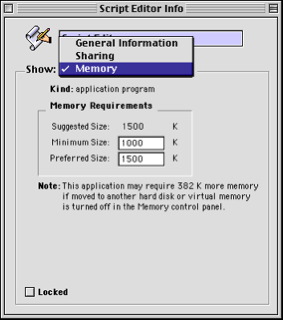
Funny thing...the old Macintosh operations systems (Prior to OSX) used to have that capability. If you requested "info" on an app (equivalent to "properties" in Windows) you got this window (see below) where you could easily set the min/max amount of RAM use allowed per application...

[attach]
« Last Edit: August 09, 2014, 08:59 PM by 40hz »

Edvard

  • Coding Snacks Author
  • Charter Honorary Member
  • Joined in 2005
  • ***
  • Posts: 3,027
    • Participated in NANY Challenge Once
    • Coding Snacks
    • Linux User
Re: IDEA: Application memory limiter
« Reply #11 on: August 10, 2014, 08:29 PM »
IIRC there used to be something called a "job object" where you could do something similar.

There still is:
http://msdn.microsoft.com/en-us/library/ms684161%28VS.85%29.aspx
Quote
A job object allows groups of processes to be managed as a unit. Job objects are namable, securable, sharable objects that control attributes of the processes associated with them. Operations performed on a job object affect all processes associated with the job object. Examples include enforcing limits such as working set size and process priority or terminating all processes associated with a job.

No idea where to go from there, but there's example code from the links at that page.
All children left unattended will be given a mocha and a puppy.

R-X

  • Participant
  • Joined in 2014
  • *
  • Posts: 1
Re: IDEA: Application memory limiter
« Reply #12 on: October 15, 2014, 12:38 AM »
Hi guys,
New user here but exact same requirements as vbmark. I have an application that I know is running away when it hits 1gb RAM. I currently have a solution which I'm running on Windows 7 x64 but I want a better one as described above.

To assist those looking for *something* I use a little app called Usage Monitor which has the capability to monitor a memory level on a given process and take action once that level is hit. I have it executing a batch file which includes a taskkill.exe command to kill off the offending process and a blat.exe command to email me so I can see when this happens (all hours it seems).

The problem with this setup is that the memory limit on the process seems to have to be set every time the process is created and I often forget to set the limit until I notice it has taken all available RAM and made my PC run like a 286. It would also be nice if that util could accept the commands straight into its own menus but it gets the job done and the best improvement to it would be to just monitor for when that process starts so I don't have to set it every time.

I had a bit of a look for other tools which brought me here but haven't found anything else so far.

Enjoy
« Last Edit: October 15, 2014, 12:50 AM by R-X »

skwire

  • I eat Coding Snacks for breakfast...
  • Global Moderator
  • Joined in 2005
  • *****
  • Posts: 5,297
    • Participated in NANY Challenge Seventeen Times
    • Coding Snacks
    • Superboy Coder
    • Cody Award
    • Volunteers/Staff
    • Gathering Badge
Re: IDEA: Application memory limiter
« Reply #13 on: October 16, 2014, 02:02 PM »
New user here but exact same requirements as vbmark.

Hi, R-X, and welcome to the DonationCoder forums.  :)  My script from above can easily be adapted to do what you want.  It current just shows a message box when the memory limit is exceeded but that can be changed to kill a process.  Are you familiar with AutoHotkey scripting?

mouser

  • First Author
  • Administrator
  • Joined in 2005
  • *****
  • Posts: 40,931
    • Gathering Badge
    • Plugin Coding Medal
    • Participated in NANY Challenge Seventeen Times
    • Cody Award
    • Coding Snacks
    • Volunteers/Staff
Re: IDEA: Application memory limiter
« Reply #14 on: October 16, 2014, 03:02 PM »
NANY 2015 is coming up, this might be time for me to add features to Process Piglet tool that would do this kind of thing.
It would assist me if you could try it and tell me how you'd like me to add the new features.

Original address: https://www.donationcoder.com/forum/index.php?topic=30155.0