
BULK Rename Utility
« on: February 29, 2012, 04:49 PM »


 Topic: BULK Rename Utility (Read 40,859 times)


Or here Mini-Reviews by Members - I love the Bulk Rename Utility!
 I didn't use Bulk in the name but I found it again anyway... through Gizmos.


In addition to the conventional Bulk Rename Utility, we also now have a command-line version, called Bulk Rename Command.
For those of you who grew up with Windows, the command-line is the non-GUI way to perform commands on your PC. With DOS everything was driven from the command-line, but with Windows you have to access the command-line by clicking Start, Run, then typing cmd (or command, if you use Windows 98). You might think this sounds convoluted and backward, but a command-line utility can wield immense power if you are performing repetitive tasks. For example, you can:
* Create scheduled jobs
* Create a set of batch files which perform a single task, safe in the knowledge they will do exactly the same thing each time.
* See exactly what command is being performed - no hidden settings
* Be sure that you will always keep the command details -there are no config files to lose.
Bulk Rename Command (BRC) is targeted at system administrators and power-users, who need to perform specific tasks repetitively. For example, the renaming of log files, or the processing of backup files. As such, it does not contain some of the features of Bulk Rename Utility such as MP3-tag or EXIF tag processing.
You can download BRC here. http://www.bulkrenameutility.co.uk/Download.php
Don't overlook its companion command-line utility, BRC, Bulk Rename Command:QuoteIn addition to the conventional Bulk Rename Utility, we also now have a command-line version, called Bulk Rename Command.
For those of you who grew up with Windows, the command-line is the non-GUI way to perform commands on your PC. With DOS everything was driven from the command-line, but with Windows you have to access the command-line by clicking Start, Run, then typing cmd (or command, if you use Windows 98). You might think this sounds convoluted and backward, but a command-line utility can wield immense power if you are performing repetitive tasks. For example, you can:
* Create scheduled jobs
* Create a set of batch files which perform a single task, safe in the knowledge they will do exactly the same thing each time.
* See exactly what command is being performed - no hidden settings
* Be sure that you will always keep the command details -there are no config files to lose.
Bulk Rename Command (BRC) is targeted at system administrators and power-users, who need to perform specific tasks repetitively. For example, the renaming of log files, or the processing of backup files. As such, it does not contain some of the features of Bulk Rename Utility such as MP3-tag or EXIF tag processing.
You can download BRC here. http://www.bulkrenameutility.co.uk/Download.php


@crabby3: Many thanks for this. That looks like a seriously powerful utility. It apparently does things I have wished I could do with xplorer²'s superb bulk rename, but cannot.
Going to download it now...
It apparently does things I have wished I could do with xplorer²'s superb bulk rename, but cannot.


 thanks for the tip


 rjbull....I'm looking at your taskbar and it's looks more or less just like mine. We use the same programs. It's the DC connection.

Thanks rjbull i got that: couldn't get my eye over there:It's easy to go boggle-eyed looking at BRU
Another thing , can i rename any file in a folder containing zip and rar files just by adding a number in the start of of the file name: i.e.,
like for instance in this folder containing zip and rar files i just want the name to be the same but i want serial number in the start of the file name: starting from the rar or zip. If that could be done it would be a beauty: )
 BRU numbering before extensions Screenshot - 08_03_2012 , 22_36_38.png
(88.6 KB, 809x549 - viewed 722 times.)
BRU numbering before extensions Screenshot - 08_03_2012 , 22_36_38.png
(88.6 KB, 809x549 - viewed 722 times.) BRU numbering after extensions Screenshot - 08_03_2012 , 22_32_13.png
(89.2 KB, 809x549 - viewed 802 times.)
BRU numbering after extensions Screenshot - 08_03_2012 , 22_32_13.png
(89.2 KB, 809x549 - viewed 802 times.)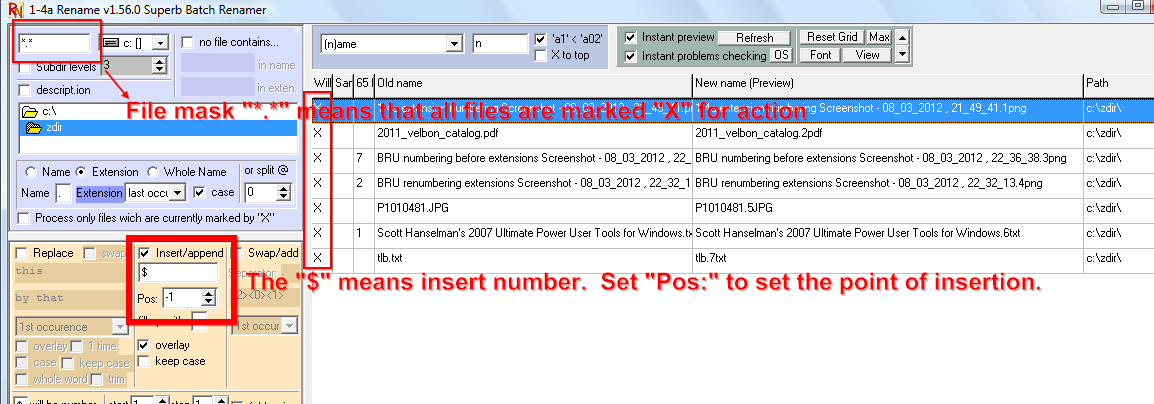 1-4a renaming extension sshot-01.png
(62.2 KB, 1154x404 - viewed 755 times.)
1-4a renaming extension sshot-01.png
(62.2 KB, 1154x404 - viewed 755 times.)


Or here Mini-Reviews by Members - I love the Bulk Rename Utility!I have added a post to that review:
This review needs updating.
SUPERB piece of software!
Bulk renames those files that other file renamers cannot rename.
...nor by deranged freeware zealotsI object to the potential implication that I may be "deranged". I are not.


Original address: https://www.donationcoder.com/forum/index.php?topic=30142.0
 I only use a few, i.e. File (2), Remove (5) and Numbering (10), but it's nice to have the additional 10 Options in case I need them.
