


This can be a handy and time-saving script.
For ergonomic efficiency and out of preference - but also necessitated by my having had RSI in my wrists - I tend to use the keyboard a lot more than I do the mouse.
However, I cannot always remember the hotkey combos that I need to invoke some of the lesser-used Windows functionality.
Some time ago, a friend asked me to provide them with a popup reminder of certain Windows keys, so I used a simple bit of AHK script to do it. I later adapted the thing to my own needs, and this is the script that I arrived at. It gives a fairly comprehensive popup display of all the Windows 7 Hotkey combos that I might want to be reminded of.
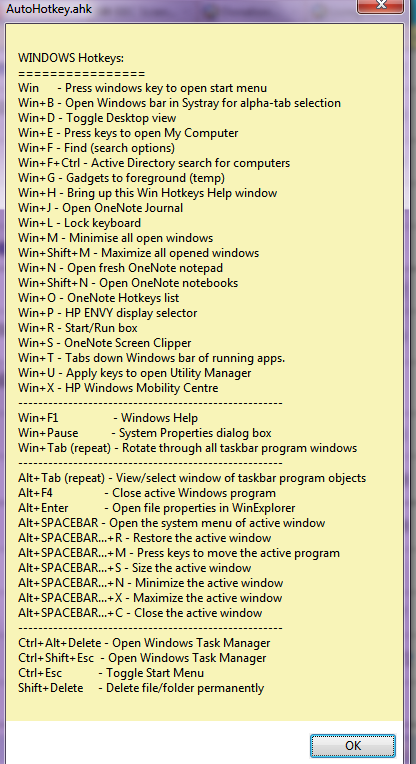
The popup is invoked by pressing the Win+H hotkey combo. (Please note that some of the hotkey combos shown may be peculiar to my installation.)
The popup window can be closed by either clicking on the OK button or by pressing the ESC key.
Here's the popup:
For ergonomic efficiency and out of preference - but also necessitated by my having had RSI in my wrists - I tend to use the keyboard a lot more than I do the mouse.
However, I cannot always remember the hotkey combos that I need to invoke some of the lesser-used Windows functionality.
Some time ago, a friend asked me to provide them with a popup reminder of certain Windows keys, so I used a simple bit of AHK script to do it. I later adapted the thing to my own needs, and this is the script that I arrived at. It gives a fairly comprehensive popup display of all the Windows 7 Hotkey combos that I might want to be reminded of.
The popup is invoked by pressing the Win+H hotkey combo. (Please note that some of the hotkey combos shown may be peculiar to my installation.)
The popup window can be closed by either clicking on the OK button or by pressing the ESC key.
Spoiler (click to show/hide)
;-------------------------------------------------------------------
#h:: ; Display panel of Windows system hotkeys - some from: http://www.worldstart.com/tips/tips.php/hotkey-refresher-course
TextOut=
(
WINDOWS Hotkeys:
================
Win - Press windows key to open start menu
Win+B - Open Windows bar in Systray for alpha-tab selection
Win+D - Toggle Desktop view
Win+E - Press keys to open My Computer
Win+F - Find (search options)
Win+F+Ctrl - Active Directory search for computers
Win+G - Gadgets to foreground (temp)
Win+H - Bring up this Win Hotkeys Help window
Win+J - Open OneNote Journal
Win+L - Lock keyboard
Win+M - Minimise all open windows
Win+Shift+M - Maximize all opened windows
Win+N - Open fresh OneNote notepad
Win+Shift+N - Open OneNote notebooks
Win+O - OneNote Hotkeys list
Win+P - HP ENVY display selector
Win+R - Start/Run box
Win+S - OneNote Screen Clipper
Win+T - Tabs down Windows bar of running apps.
Win+U - Apply keys to open Utility Manager
Win+X - HP Windows Mobility Centre
-----------------------------------------------------
Win+F1 - Windows Help
Win+Pause - System Properties dialog box
Win+Tab (repeat) - Rotate through all taskbar program windows
-----------------------------------------------------
Alt+Tab (repeat) - View/select window of taskbar program objects
Alt+F4 - Close active Windows program
Alt+Enter - Open file properties in WinExplorer
Alt+SPACEBAR - Open the system menu of active window
Alt+SPACEBAR...+R - Restore the active window
Alt+SPACEBAR...+M - Press keys to move the active program
Alt+SPACEBAR...+S - Size the active window
Alt+SPACEBAR...+N - Minimize the active window
Alt+SPACEBAR...+X - Maximize the active window
Alt+SPACEBAR...+C - Close the active window
-----------------------------------------------------
Ctrl+Alt+Delete - Open Windows Task Manager
Ctrl+Shift+Esc - Open Windows Task Manager
Ctrl+Esc - Toggle Start Menu
Shift+Delete - Delete file/folder permanently
)
MsgBox, %TextOut%
return
;-------------------------------------------------------------------
#h:: ; Display panel of Windows system hotkeys - some from: http://www.worldstart.com/tips/tips.php/hotkey-refresher-course
TextOut=
(
WINDOWS Hotkeys:
================
Win - Press windows key to open start menu
Win+B - Open Windows bar in Systray for alpha-tab selection
Win+D - Toggle Desktop view
Win+E - Press keys to open My Computer
Win+F - Find (search options)
Win+F+Ctrl - Active Directory search for computers
Win+G - Gadgets to foreground (temp)
Win+H - Bring up this Win Hotkeys Help window
Win+J - Open OneNote Journal
Win+L - Lock keyboard
Win+M - Minimise all open windows
Win+Shift+M - Maximize all opened windows
Win+N - Open fresh OneNote notepad
Win+Shift+N - Open OneNote notebooks
Win+O - OneNote Hotkeys list
Win+P - HP ENVY display selector
Win+R - Start/Run box
Win+S - OneNote Screen Clipper
Win+T - Tabs down Windows bar of running apps.
Win+U - Apply keys to open Utility Manager
Win+X - HP Windows Mobility Centre
-----------------------------------------------------
Win+F1 - Windows Help
Win+Pause - System Properties dialog box
Win+Tab (repeat) - Rotate through all taskbar program windows
-----------------------------------------------------
Alt+Tab (repeat) - View/select window of taskbar program objects
Alt+F4 - Close active Windows program
Alt+Enter - Open file properties in WinExplorer
Alt+SPACEBAR - Open the system menu of active window
Alt+SPACEBAR...+R - Restore the active window
Alt+SPACEBAR...+M - Press keys to move the active program
Alt+SPACEBAR...+S - Size the active window
Alt+SPACEBAR...+N - Minimize the active window
Alt+SPACEBAR...+X - Maximize the active window
Alt+SPACEBAR...+C - Close the active window
-----------------------------------------------------
Ctrl+Alt+Delete - Open Windows Task Manager
Ctrl+Shift+Esc - Open Windows Task Manager
Ctrl+Esc - Toggle Start Menu
Shift+Delete - Delete file/folder permanently
)
MsgBox, %TextOut%
return
;-------------------------------------------------------------------
Spoiler (click to show/hide)
[attach]


 I think that might have been me.