


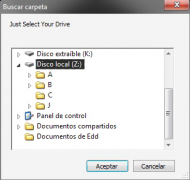
First of all I select the Z:\ drive..
As you can see inside the Z:\ drive there are 4 Folders more: (A, B, C, J)
Then it will appear this window..
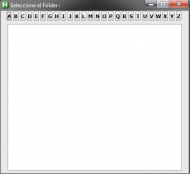
I click the "B" button..
First It will list all Folders inside "Z:\" in a text file:
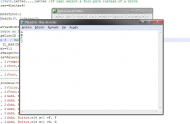
Then it'll list all Folders inside "Z:\" that begins with "B" (remember I clicked on the "B" button before)
In this case:
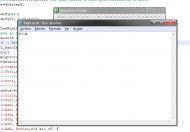
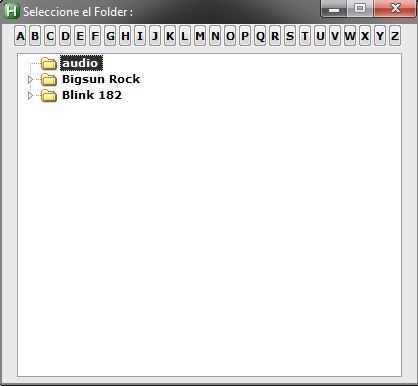
Then it will show the content inside "Z:\B\"..
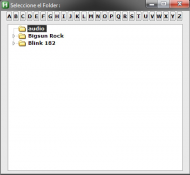
After that it'll create an INI document:
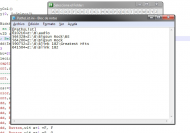
As you see the content in the INI document it's exactly the same as the content in treeview.
So the problem is..
Inside the Folder "B" there are 3 more Folders:
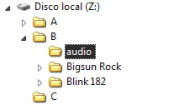
But the Folder "audio" doesn't starts with "b" so it shouldn't be inside the Folder "B"..
What I need it's not to move the Folder "audio" but I need not to appear in the Treeview and in the INI document.
Like a loop jump when it founds a Folder not starting with "B" in this case.
This is the code of the Script.
Note:
To run it and test it you will need to create the folders like an example the ones are in the images.
As you can see inside the Z:\ drive there are 4 Folders more: (A, B, C, J)
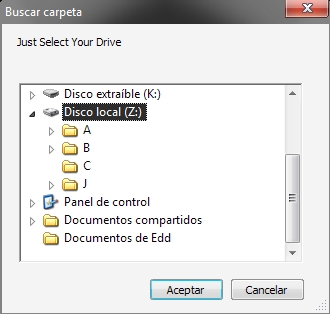
Then it will appear this window..
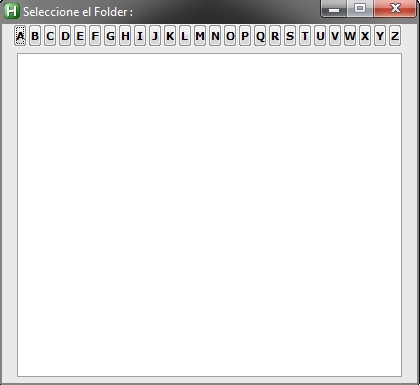
I click the "B" button..
First It will list all Folders inside "Z:\" in a text file:
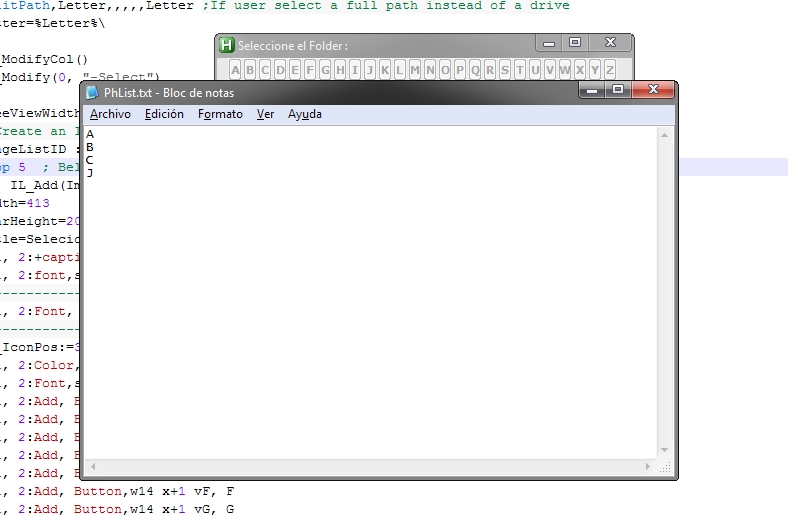
Then it'll list all Folders inside "Z:\" that begins with "B" (remember I clicked on the "B" button before)
In this case:
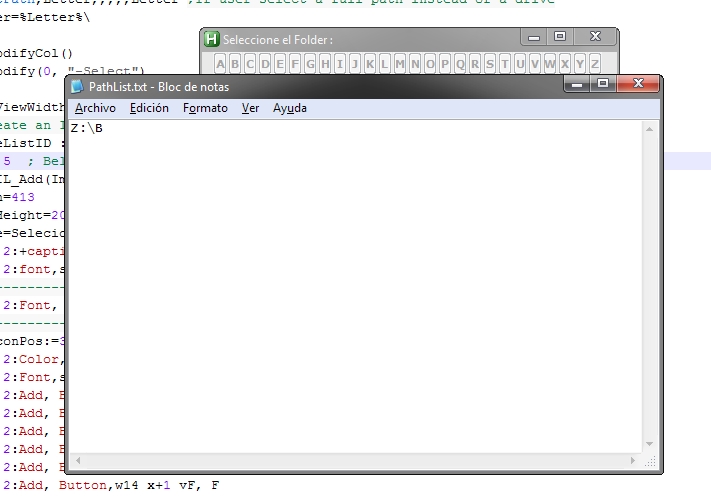
Then it will show the content inside "Z:\B\"..
After that it'll create an INI document:
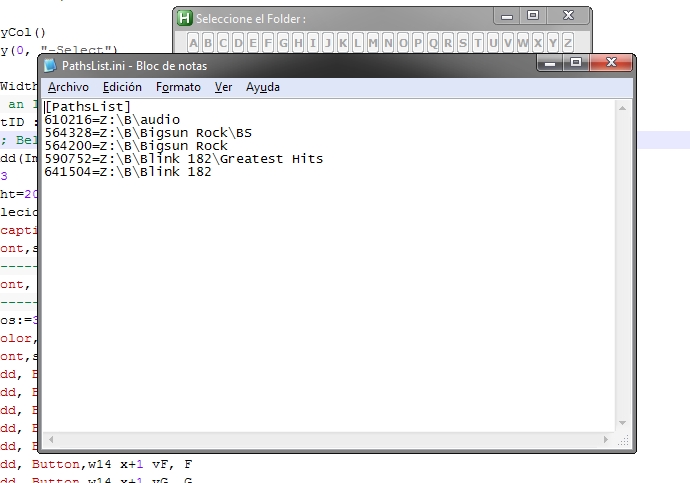
As you see the content in the INI document it's exactly the same as the content in treeview.
So the problem is..
Inside the Folder "B" there are 3 more Folders:
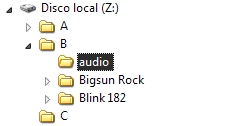
But the Folder "audio" doesn't starts with "b" so it shouldn't be inside the Folder "B"..
What I need it's not to move the Folder "audio" but I need not to appear in the Treeview and in the INI document.
Like a loop jump when it founds a Folder not starting with "B" in this case.
This is the code of the Script.
Code: (autohotkey)
#NoEnv
FileSelectFolder, Letter,::{20d04fe0-3aea-1069-a2d8-08002b30309d}, 0,Just Select Your Drive
SplitPath,Letter,,,,,Letter ;If user select a full path instead of a drive
Letter=%Letter%\

LV_ModifyCol()
LV_Modify(0, "-Select")

TreeViewWidth := 385
; Create an ImageList and put some standard system icons into it:
ImageListID := IL_Create(5)
Loop 5  ; Below omits the DLL's path so that it works on Windows 9x too:
    IL_Add(ImageListID, "shell32.dll", A_Index)
Width=413
tBarHeight=20.5
Title=Selecione el Folder :
Gui, 2:+caption +0x400000
Gui, 2:font,s10, Verdana
;---------------------------------------------------------- Title Bar & Caption Text
Gui, 2:Font, S10 Bold, Verdana
;----------------------------------------------------------- Minimize / Close Icons
Cl_IconPos:=395
Gui, 2:Color,E9E9E9
Gui, 2:Font,s8 q5, Verdana
Gui, 2:Add, Button,w14 x+1 vA, A
Gui, 2:Add, Button,w14 x+1 vB, B
Gui, 2:Add, Button,w14 x+1 vC, C
Gui, 2:Add, Button,w14 x+1 vD, D
Gui, 2:Add, Button,w14 x+1 vE, E
Gui, 2:Add, Button,w14 x+1 vF, F
Gui, 2:Add, Button,w14 x+1 vG, G
Gui, 2:Add, Button,w14 x+1 vH, H
Gui, 2:Add, Button,w14 x+1 vI, I
Gui, 2:Add, Button,w14 x+1 vJ, J
Gui, 2:Add, Button,w14 x+1 vK, K
Gui, 2:Add, Button,w14 x+1 vL, L
Gui, 2:Add, Button,w14 x+1 vM, M
Gui, 2:Add, Button,w14 x+1 vN, N
Gui, 2:Add, Button,w14 x+1 vO, O
Gui, 2:Add, Button,w14 x+1 vP, P
Gui, 2:Add, Button,w14 x+1 vQ, Q
Gui, 2:Add, Button,w14 x+1 vR, R
Gui, 2:Add, Button,w14 x+1 vS, S
Gui, 2:Add, Button,w14 x+1 vT, T
Gui, 2:Add, Button,w14 x+1 vU, U
Gui, 2:Add, Button,w14 x+1 vV, V
Gui, 2:Add, Button,w14 x+1 vW, W
Gui, 2:Add, Button,w14 x+1 vX, X
Gui, 2:Add, Button,w14 x+1 vY, Y
Gui, 2:Add, Button,w14 x+1 vZ, Z
; Create a TreeView and a ListView side-by-side to behave like Windows Explorer:
Gui, 2:Add, TreeView, vMyTree x15 r20 w%TreeViewWidth% gMyTreeLabel ImageList%ImageListID%
SB_SetParts(60, 85)  ; Create three parts in the bar (the third part fills all the remaining width).
Winset, AlwaysOnTop, OFF, ahk_id %SEWIN_ID%
Gui, 2:Show, w415, Seleccione el Folder :
GuiNum=2
Loop
{
IfWinActive, Seleccione el Folder :
{
SEWIN_ID:=WinExist("A")
WinGet, ExStyle, ExStyle, ahk_id %SEWIN_ID%
break
}
return

Fill:
GuiControl, disable, A
GuiControl, disable, B
GuiControl, disable, C
GuiControl, disable, D
GuiControl, disable, E
GuiControl, disable, F
GuiControl, disable, G
GuiControl, disable, H
GuiControl, disable, I
GuiControl, disable, J
GuiControl, disable, K
GuiControl, disable, L
GuiControl, disable, M
GuiControl, disable, N
GuiControl, disable, O
GuiControl, disable, P
GuiControl, disable, Q
GuiControl, disable, R
GuiControl, disable, S
GuiControl, disable, T
GuiControl, disable, U
GuiControl, disable, V
GuiControl, disable, W
GuiControl, disable, X
GuiControl, disable, Y
GuiControl, disable, Z
FileDelete, %A_Temp%\PathsList.ini
Loop %Letter%\*.*, 2
{
FileAppend, %A_LoopFileName%`n,%A_Temp%\PhList.txt,UTF-8
}
MsgBox, 4096,,I created a txt document named "PhList.txt", this is the content...
MsgBox, 4096,,That txt document is the content on "%Letter%"
SplashTextOff
RunWait, %A_Temp%\PhList.txt
SplashTextOn, 200, 25, Cargando, Espere un momento..
Loop
{
FileReadLine, TempFlderName, %A_Temp%\PhList.txt, %A_Index%
If ErrorLevel
{
FileDelete, %A_Temp%\PhList.txt
	break
	}
	StringLeft, FirstLetterOrNumber, TempFlderName, 1

If FirstLetterOrNumber=%FilterLetterOrNumber%
{
SplashTextOn, 200, 25, Cargando, Espere un momento..
FileAppend,
(
%Letter%%TempFlderName%`n
),%A_Temp%\PathList.txt,UTF-8
}
}
IfExist, %A_Temp%\PathList.txt
{
MsgBox, 4096,,I created a txt document named "PathList.txt", this is the content...
SplashTextOff
RunWait, %A_Temp%\PathList.txt
SplashTextOn, 200, 25, Cargando, Espere un momento..
}
else
{
SplashTextOff
MsgBox, 4096,,You don't have folders that begins with "%FilterLetterOrNumber%" on "%Letter%".
MsgBox, 4096,,Try with other letter...
Goto, Guishow
}
Loop
{
IfExist, %A_Temp%\PathList.txt
{
FileReadLine, TreeRoot, %A_Temp%\PathList.txt, %A_Index%
If ErrorLevel
{
FileDelete, %A_Temp%\PathList.txt
	break
	}
AddSubFoldersToTree(TreeRoot)

AddSubFoldersToTree(Folder, ParentItemID = 0)
{
    ; This function adds to the TreeView all subfolders in the specified folder.
    ; It also calls itself recursively to gather nested folders to any depth.
    Loop %Folder%\*.*, 2  ; Retrieve all of Folder's sub-folders.
        AddSubFoldersToTree(A_LoopFileFullPath, TV_Add(A_LoopFileName, ParentItemID, "Icon4"))
		  TV_Modify(0, "Sort")
/*
		  Already2=1
		  If Already2!=
		  {
		  Already2:=
TV_GetText(OutputVarName, ParentItemID)
StringLeft, OutFirstChar, OutputVarName,1
IfNotInString, OutFirstChar, %FilterLetterOrNumber%
{
TV_Delete(ParentItemID)
}
}
*/
		If ParentItemID!=0
		IniWrite, %A_LoopFileFullPath%, %A_Temp%\PathsList.ini, PathsList, %ParentItemID%
}
}
}
SplashTextOff
IfExist, %A_Temp%\PathsList.ini
{
MsgBox, 4096,,I created an ini document named "PathsList.ini", this is the content...
RunWait, %A_Temp%\PathsList.ini
}
else
MsgBox, 4096,,The founded root(s) doesn't contain folders to add...
SplashTextOff
Guishow:
Gui, 2:Show,, Seleccione el Folder :
GuiControl, enable, A
GuiControl, enable, B
GuiControl, enable, C
GuiControl, enable, D
GuiControl, enable, E
GuiControl, enable, F
GuiControl, enable, G
GuiControl, enable, H
GuiControl, enable, I
GuiControl, enable, J
GuiControl, enable, K
GuiControl, enable, L
GuiControl, enable, M
GuiControl, enable, N
GuiControl, enable, O
GuiControl, enable, P
GuiControl, enable, Q
GuiControl, enable, R
GuiControl, enable, S
GuiControl, enable, T
GuiControl, enable, U
GuiControl, enable, V
GuiControl, enable, W
GuiControl, enable, X
GuiControl, enable, Y
GuiControl, enable, Z
return


MyTreeLabel:  ; This subroutine handles user actions (such as clicking).
FileDelete, %A_Temp%\List.txt
if A_GuiEvent <> S
return
lns=0
SoundPlay, 0
Sng:=
		TV_GetText(SelectedItemText, A_EventInfo)
		ItemText=%SelectedItemText%
ParentID := A_EventInfo
Loop  ; Build the full path to the selected folder.
{
If MainGuiLeft=0
break
    ParentID := TV_GetParent(ParentID)
    if not ParentID  ; No more ancestors.
        break
    TV_GetText(ParentText, ParentID)
    SelectedItemText = %ParentText%\%SelectedItemText%
}
sel := TV_GetSelection()
IniRead, SelectedFullPath, %A_Temp%\PathsList.ini, PathsList, %sel%
return

2ButtonA:
TV_Delete()
FileDelete, %A_Temp%\List.txt
FilterLetterOrNumber=A
Goto, Fill
return
2ButtonB:
TV_Delete()
FileDelete, %A_Temp%\List.txt
FilterLetterOrNumber=B
Goto, Fill
return
2ButtonC:
TV_Delete()
FileDelete, %A_Temp%\List.txt
FilterLetterOrNumber=C
Goto, Fill
return
2ButtonD:
TV_Delete()
FileDelete, %A_Temp%\List.txt
FilterLetterOrNumber=D
Goto, Fill
return
2ButtonE:
TV_Delete()
FileDelete, %A_Temp%\List.txt
FilterLetterOrNumber=E
Goto, Fill
return
2ButtonF:
TV_Delete()
FileDelete, %A_Temp%\List.txt
FilterLetterOrNumber=F
Goto, Fill
return
2ButtonG:
TV_Delete()
FileDelete, %A_Temp%\List.txt
FilterLetterOrNumber=G
Goto, Fill
return
2ButtonH:
TV_Delete()
FileDelete, %A_Temp%\List.txt
FilterLetterOrNumber=H
Goto, Fill
return
2ButtonI:
TV_Delete()
FileDelete, %A_Temp%\List.txt
FilterLetterOrNumber=I
Goto, Fill
return
2ButtonJ:
TV_Delete()
FileDelete, %A_Temp%\List.txt
FilterLetterOrNumber=J
Goto, Fill
return
2ButtonK:
TV_Delete()
FileDelete, %A_Temp%\List.txt
FilterLetterOrNumber=K
Goto, Fill
return
2ButtonL:
TV_Delete()
FileDelete, %A_Temp%\List.txt
FilterLetterOrNumber=L
Goto, Fill
return
2ButtonM:
TV_Delete()
FileDelete, %A_Temp%\List.txt
FilterLetterOrNumber=M
Goto, Fill
return
2ButtonN:
TV_Delete()
FileDelete, %A_Temp%\List.txt
FilterLetterOrNumber=N
Goto, Fill
return
2ButtonO:
TV_Delete()
FileDelete, %A_Temp%\List.txt
FilterLetterOrNumber=O
Goto, Fill
return
2ButtonP:
TV_Delete()
FileDelete, %A_Temp%\List.txt
FilterLetterOrNumber=P
Goto, Fill
return
2ButtonQ:
TV_Delete()
FileDelete, %A_Temp%\List.txt
FilterLetterOrNumber=Q
Goto, Fill
return
2ButtonR:
TV_Delete()
FileDelete, %A_Temp%\List.txt
FilterLetterOrNumber=R
Goto, Fill
return
2ButtonS:
TV_Delete()
FileDelete, %A_Temp%\List.txt
FilterLetterOrNumber=S
Goto, Fill
return
2ButtonT:
TV_Delete()
FileDelete, %A_Temp%\List.txt
FilterLetterOrNumber=T
Goto, Fill
return
2ButtonU:
TV_Delete()
FileDelete, %A_Temp%\List.txt
FilterLetterOrNumber=U
Goto, Fill
return
2ButtonV:
TV_Delete()
FileDelete, %A_Temp%\List.txt
FilterLetterOrNumber=V
Goto, Fill
return
2ButtonW:
TV_Delete()
FileDelete, %A_Temp%\List.txt
FilterLetterOrNumber=W
Goto, Fill
return
2ButtonX:
TV_Delete()
FileDelete, %A_Temp%\List.txt
FilterLetterOrNumber=X
Goto, Fill
return
2ButtonY:
TV_Delete()
FileDelete, %A_Temp%\List.txt
FilterLetterOrNumber=Y
Goto, Fill
return
2ButtonZ:
TV_Delete()
FileDelete, %A_Temp%\List.txt
FilterLetterOrNumber=Z
Goto, Fill
return

}
return

Close:
IfWinNotExist, Cargando
{
GuiControl, %GuiNum%:Hide, Button_Close1
If GuiNum=2
{
2GuiClose:
If Looping=
{
FileDelete, %A_Temp%\PathsList.ini
FileDelete, %A_Temp%\PhList.txt
FileDelete, %A_Temp%\PathList.txt

SplashTextOff
Gui 2:Destroy
MsgBox, 4096,Closing...,Don't worry I've already erased all temp files.,2.5
ExitApp
}
}
}
return
Note:
To run it and test it you will need to create the folders like an example the ones are in the images.


 VanDragt.com





