DonationCoder.com forum
 
Read-only archive. This is a static copy of the DonationCoder.com forum. Reading and searching work as before; logging in, posting and private messages do not.
Archive of 2026-10-21 · About this archive · Main site

Author Topic: Can CSS apply custom user style to a certain range of Unicode characters?  (Read 8,930 times)

daddydave

  • test
  • Supporting Member
  • Joined in 2008
  • **
  • Posts: 867
    • Participated in NANY Challenge Once
Is there a way in CSS to have a selector for all text with a Unicode range of say, 0900–097F? (Assume the HTML does use any language tags.)

Trying to see if this problem can be resolved using Stylish and a custom userstyle for Unicode characters in that range.

Quote from: "daddydave"
Yesterday I discovered the Siddhanta font for displaying Devanagari. Today I discovered that most of the Devanagari on the web is in Arial, Helvetica, or sans-serif font, even in things like Devanagari conjunct tables, where it makes no sense. Why would they not use at least Mangal? Since it is easy enough for web designers to specify a list of display fonts in order of preference, what are they thinking? Are they so grateful we have Unicode these days, they just don't care what font it is in?

Any idea why on earth would that be, and how do I shoehorn in alternative fonts generally? The closest thing I've come up with is the FontFinder extension for Firefox, but that will only let you change the font one character or word at a time or the whole web page, and you have to do it manually after the page loads.
« Last Edit: December 17, 2011, 04:40 AM by daddydave »

nudone

  • Cody's Creator
  • Columnist
  • Joined in 2005
  • ***
  • Posts: 4,119
    • Cody Award
My first thought is that it's way beyond CSS.

More of a javascript thing perhaps?

Eóin

  • O'Callaghan
  • Charter Member
  • Joined in 2006
  • ***
  • Posts: 1,401
Sounds like something that could be done with a simple enough custom Javascript bookmarklet. I don't do much JS myself, but could be worth asking in coding snacks section.
Interviewer: Is there anything you don't like?
Bjarne Stroustrup: Marketing hype as a substitute for technical argument. Thoughtless adherence to dogma. Pride in ignorance.

daddydave

  • test
  • Supporting Member
  • Joined in 2008
  • **
  • Posts: 867
    • Participated in NANY Challenge Once
My first thought is that it's way beyond CSS.

More of a javascript thing perhaps?

I think so probably, but then I saw selectors that could apply to text tagged for specific languages, and thought this might be possible, too. Yeah, probably a Greasemonkey script could do it. It may not matter much, I think some of the ligatures/conjuncts are used more for Sanskrit than Hindi which I am learning, so I don't want to get too confused with alternate forms.

daddydave

  • test
  • Supporting Member
  • Joined in 2008
  • **
  • Posts: 867
    • Participated in NANY Challenge Once
It's not CSS, but the solution to the real problem turned out to be hidden in plain sight; see my update to my Unilang thread. Now I am just looking for some kind of browser addon to change this setting back and forth with one or two clicks.

I am taking it that Devanagari in that dropdown refers to the Unicode range itself, since there does not seems to be any language tags or markup that indicates it is Hindi or Devanagari text, and it works.
« Last Edit: December 29, 2011, 01:07 AM by daddydave »

daddydave

  • test
  • Supporting Member
  • Joined in 2008
  • **
  • Posts: 867
    • Participated in NANY Challenge Once
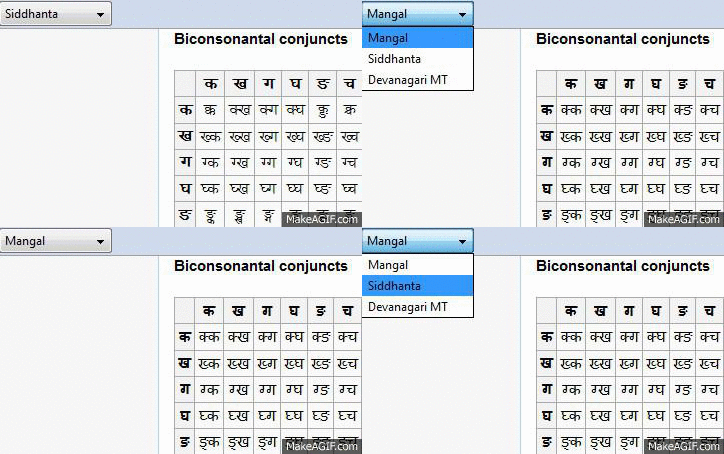
Got it done with PrefBar! And it is definitely a geek tool. Still fine tuning it because I actually want to change 2-3 settings at the same time, but this works so great I made an animated gif of my custom preference in action (used the ScreenshotCaptor Grab Repeat Last Size+Pos feature for the first time):

s1-4.gif


« Last Edit: December 29, 2011, 01:08 AM by daddydave »

Original address: https://www.donationcoder.com/forum/index.php?topic=29318.0