DonationCoder.com forum
 
Read-only archive. This is a static copy of the DonationCoder.com forum. Reading and searching work as before; logging in, posting and private messages do not.
Archive of 2026-10-21 · About this archive · Main site

Last post Author Topic: Alias sharing  (Read 65,988 times)

kae99

  • Charter Honorary Member
  • Joined in 2006
  • ***
  • Posts: 6
Alias sharing
« on: March 23, 2006, 01:47 PM »
Hi all!
First of all, awesome program mouser! I love trying new software and finding those little gems that make your computer experience nicer and this one is one of the best! And good license/sharing your work philosophy!

Said that, I see that f+r has an alias feature that can be really powerful, but it seems to be under used.

I'm sure that it can be a really good tool to control your computer (accessing control panel, enabling/disabling tv out, turning off pc, etc.) just knowing the right windows command (maybe with the aid of third party tools) and assigning it an alias for fast access or to exploit webpages and search engines potential.

But I don't see many posts talking about new aliases to do new things and sharing new ones. (sorry, because I'm a new forum reader so maybe I missed them).

IMHO, it would be really nice to have an organized way of sharing new aliases with the rest of the users, something like a small online searcheable database of aliases, each one with a short description of what it does (in a nice to read format) and the command to be pasted in f+r.

But i know that it would be a lot of work and useless when there are so few of them right now.

In the meantime, maybe an organized way of sharing them through the forum would be nice.

To start sharing, here there are some I have added and use very often:

English Wikipedia search:
1000>>>wp>->Wikipedia Eng | http://en.wikipedia.org/?search=$$1>+>^wp (.*)

Spanish Wikipedia search:
1000>>>wpes>->Wikipedia Esp | http://es.wikipedia.org/wiki/Especial:Search?search=$$1>+>^wpes (.*)

English -> Spanish translation using WordReference:
1000>>>enes>->WordReference English -> Spanish | http://www.wordreference.com/es/translation.asp?tranword=$$1&dict=enes&B10=Search>+>^enes (.*)

Spanish -> English translation using WordReference:
1000>>>esen>->Esp - Eng |  http://www.wordreference.com/es/en/translation.asp?spen=$$1>+>^esen (.*)

Currency conversion:
1000>>>xe>->xe EUR -> USD | http://www.xe.com/ucc/convert.cgi?Amount=$$1&From=EUR&To=USD>n>xe USD -> EUR | http://www.xe.com/ucc/convert.cgi?Amount=$$1&From=USD&To=EUR>n>xe EUR -> GBP | http://www.xe.com/ucc/convert.cgi?Amount=$$1&From=EUR&To=GBP>n>xe GBP -> EUR | http://www.xe.com/ucc/convert.cgi?Amount=$$1&From=GBP&To=EUR>+>^xe (.*)

RAE dictionary search:
1000>>>rae>->RAE | http://buscon.rae.es/draeI/SrvltGUIBusUsual?TIPO_HTML=2&TIPO_BUS=3&LEMA=$$1>n>DRAE | http://buscon.rae.es/draeI/SrvltGUIBusUsual?TIPO_BUS=3&LEMA=$$1>+>^rae (.*)

Bittorrent search:
1000>>>tor>->Torrentz | http://www.torrentz.com/s.php?q=$$1>n>TorrentSpy |  http://www.torrentspy.com/search.asp?query=$$1>n>TorrentTyphoon | http://www.torrenttyphoon.com/default.aspx?q=$$1>n>Mininova | http://mininova.org/search/?search=$$1>n>Bittorrent | http://search.bittorrent.com/search.jsp?query=$$1>n>Pirate Bay | http://thepiratebay.org/search.php?q=$$1>+>^tor (.*)

And accessing my most frequently used webpages like:

Gmail
1000>>>gmail>->Gmail | www.gmail.com

Netvibes
1000>>>netvibes>->Netvibes | www.netvibes.com

----------

I know most of them are 'Spanish related', but I'm from Spain :), i hope they will be useful for somebody or give new ideas of new commands to add to their own collection.

All of them fall in the category of 'exploiting search engines potential', I got the ideas for them from the YubNub search engine.

If somebody doesn't know it, YubNub it is a 'social commandline for the web' and has literally thousands of commands like these!!

Just write 'ls' in their search box (or 'ls <something>' to narrow the search) and you will find tons of commands to do nearly anything with the search engines that exist out there.

To add it to f+r, just copy the url related to the command that you want to use from YubNub and replace %s by $$1 in FARR and you are done!

Or, add this alias and you will have all the power of YubNub in FARR :)

YubNub commandline:
1000>>>yn>->YubNub | http://www.yubnub.org/parser/parse?command=$$1+$$2>+>^yn ([^\s]+)(?:\s)?(.*)

Examples:
yn wp test --> Look up 'test' in the English Wikipedia
yn gim test --> Performs a Google Image search for 'test'
etc.

I just prefer to add the ones that i use most as direct aliases so i have to type less and they work faster because YubNub doesn't need to parse it.

Kae

P.S. The way that yubnub allows searching and looking up its commands could be a good one for aliases database too ;)


mouser

  • First Author
  • Administrator
  • Joined in 2005
  • *****
  • Posts: 40,931
    • Gathering Badge
    • Plugin Coding Medal
    • Participated in NANY Challenge Seventeen Times
    • Cody Award
    • Coding Snacks
    • Volunteers/Staff
Re: Alias sharing
« Reply #1 on: March 25, 2006, 06:03 AM »
kae, sorry for the delay in responding -
i think this is a great idea, i hope to make it easier to share aliases soon - it's definitely something that should be added to farr v2.

let's use this thread for anyone that might have aliases to post, and then i can try to collect them and make them available for easier download and import.

jballi

  • Charter Member
  • Joined in 2005
  • ***
  • Posts: 22
Re: Alias sharing
« Reply #2 on: March 25, 2006, 08:53 PM »
By request of jgpaiva
AMG (allmusic.com)

Discovered these by trial and error.  Artist search included by default with recent versions of FARR.
-------

Artist Search:
http://www.allmusic.com/cg/amg.dll?P=amg&sql=$$1&x=0&y=0&opt1=1&sourceid=mozilla-search

Album Search:
http://www.allmusic.com/cg/amg.dll?P=amg&sql=$$1&x=0&y=0&opt1=2&sourceid=mozilla-search

Song Search
http://www.allmusic.com/cg/amg.dll?P=amg&sql=$$1&x=0&y=0&opt1=3&sourceid=mozilla-search

Style Search:
http://www.allmusic.com/cg/amg.dll?P=amg&sql=$$1&x=0&y=0&opt1=4&sourceid=mozilla-search

Label Search:
http://www.allmusic.com/cg/amg.dll?P=amg&sql=$$1&x=0&y=0&opt1=5&sourceid=mozilla-search


P.S.  The correct search parameter delimiter for this command "appears" to be the OR symbol: "|"  So, if searching for Billy Ray Cyrus (I'm not sure why you would), you would enter (sans quotes) "Billy|Ray|Cyrus" as your search parameter.  I found this by trial and error.  If anyone has more correct information, please post!
« Last Edit: March 25, 2006, 09:09 PM by jballi »

jgpaiva

  • Artificial Idiocy
  • Global Moderator
  • Joined in 2006
  • *****
  • Posts: 4,727
    • Cody Award
    • Participated in NANY Challenge Once
    • Coding Snacks
    • Portugal Inhabitant
    • Linux User
Re: Alias sharing
« Reply #3 on: March 26, 2006, 01:00 AM »
Thanks for posting it here, jballi.

Here are the ones i most use:

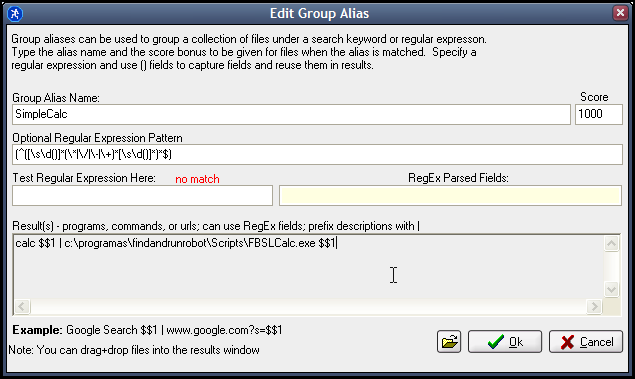
SimpleCalc, by Gerome, more information here. (i've set up the alias for '+', not calc)
1000>>>SimpleCalc>->calc $$1 | Scripts/FBSL.exe Scripts/FBSLCalc.fbs "$$1">+>^\+(.*)

An alias that alows you to directlly type an url (without http:// or www.) and open it in the "default" browser. (i set it up for opera)
1000>>>Surf.com.net.org.pt.info.nu.ru>->c:\programas\opera\opera.exe www.$$1>+>((.*)(.com|.net|.org|.pt|.info|.nu|.ru)$)

An alias for opening pages that don't work in opera ;)
1000>>>Surf in ie>->C:\Programas\Internet Explorer\iexplore.exe $$1>+>^ie (.*)

The necessary command to not needing the windows run box:
1000>>>R>->Run $$1|$$1>+>^r (.*)

And last but not least, the most important of them all, the DC alias (got from this thread):
1000>>>Donation Coder>->DC Forum Search for "$$1" | http://www.donationcoder.com/forum/index.php?action=search2;search=$$1>n>Recent Posts | http://www.donationcoder.com/forum/index.php?action=recentdense>n>New Replies | http://www.donationcoder.com/forum/index.php?action=unreadreplies>n>Unread Posts | http://www.donationcoder.com/forum/index.php?action=unread;all>n>Specials | http://www.donationcoder.com/Specials/index.html>+>^dc[ ]*(.*)

lanux128

  • Global Moderator
  • Joined in 2005
  • *****
  • Posts: 6,277
    • Coding Snacks
    • Volunteers/Staff
    • Gathering Badge
    • Participated in NANY Challenge Once
    • Linux User
Re: Alias sharing
« Reply #4 on: March 28, 2006, 02:29 AM »
good idea kae99.  :up:
something like this would only emphasise f+rr's capabilities. on my part, i would like to suggest that a special section is dedicated to user-submitted aliases on the f+rr page.

alexp

  • Is cheese the plural of choose?????
  • Charter Member
  • Joined in 2005
  • ***
  • Posts: 41
Re: Alias sharing
« Reply #5 on: March 28, 2006, 06:52 AM »
OK call me stupid but exactly how would I go about implementing these into f+rr? I know you have to go to the groups tab and create a new group but then exactly what goes where?
Why is it that writers write, but fingers don't fing, grocers don't groce, and hammers don't ham? If the plural of tooth is teeth, why isn't the plural of booth beeth? One goose, 2 geese. So, one moose, 2 meese? One index, two indices? Is cheese the plural of choose?

lanux128

  • Global Moderator
  • Joined in 2005
  • *****
  • Posts: 6,277
    • Coding Snacks
    • Volunteers/Staff
    • Gathering Badge
    • Participated in NANY Challenge Once
    • Linux User
Re: Alias sharing
« Reply #6 on: March 28, 2006, 07:22 AM »
Quote from: "alexp"
I know you have to go to the groups tab and create a new group but then exactly what goes where?

actually you can go to F+RR's options then click on "Import and Export" menu and choose "Import Alias Group List".

you can get some pre-configured aliases here and here, but I think these already included in the newer versions of F+RR

jgpaiva

  • Artificial Idiocy
  • Global Moderator
  • Joined in 2006
  • *****
  • Posts: 4,727
    • Cody Award
    • Participated in NANY Challenge Once
    • Coding Snacks
    • Portugal Inhabitant
    • Linux User
Re: Alias sharing
« Reply #7 on: September 29, 2006, 09:58 AM »
Thanks to lanux, i refound this topic.
Here's the new alias i use for the calculator, which allows you to input maths directly without having to prepend the calculation with "calc" or "+" as i had in my previous example.

Code
(^([\s\d()]*(\*|\/|\-|\+)*[\s\d()]*)*$)

lanux128

  • Global Moderator
  • Joined in 2005
  • *****
  • Posts: 6,277
    • Coding Snacks
    • Volunteers/Staff
    • Gathering Badge
    • Participated in NANY Challenge Once
    • Linux User
Re: Alias sharing
« Reply #8 on: October 02, 2006, 02:33 AM »
jgpaiva: how do i enter your alias in the alias group?  :-[
and does this alias still use Gerome's FBSL Calc.exe?
btw, the forum's bookmarking abilites is very useful. that's how i am able "remember" all this topics. :Thmbsup:

jgpaiva

  • Artificial Idiocy
  • Global Moderator
  • Joined in 2006
  • *****
  • Posts: 4,727
    • Cody Award
    • Participated in NANY Challenge Once
    • Coding Snacks
    • Portugal Inhabitant
    • Linux User
Re: Alias sharing
« Reply #9 on: October 02, 2006, 07:48 AM »
jgpaiva: how do i enter your alias in the alias group?  :-[
and does this alias still use Gerome's FBSL Calc.exe?

Yes, that alias works with gerome's calculator.
Here's how i have it configured: see attached image

btw, the forum's bookmarking abilites is very useful. that's how i am able "remember" all this topics. :Thmbsup:
Good point, i always tend to forget that function exists :(
« Last Edit: October 02, 2006, 07:50 AM by jgpaiva »

mouser

  • First Author
  • Administrator
  • Joined in 2005
  • *****
  • Posts: 40,931
    • Gathering Badge
    • Plugin Coding Medal
    • Participated in NANY Challenge Seventeen Times
    • Cody Award
    • Coding Snacks
    • Volunteers/Staff
Re: Alias sharing
« Reply #10 on: March 26, 2007, 12:33 PM »
im incorporating all of these into new FARR v2 default aliases, but I'd love to hear more suggested aliases to add..

speak up -- now is your chance to have your favorite aliases make history!  :P

cnewtonne

  • Honorary Member
  • Joined in 2006
  • **
  • Posts: 117
Re: Alias sharing
« Reply #11 on: March 27, 2007, 09:16 PM »
Here're mine...

Creating new outlook items
alias name: ol
----------------------------------------
journal | c:\program files\Microsoft Office\OFFICE11\OUTLOOK.EXE /c ipm.activity
appointment | c:\program files\Microsoft Office\OFFICE11\OUTLOOK.EXE /c ipm.appointment
contact | c:\program files\Microsoft Office\OFFICE11\OUTLOOK.EXE /c ipm.contact
message | c:\program files\Microsoft Office\OFFICE11\OUTLOOK.EXE /c ipm.note
note | c:\program files\Microsoft Office\OFFICE11\OUTLOOK.EXE /c ipm.stickynote
task | c:\program files\Microsoft Office\OFFICE11\OUTLOOK.EXE /c ipm.task

Shutting down system with timer using native commands.
Alias: sys
argument: number of seconds
----------------------------------------
LOGOFF $$1 secs | c:\windows\system32\shutdown.exe -i -l -t $$1
REBOOT $$1 secs | c:\windows\system32\shutdown.exe -r -f -t $$1
SHUTDOWN $$1 secs | c:\windows\system32\shutdown.exe -s -f -t $$1
above INTERACTIVE $$1 | c:\windows\system32\shutdown.exe -i -t $$1
ABORT above $$1 | c:\windows\system32\shutdown.exe -a -t $$1

JoTo

  • Super Honorary
  • Charter Member
  • Joined in 2005
  • ***
  • Posts: 236
    • Gathering Badge
    • Participated in NANY Challenge Twice
Re: Alias sharing
« Reply #12 on: April 04, 2007, 08:47 AM »
Hi there,

the last versions of FARR v2 added some duplicate email-alias entries. That makes me to have a closer look at them all. And then i decided to try to improve the very complicated (at least two different) email-aliases and try to merge them in a "one fits all" one.

This is what i get so far, and it works for me very well. So this version is the one and only email alias i now need and use:

Group Alias Name: email
RegEx Pattern: ^email\s+([a-zA-Z0-9._%-]+@[A-Za-z0-9.-]+\.[A-Za-z]{2,4})\s*(.*)
Result: Email to $$1 with Subject $$2|mailto:$$1?subject=$$2

It accepts:

email anyname@anydomain.tld    (Brings up the default email editor with only a receipent - no subject)

email anyname@anydomain.tld  bla1 bla2 bla3 ... blaN  (Brings up the default email editor with a receipent AND a subject with all the words from bla1 upto blaN)

(For anyname@anydomain.tld also nicknames can be used that your email editor then understands and can expand it to real adresses)

If s.o. finds a bug or can improve, i would be glad to hear about that.

Greetings
JoTo

UPDATE:
Forgot to implement the lowercase letters in the character classes. So the first version will only work if regexmatching is set to case-insensitive. With this version it works in both modes.
« Last Edit: April 09, 2007, 04:45 PM by JoTo »

rjbull

  • Charter Member
  • Joined in 2005
  • ***
  • Posts: 3,217
Re: Alias sharing
« Reply #13 on: April 04, 2007, 09:54 AM »
Creating new outlook items

cnewtonne,

I take it this is for the "full" version of Outlook, not Express?

I thought of giving Outlook etc. an alias of Bureaucracy, which turned out to shorten by John Knowles' ABCZ system to "bury."  Which is about what I'd like to do with it...
:mad:


justice

  • Solve issues simply.
  • Supporting Member
  • Joined in 2006
  • **
  • Posts: 1,898
    • Participated in NANY Challenge Four Times
    • Cody Award
    • Coding Snacks
    • DJ Badge - DJ
Re: Alias sharing
« Reply #14 on: May 26, 2007, 12:07 AM »
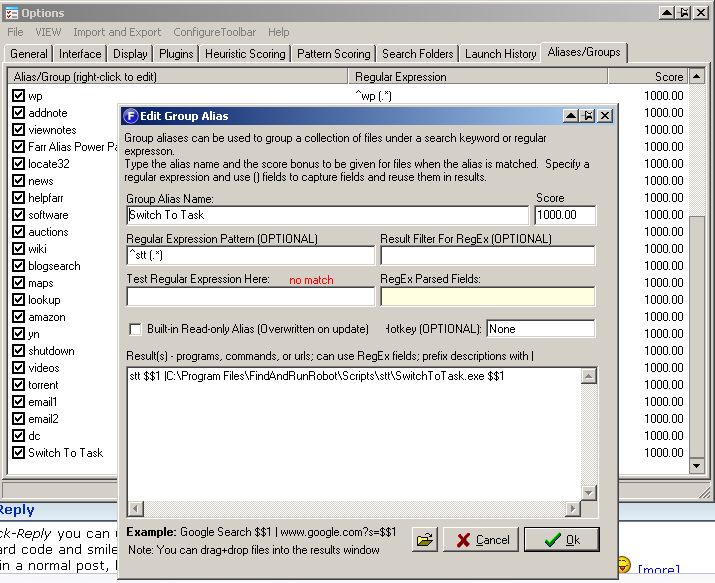
Always wanted to use FARR instead of the taskbar or alt-tab? Want to switch to windows or tasks quickly? Use stt:

Code
1000>>>Switch To Task>->stt $$1 |C:\Scripts\SwitchToTask\SwitchToTask.exe $$1>+>^stt (.*)
Change the path to SwitchToTask.exe to the folder you extract the zip file to.

Then type in farr:
Code
stt fox
to switch to firefox (case insensitive regexes supported)
Code
stt opera
to switch to opera
or any other part of a window. Or a lot more powerful using AHK regular expressions
« Last Edit: May 26, 2007, 12:32 AM by justice »

Dr-Leech

  • Psychedelic Coder
  • Member
  • Joined in 2006
  • **
  • Posts: 151
Re: Alias sharing
« Reply #15 on: May 26, 2007, 12:25 AM »
nice, dude..

It's really useful when you can't use Alt+Tab (like using VMWare, or VNC, etc)

thanks.

justice

  • Solve issues simply.
  • Supporting Member
  • Joined in 2006
  • **
  • Posts: 1,898
    • Participated in NANY Challenge Four Times
    • Cody Award
    • Coding Snacks
    • DJ Badge - DJ
Re: Alias sharing
« Reply #16 on: May 26, 2007, 12:36 AM »
Or when you've got 7 explorer windows open + 10 other applications and you want to switch to the right one ;)

Dr-Leech

  • Psychedelic Coder
  • Member
  • Joined in 2006
  • **
  • Posts: 151
Re: Alias sharing
« Reply #17 on: May 26, 2007, 01:08 AM »
ya, right.. or many notepads and to get the correct..

:)

Laughing Man

  • V for Viktor
  • Charter Member
  • Joined in 2006
  • ***
  • Posts: 105
Re: Alias sharing
« Reply #18 on: May 27, 2007, 04:25 AM »
Odd, I added everything needed for the stt alias to work and it checked out. But when I try using it, it sees the autohotkey script but typing in stt opera and stt firefox doesn't do anything.

justice

  • Solve issues simply.
  • Supporting Member
  • Joined in 2006
  • **
  • Posts: 1,898
    • Participated in NANY Challenge Four Times
    • Cody Award
    • Coding Snacks
    • DJ Badge - DJ
Re: Alias sharing
« Reply #19 on: May 27, 2007, 09:26 AM »
Thanks Laughing Man! Sorry to see you're having problems. The code of SwitchToTask is just as folllows:
Code
#NoEnv
SendMode Input
SetTitleMatchMode RegEx
WinActivate, i)%1%
It matches on the window title (case insensitive -partial matches allowed). I don't see why it can't work, maybe some AHK expert can solve the issue?

Armando

  • Charter Member
  • Joined in 2005
  • ***
  • Posts: 2,727
    • Coding Snacks
Re: Alias sharing
« Reply #20 on: May 31, 2007, 10:04 PM »
Odd, I added everything needed for the stt alias to work and it checked out. But when I try using it, it sees the autohotkey script but typing in stt opera and stt firefox doesn't do anything.

Same thing here. I don't know what I am doing wrong...
"I suppose it can be said that I'm an absent-minded driver. It's true that I've driven through a number of red lights on occasion, but on the other hand, I've stopped at a lot of green ones but never gotten credit for it."
Glenn Gould

justice

  • Solve issues simply.
  • Supporting Member
  • Joined in 2006
  • **
  • Posts: 1,898
    • Participated in NANY Challenge Four Times
    • Cody Award
    • Coding Snacks
    • DJ Badge - DJ
Re: Alias sharing
« Reply #21 on: May 31, 2007, 10:50 PM »
* I downloaded the zipfile provided
* extracted it to C:\Program Files\FindAndRunRobot\Scripts\stt
* changed the alias to 1000>>>Switch To Task>->stt $$1 |C:\Program Files\FindAndRunRobot\Scripts\stt\SwitchToTask.exe $$1>+>^stt (.*)
* found the alias tab in FARR
* right click - paste preformatted alias group
* pasted in point 3

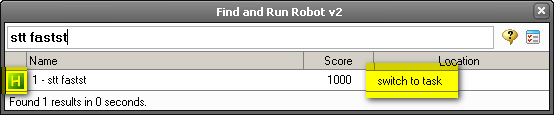
and it worked. I am using the Find+Run Robot v2.00.82 though. See the highlighted text below to verify that it works (the AHK icon and the switch to task text)
[attachimg=#]
[attachthumb=#]
« Last Edit: May 31, 2007, 10:55 PM by justice »

Armando

  • Charter Member
  • Joined in 2005
  • ***
  • Posts: 2,727
    • Coding Snacks
Re: Alias sharing
« Reply #22 on: May 31, 2007, 11:25 PM »
@ justice : thanks!

It works. Just a little syntax problem on my side -- I wasn't using the "paste preformatted alias group" function and so I made a mistake when I filled the fields.

Thanks again.
"I suppose it can be said that I'm an absent-minded driver. It's true that I've driven through a number of red lights on occasion, but on the other hand, I've stopped at a lot of green ones but never gotten credit for it."
Glenn Gould

Liquidmantis

  • Supporting Member
  • Joined in 2007
  • **
  • Posts: 64
Re: Alias sharing
« Reply #23 on: June 01, 2007, 04:28 AM »
I've got a new one.  I really wanted FARR to support Firefox bookmark keywords so I created an AutoHotKey script to add it in conjuction with an alias.

Here's the AutoHotKey script:
Code
SetTitleMatchMode 2
Ifwinexist, - Mozilla Firefox
	WinActivate
Else
	{
		Run,"D:\Program Files\Mozilla Firefox\firefox.exe"
		winwait, - Mozilla Firefox
		winactivate
	}
Sleep 25
SendInput ^t
Sleep, 250
SendInput !d
Sleep, 25
counter = 1
Loop
	{
		inputParameter := %counter%
		If inputParameter !=
			{
				SendInput %inputParameter%{space}
				counter++
			}
		Else
			Break
	}
SendInput {enter}
return

And here is the FARR alias:
Code
1000>>>FireFox Keyword>->Firefox Keyword $$1|d:\scripts\ffkw.ahk $$1>+>ffkw (.*)

Modify path and names to suit.  This also works for keyword searches, e.g. ffkw wp .w
« Last Edit: June 01, 2007, 04:30 AM by Liquidmantis »

mouser

  • First Author
  • Administrator
  • Joined in 2005
  • *****
  • Posts: 40,931
    • Gathering Badge
    • Plugin Coding Medal
    • Participated in NANY Challenge Seventeen Times
    • Cody Award
    • Coding Snacks
    • Volunteers/Staff
Re: Alias sharing
« Reply #24 on: June 01, 2007, 04:46 AM »
this sounds quite intriguing, i'll have to try it and see how it works since i've never used ff keywords.

Original address: https://www.donationcoder.com/forum/index.php?topic=2907.0