DonationCoder.com forum
 
Read-only archive. This is a static copy of the DonationCoder.com forum. Reading and searching work as before; logging in, posting and private messages do not.
Archive of 2026-10-21 · About this archive · Main site

Author Topic: DONE: Commandline Calculator (for Farr)  (Read 28,527 times)

jgpaiva

  • Artificial Idiocy
  • Global Moderator
  • Joined in 2006
  • *****
  • Posts: 4,727
    • Cody Award
    • Participated in NANY Challenge Once
    • Coding Snacks
    • Portugal Inhabitant
    • Linux User
DONE: Commandline Calculator (for Farr)
« on: February 06, 2006, 07:27 PM »
Farr is my most loved app. I use it to launch everything, and i hope soon, it'll have even more uses.
But I'd like Farr to be my calculator.
Without bugging mouser to include this in Farr, i can just add a groups alias that has a regex that detects mathematics operators (something like: ((.*)+(.*))|((.*)-(.*))
And then, associate it with a ahk script that takes command line parameters, and have the group alias launch it with the expression that i type.
Up until now, everything is easy. The problem is, making the program that does the calc.
I tried something like:

Code
;Calc
if 0 < 1 ; if there are not command line parameters, exit
  ExitApp
Expr=
Loop %0%
  {
  counter := %a_index%
  Expr=%Expr%%counter%  
  }
StringReplace CompleteExpr, Expr,`,,.,ReplaceAll
Result:=0 + Expr
MsgBox,.%Result%.
return
But the line "Result:=0 + Expr" isn't interpreted as i expected, Expr has to be a number, and it's an expression :(
Any ideas?
Or maybe some command line app that does this?
Hope you can help me! thanks!
« Last Edit: March 01, 2006, 02:42 PM by brotherS »

mouser

  • First Author
  • Administrator
  • Joined in 2005
  • *****
  • Posts: 40,931
    • Gathering Badge
    • Plugin Coding Medal
    • Participated in NANY Challenge Seventeen Times
    • Cody Award
    • Coding Snacks
    • Volunteers/Staff
Re: Farr's calculator
« Reply #1 on: February 06, 2006, 09:08 PM »
dont know autohotkey enough to answer this, but thought i would add two things:
1) might be nice to have it copy the result to the clipboard.
2) an alternative alias if you want to specify an explicit command instead of trying to detect all math expressions would be just to have a regex expression of:  calc (.*)
im not saying you couldn't use a regex like you want that would let you just type any expression, just saying using a keyword like calc would free you from having to figure out the regular expression that covers all expressions.

jgpaiva

  • Artificial Idiocy
  • Global Moderator
  • Joined in 2006
  • *****
  • Posts: 4,727
    • Cody Award
    • Participated in NANY Challenge Once
    • Coding Snacks
    • Portugal Inhabitant
    • Linux User
Re: Farr's calculator
« Reply #2 on: February 06, 2006, 09:23 PM »
1) Very good idea! When i found out how to do this, I'll add that option!
2 )I already have the alias calc for windows calculator ;) And i prefer to just type ahead, usually, i want to know the result as fast as possible :D

skrommel

  • Fastest code in the west
  • Developer
  • Joined in 2005
  • ***
  • Posts: 933
    • Participated in NANY Challenge Twice
    • Coding Snacks
Re: Farr's calculator
« Reply #3 on: February 06, 2006, 10:07 PM »
:) Lazlo has an AHK solution over at http://www.autohotkey.com/forum/viewtopic.php?t=5060.

You could also download calc387.zip from http://home.att.net/~short.stop/freesoft/calc.htm

Skrommel

mouser

  • First Author
  • Administrator
  • Joined in 2005
  • *****
  • Posts: 40,931
    • Gathering Badge
    • Plugin Coding Medal
    • Participated in NANY Challenge Seventeen Times
    • Cody Award
    • Coding Snacks
    • Volunteers/Staff
Re: Farr's calculator
« Reply #4 on: February 06, 2006, 10:57 PM »
gerome, (one of?) the primary developer of FSBL (see end of http://www.donationcoder.com/forum/index.php?topic=1167.msg15008#msg15008) ,

has made a tiny little FSBL script for this with instructions on how to use the very cool online compiler to make a 100k exe of it.
i've tested it and it works like a charm!

here's the script:

Code
$AppType GUI
Dim $cmd = Remove( command(-1), Chr(34) )
Dim $code = "Dim $result = " & cmd & ": Return result"
Dim $resulttext = $cmd & " = " & Execline(code)
Msgbox( Null, $resulttext ,"Result:", MB_OK )
ClipBoardSetText( $resulttext )


You can compile that into a small exe by pasting it into this page and hitting build (use left button):
http://gedd123.free.fr/studio/fbsl2exe.php

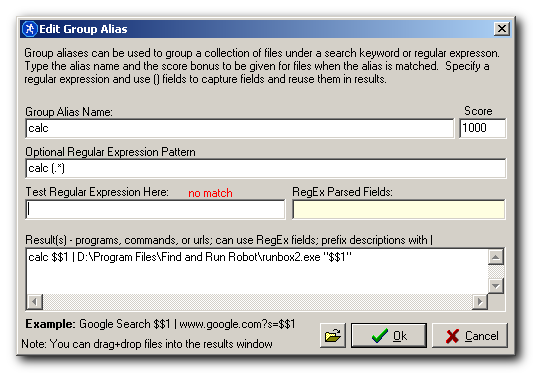
that will generate for you a 100k exe that I saved my compiled exe as runbox2.exe

which you can configure this way for farr:

runbox1.png


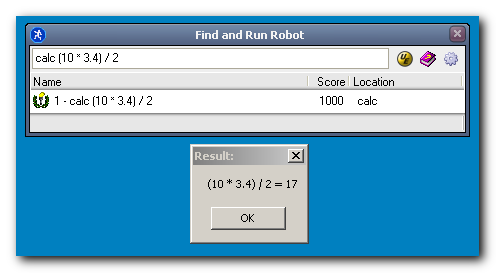
With results like this:
runbox2.png


nice!!!!

mouser

  • First Author
  • Administrator
  • Joined in 2005
  • *****
  • Posts: 40,931
    • Gathering Badge
    • Plugin Coding Medal
    • Participated in NANY Challenge Seventeen Times
    • Cody Award
    • Coding Snacks
    • Volunteers/Staff
Re: Farr's calculator
« Reply #5 on: February 06, 2006, 10:58 PM »
note the script also copies the result to the clipboard for easier pasting into another application.

and needless to say you need to change the filename and path to point to wherever you put your exe.

FSBL = Freestyle Basic Script Langage
it's free for personal use by the way.
« Last Edit: February 06, 2006, 11:09 PM by mouser »

Gerome

  • Charter Honorary Member
  • Joined in 2006
  • ***
  • Posts: 154
Re: Farr's calculator
« Reply #6 on: February 06, 2006, 11:05 PM »
Hello,

Yes, i'm the original FBSL author since 2001 :)
FBSL was made for Basic lovers, but one can easily come from C, PHP or Pascal :)
It's simple to use and versatile, it's documentation is about 500 pages and quite complete, bundled with tons of samples + tutorials!
For people who are aware of FBSL capacities, i invite you to get the full Setup (1.5 MB) there :
http://gedd123.free.fr/FBSLv3.exe

And thanks to Mouser for his support!
Enjoy ;)
Yours,
(¯`·._.·[Gerome GUILLEMIN]·._.·´¯)
http://www.fbsl.net [FBSL Author]
http://gedd123.free.fr/FBSLv3.zip [FBSL Help file]
(¯`·._.·[If you need help... just ask]·._.·´¯)

mouser

  • First Author
  • Administrator
  • Joined in 2005
  • *****
  • Posts: 40,931
    • Gathering Badge
    • Plugin Coding Medal
    • Participated in NANY Challenge Seventeen Times
    • Cody Award
    • Coding Snacks
    • Volunteers/Staff
Re: Farr's calculator
« Reply #7 on: February 06, 2006, 11:09 PM »
welcome to the site Gerome

mouser

  • First Author
  • Administrator
  • Joined in 2005
  • *****
  • Posts: 40,931
    • Gathering Badge
    • Plugin Coding Medal
    • Participated in NANY Challenge Seventeen Times
    • Cody Award
    • Coding Snacks
    • Volunteers/Staff
Re: Farr's calculator
« Reply #8 on: February 07, 2006, 07:41 AM »
here's the precompiled runbox2.exe (which is the calculator exe fbsl program) for those who don't want to go through the online compiler.

jgpaiva

  • Artificial Idiocy
  • Global Moderator
  • Joined in 2006
  • *****
  • Posts: 4,727
    • Cody Award
    • Participated in NANY Challenge Once
    • Coding Snacks
    • Portugal Inhabitant
    • Linux User
Re: DONE - Idea: Commandline Calculator (for Farr)
« Reply #9 on: February 07, 2006, 06:14 PM »
I love this program!
It does exactly what i was needing, and the "copy to clipboard" feature is extremelly handy, thanks mouser for remembering it :D
Looks like Fbsl is very powerfull, maybe it should be more featured in coding snacks!
I surelly will look into it ;)
Thanks Gerome!

PS: i have set my regex to be activated with "+", i think it's easier than writing "calc".

lanux128

  • Global Moderator
  • Joined in 2005
  • *****
  • Posts: 6,277
    • Coding Snacks
    • Volunteers/Staff
    • Gathering Badge
    • Participated in NANY Challenge Once
    • Linux User
Re: DONE - Idea: Commandline Calculator (for Farr)
« Reply #10 on: February 09, 2006, 01:39 AM »
hi there,

this is very much the same as my earlier request...
glad to see that the idea has been floating around. ;-)

best regards,
lanux

Gerome

  • Charter Honorary Member
  • Joined in 2006
  • ***
  • Posts: 154
Re: DONE - Idea: Commandline Calculator (for Farr)
« Reply #11 on: February 10, 2006, 10:50 AM »
Hi there!
I love this program!
It does exactly what i was needing, and the "copy to clipboard" feature is extremelly handy, thanks mouser for remembering it :D
Looks like Fbsl is very powerfull, maybe it should be more featured in coding snacks!
I surelly will look into it ;)
Thanks Gerome!

PS: i have set my regex to be activated with "+", i think it's easier than writing "calc".

I'm glad to see happy users :)
since Fbsl was developped for simple, middle and hard tasks, and for different programming style approaches : basic, semi ooped and more... minded developers, i can affirm that Fbsl is made for you without any restriction apart the limit of your imagination ;)

Enjoy it!
Yours,
(¯`·._.·[Gerome GUILLEMIN]·._.·´¯)
http://www.fbsl.net [FBSL Author]
http://gedd123.free.fr/FBSLv3.zip [FBSL Help file]
(¯`·._.·[If you need help... just ask]·._.·´¯)

jdmarch

  • Charter Member
  • Joined in 2005
  • ***
  • Posts: 186
Re: DONE - Idea: Commandline Calculator (for Farr)
« Reply #12 on: February 18, 2006, 06:45 PM »
Wonderful!!! It's great that the expression is also copied to the clipboard (not only the result); this makes it trivial to repeat the calculation with a slight modification.

And I'm downloading FBSL right now!!

Original address: https://www.donationcoder.com/forum/index.php?topic=2344.0