DonationCoder.com forum
 
Read-only archive. This is a static copy of the DonationCoder.com forum. Reading and searching work as before; logging in, posting and private messages do not.
Archive of 2026-10-21 · About this archive · Main site

Last post Author Topic: DONE: Scud (RandomMediaLauncher) - enjoy your media collection in a fun way!  (Read 58,604 times)

brotherS

  • Master of Good Ideas
  • Honorary Member
  • Joined in 2005
  • **
  • Posts: 2,261
Hi!

Wouldn't it be fun if you had a little launcher tool that would ask you for a path (and you could either click through to a folder or just paste a path into the window) and it would search for all media matching the given extension(s) and then randomly launch one (with the media player association you set in Windows)? I'd love it! :)

Optional extras:
- put the full path of the file launched into the Windows clipboard
- a customizable list of file types to pick from, somewhat like in Locate (http://www.donationcoder.com/forum/index.php?topic=1385.0) so you don't have to enter all the different video or sound file types manually

Thank you.
« Last Edit: December 05, 2011, 08:11 AM by brotherS »

skwire

  • I eat Coding Snacks for breakfast...
  • Global Moderator
  • Joined in 2005
  • *****
  • Posts: 5,297
    • Participated in NANY Challenge Seventeen Times
    • Coding Snacks
    • Superboy Coder
    • Cody Award
    • Volunteers/Staff
    • Gathering Badge
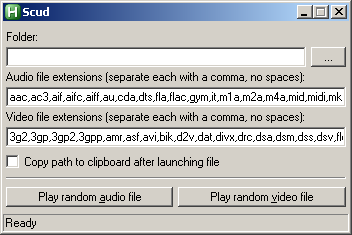
Give this a shot: Scud

2011-12-05_000216.png
« Last Edit: December 05, 2011, 06:03 AM by skwire »

brotherS

  • Master of Good Ideas
  • Honorary Member
  • Joined in 2005
  • **
  • Posts: 2,261
Wow, awesome! Thanks a lot! Works like a charm :Thmbsup:
Thank you.

brotherS

  • Master of Good Ideas
  • Honorary Member
  • Joined in 2005
  • **
  • Posts: 2,261
More ideas:

- an option below the folder field to specify "must match", results would be limited to matching a pattern you enter here, e.g. "vacation" would only launch files with that search string in the path (maybe an additional option to choose if it must be in the file name or/and in the directory part of the path)

- how about an icon for Scud? The forum didn't allow to attach it, so here it is: http://www.zshare.net/download/96988396bf848a4c/

- how about an option/button for a random image?
Thank you.
« Last Edit: December 05, 2011, 02:28 PM by brotherS »

brotherS

  • Master of Good Ideas
  • Honorary Member
  • Joined in 2005
  • **
  • Posts: 2,261
And a little bug :)

I got an "error launching file" - I can start it OK from Locate, so not sure why... the only 'special' thing is that the path contains a "#" character, does AHK maybe have a problem with that?

Edit: Hmm... another error message, but this time no "#" character in the path.
Thank you.

skwire

  • I eat Coding Snacks for breakfast...
  • Global Moderator
  • Joined in 2005
  • *****
  • Posts: 5,297
    • Participated in NANY Challenge Seventeen Times
    • Coding Snacks
    • Superboy Coder
    • Cody Award
    • Volunteers/Staff
    • Gathering Badge
- an option below the folder field to specify "must match", results would be limited to matching a pattern you enter here, e.g. "vacation" would only launch files with that search string in the path

Done.

(maybe an additional option to choose if it must be in the file name or/and in the directory part of the path)

Done.

- how about an icon for Scud? The forum didn't allow to attach it, so here it is: http://www.zshare.net/download/96988396bf848a4c/

Done.

- how about an option/button for a random image?

Done.

I got an "error launching file" - I can start it OK from Locate, so not sure why... the only 'special' thing is that the path contains a "#" character, does AHK maybe have a problem with that?

Fixed.

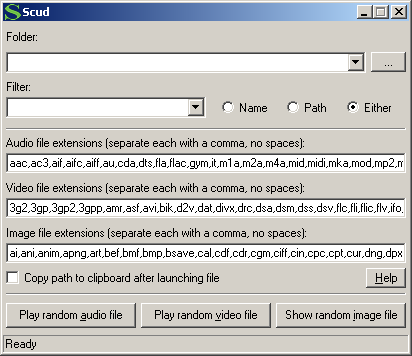
New version: Scud download

Also, click the Help button to learn how to add entries to the folder and filter dropdowns.

2011-12-05_125749.png
« Last Edit: December 05, 2011, 07:17 PM by skwire »

brotherS

  • Master of Good Ideas
  • Honorary Member
  • Joined in 2005
  • **
  • Posts: 2,261
Thanks a lot! Great idea with the help button/functions behind it.

For some reason the icon looks a little bit fuzzy here on the taskbar (Win7), should I create another icon?
Thank you.

skwire

  • I eat Coding Snacks for breakfast...
  • Global Moderator
  • Joined in 2005
  • *****
  • Posts: 5,297
    • Participated in NANY Challenge Seventeen Times
    • Coding Snacks
    • Superboy Coder
    • Cody Award
    • Volunteers/Staff
    • Gathering Badge
Redownload it and see if this build makes a difference in regards to the icon.

Josh

  • Charter Honorary Member
  • Joined in 2005
  • ***
  • Posts: 3,411
    • Gathering Badge
    • Official Forum Clown
    • Coding Snacks
    • Plugin Coding Medal
    • Volunteers/Staff
    • Military Service Badge - US Army
    • Furry Fandom Badge - Furry Fandom
    • Linux User
WOW! Great tool Skwire!
Strength in Knowledge

skwire

  • I eat Coding Snacks for breakfast...
  • Global Moderator
  • Joined in 2005
  • *****
  • Posts: 5,297
    • Participated in NANY Challenge Seventeen Times
    • Coding Snacks
    • Superboy Coder
    • Cody Award
    • Volunteers/Staff
    • Gathering Badge
Great idea with the help button/functions behind it.

Thanks, even though I was lazy and didn't implement auto-saving of entered paths.

WOW! Great tool Skwire!

Thanks, glad you find it useful.

brotherS

  • Master of Good Ideas
  • Honorary Member
  • Joined in 2005
  • **
  • Posts: 2,261
Whatever you did, you did it well: the icon looks beautiful now!  :Thmbsup:
Thank you.

brotherS

  • Master of Good Ideas
  • Honorary Member
  • Joined in 2005
  • **
  • Posts: 2,261
More ideas:

- make Alt+f work as a shortcut to activate the Folder selection

- Alt+r --> Filter selection

- Alt+n --> Name

- Alt+p --> Path

- Alt+e --> Either
Thank you.

skwire

  • I eat Coding Snacks for breakfast...
  • Global Moderator
  • Joined in 2005
  • *****
  • Posts: 5,297
    • Participated in NANY Challenge Seventeen Times
    • Coding Snacks
    • Superboy Coder
    • Cody Award
    • Volunteers/Staff
    • Gathering Badge
More ideas:
- make Alt+f work as a shortcut to activate the Folder selection
- Alt+r --> Filter selection
- Alt+n --> Name
- Alt+p --> Path
- Alt+e --> Either

Done.  I also added Alt+C to toggle the clipboard option.  Please redownload.

brotherS

  • Master of Good Ideas
  • Honorary Member
  • Joined in 2005
  • **
  • Posts: 2,261
Great! Could you please use the font and font size you use for the Trout menus? It's better to read than the current one used in Scud now.
Thank you.

skwire

  • I eat Coding Snacks for breakfast...
  • Global Moderator
  • Joined in 2005
  • *****
  • Posts: 5,297
    • Participated in NANY Challenge Seventeen Times
    • Coding Snacks
    • Superboy Coder
    • Cody Award
    • Volunteers/Staff
    • Gathering Badge
Great! Could you please use the font and font size you use for the Trout menus? It's better to read than the current one used in Scud now.

The only thing I do in my apps is put in code to ignore large-font DPI settings for GUI elements.  They're such a pain in the arse to code for, test, and support (just ask mouser).  In other words, I don't specifically change to a different font, I just restrict its size.

brotherS

  • Master of Good Ideas
  • Honorary Member
  • Joined in 2005
  • **
  • Posts: 2,261
Great! Could you please use the font and font size you use for the Trout menus? It's better to read than the current one used in Scud now.

The only thing I do in my apps is put in code to ignore large-font DPI settings for GUI elements.  They're such a pain in the arse to code for, test, and support (just ask mouser).  In other words, I don't specifically change to a different font, I just restrict its size.

Hmm... please help me to understand. Yes, I have set Windows to larger than default with the fonts/DPI (whatever it's called), but how come then I can read the Trout menus comfortably while the Scud font size (which is smaller in comparison) is a bit eye-straining to read?
Thank you.

skwire

  • I eat Coding Snacks for breakfast...
  • Global Moderator
  • Joined in 2005
  • *****
  • Posts: 5,297
    • Participated in NANY Challenge Seventeen Times
    • Coding Snacks
    • Superboy Coder
    • Cody Award
    • Volunteers/Staff
    • Gathering Badge
Hmm... please help me to understand.

My code doesn't affect menus, only GUI controls on the form itself.

skwire

  • I eat Coding Snacks for breakfast...
  • Global Moderator
  • Joined in 2005
  • *****
  • Posts: 5,297
    • Participated in NANY Challenge Seventeen Times
    • Coding Snacks
    • Superboy Coder
    • Cody Award
    • Volunteers/Staff
    • Gathering Badge
Please redownload.  This version should support 120 DPI displays.

brotherS

  • Master of Good Ideas
  • Honorary Member
  • Joined in 2005
  • **
  • Posts: 2,261
Great, looks good now! :)

More ideas:
- make Alt+f work as a shortcut to activate the Folder selection
- Alt+r --> Filter selection
- Alt+n --> Name
- Alt+p --> Path
- Alt+e --> Either

Done.  I also added Alt+C to toggle the clipboard option.  Please redownload.

I just noticed that all those six additions have no underlined 'trigger letter'. Pressing the listed button together with Alt works just fine, but the UI doesn't hint which letter to press.
Thank you.

brotherS

  • Master of Good Ideas
  • Honorary Member
  • Joined in 2005
  • **
  • Posts: 2,261
And the icon looks fuzzy again.
Thank you.

skwire

  • I eat Coding Snacks for breakfast...
  • Global Moderator
  • Joined in 2005
  • *****
  • Posts: 5,297
    • Participated in NANY Challenge Seventeen Times
    • Coding Snacks
    • Superboy Coder
    • Cody Award
    • Volunteers/Staff
    • Gathering Badge
I just noticed that all those six additions have no underlined 'trigger letter'. Pressing the listed button together with Alt works just fine, but the UI doesn't hint which letter to press.

Those aren't automatically added to a Windows form but I added them in the latest build.  Also, please let me know if the icon is fixed (again).  Download

brotherS

  • Master of Good Ideas
  • Honorary Member
  • Joined in 2005
  • **
  • Posts: 2,261
Oooh.... you made them now appear only after Alt is pressed - fancy! :D

Thanks for yet another update, looks great!
Thank you.

brotherS

  • Master of Good Ideas
  • Honorary Member
  • Joined in 2005
  • **
  • Posts: 2,261
Two minor bugs:

When you enter a folder with a "\" at the end of the path in the Folder input box, Scud works correctly, but pastes a path with two "\" ("\\") to the clipboard, which of course then doesn't work if you try to access it in Windows Explorer.

When you accidently remove the entry in the Folder input box, Scud still is able to randomly launch a file, but pastes an incomplete path to the clipboard.
Thank you.

skwire

  • I eat Coding Snacks for breakfast...
  • Global Moderator
  • Joined in 2005
  • *****
  • Posts: 5,297
    • Participated in NANY Challenge Seventeen Times
    • Coding Snacks
    • Superboy Coder
    • Cody Award
    • Volunteers/Staff
    • Gathering Badge
Two minor bugs:

When you enter a folder with a "\" at the end of the path in the Folder input box, Scud works correctly, but pastes a path with two "\" ("\\") to the clipboard, which of course then doesn't work if you try to access it in Windows Explorer.

When you accidently remove the entry in the Folder input box, Scud still is able to randomly launch a file, but pastes an incomplete path to the clipboard.

Apologies for the delay.  Both bugs should be fixed in this version.  Thanks for the report.  Download

brotherS

  • Master of Good Ideas
  • Honorary Member
  • Joined in 2005
  • **
  • Posts: 2,261
No problem :) Thanks for the update!
Thank you.

Original address: https://www.donationcoder.com/forum/index.php?topic=29050.0