
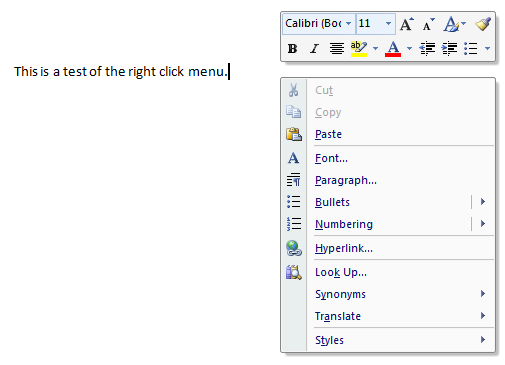
you can't get to Font or Paragraph properties without those
Yes you can. I know I have, and I'd forgotten that you can click that. I think the right click menu has it.
UPDATE: I was right... it is the right-click menu.


 Topic: Ribbon UI - is it really THAT good? (Read 55,462 times)


you can't get to Font or Paragraph properties without those


The ribbon gives you a flexible toolbar. Looking at the example you gave there, that's what it looks like. You just don't get that nice, compact UI with most toolbars.
 The way I see it, in reply to the part quoted above, the ribbon gives you a flexible toolbar but takes away the menu. I don't miss the toolbars, I miss the menus! A menu is much more compact, faster to navigate with the keyboard and - to me - more discoverable than the ribbon.
If you can't fit in an extra 80 pixels or so at the top when you have monitors at 1920 x 1200... You have a real problem. It's not the software taking up 80 pixels that's the problem.
If you can't afford a monitor with a modern resolution, then the solution to me seems to be to use older software that's designed for small resolutions. But don't blame the software author for taking advantage of newer technologies that most people have.
As for .NET. Who cares?
At the end of the day there is 1 and only 1 and exactly 1 consideration that matters: What will make life easier for the people that use the software? Nothing else matters beyond that. Nothing.
I do, when a program that used to start inside of a second now takes 10, and when it flickers all the time displaying menus or switching views. When I built my last system 4 years ago, I started from this, then upped some of the specs even more. I later swapped a video card for one that can play most of today's FPS games at max settings. I used to have a WD Raptor drive for the system partition (until it broke). I really don;t like waiting, so I built a system that didn't make me wait too much. And still, both back than and today, .Net apps flicker like heck and perform most operations with the urgency of a lazy iceberg. Granted, sometimes coders do things in ways that are inappropriate for the platform, but their suboptimal code would not cause significant slowdowns in native C++ or a Delphi apps. And still the apps crash just like they used to, except what used to be "invalid pointer operation" is now "reference not set to a valid object instance" or some such. It's the same darn error! For the user, .Net gives no gain whatsoever, but it exacts the very high price in loss of performance.


But I've found that once I figure something out in WPF/XAML, the solution is a lot easier to implement, a lot more straightforward, and easier to maintain.Yup, that, and stick to MVVM.
But I've found that once I figure something out in WPF/XAML, the solution is a lot easier to implement, a lot more straightforward, and easier to maintain.Yup, that, and stick to MVVM.


Also don't forget that the ribbon is more than just a menu / toolbar replacement, e.g. the Galleries are a new concept, which I think is very powerful.
Yes, the part where you hover the mouse over a font or style selector and the text in your document temporarily assumes that style - that part is awesome. But although it came together with the ribbon, it does not require one. You could just easily have that kind of "live preview" with a menu or a toolbar.
On the other hand, Office 2007 had these tiny semi-buttons:
(see attachment in previous post)
I wonder how many people ever figured out you can click those. I personally know a few who never have. And these are pretty important buttons - you can't get to Font or Paragraph properties without those. Why not allow users to click the whole lower bar where the "Font" and "Paragraph" labels are? Now that would be intuitive and easy to click. Seems like no-one at Microsoft has ever read Joel Spolsky's essay on affordances - or they have read it and decided to do the opposite out of spite.
And although you can navigate to these tiny thingamajigs with the Tab key, try doing that in Word 2007, it takes at least twice as many keypresses as Alt+F (Open Format menu) and three or four Down Arrow (to navigate to "Paragraph..." or "Font..") used to take. And really, even if you see them, there is no indication of what they do. They seem to still be there in Office 2010.


At the end of the day there is 1 and only 1 and exactly 1 consideration that matters: What will make life easier for the people that use the software? Nothing else matters beyond that. Nothing. If a ribbon fits that, then so be it. If not, then that's the answer.


 (Just kidding.)
If 80 pixels is a big deal, why not hide the UI automatically? You can set it to auto-appear only on hover or when the ALT key is pressed. This actually takes up less real estate than the standard menu system with toolbars.


 .
. , older or visually impaired folk may not have that luxury
  . Oh, yeah, those same icons are not intuitive, they have to be learned
  .
. . Recently discontinued a program I'd been using for years for that very reason. They added a ribbon which stole a minimum of four (4) lines of vertical dimension. That's four (4) lines of information that can no longer be viewed w/o scrolling. OK, the ribbon can be minimized to some extent, but that's just more work - clicks, shortcuts, or the like - that has to be done, consuming more time that could be devoted to the project at hand.

My biggest complaint with the ribbon is screen real estate - it takes a significant amount compared to a menu or even a toolbar. (That's generic, not application specific, btw.) And while you folk without vision impairment might well be able to discern each discrete icon and recognize its function
But my biggest gripe is screen real estate
MS was notorious when I was in IT for changing the menu structure in every new release of Office, and the ribbon strikes me as one more unwarranted change, just so you'll know it's a new version. I can see some usefulness in, say, a graphics program, but for me and some of my contemporaries, it is a production hindrance in most of the software that we've seen utilize it.
I am very critical of the quality, design and purposes of most new technology. I tend towards a minimalist approach. The technology that I acquire usually has to meet some general benefit and function criteria. I usually put it through a PMI (Plus, Minus, Interesting - per De Bono) review before I acquire it. The PMI will cover these pretty basic requirements:
- #1: Input: Does it improve my current processes of data/information/knowledge gathering?
- #2: Processing (includes Output): Does it improve my current processing methods?
- #3: Storage/backup: Does it improve my current processes of storage or backup/recovery?
- #4: Quality: Is it technically sound, well-designed and well-made for its purpose?
- #5: Support: Is it likely to have some reasonable degree of continuing support?
- #6: Reliability: Can I trust the provider to be delivering something of reasonable quality and that he will not rip me off (i.e., make a victim of the customer)?
- #7a: Use - Ergonomics (and efficiency): Does it at least meet my current ergonomic requirements?
- #7b: Use - Control: Will I have full, free and unencumbered control over the technology, to use as I need/please?
- #8: Cost: What is the cost, and does it seem reasonable?
- #9: Change: Will the use of the technology effect/necessitate a change for the better in the way I do things?
- #10: Deficiencies: How is it deficient in light of the above criteria, or in any other way?
- #11: Trade-off/compromise: What deficiencies are worth accepting in order to realise the improvements/benefits of using this technology?
I don't suppose a whole lot survives that list these days...Haha. Yes, you are probably right - but then that's a good thing, I think. Your selection process using those criteria (or similar) can be quite speedy. You can narrow the field down rapidly because the failure rate is so high. It narrows things down to just a few choices at most.


If Microsoft goes down the 'Windows is dead' route I think we can also safely say at the point 'Microsoft is dead'
In fact even as an Apple hater i could see my self moving to Mac before I would accept Metro as a desktop OS.


In fact even as an Apple hater i could see my self moving to Mac before I would accept Metro as a desktop OS.+1
which they plan on forcing everyone over to eventually.
This is just the beginning of the discussion. There’s so much more to talk about as we dive into details about the Windows 8 UI. We’re delivering a whole new experience, reimagined from the chips all the way to the user experience, to enable new scenarios, new apps, and new ways of using a PC.
Original address: https://www.donationcoder.com/forum/index.php?topic=28892.0