


Does anybody know how to set up, under W7, multiple instances of a printer, each using its own set of parameters — and in a way that works?
E.g. for the same printer:
One definition might print on plain paper, fed from one source, and in draft mode.
One definition might print on photo paper, fed from a different source, and in highest-quality mode.
Under XP one simply made a copy of a printer listed in the devices section and then set the preferences for that copy.
After some fiddling, I made a copy of a printer under W7. Then I set one copy to params a and the other to params b. Both 'printers' appear but one is on a sub-menu of the printer icon (see image).
[attachthumb]
E.g. for the same printer:
One definition might print on plain paper, fed from one source, and in draft mode.
One definition might print on photo paper, fed from a different source, and in highest-quality mode.
Under XP one simply made a copy of a printer listed in the devices section and then set the preferences for that copy.
After some fiddling, I made a copy of a printer under W7. Then I set one copy to params a and the other to params b. Both 'printers' appear but one is on a sub-menu of the printer icon (see image).
[attachthumb]
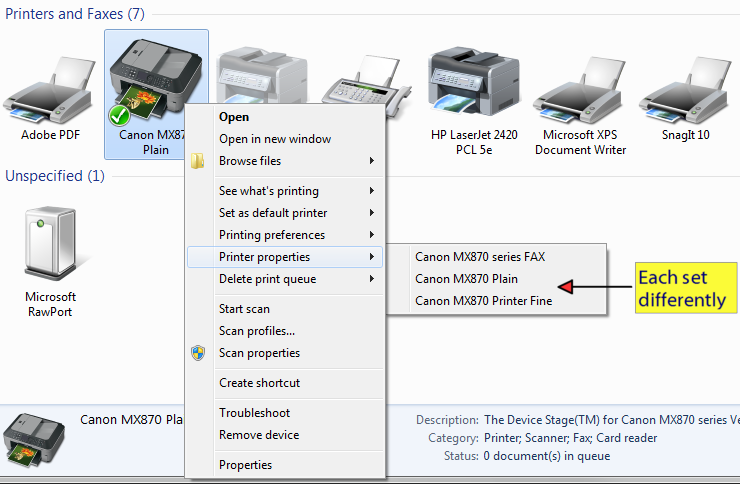


 ). I don't understand why it happened — did the OS treat the Canon initially as a network printer? — and I'm too idle to rip out the whole thing and go round yet again in order to research it.
