DonationCoder.com forum
 
Read-only archive. This is a static copy of the DonationCoder.com forum. Reading and searching work as before; logging in, posting and private messages do not.
Archive of 2026-10-21 · About this archive · Main site

Last post Author Topic: IDEA ~ Show List of Shortcuts overlaid on Desktop  (Read 40,703 times)

rgdot

  • Supporting Member
  • Joined in 2009
  • **
  • Posts: 2,197
Re: IDEA ~ Show List of Shortcuts overlaid on Desktop
« Reply #25 on: September 16, 2011, 09:57 PM »
Keep him busy with something too big for a coding snack...I can come up with something  ;)

skwire

  • I eat Coding Snacks for breakfast...
  • Global Moderator
  • Joined in 2005
  • *****
  • Posts: 5,297
    • Participated in NANY Challenge Seventeen Times
    • Coding Snacks
    • Superboy Coder
    • Cody Award
    • Volunteers/Staff
    • Gathering Badge
Re: IDEA ~ Show List of Shortcuts overlaid on Desktop
« Reply #26 on: September 16, 2011, 10:12 PM »
I'm happy to back off of this one; somebody else can take up the mantle.  :P

wraith808

  • Supporting Member
  • Joined in 2006
  • **
  • Posts: 11,205
    • Participated in NANY Challenge Fourteen Times
    • Coding Snacks
    • Writer
    • Hardware Hacker
Re: IDEA ~ Show List of Shortcuts overlaid on Desktop
« Reply #27 on: September 17, 2011, 12:19 AM »
We can have more than one... (and I say that as someone who was thinking about doing this too...)  ;D

bob99

  • Supporting Member
  • Joined in 2008
  • **
  • Posts: 345
Re: IDEA ~ Show List of Shortcuts overlaid on Desktop
« Reply #28 on: September 17, 2011, 02:02 AM »
bob99,

Yes -- this is exactly one of the things i am considering.
Actually i've been planning to add this as a standalone feature of LaunchBarCommander for a while now, and that will happen.

The outstanding question is how can i best support a large user repository of application-specific help data in the best way.

My thought with the LBC variation was basic in nature.  The main bar, with the ability of adding a child for each program and a sibling that would list the hotkeys.  The sibling being more along the line of a notepad page where the user enters the keys in a format like tomos provided in his earlier post. 
The free form notepad type view could let each user group the hotkeys to their preference.  Alphabetically, by function, function group, most used... 

bob99

  • Supporting Member
  • Joined in 2008
  • **
  • Posts: 345
Re: IDEA ~ Show List of Shortcuts overlaid on Desktop
« Reply #29 on: September 18, 2011, 02:48 PM »

The outstanding question is how can i best support a large user repository of application-specific help data in the best way.

Not sure of the direction you are considering but here's another thought.  Provide the ability of importing hotkey lists in csv or some other format.  Interested and willing members familiar with a specific program could send in a list of those hotkeys in the preferred format.  Users could pick and choose which list they would need from a repository of sorts.  These could be standard program default hotkey lists or maybe user suggestions. Saves you or even the user from tracking down hotkey lists.  It also becomes a community project. Similar to the All Hotkeys Site.
Any way you or others go, I think this would be a great program.

« Last Edit: September 18, 2011, 02:50 PM by bob99 »

Ath

  • Supporting Member
  • Joined in 2006
  • **
  • Posts: 3,649
    • Participated in NANY Challenge Eleven Times
    • Coding Snacks
    • Linux User
    • Hardware Hacker
Re: IDEA ~ Show List of Shortcuts overlaid on Desktop
« Reply #30 on: September 18, 2011, 03:17 PM »
We can have more than one...

Fully agree on that, especially if there's a stand-alone and a FARR integrated solution available. :up: :up:
/Ton
Ath's software collection, Quote: "A problem well stated is a problem half-solved." (Charles Kettering)

mouser

  • First Author
  • Administrator
  • Joined in 2005
  • *****
  • Posts: 40,931
    • Gathering Badge
    • Plugin Coding Medal
    • Participated in NANY Challenge Seventeen Times
    • Cody Award
    • Coding Snacks
    • Volunteers/Staff
Re: IDEA ~ Show List of Shortcuts overlaid on Desktop
« Reply #31 on: September 18, 2011, 03:32 PM »
Quote
Provide the ability of importing hotkey lists in csv or some other format.  Interested and willing members familiar with a specific program could send in a list of those hotkeys in the preferred format.  Users could pick and choose which list they would need from a repository of sorts.  These could be standard program default hotkey lists or maybe user suggestions. Saves you or even the user from tracking down hotkey lists.  It also becomes a community project.

This is the whole part that i've always been focued on -- figuring out a nice way to support a community driven wiki-like site for sharing cheat sheets / hotkey lists for apps, without it getting spammed.

rjbull

  • Charter Member
  • Joined in 2005
  • ***
  • Posts: 3,217
Re: IDEA ~ Show List of Shortcuts overlaid on Desktop
« Reply #32 on: September 18, 2011, 03:43 PM »
What's the procedure for scaring away skwire from a coding request one wants to work on?
I wondered the opposite - what happens if you gene-splice skwire with skrommel

Ath

  • Supporting Member
  • Joined in 2006
  • **
  • Posts: 3,649
    • Participated in NANY Challenge Eleven Times
    • Coding Snacks
    • Linux User
    • Hardware Hacker
Re: IDEA ~ Show List of Shortcuts overlaid on Desktop
« Reply #33 on: September 18, 2011, 03:45 PM »
what happens if you gene-splice skwire with skrommel
I would assume AHK tools for solutions that haven't been requested yet ;D
/Ton
Ath's software collection, Quote: "A problem well stated is a problem half-solved." (Charles Kettering)

rgdot

  • Supporting Member
  • Joined in 2009
  • **
  • Posts: 2,197
Re: IDEA ~ Show List of Shortcuts overlaid on Desktop
« Reply #34 on: September 18, 2011, 04:09 PM »
^ If computer detects that the solution is not made using AHK it shuts down

Target

  • Honorary Member
  • Joined in 2006
  • **
  • Posts: 1,840
    • Coding Snacks
Re: IDEA ~ Show List of Shortcuts overlaid on Desktop
« Reply #35 on: September 19, 2011, 10:41 PM »
do you have a copy of the text you want to use?

I need to work on that. Below are XYPlorer shortcuts. The full list, and a very quickly edited list.
The edited list is still a long list... I would probably want to cut it down to half that size or smaller.

EDIT/ anyone know where I can get a list of DOpus shortcuts

what other apps are you hoping to use this for (apart from DOpus)?

I have an idea that might deal with multiple apps - it would require a separate source file for each (per your example) but they would all have to be formatted the same way

How did you generate the sample shortcut lists?  If this is a copy and paste from a help file it's fine, but if you have to manually produce them it may become a little onerous...

Alcohol is photoshop, bottled
Askhole - someone who ask for advice, then ignores it
"Look wise, say nothing, and grunt. Speech was given to conceal thought" - Sir William Osler

wraith808

  • Supporting Member
  • Joined in 2006
  • **
  • Posts: 11,205
    • Participated in NANY Challenge Fourteen Times
    • Coding Snacks
    • Writer
    • Hardware Hacker
Re: IDEA ~ Show List of Shortcuts overlaid on Desktop
« Reply #36 on: September 20, 2011, 01:31 AM »
What's the procedure for scaring away skwire from a coding request one wants to work on?
I wondered the opposite - what happens if you gene-splice skwire with skrommel

The whole world is surrounded by an ahk-field as they overload?

tomos

  • Charter Member
  • Joined in 2006
  • ***
  • Posts: 11,970
    • Gathering Badge
    • Participated in NANY Challenge Once
Re: IDEA ~ Show List of Shortcuts overlaid on Desktop
« Reply #37 on: September 20, 2011, 08:54 AM »
what other apps are you hoping to use this for (apart from DOpus)?
[...]
How did you generate the sample shortcut lists?  If this is a copy and paste from a help file it's fine, but if you have to manually produce them it may become a little onerous...

That XY one was generated by the programme itself** - I would definitely use a shortened version of that
I would like to use this initially for
  • DOpus
  • XYPlorer
  • Adobe Illustrator (CS4)

Manually producing lists need not be a problem - what would be important to me would be ease of editing of lists. Cause once I learn a shortcut I dont really need it on the list any more. Initially I might just start with a handful of key shortcuts I would like to learn. I could add shortcuts as I come across them or find I want to use them.
This was prompted by going back to default settings in dopus - I like some of the new(?) default shortcuts, but not familiar with them. Also I have started creating (again) my own custom shortcuts, ideally I could add these to the list as I create them.

** Xyplorer has a very advanced export capability for exporting shortcuts (wish I could say the same for other programmes)

[attachthumb=#]
Tom

Paul Keith

  • Member
  • Joined in 2008
  • **
  • Posts: 1,989
Re: IDEA ~ Show List of Shortcuts overlaid on Desktop
« Reply #38 on: September 20, 2011, 02:15 PM »

The outstanding question is how can i best support a large user repository of application-specific help data in the best way.

Not sure of the direction you are considering but here's another thought.  Provide the ability of importing hotkey lists in csv or some other format.  Interested and willing members familiar with a specific program could send in a list of those hotkeys in the preferred format.  Users could pick and choose which list they would need from a repository of sorts.  These could be standard program default hotkey lists or maybe user suggestions. Saves you or even the user from tracking down hotkey lists.  It also becomes a community project. Similar to the All Hotkeys Site.
Any way you or others go, I think this would be a great program.

May not be quite what you are looking for but:

http://devcheatsheet.com/

...for those who don't know.
<reserve space for the day DC can auto-generate your signature from your personal PopUp Wisdom quotes>

bob99

  • Supporting Member
  • Joined in 2008
  • **
  • Posts: 345
Re: IDEA ~ Show List of Shortcuts overlaid on Desktop
« Reply #39 on: September 20, 2011, 02:59 PM »

May not be quite what you are looking for but:

http://devcheatsheet.com/

...for those who don't know.

Paul,

Thanks for the link. Added it to my Linkman. Will come in handy.


Target

  • Honorary Member
  • Joined in 2006
  • **
  • Posts: 1,840
    • Coding Snacks
Re: IDEA ~ Show List of Shortcuts overlaid on Desktop
« Reply #40 on: September 21, 2011, 12:28 AM »
where are all the solutions you guys have been working on?

Boarding Hows shows a (separate) context menu for each application - hotkey Win+F1 to show

Each application must have a corresponding helper file, and it must be in the same format as Tomos' original examples (ie XXX / ZZZZZZZZZZZZZZZZ) as the script parses each line and uses the first field to build the submenu's 

Helper files must be named for the relevant application (eg Outlook.txt, Excel.txt, etc), and the names should be case sensitive - if you want to have a game simply rename the sample text files according to your particular requirements

only downside I can see is dealing with multiple apps with similar/common titles (eg Notepad, Notepad2, Natepad++, etc)

Alcohol is photoshop, bottled
Askhole - someone who ask for advice, then ignores it
"Look wise, say nothing, and grunt. Speech was given to conceal thought" - Sir William Osler

tomos

  • Charter Member
  • Joined in 2006
  • ***
  • Posts: 11,970
    • Gathering Badge
    • Participated in NANY Challenge Once
Re: IDEA ~ Show List of Shortcuts overlaid on Desktop
« Reply #41 on: September 21, 2011, 09:45 AM »
sounds good Target,
needed a restart after adding new text file (logical - just noting)

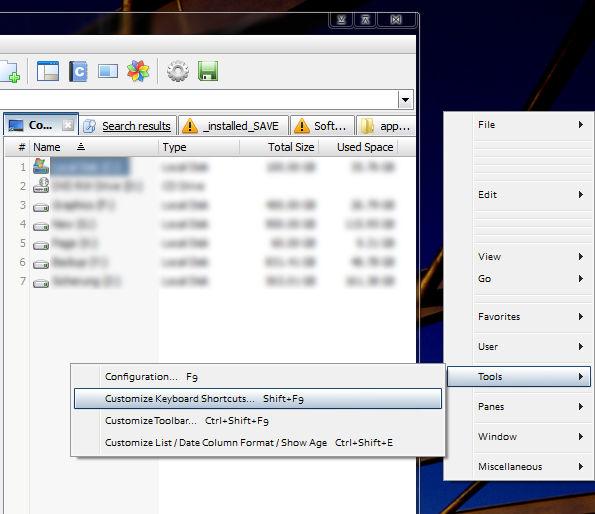
That's an interesting implementation:
it recreates the menu, but just showing the shortcuts you have in the list.

[attachimg=#]

It has focus, so I'm able to navigate it with arrow, enter & escape keys. As soon as I click on the Alt key (wanted to AltTab) it disappears :up:
It also disappears after clicking on the XY window

The thing is, with XYplorer, the shortcuts are already shown in the menu(s) so the temptation is to just use the XY menu's...
But one could also construct one's own menus e.g.
  • File-Operations
  • Views-Sorting
  • Panes
  • etc.


[edit] those extra spaces under File etc were in the text file - I had left blank spaces where I had cut lines from the list. It jumps these spaces when using the arrow keys :up:
List was created from my "Edited List" in reply #14. Attached in case - NOT a full list! [/edit]
Tom
« Last Edit: September 21, 2011, 09:54 AM by tomos »

Target

  • Honorary Member
  • Joined in 2006
  • **
  • Posts: 1,840
    • Coding Snacks
Re: IDEA ~ Show List of Shortcuts overlaid on Desktop
« Reply #42 on: September 21, 2011, 10:40 PM »
Quote
needed a restart after adding new text file (logical - just noting)

use WIN+R to reload :)

Quote
That's an interesting implementation:
it recreates the menu, but just showing the shortcuts you have in the list.

is that not what you were asking for?

all it does is create a 'menu' based on your text file(s) (in the example I used the 'full' list you supplied)

I did fiddle with a couple of GUI implementations but they just seemed to intrusive

Quote
The thing is, with XYplorer, the shortcuts are already shown in the menu(s) so the temptation is to just use the XY menu's...
But one could also construct one's own menus e.g.

more options are better than less, and it's not costing you anything

theoretically you could put anything you like in it, so long as you maintain the string format

Quote
those extra spaces under File etc were in the text file - I had left blank spaces where I had cut lines from the list. It jumps these spaces when using the arrow keys

interesting - that was the first thing I noticed in your screenshot (thanks for the explanation!!)

and after all that, does it answer your original requirements?
Alcohol is photoshop, bottled
Askhole - someone who ask for advice, then ignores it
"Look wise, say nothing, and grunt. Speech was given to conceal thought" - Sir William Osler

tomos

  • Charter Member
  • Joined in 2006
  • ***
  • Posts: 11,970
    • Gathering Badge
    • Participated in NANY Challenge Once
Re: IDEA ~ Show List of Shortcuts overlaid on Desktop
« Reply #43 on: September 22, 2011, 07:38 AM »
did I say thanks Target? :Thmbsup:
It's very polished really, I like the implementation.

Quote
That's an interesting implementation:
it recreates the menu, but just showing the shortcuts you have in the list.

is that not what you were asking for?

Originally I had the idea of a short list - then I was looking at/using XYplorer (which I only usually use for a couple of specific uses) and realised there was a lot I could learn there. So, then I had the idea of a long, possibly scrollable list.
So it is very different than I imagined - but I didnt really know what I was asking for, beyond help :)

and after all that, does it answer your original requirements?

I'll try it out with dopus (which I using more often) and see how I get on with it :up:
Tom

Target

  • Honorary Member
  • Joined in 2006
  • **
  • Posts: 1,840
    • Coding Snacks
Re: IDEA ~ Show List of Shortcuts overlaid on Desktop
« Reply #44 on: September 23, 2011, 12:44 AM »
fwiw, here's the source code
Alcohol is photoshop, bottled
Askhole - someone who ask for advice, then ignores it
"Look wise, say nothing, and grunt. Speech was given to conceal thought" - Sir William Osler

dragonmage

  • Supporting Member
  • Joined in 2009
  • **
  • Posts: 21
Re: IDEA ~ Show List of Shortcuts overlaid on Desktop
« Reply #45 on: September 24, 2011, 01:28 AM »
I would have tried Stickies. It has the ability to attach notes to specific windows and to export notes.

Contro

  • Supporting Member
  • Joined in 2007
  • **
  • Posts: 3,947
Re: IDEA ~ Show List of Shortcuts overlaid on Desktop
« Reply #46 on: June 03, 2012, 07:14 AM »
where are all the solutions you guys have been working on?

Boarding Hows shows a (separate) context menu for each application - hotkey Win+F1 to show

Each application must have a corresponding helper file, and it must be in the same format as Tomos' original examples (ie XXX / ZZZZZZZZZZZZZZZZ) as the script parses each line and uses the first field to build the submenu's 

Helper files must be named for the relevant application (eg Outlook.txt, Excel.txt, etc), and the names should be case sensitive - if you want to have a game simply rename the sample text files according to your particular requirements

only downside I can see is dealing with multiple apps with similar/common titles (eg Notepad, Notepad2, Natepad++, etc)


In my system don't go and I don't know what am i doing bad.

I execute the script, but the combination WIN+F1 don't go.
Can I define other hotkey ?

Original address: https://www.donationcoder.com/forum/index.php?topic=28022.0