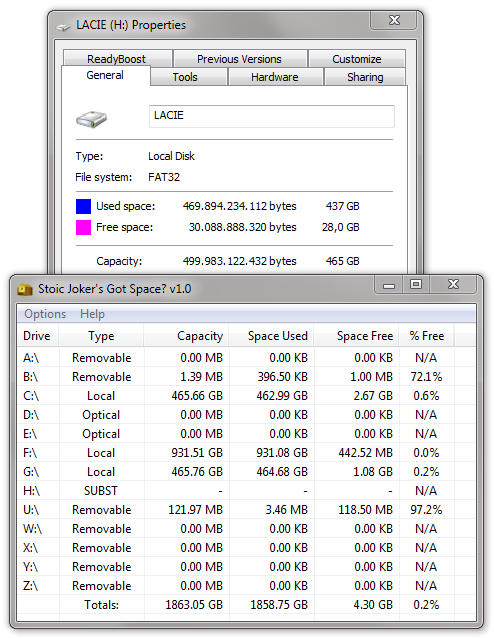
FAT32, 500gb. It's the only partition on the device to my knowledge.
Re: NANY 2012: Got Space? Disk Utility.
« Reply #25 on: July 22, 2011, 12:23 PM »


 Topic: NANY 2012 Release: Got Space? (Read 174,740 times)


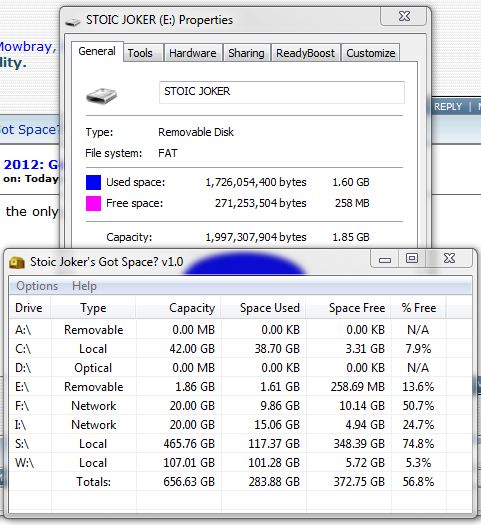


If the Lacie is an external USB drive, why is it getting classified as a Local Disk??
If the Lacie is an external USB drive, why is it getting classified as a Local Disk??
I just turned on an external WD USB (NTFS) drive, listed in properties as a USB device, which turned up in GS as local. Same thing with a WD MyBook (NTFS).
If the Lacie is an external USB drive, why is it getting classified as a Local Disk??
I just turned on an external WD USB (NTFS) drive, listed in properties as a USB device, which turned up in GS as local. Same thing with a WD MyBook (NTFS).
If the Lacie is an external USB drive, why is it getting classified as a Local Disk??
I just turned on an external WD USB (NTFS) drive, listed in properties as a USB device, which turned up in GS as local. Same thing with a WD MyBook (NTFS).
Okay, so it was identified as local and not SUBST then yes?
I'm trying to gauge the scope of the issue.
Yes, they both turned up as local, not SUBST.
		  dwAttrib = GetFileAttributes(szDrive); // SUBSTitute Drive Bugg
		  if(dwAttrib == FILE_ATTRIBUTE_DIRECTORY) { //-{found by}-+> Ath
			  StringCbPrintf(szType, TNY_BUFF, TEXT("SUBST"));
			  bCountSpace = FALSE;
		  }else{
			  StringCbPrintf(szType, TNY_BUFF, TEXT("Local"));
			  bCountSpace = TRUE;
} //--+++--> Fix for SUBSTitute Drive Bugg Found by: Ath
// Solution to the SUBSTitute FAT Bugg -> Found by: worstje
GetVolumePathName(pszDrive, szType, TNY_BUFF);
if(_tcscmp(pszDrive, szType)) { //-+> (requested by) worstje
StringCbCopy(szType, TNY_BUFF, TEXT("SUBST"));
StringCbCopy(szTotal, TNY_BUFF, TEXT("-"));
StringCbCopy(szUsed, TNY_BUFF, TEXT("-"));
StringCbCopy(szFree, TNY_BUFF, TEXT("-"));
StringCbCopy(szOdds, TNY_BUFF, TEXT("N/A"));
bCountSpace = FALSE;
}else{
Get_DriveType(pszDrive, szType);
}
if(bCountSpace) {
GetDriveSpace(pszDrive, szTotal, szUsed, szFree, szOdds);
}Maybe the '% Free' column could have a visual indication of the amount of free space? Like fill that percentage of the background of the cell with a different color, a bit like in TreeSize.
this was a indeed FAT related issue
 So now it's lean and mean!




Something I'd like to see (although it might need a reworking of your current logic stuffs...) is quicker start times. Or to be more precise, faster discovery. Maybe it is just odd on my computer and nobody elses, but starting the application takes 5 seconds before the window appears. Refreshing the view locks the application up for 5 seconds. I suspect the reason is two-fold: I have a lot of devices, and you test them all one by one. My guess is that if you did each drives discovery in a separate thread, it would take less than a second. (Of course, once you get 26 drives in your machine, it might seem a bit taxing in the threads department for a second, but given that it is pretty much all I/O blocking there ought to be no problems with a mere 26 threads.)
The reason why I'd like this is because I think this app really has a lot of potential. I have a habit of running out of diskspace on some drive or another, and the explorer Computer window is annoying with all of its disks that don't matter to me in that situation.
Additionally, assuming you don't have plans already, I'd suggest double-click opening the drive in question and the rightclick on an item translating to a rightclick in Explorer. (The right-click stuff I can help you with; I've got experience with those APIs from my Cautomaton entry last year.) Oh, and how about a volume names column?
I think that fits well with the above plan, yes?
Sure!Volume Names? I thought we were trying to make this faster?? (hehe - jk) I've actually been thinking about this, but was more aimed toward making it part of a more in-depth drive properties/details dialog when a drive was double clicked.
Translating the Explorer rightclicks & opening drive file views is a little outside the intended scope of the project. That is more in the loader/launcher territory. But I haven't even started on that part of the code yet so nothing is carved in stone at this pont.
Fair enough. My point is mostly that right now, it is just a list of text that I can only look at. (Which is somewhat disappointing after those 5s refresh times!) When I see drives, about half the time I'll also want to interact with them. So in my eyes, it is very much in the scope of what one might expect.
I think that fits well with the above plan, yes?Sure!
Volume Names? I thought we were trying to make this faster?? (hehe - jk) I've actually been thinking about this, but was more aimed toward making it part of a more in-depth drive properties/details dialog when a drive was double clicked.
Fair enough. My point is mostly that right now, it is just a list of text that I can only look at. (Which is somewhat disappointing after those 5s refresh times!) When I see drives, about half the time I'll also want to interact with them. So in my eyes, it is very much in the scope of what one might expect.
Btw, you renamed the topic, and you introduced a typo. Bata makes me think of a lot of things, but not software.

Original address: https://www.donationcoder.com/forum/index.php?topic=27333.0