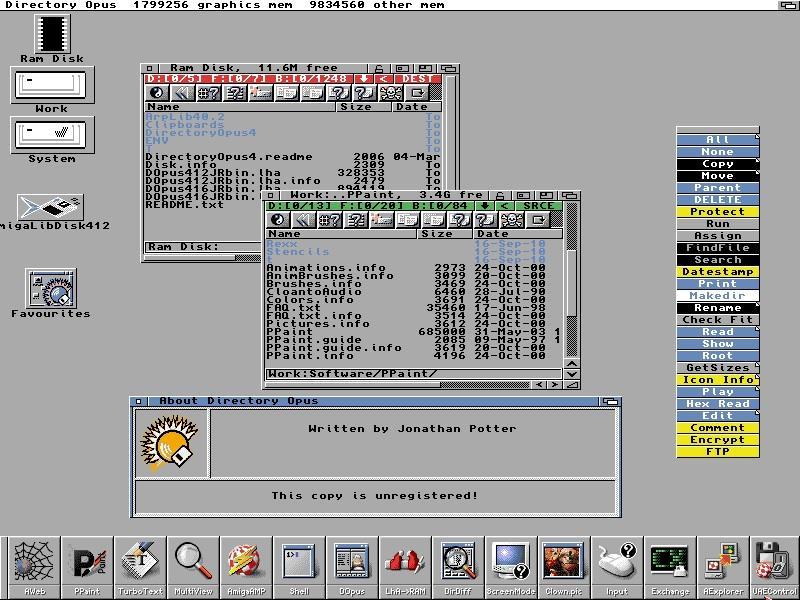
I also should say that Dopus 5 on Amiga used a similar concept as 'the Gimp', a small window containing the buttons for the (programmable) file actions and small explorer-like windows.
[attach]
[attach]


 Topic: Directory Opus 10 (Read 136,520 times)


As I see the amount of "hate" that type of interface creates among users, I can imagine that GPSoftware is not likely to implement it soon. Personally, I wouldn't mind having to work with this type of interface at all. But I think the sales of this DOpus version would never cover for the amount of work GPSoftware would have to do.
The real prob with DO is elsewhere: It's considered superior, and whenever you ask for a function that isn't there, you get the answer, "it's possible", without anybody telling you which way it could be possible.

Very fine, cthorpe, no need to give you the benefit of the doubt a second time in a row when you SYSTEMATICALLY twist my words in order to "answer" to something else I never said, or even better, to make me not having said things that are obviously there. (Just a hint, though, do it "by accident", here and here, then it will perhaps go unnoticed and pass your manipulative message, but if you do it with every sentence, well, it's ineffective when it becomes too apparent.) Thank you.



In fact, it's perfectly possible to buy a decent MS Office (= 2010, = not the latest, very problematic version) for LESS than this D "Opus" costs.


XYplorer file manager has this feature -
Menu >Tools >Customise List >Manual Sorting
then
drag n drop to sort.
I havent used it in a while - it doesn't seem to work with large thumbnails, but does work with the details-with-[small]-thumbnail view.
By default, if you left click on a thumbnail, it will display at full size. This makes it difficult to drag! Go to:
menu >Tools >Configuration >Thumbnails >Turn off: popup image on mouse down (bottom of window).
Then try it as instructed above and it works fine.

..., as in Norton Commander of the Ancient Age,...


Original address: https://www.donationcoder.com/forum/index.php?topic=26594.0