DonationCoder.com forum
 
Read-only archive. This is a static copy of the DonationCoder.com forum. Reading and searching work as before; logging in, posting and private messages do not.
Archive of 2026-10-21 · About this archive · Main site

Last post Author Topic: What Android Apps Do You Use?  (Read 296,451 times)

CWuestefeld

  • Supporting Member
  • Joined in 2006
  • **
  • Posts: 1,009
    • Participated in NANY Challenge Once
Re: What Android Apps Do You Use?
« Reply #75 on: May 05, 2011, 07:22 PM »
After a bit of searching around and testing, here's a supplementary list (i.e., not including things I already talked about) of apps worth looking at.

  • Akimbo player for audio books ($)
    http://www.appbrain.com/app/akimbo-audiobook-player-trial/com.akimbo.abp.trial
  • Backgrounds for … backgrounds. Lots of pretty backgrounds
    http://www.appbrain.com/app/akimbo-audiobook-player-trial/com.akimbo.abp.trial
  • BoggleDroid Lite. Play Boggle.
    http://www.appbrain.com/app/boggledroid-lite/org.lite.boogledroid
  • C:geo for geocaching
    http://www.appbrain.com/app/c:geo-~-geocaching-for-android/carnero.cgeo
  • Bump - transfer files between devices after a bump
    http://www.appbrain.com/app/bump/com.bumptech.bumpga
  • Evernote – cloud-based notetaking, sync with desktop
    http://www.appbrain.com/app/evernote/com.evernote
  • Lookout – security: antivirus, find lost device
    http://www.appbrain.com/app/lookout-mobile-security/com.lookout
  • Inserty – store frequently-type text, insert into text fields
    http://www.appbrain.com/app/inserty-(free)/com.roomfour0four.android.market.inserty
  • Roboform (yes, I know... But KeePass doesn't allow editing of v2 data on the android) ($)
    http://www.appbrain.com/app/roboform/com.siber.roboform
  • WidgetLocker – replacement for lock screen, hosts regular widgets. This lets me play or pause music or audiobooks while I’m driving, without having to unlock ($)
    http://www.appbrain.com/app/widgetlocker-lockscreen/com.teslacoilsw.widgetlocker
  • D7 Google Reader – pulls RSS from Google Reader
    http://www.appbrain.com/app/d7-google-reader/com.droidlab7.reader
  • Dolphin Browser Mini – replacement web browser, has tabs
    http://www.appbrain.com/app/dolphin-browser%E2%84%A2-mini/com.dolphin.browser
  • ES File Explorer – file explorer, also explore SMB and FTP folders (I’ve got a problem on my PC, where connecting the SD as USB causes BSoD, so I have to pull files through WiFi)
    http://www.appbrain.com/app/es-file-explorer/com.estrongs.android.pop
  • Facebook
    http://www.appbrain.com/app/facebook-for-android/com.facebook.katana
  • Folder Organizer – Tag your apps, then put a widget on launcher that, when clicked, brings up a menu of apps having corresponding tag. Useful if you have too many apps  ($)
    http://www.appbrain.com/app/folder-organizer/com.abcOrganizer
  • GO Contacts – better organizer for contacts. Also, a better Dialer.
    http://www.appbrain.com/app/go-contacts/com.jbapps.contact
  • GO Launcher EX – nicer launcher. Also, its support for scrolling widgets is required for some other stuff I listed.
    http://www.appbrain.com/app/go-launcher-ex/com.gau.go.launcherex
  • GO SMS Pro – much better SMS. Threaded conversations, etc. Nice widget.
    http://www.appbrain.com/app/go-sms-pro/com.jb.gosms
  • LunaSolCal – widget showing sun rise/set, moon rise/set and phase
    http://www.appbrain.com/app/lunasolcal-mobile/com.vvse.lunasolcal
  • Battery Solo Widget – just show battery strength in a pie
    http://www.appbrain.com/app/battery-solo-widget/net.maicas.android.batterys
  • NewCompass(AD) – like normal compass, but also shows direction relative to sun and moon
    http://www.appbrain.com/app/newcompass(ad)/com.leeyh.NewCompass
  • Pure news widget (scrollable) – Show headline news in a widget, as scraped from a Google Reader account  ($)
    http://www.appbrain.com/app/pure-news-widget-(scrollable)/org.koxx.pure_news
  • Pro HDR Camera – take HDR photos. (really just a toy, but a cool one) ($)
    http://www.appbrain.com/app/pro-hdr-camera/com.eyeappsllc.prohdr
  • Quick Settings – Quick access to common settings
    http://www.appbrain.com/app/quick-settings/com.bwx.bequick
  • Scrambled Net – puzzle game.
    http://www.appbrain.com/app/scrambled-net/org.hermit.netscramble
  • Wikitude – like Google Sky Map, but for Earth. Labels what you’re looking at.
    http://www.appbrain.com/app/wikitude-world-browser/com.wikitude
  • GoldenPicLite – calculate "golden hour" and "blue hour" for photography
    http://www.appbrain.com/app/goldenpiclite/jebs.goldenpiclite


ewemoa

  • Honorary Member
  • Joined in 2008
  • **
  • Posts: 2,922
    • Plugin Coding Medal
    • Participated in NANY Challenge Three Times
Re: What Android Apps Do You Use?
« Reply #76 on: July 12, 2011, 12:45 AM »
Lately I'm noticing the displayed time being sooner later than what seems correct -- and it seems to get worse over time.

Installed ClockSync (root required) and am hoping for an improvement.

Has anyone else had similar problems?
« Last Edit: July 12, 2011, 05:01 AM by ewemoa »

phitsc

  • Honorary Member
  • Joined in 2008
  • **
  • Posts: 1,198
    • Participated in NANY Challenge Seven Times
    • Plugin Coding Medal
Re: What Android Apps Do You Use?
« Reply #77 on: July 12, 2011, 11:50 AM »
Lately I'm noticing the displayed time being sooner later than what seems correct -- and it seems to get worse over time.

Installed ClockSync (root required) and am hoping for an improvement.

Has anyone else had similar problems?

Not me. I think my phone synchs it's time with a reference supplied via the phone network. Under Settings - Date & Time, there's an option 'Automatic' which I have ticked.

Dormouse

  • Supporting Member
  • Joined in 2007
  • **
  • Posts: 1,992
Re: What Android Apps Do You Use?
« Reply #78 on: July 12, 2011, 04:41 PM »
My watch syncs by radio and is always correct  :up:. My phones sync with their networks and are always correct  :up:. My W7 computer syncs daily with the windows internet timeserver and is 8 minutes fast (& this doesn't change even if I do a manual update or change the timeserver  :down: :down: :down:).

Tuxman

  • OMG not him again!
  • Supporting Member
  • Joined in 2006
  • **
  • Posts: 2,522
    • Participated in NANY Challenge Seven Times
Re: What Android Apps Do You Use?
« Reply #79 on: July 12, 2011, 04:49 PM »
I recently found TinyShark, free Grooveshark for Android. You don't even need a Grooveshark account. Very, very great.  :-*
I bet when Cheetahs race and one of them cheats, the other one goes "Man, you're such a Cheetah!" and they laugh & eat a zebra or whatever.

Deozaan

  • Charter Member
  • Joined in 2006
  • ***
  • Posts: 9,827
    • Participated in NANY Challenge Eight Times
    • Cody Award
Re: What Android Apps Do You Use?
« Reply #80 on: July 13, 2011, 01:04 AM »
Lately I'm noticing the displayed time being sooner later than what seems correct -- and it seems to get worse over time.

Installed ClockSync (root required) and am hoping for an improvement.

Has anyone else had similar problems?

On Sunday the power went out here and I reset the clock in the kitchen according to my Android's clock. I found out later that day that my Android clock was about 20 minutes behind actual time and I was late for something. This thread reminded me to fix my clock on my Android, but I just checked and it is accurate now. :huh:

I no longer subscribe to cellular/data service on my Android, I also hadn't had it connected to the wifi for a while and it got behind. But for about the past 24 hours it's been connected to WiFi and now the clock is right, so I think perhaps it automatically syncs itself with some sort of "atomic clock" if it has data/WiFi access.

Other than this instance on Sunday, I've never noticed my Android clock being wrong, except perhaps when I was travelling by airplane (phone was off) across timezones.

ewemoa

  • Honorary Member
  • Joined in 2008
  • **
  • Posts: 2,922
    • Plugin Coding Medal
    • Participated in NANY Challenge Three Times
Re: What Android Apps Do You Use?
« Reply #81 on: July 13, 2011, 10:17 AM »
Thanks all for your comments :)

The device in question here isn't currently associated with any phone plans and its WiFi doesn't tend to be on very much to increase the time between battery charges.

ewemoa

  • Honorary Member
  • Joined in 2008
  • **
  • Posts: 2,922
    • Plugin Coding Medal
    • Participated in NANY Challenge Three Times
Re: What Android Apps Do You Use?
« Reply #82 on: July 28, 2011, 12:42 AM »

Renegade

  • Tell me something you don't know...
  • Charter Member
  • Joined in 2005
  • ***
  • Posts: 13,291
    • Participated in NANY Challenge Three Times
    • Furry Fandom Badge - Furry Fandom
    • Linux User
Re: What Android Apps Do You Use?
« Reply #83 on: July 28, 2011, 09:30 PM »
I just started using Andricious - a Delicious client that integrates with Android. Works very well.

https://market.android.com/details?id=com.sherbert.delicious

The integration is good and I can use it in Opera. So... Happy. :)
Slow Down Music - Where I commit thought crimes...

Freedom is the right to be wrong, not the right to do wrong. - John Diefenbaker

Tuxman

  • OMG not him again!
  • Supporting Member
  • Joined in 2006
  • **
  • Posts: 2,522
    • Participated in NANY Challenge Seven Times
Re: What Android Apps Do You Use?
« Reply #84 on: July 28, 2011, 09:46 PM »
Delicious is still around? Thought Yahoo canceled it.
I bet when Cheetahs race and one of them cheats, the other one goes "Man, you're such a Cheetah!" and they laugh & eat a zebra or whatever.

Renegade

  • Tell me something you don't know...
  • Charter Member
  • Joined in 2005
  • ***
  • Posts: 13,291
    • Participated in NANY Challenge Three Times
    • Furry Fandom Badge - Furry Fandom
    • Linux User
Re: What Android Apps Do You Use?
« Reply #85 on: July 28, 2011, 10:19 PM »
Delicious is still around? Thought Yahoo canceled it.

Nope. Not yet. They've been canceling other services though, e.g. Pulse. My wife got burned there. Yay for the cloud...  :-\
Slow Down Music - Where I commit thought crimes...

Freedom is the right to be wrong, not the right to do wrong. - John Diefenbaker

Tuxman

  • OMG not him again!
  • Supporting Member
  • Joined in 2006
  • **
  • Posts: 2,522
    • Participated in NANY Challenge Seven Times
Re: What Android Apps Do You Use?
« Reply #86 on: July 29, 2011, 02:05 AM »
"Cloud" makes 15 points in bullshit bingo, right?
I bet when Cheetahs race and one of them cheats, the other one goes "Man, you're such a Cheetah!" and they laugh & eat a zebra or whatever.

Renegade

  • Tell me something you don't know...
  • Charter Member
  • Joined in 2005
  • ***
  • Posts: 13,291
    • Participated in NANY Challenge Three Times
    • Furry Fandom Badge - Furry Fandom
    • Linux User
Re: What Android Apps Do You Use?
« Reply #87 on: July 29, 2011, 02:10 AM »
"Cloud" makes 15 points in bullshit bingo, right?

Hahahaha~! :)

One of these days I do want to check out Azure as I've not done that yet. I can see value in the cloud, but it also has risks. I'm all in favour of some paid services as it gives some security -- a profitable company will continue to take your money. It's the free cloud that scares me.
Slow Down Music - Where I commit thought crimes...

Freedom is the right to be wrong, not the right to do wrong. - John Diefenbaker

Tuxman

  • OMG not him again!
  • Supporting Member
  • Joined in 2006
  • **
  • Posts: 2,522
    • Participated in NANY Challenge Seven Times
Re: What Android Apps Do You Use?
« Reply #88 on: July 29, 2011, 11:26 AM »
No joke intended...
I bet when Cheetahs race and one of them cheats, the other one goes "Man, you're such a Cheetah!" and they laugh & eat a zebra or whatever.

ewemoa

  • Honorary Member
  • Joined in 2008
  • **
  • Posts: 2,922
    • Plugin Coding Medal
    • Participated in NANY Challenge Three Times
Re: What Android Apps Do You Use?
« Reply #89 on: July 06, 2012, 11:12 AM »
File Expert - Excellent file manager plus one touch HTTP/FTP server for managing via PC.

The one touch HTTP/FTP server feature is really great -- thanks again for mentioning this  :up:

FWIW, I think it can also be obtained from:

    http://www.xageek.com/en/

As a non-user of Play, I really appreciate it when it is possible to obtain official apks via other means :)

4wd

  • Pedantic Old Bastard
  • Supporting Member
  • Joined in 2006
  • **
  • Posts: 5,652
    • Coding Snacks
Re: What Android Apps Do You Use?
« Reply #90 on: July 06, 2012, 11:47 AM »
Been using Llama and I have to say it's an excellent piece of software.

It uses mobile phone antenna towers to determine what actions to take when you enter or leave an area.

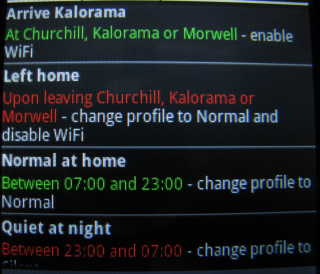
At the moment I have some areas set, (home, library, some friends places), so that when I enter them the WiFi gets turned on, when I leave it gets turned off.
At home between 2300-0700 it switches to silent, (no noise, no vibration), when I leave the area during 2300-0700 it switches to normal, (ringer + vibration).  Other places between 2300-0700 it will switch to quiet, (no noise).

The developers blog is at kebabapps where you can pick up the latest betas, (including NFC and Roaming detection).
"I will not follow where the path may lead, but I will go where there is no path, and I will leave a trail." - Muriel Strode, 1903

ewemoa

  • Honorary Member
  • Joined in 2008
  • **
  • Posts: 2,922
    • Plugin Coding Medal
    • Participated in NANY Challenge Three Times
Re: What Android Apps Do You Use?
« Reply #91 on: July 06, 2012, 12:01 PM »
That sound quite nice!

Does it function well?  Getting accurate location information seems far from easy.

4wd

  • Pedantic Old Bastard
  • Supporting Member
  • Joined in 2006
  • **
  • Posts: 5,652
    • Coding Snacks
Re: What Android Apps Do You Use?
« Reply #92 on: July 06, 2012, 12:16 PM »
Does it function well?  Getting accurate location information seems far from easy.

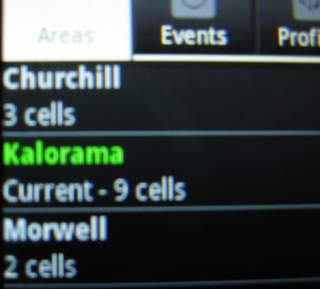
Yes, when you enter an area you want to create a trigger for, you tell it how long you are going to be in that area and it will use that time to "learn" what mobile antenna towers are nearby, anywhere from a few minutes to a few hours - the longer it has, the more accurate.

eg. For me, at home it lists 9 towers.

IMG_4901.JPG

And here's some events:

IMG_4902.JPG

It's not only restricted to things that happen due to you moving through areas, you can also trigger on:
Active Application
Airplane Mode
Alarm Time
App Notification Bar icon
Audio Becoming Noisy
Battery Level
Bluetooth Device Connected/Disconnected/Not Connected
Calendar Event
and many, many more....
"I will not follow where the path may lead, but I will go where there is no path, and I will leave a trail." - Muriel Strode, 1903
« Last Edit: July 06, 2012, 12:24 PM by 4wd »

raja123

  • Participant
  • Joined in 2012
  • *
  • Posts: 1
Re: What Android Apps Do You Use?
« Reply #93 on: July 07, 2012, 05:48 AM »
I do use the following apps for android:

call recorder
android browser
android file manager
android torrent
angry bird

And i am really enjoying it now..!! ;D

ewemoa

  • Honorary Member
  • Joined in 2008
  • **
  • Posts: 2,922
    • Plugin Coding Medal
    • Participated in NANY Challenge Three Times
Re: What Android Apps Do You Use?
« Reply #94 on: July 07, 2012, 07:29 AM »
...when you enter an area you want to create a trigger for, you tell it how long you are going to be in that area and it will use that time to "learn" what mobile antenna towers are nearby, anywhere from a few minutes to a few hours - the longer it has, the more accurate.

Thanks for the follow-up and details.  It's good to see that there is at least one approach that works -- now if we can get people to use this type of thing to auto-switch to vibration mode in certain public areas :)

ewemoa

  • Honorary Member
  • Joined in 2008
  • **
  • Posts: 2,922
    • Plugin Coding Medal
    • Participated in NANY Challenge Three Times
Re: What Android Apps Do You Use?
« Reply #95 on: July 10, 2012, 10:05 AM »
For those with more than one Android device -- and one that connects to a larger screen, may be you'll like Tablet Remote.  It allows one Android device to more-or-less control another via Bluetooth:

Tablet Remote: Control One Android Device With Another via Bluetooth (addictivetips)

Got it working with a few devices here -- though struggling with a third.


On a side note, has any one else encountered problems sending files between Android devices using Bluetooth?  When this happens, it appears that it can be worked around sometimes if the file in question is zipped...quite odd.


getting the apk
If anyone knows of an official way to get the apk via non-Play means, please share -- ended up getting mine via a friend's phone.

ewemoa

  • Honorary Member
  • Joined in 2008
  • **
  • Posts: 2,922
    • Plugin Coding Medal
    • Participated in NANY Challenge Three Times
Re: What Android Apps Do You Use?
« Reply #96 on: November 17, 2012, 09:28 AM »
Recently came across:

 Hacker's Keyboard

Finding it nice on a tablet -- arrow keys!

cmpm

  • Charter Member
  • Joined in 2006
  • ***
  • Posts: 2,026
Re: What Android Apps Do You Use?
« Reply #97 on: December 10, 2012, 12:21 AM »
My Installed Android Apps
  • Adblock Plus (v1.0.1)
  • Adobe AIR (v3.5.0.60)
  • Adobe Reader (v10.4.2)
  • Angry Birds (v2.3.0)
  • Angry Birds (v1.1.0)
  • App List Backup (v1.0)
  • APV PDF Viewer (v0.3.4)
  • ASUS Studio (v2.0.20121130)
  • Audiogalaxy (v2.4.
  • Aviary (v2.1.91)
  • Aviary Photo Editor Plugin (v2.1.91)
  • Big Fat Canvas (v1.0)
  • Box (v2.0.1)
  • Brightest Flashlight Free (v1.9.9)
  • Camera360 (v3.9)
  • CamScanner (v1.6.0.20121016)
  • Catch (v4.5.7)
  • Catch Notes Widget (v1.2)
  • Chat (v1.9)
  • ChessCom (v2.0.13)
  • Cleaner (v1.1)
  • Clipper (v2.0.3.4)
  • CloudOn (v2.5.1)
  • Color Splash FX (v1.3.2)
  • ColorNote (v3.9.11)
  • CoolNote Free (v1.6)
  • Crop Wallpaper (v1.30)
  • Cubby (v1.0.0.10922)
  • Currents (v1.5.1)
  • Desktop Toggles (v1.3.2)
  • Dolphin Browser (v9.0.3)
  • Drive (v1.1.470.11)
  • Droid Scan Lite (v5.7.3)
  • Dropbox (v2.2.2)
  • Easy Photo Editor (v0.3.25.1)
  • eGDocs (v1.1.5)
  • ES File Explorer (v1.6.2.3)
  • ES File Explorer (v1.6.0.4)
  • ES Task Manager (v1.3.1)
  • Facebook (v1.9.12)
  • File Expert (v5.0.6)
  • File2PDF (v1.0)
  • Firefox (v17.0)
  • Flashlight (v4.9.4)
  • FolderSync (v2.3.0)
  • Free Music Download (vv1.10)
  • FreeNote (v7.9.
  • Friendcaster (v5.1.3)
  • FxCamera (v2.5.2)
  • GDocs (v0.8.14.1)
  • GMESSAGE (v1.6.68)
  • GNotes (v0.7.1)
  • gTunes music download (v6.62)
  • Handrite Free (v1.81)
  • Handy Scanner (v1.1.13)
  • Hotmail (v7.8.2.8.47.5646)
  • Image Shrink Lite (v2.3.0)
  • Imgur Android (v1.0.6)
  • Imgur Browser (v2.0.2)
  • Imgur Mushroom (v2.20)
  • InkPad NotePad (v2.4.2)
  • Instagram (v3.2.0)
  • IntouchApp (v0.9.83)
  • iShare (v1.2)
  • JetNote (v1.0)
  • Jorte (v1.4.15)
  • JPEG Tool (v0.3.6)
  • JS Image Finder (v1.67)
  • JS Photo (v1.1.0)
  • Kingsoft Office (v5.2.1)
  • LeaderTask To Do List (v1.6.0.49)
  • LittlePhoto (v6.3.1)
  • Locus - addon Map Tweak (v2.0.2)
  • Locus Free (v2.8.1)
  • Maps Ruler (v1.3)
  • Messenger (v2.2.2-release)
  • MiMedia (v1.0.59)
  • Minus (v3.1.0.5)
  • Ms FolderNote Free (v1.6.2)
  • Music Cloud (vv1.02)
  • MX Player (v1.7.
  • MyAppsList (v1.6)
  • MyDirections (v3.0 beta r4)
  • MyScript Calculator (v1.0.1)
  • MyTopo Maps (v1.8.1)
  • Navigator (v5.3.0)
  • NE GDocs (v2.0.4)
  • Newspapers USA (v1.5)
  • Note Everything (v4.2.6)
  • Note Stacks (v1.3.10)
  • Notes Lite (v1.0.9)
  • OfficeSuite (v6.5.1010)
  • OneCloud Text Editor (vRelease 2)
  • OneNote (v14.0.5602.3000)
  • Outliner (v1.1.0)
  • password Notes (v1.0.9)
  • Pastebin for Android (v3.5)
  • Pho.to Lab (v1.2.16)
  • Photo Editor Ultimate Free (v6.9.6)
  • Photo Studio (v0.9.9)
  • photo.merq.org (v1.0)
  • Photobucket (v1.5.7)
  • PhotoFunia (v3.0.1)
  • Photo Editor (v1.3.5)
  • PicArts (v3.2.3)
  • Picasa Tool (v6.5)
  • Picasa Web (v0.19.13161.97817)
  • PicsArt (v3.1.2)
  • PicsArt Viewer (v1.3.2)
  • PicSay (v1.4.0.1)
  • Pixlr Express (v1.0.1)
  • Pixlr-o-matic (v2.1.3)
  • Pulse (v3.0.4)
  • Reduce Photo Size (v1.0.22)
  • Scan Master (v1.1)
  • ScanToPDF Free (v2.0.4)
  • Screen Cut (v2.8.3)
  • Settings Switcher (v1.0.4)
  • Share Image (free) (v4.62)
  • Simply Notes B/W (v1.0)
  • Simply Notes Widget (v0.2.3)
  • SiteShot (v3)
  • SketchBookX (v2.1)
  • SKY.FM (v1.3.14)
  • SkyDrive (v1.1)
  • SLater (v1.75)
  • Slide Notes (v1.40)
  • Snapfish (v1.02)
  • Snapseed (v1.4.1)
  • Spell Checker (v2.7)
  • Text Sizer (v1.4.2)
  • ThinkFree Office Viewer (v5.0.121025)
  • Translate (v2.5.3)
  • TwinDocs (v2.0.1)
  • Vitamio (v1.2.
  • WebStorage Widget (v1.0.2.4732)
  • Wikipedia (v1.3.3)
  • Wikipedia QSB (v2)
  • Write (v1.5)
  • Writer (v1.1)
  • Wuala (v2.4.2)
  • xWriter Free (v3.0.2)

Device Summary
  • Device: asus ASUS Transformer Pad TF300T
  • Android Version: 4.1.1
  • Build: JRO03C.US_epad-10.4.2.17-20121018
  • Applications Installed: 142
« Last Edit: December 10, 2012, 12:35 AM by Stephen66515 »

cmpm

  • Charter Member
  • Joined in 2006
  • ***
  • Posts: 2,026
Re: What Android Apps Do You Use?
« Reply #98 on: December 10, 2012, 12:26 AM »
about the only way i could post them all fast
that i could do with my android

edit-that I could figure out anyway

I do like them all.
« Last Edit: December 10, 2012, 12:34 AM by cmpm »

KynloStephen66515

  • Animated Giffer in Chief
  • Honorary Member
  • Joined in 2010
  • **
  • Posts: 3,772
    • Participated in NANY Challenge Three Times
    • Cody Award
    • Coding Snacks
    • Official Forum Clown
    • Volunteers/Staff
    • Writer
    • Hardware Hacker
    • DJ Badge - DJ
    • Linux User
Re: What Android Apps Do You Use?
« Reply #99 on: December 10, 2012, 12:36 AM »
Fixed your post so all that code is no longer there :)

Original address: https://www.donationcoder.com/forum/index.php?topic=26168.0