DonationCoder.com forum
 
Read-only archive. This is a static copy of the DonationCoder.com forum. Reading and searching work as before; logging in, posting and private messages do not.
Archive of 2026-10-21 · About this archive · Main site

Last post Author Topic: DVCS ? (All about Git, Mercurial-Hg and the like...)  (Read 201,593 times)

Armando

  • Charter Member
  • Joined in 2005
  • ***
  • Posts: 2,727
    • Coding Snacks
Re: DVCS ?
« Reply #75 on: June 06, 2011, 03:54 AM »
Yes 2 great references.  :up:

I put a list of references a while ago but haven't got the time to really "finalize" it or anything
Since we've been into references lately, here is some of it (there are a few already mentioned... I'll update the list with other entries -- if necessary -- when I'll have more time).

I got many links through this site : A central reference

If one is just trying Git and wants to use the basic Git GUI (which is perfectly functional IMO), this is a good "how to" to just learn the basics + a couple more tricks : An Illustrated Guide to Git on Windows (Start using Git with msysgit)

And then here are my personal favorites :

Pro Git

Git Reference (already mentioned by wraith808)

Git Ready

Git Magic


And then a lot of other useful stuff :

The official tutorial

The official manual

--

Everyday commands

Cheat Sheet

Git FAQ

Git for Computer Scientists

Git from the bottom up


Lots of screencasts/videos… Here are some interesting URLs with a few fun tricks :) :

http://tekpub.com/productions/git
http://blip.tv/file/4213359/
http://blip.tv/file/4094727


And... Good  Comparisons with Mercurial

Git and Mercurial - Compare and Contrast

Mercurial and Git: a technical comparison


P.S. : BTW, I'm using SmartGit a lot these days and I like it more and more.
I'm still used to the "one pane" diff viewer of the basic git GUI though... for some (strange?) reasons I kinda like it. Anybody else? :)
"I suppose it can be said that I'm an absent-minded driver. It's true that I've driven through a number of red lights on occasion, but on the other hand, I've stopped at a lot of green ones but never gotten credit for it."
Glenn Gould
« Last Edit: June 06, 2011, 03:59 AM by Armando »

Armando

  • Charter Member
  • Joined in 2005
  • ***
  • Posts: 2,727
    • Coding Snacks
Re: DVCS ?
« Reply #76 on: June 06, 2011, 04:28 AM »
One question- it seems that your repository in the case that you're not using something like github is purely local- is this true?

Yes, I imagine, unless you decide to move it somewhere else (other than github).

At some point I was thinking of setting my own "remote server" using a dropbox/spideroak/[...] account and use it as a git remote server. There are already a lot of examples of similar setup on the web. I could share a few links if you're interested.


Quote
And is there a way to have a copy of the repository without another machine?

You mean cloning your repo? you can clone a repo wherever you want. From a server or a local machine.
http://www.kernel.org/pub/software/scm/git/docs/git-clone.html

I think you'd need to use the -l  and maybe the --no-hardlinks flags (depending on what you want).

SmartGit and other GUIs make cloning a piece of cake.

I don't know if that answers your questions though...?
"I suppose it can be said that I'm an absent-minded driver. It's true that I've driven through a number of red lights on occasion, but on the other hand, I've stopped at a lot of green ones but never gotten credit for it."
Glenn Gould

wraith808

  • Supporting Member
  • Joined in 2006
  • **
  • Posts: 11,205
    • Participated in NANY Challenge Fourteen Times
    • Coding Snacks
    • Writer
    • Hardware Hacker
Re: DVCS ?
« Reply #77 on: June 06, 2011, 12:33 PM »
Basically, when I wasn't using VSS, I was using a product called QVCS (very good... got a bit slow when the repo became large).  I have two machines at home that I develop on (sometimes 3- but down to 2 right now), so I wanted a repository that I could share between machines, and of course use as a back up.  I know that you can use Git that way, but I was trying to figure out how to do that without a central server.

Thoughts?

Armando

  • Charter Member
  • Joined in 2005
  • ***
  • Posts: 2,727
    • Coding Snacks
Re: DVCS ?
« Reply #78 on: June 07, 2011, 03:51 AM »
So you want to be able to connect computer A to computer B and pull the changes from one to the other?
Would using something like Dropbox/spideroak a possibility?
There are many blogs where steps are described. A few good ones :

http://intermediaware.com/blog/how-to-use-dropbox-as-a-git-repository#more-17
http://stackoverflow.com/questions/1960799/using-gitdropbox-together-effectively
https://github.com/agnoster/git-dropbox#readme
http://tumblr.intranation.com/post/766290743/using-dropbox-git-repository

etc.

Generally speaking the setup process seems simple : 1- initialize your local repo, 2- initialize a "bare" repo in Dropbox, 3- link both repo (add origin), 4- push from your "local repo" to Dropbox.
"I suppose it can be said that I'm an absent-minded driver. It's true that I've driven through a number of red lights on occasion, but on the other hand, I've stopped at a lot of green ones but never gotten credit for it."
Glenn Gould

wraith808

  • Supporting Member
  • Joined in 2006
  • **
  • Posts: 11,205
    • Participated in NANY Challenge Fourteen Times
    • Coding Snacks
    • Writer
    • Hardware Hacker
Re: DVCS ?
« Reply #79 on: June 07, 2011, 12:49 PM »
^ I thought that might be possible; but I thought that was also what the (D) in DVCS stood for... distributed?  So I thought it was peer-to-peer from the description.  Is that just a function of Git that it doesn't work that way?  Or is the description wrong at wikipedia (which is always a possibility) or am I misunderstanding something?

Armando

  • Charter Member
  • Joined in 2005
  • ***
  • Posts: 2,727
    • Coding Snacks
Re: DVCS ?
« Reply #80 on: June 07, 2011, 02:35 PM »
if A and B are on a network, you can directly pull to A from B and conversely.
"I suppose it can be said that I'm an absent-minded driver. It's true that I've driven through a number of red lights on occasion, but on the other hand, I've stopped at a lot of green ones but never gotten credit for it."
Glenn Gould

wraith808

  • Supporting Member
  • Joined in 2006
  • **
  • Posts: 11,205
    • Participated in NANY Challenge Fourteen Times
    • Coding Snacks
    • Writer
    • Hardware Hacker
Re: DVCS ?
« Reply #81 on: June 07, 2011, 02:52 PM »
if A and B are on a network, you can directly pull to A from B and conversely.

So how do I do that?  I didn't see anything about it on any of the reference that I saw, though I might have just missed it.  Can you point me to something that shows how to do that?  I think I see the light... but I just can't figure out whether it's the end of the tunnel or a train...

Armando

  • Charter Member
  • Joined in 2005
  • ***
  • Posts: 2,727
    • Coding Snacks
Re: DVCS ?
« Reply #82 on: June 07, 2011, 04:38 PM »
I haven't tried it (not my current setup) and I know some here are much more knowledgeable than me. But I gues it would go like that :

1- initialize "yourproject" repo in A and track all files. In your directory:
cd "your directory"
git init
git add *.*

2- in B, create a directory and clone the A repo:
cd "your directory in B"
git clone -l --no-hardlinks "path to your repo in A"

3- in B, add a reference to A:
git remote add "name you want to give to this remote" "path to your repo in A"

4- in A, add a reference to B :
cd "your directory in A"
git remote add "name you want to give to this remote" "path to your repo in B"

Now from A or B, you can pull changes :
cd "your directory in A"
git pull "path to your repo in B"

OR
cd "your directory in B"
git pull "path to your repo in A"


[EDIT : you might want to do a "git fetch" and then a "git diff" followed y a "git merge", rather than a "git pull", that way you can review what you're bringing in.
git fetch doesn’t touch your working tree at all but "pull" will.]
"I suppose it can be said that I'm an absent-minded driver. It's true that I've driven through a number of red lights on occasion, but on the other hand, I've stopped at a lot of green ones but never gotten credit for it."
Glenn Gould
« Last Edit: June 07, 2011, 08:29 PM by Armando »

Armando

  • Charter Member
  • Joined in 2005
  • ***
  • Posts: 2,727
    • Coding Snacks
Re: DVCS ?
« Reply #83 on: June 08, 2011, 03:04 AM »
Just took 15 min to try it (to make sure...) and it seems to work well -- at least with the command line. (P.S.:Using "Pull" rather than "fetch" + "diff" + "merge" for such a setup seems more straight forward.)
"I suppose it can be said that I'm an absent-minded driver. It's true that I've driven through a number of red lights on occasion, but on the other hand, I've stopped at a lot of green ones but never gotten credit for it."
Glenn Gould
« Last Edit: June 08, 2011, 03:06 AM by Armando »

wraith808

  • Supporting Member
  • Joined in 2006
  • **
  • Posts: 11,205
    • Participated in NANY Challenge Fourteen Times
    • Coding Snacks
    • Writer
    • Hardware Hacker
Re: DVCS ?
« Reply #84 on: June 08, 2011, 04:25 AM »
Thanks for your help with this.  I'm going to try to set it up tomorrow.

kyrathaba

  • N.A.N.Y. Organizer
  • Honorary Member
  • Joined in 2006
  • **
  • Posts: 3,200
    • Participated in NANY Challenge Eight Times
    • Programming School - Deluxe Bonus Medal
    • Programming School - Stage 1 Medal
    • Coding Snacks
    • Military Service Badge - US Army
    • Writer
Re: DVCS ?
« Reply #85 on: June 08, 2011, 10:31 PM »
I've used Tortoise SVN with the Express editions of Visual C#.  Can Mercurial or GIT either one be used with these Express versions, or do they only function with the Professional/Enterprise versions of the Visual Studio IDE?
Win 10 Pro running on a 3.2 GHz CPU and 12 Gb RAM
__________________________________________

Proofreading Service: http://williammillerservices.com/proofreading

wraith808

  • Supporting Member
  • Joined in 2006
  • **
  • Posts: 11,205
    • Participated in NANY Challenge Fourteen Times
    • Coding Snacks
    • Writer
    • Hardware Hacker
Re: DVCS ?
« Reply #86 on: June 08, 2011, 11:17 PM »
I've used Tortoise SVN with the Express editions of Visual C#.  Can Mercurial or GIT either one be used with these Express versions, or do they only function with the Professional/Enterprise versions of the Visual Studio IDE?

Both of them operate on the files, so the version of VS shouldn't influence whether they work.  If you're talking about integration with the IDE, that's a different story- you can browse the add-ons in VS to find the git-extensions and see if you can install the SC provider.
« Last Edit: June 08, 2011, 11:40 PM by wraith808 »

kyrathaba

  • N.A.N.Y. Organizer
  • Honorary Member
  • Joined in 2006
  • **
  • Posts: 3,200
    • Participated in NANY Challenge Eight Times
    • Programming School - Deluxe Bonus Medal
    • Programming School - Stage 1 Medal
    • Coding Snacks
    • Military Service Badge - US Army
    • Writer
Re: DVCS ?
« Reply #87 on: June 08, 2011, 11:20 PM »
Thanks, that answers my question.
Win 10 Pro running on a 3.2 GHz CPU and 12 Gb RAM
__________________________________________

Proofreading Service: http://williammillerservices.com/proofreading

Armando

  • Charter Member
  • Joined in 2005
  • ***
  • Posts: 2,727
    • Coding Snacks
Re: DVCS ?
« Reply #88 on: July 08, 2011, 05:57 PM »
Some SmartGit feeback...
I've been using it a lot more more since the end of May and I can say it's been extremely stable, reliable and easy to work with. It's a really good product. I'm starting to forget how to use the command line now...

Plus, as you noticed, the developer even dropped by to say hi and discuss criticisms and feature/modifications requests.  :up:

Highly recommended.

====

One thing I wish I could do sometimes, and I still use Tortoise Git for that : in the log window, I'd like to be able to select a bunch of commits and copy each of them in a list with their full message (context menu and/or maybe Ctrl+Shift+c by default).

Ctrl+c (copy) already copies the selected list, showing  dates and the first line of each commit, but it would be nice to be able to do the same but with the whole message content for each entry/commit.

EDIT : One other small thing... "Commit" dialog (ctrl+k) : unless I'm mistaken, apart from hitting tab 2 times when in the commit dialog, there doesn't seem to be a way to hit the "commit" button directly. It would be logical to press alt+c maybe, or just enter. Note that since the commit message is preselected and has the focus, pressing enter clears it! fortunately a ctrl+z will restore it but it can be surprising...
"I suppose it can be said that I'm an absent-minded driver. It's true that I've driven through a number of red lights on occasion, but on the other hand, I've stopped at a lot of green ones but never gotten credit for it."
Glenn Gould
« Last Edit: July 08, 2011, 06:06 PM by Armando »

Armando

  • Charter Member
  • Joined in 2005
  • ***
  • Posts: 2,727
    • Coding Snacks
Re: DVCS ?
« Reply #89 on: July 08, 2011, 05:58 PM »
Thanks for your help with this.  I'm going to try to set it up tomorrow.

Hey Wraith808, I know it's been a while but... Do you finally use that set up or are you using some other strategy ?
"I suppose it can be said that I'm an absent-minded driver. It's true that I've driven through a number of red lights on occasion, but on the other hand, I've stopped at a lot of green ones but never gotten credit for it."
Glenn Gould

Armando

  • Charter Member
  • Joined in 2005
  • ***
  • Posts: 2,727
    • Coding Snacks
Re: DVCS ?
« Reply #90 on: September 12, 2011, 04:50 PM »
Another pretty good git Article : Git Is Simpler Than You Think

The article is well written. It gets "more" interesting from the The So-Called “Object Database” section.
"I suppose it can be said that I'm an absent-minded driver. It's true that I've driven through a number of red lights on occasion, but on the other hand, I've stopped at a lot of green ones but never gotten credit for it."
Glenn Gould

ewemoa

  • Honorary Member
  • Joined in 2008
  • **
  • Posts: 2,922
    • Plugin Coding Medal
    • Participated in NANY Challenge Three Times
Re: DVCS ? (All about Git, Mercurial-Hg and the like...)
« Reply #91 on: April 22, 2012, 12:20 AM »
I'm having difficulty with SmartGit 3.0.4 and SSL access for self-signed certificates.

The steps I followed are:

Server end:
  • Prepare a bare repository to be accessible via SSL + self-signed certificate

In SmartGit:
  • Project -> Clone...
  • Fill in the "Remote Git..." Repository URL with an https URL pointing to a repository available via SSL + self-signed certificate (e.g. https://example.com:4567/myrepos.git)
  • Click "Next"
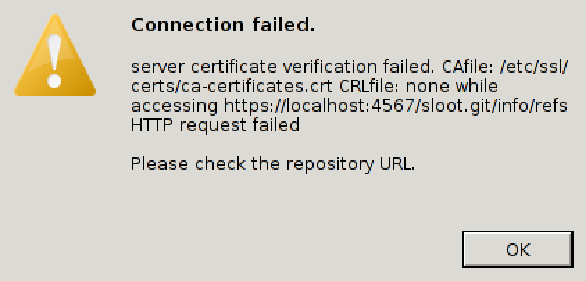
  • Observe the following dialog box:

smartgit-server-certification-verification-failed.png

I expected to be able to bypass the dialog to access any way.

Didn't find anything relevant via a few search engines nor looking through the various settings files.

Armando

  • Charter Member
  • Joined in 2005
  • ***
  • Posts: 2,727
    • Coding Snacks
Re: DVCS ? (All about Git, Mercurial-Hg and the like...)
« Reply #92 on: April 22, 2012, 03:46 AM »
Strange. I'll see if I can test that tomorrow.
"I suppose it can be said that I'm an absent-minded driver. It's true that I've driven through a number of red lights on occasion, but on the other hand, I've stopped at a lot of green ones but never gotten credit for it."
Glenn Gould

ewemoa

  • Honorary Member
  • Joined in 2008
  • **
  • Posts: 2,922
    • Plugin Coding Medal
    • Participated in NANY Challenge Three Times
Re: DVCS ? (All about Git, Mercurial-Hg and the like...)
« Reply #93 on: April 22, 2012, 03:55 AM »
Thanks Armando, I appreciate it :)

ewemoa

  • Honorary Member
  • Joined in 2008
  • **
  • Posts: 2,922
    • Plugin Coding Medal
    • Participated in NANY Challenge Three Times
Re: DVCS ? (All about Git, Mercurial-Hg and the like...)
« Reply #94 on: April 22, 2012, 05:40 AM »
FWIW, via the command line the following sort of thing is one way to get a successful clone with a self-signed certificate:

Quote
env GIT_SSL_NO_VERIFY=true git clone https://example.com:4567/myrepos.git

Applying the above, under one *nix, the following enabled SmartGit to work as desired:

Quote
env GIT_SSL_NO_VERIFY=true path-to-smartgit-folder/bin/smartgit.sh
« Last Edit: April 22, 2012, 05:46 AM by ewemoa »

ewemoa

  • Honorary Member
  • Joined in 2008
  • **
  • Posts: 2,922
    • Plugin Coding Medal
    • Participated in NANY Challenge Three Times
Re: DVCS ? (All about Git, Mercurial-Hg and the like...)
« Reply #95 on: April 22, 2012, 10:31 AM »
Under Windows XP SP3, via cmd.exe, something like the following worked:

Quote
set GIT_SSL_NO_VERIFY=true
start c:\apps\SmartGit\bin\smartgit.exe

ewemoa

  • Honorary Member
  • Joined in 2008
  • **
  • Posts: 2,922
    • Plugin Coding Medal
    • Participated in NANY Challenge Three Times
Re: DVCS ? (All about Git, Mercurial-Hg and the like...)
« Reply #96 on: April 22, 2012, 10:36 AM »
Perhaps setting http.sslVerify to false via git config is an alternative approach.

I guess that may not work if one does not want that to be a global setting and there is no repository for the setting to live in yet (because no initial clone has occurred)...

ewemoa

  • Honorary Member
  • Joined in 2008
  • **
  • Posts: 2,922
    • Plugin Coding Medal
    • Participated in NANY Challenge Three Times
Re: DVCS ? (All about Git, Mercurial-Hg and the like...)
« Reply #97 on: April 22, 2012, 10:49 AM »
On a side note, I noticed that SmartGit now supports "git init" -- IIRC, it used to be that one had to use git from the command line for this :up:

Quote
Project ->
  New Window ->
    Open an existing local or create a new repository

Armando

  • Charter Member
  • Joined in 2005
  • ***
  • Posts: 2,727
    • Coding Snacks
Re: DVCS ? (All about Git, Mercurial-Hg and the like...)
« Reply #98 on: April 24, 2012, 04:06 AM »
ewemoa, you seem to be on the right path...
I realize I don't have enough time to delve into that ! I wish I could. Did you send a message to the developer(s) ?

On a side note, I noticed that SmartGit now supports "git init" -- IIRC, it used to be that one had to use git from the command line for this :up:

Quote
Project ->
 New Window ->
   Open an existing local or create a new repository


Thanks for the heads up! Didn't notice it. I asked for it a long time ago -- and, like you used the command line or tortoiseGit to to it.


Edit : actually, it was the clone --bare command I was having problems with... and while it's true I usually initialize my repos with the command line or TortoiseGit, i believe SmartGit has been offering the "Open an existing local or create a new repository" for a while (since v2.x) . I might be mistaken though...
"I suppose it can be said that I'm an absent-minded driver. It's true that I've driven through a number of red lights on occasion, but on the other hand, I've stopped at a lot of green ones but never gotten credit for it."
Glenn Gould
« Last Edit: April 24, 2012, 04:15 AM by Armando »

ewemoa

  • Honorary Member
  • Joined in 2008
  • **
  • Posts: 2,922
    • Plugin Coding Medal
    • Participated in NANY Challenge Three Times
Re: DVCS ? (All about Git, Mercurial-Hg and the like...)
« Reply #99 on: April 25, 2012, 12:26 AM »
Did you send a message to the developer(s) ?

No I didn't.  But then, may be they will see this topic...wishful thinking?

Quote
i believe SmartGit has been offering the "Open an existing local or create a new repository" for a while (since v2.x) . I might be mistaken though...

It's quite possible I didn't know it was there earlier :)

Original address: https://www.donationcoder.com/forum/index.php?topic=25765.0