)...1- some kind of optional “console like” textual feedback, some commands log view, like the one Git extensions provides (see #4). That would be good (maybe is that a secretly available option but… I didn’t find it).Not quite what you may have been looking for, but if you look in the .settings directory, there is a file named "log.txt" which contains various details. Perhaps better than nothing...
log.txt contains debug log information. It's configured via log4j.properties.
Is it possible or configurable to view the Git commands executed by SmartGit somewhere? It would be awesome if they were displayed in the status bar or a console popup.
You can find the executed Git commands (and the output of the Git command) in SmartGit's log.txt.
It would be awesome if they were displayed in the status bar or a console popup.
My log file is in not in the .setting directory but in \Application Data\syntevo\SmartGit\2.Ah, my bad...Perhaps it's in .settings for me because I'm using the portable version.
Anyway... considering all that, SmartGit is probably what I'll try to use more in the next week.Looking forward to any observations

Looking forward to any observations
BTW, I wanted to search the history of a project via the log window and was stumped initially. I learned that "search as you type" (they call this speed-search apparently) seems to work. Was this obvious to you? I didn't find this in the docs...it was again via a posting to that support list.
Then I spent a while trying to figure out how to search for subsequent occurrences -- finally after trying a variety of combinations, I hit on using the down (for next) and up (for previous) arrow keys...feels odd but at least something works.
On a related note, I've started to investigate gitk and am noticing that it seems to produce more search results than SmartGit for the same search terms in some cases. It appears that SmartGit doesn't load all commits [1] by default and the searching only seems to take place over what's loaded -- once sufficiently more commits are loaded, additional search results seem to come up...
[1] Found a "Load all commits" menu item via the Query menu.

Dunno which app(s), though - I wasn't all impressed when I checked out SmartGit, but can't remember exactly why, guess I'll give it another chance. I think my 'meh' was partially causes by the program being implemented in Java, and (worse) not having an option to use the system JDK but installing it's own separate copy.SmartGit offers three download bundles for Windows, the default one which includes a Java Runtime Environment (so the normal users are using a tested JRE version), one without a bundled JRE (requires an installed one) and a portable one with JRE (stores its settings in the same directory structure, so it can be installed on an USB stick).
It does miss some other important ones though, like “blame”,"blame" is on our todo-list. Could you please explain the use-case behind "clone --bare"? Isn't a bare repository usually located on a server without GUI?“stash”, “clone –bare” (last one : surprising, to say the least… Unless I missed something ).
I did encounter a few problems and solving these problems meant dropping to the command line. E.g. : how do you "correct" a rebase that’s stalled… and won't abort nor continue ? hmmmm...Do you mean, that SmartGit sometimes hangs during a rebase? This bug has been fixed in version "2.1 early-access build 5". This was caused by Git trying to open an editor and waiting for it to exit.
The manual is ok, but not as clear as Tortoise’s, IMHO. Very dry, almost no graphs… and so it remains slightly abstract. I’d almost rather read Git’s man pages (not bad at all btw).You are right, our manual is a weak spot.
On a related note, I've started to investigate gitk and am noticing that it seems to produce more search results than SmartGit for the same search terms in some cases. It appears that SmartGit doesn't load all commits [1] by default and the searching only seems to take place over what's loaded -- once sufficiently more commits are loaded, additional search results seem to come up..."Load all commits" does not load all commits from the repository (which might be too large), but instead loads commits which are not reachable from a branch or tag any more, e.g. those which remain after performing an amend-commit. Maybe one has a better name suggestion?
[1] Found a "Load all commits" menu item via the Query menu.
Wow, nope, I didn't know about the search as you type feature.What shortcut did you expect? What we can do to make the "search-as-you-type" feature more noticeable?
Thanks for sharing all this!
Yes, the arrows do feel a bit odd, but I'll get use to it.
It does miss some other important ones though, like “blame”,"blame" is on our todo-list. Could you please explain the use-case behind "clone --bare"? Isn't a bare repository usually located on a server without GUI?“stash”, “clone –bare” (last one : surprising, to say the least… Unless I missed something ).
I did encounter a few problems and solving these problems meant dropping to the command line. E.g. : how do you "correct" a rebase that’s stalled… and won't abort nor continue ? hmmmm...Do you mean, that SmartGit sometimes hangs during a rebase? This bug has been fixed in version "2.1 early-access build 5". This was caused by Git trying to open an editor and waiting for it to exit.
The manual is ok, but not as clear as Tortoise’s, IMHO. Very dry, almost no graphs… and so it remains slightly abstract. I’d almost rather read Git’s man pages (not bad at all btw).You are right, our manual is a weak spot.
Wow, nope, I didn't know about the search as you type feature.What shortcut did you expect? What we can do to make the "search-as-you-type" feature more noticeable?
Thanks for sharing all this!
Yes, the arrows do feel a bit odd, but I'll get use to it.
As you probably know, a lot of Windows applications (text editors, IDEs) use F3 and Shift/ctrl+F3 to move to next/previous occurrence (can't talk about Linux or Mac as I haven't really worked with those in the last couple years and I forgot...). I couldn't say for sure what the standard is, but F3 is what I'm used to... Hence the "awkward" feel.
| Chrome 11 | Firefox 4 | IE 8 | Opera 11 | |
| Enter / Shift+Enter | o | o | o | o |
| Control+G / Control+Shift+G | o | o | x | o |
| F3 / Shift+F3 | o | o | x | o |
| Alt+N / Alt+P | x | o | x | x |


As you probably know, a lot of Windows applications (text editors, IDEs) use F3 and Shift/ctrl+F3 to move to next/previous occurrence (can't talk about Linux or Mac as I haven't really worked with those in the last couple years and I forgot...). I couldn't say for sure what the standard is, but F3 is what I'm used to... Hence the "awkward" feel.OK, I'll try to add (Shift+) F3 in the next 2.1 build. Unfortunately, this will be hard-coded and not customizable, because only the shortcuts for menu items are customizable.
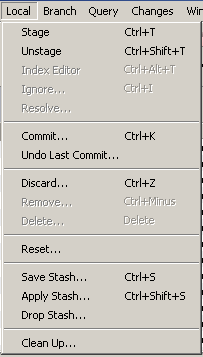
- Some other shortcuts feel a bit weird. E.g.: Ctrl+T for staging. I immediately changed it for Alt+Enter, and Ctrl+Alt+Enter for editing the index, which seems much more natural when reviewing changes using Alt+Arrows. This is personal of course... but just saying.We took Ctrl+T from the Git GUI. BTW, I have changed Alt+Up/+Down to F3/F4 so I only need one hand for navigation...
- After staging some content, the focus always moves to the newly staged file, which interrupts the "files modifications reviewing". There might be a way to prevent that but I haven't found it. Question: Could the focus remain at the top of the list and not move? When reviewing files before committing , it's inconvenient to always have to move back to the top of the file list or where the other file to review is located.We'll try to find a solution.
- Some tooltips seem too verbose.IMHO "Show unchanged files" is ambiguous: it could mean the current state or the action which happens when clicking. Hence we decided to be precise.
E.g., in the files section/table : "if selected, unchanged files will be shown".
Why not simply : "Show unchanged files" ? It's more "to the point" IMO.


BTW, have you seen the same author's post on Mercurial Queues?Quote from: http://stevelosh.com/blog/2010/01/the-real-difference-between-mercurial-and-git/With all that said, I’ve considered creating a Mercurial extension that adds git’s index functionality to Mercurial, because I think it would make the transition to Mercurial easier for git users. I’ve had enough experience with Mercurial’s internals to know that such a thing is possible, but I simply don’t have the time to do it all myself. If you’re interested in helping out please let me know!
... So maybe this index isn't that useless after all.
Thanks for the comments, and for the link to Mercurial Queues. It's true that queues are something that Git doesn't have; but then again, they're not needed in Git because it has (cheap) branches and you can reorder the commits afterwards.
However, using Mercurial Queues is definitely not the same as using the Git index, nor should it be confused as such. Yes, using Queues can enable you to do (local) feature branching (which is good) but Git's index is the set of things you are *about* to commit.
A case in point: I was merging the old Mac ZFS code and the onnv_72 code, which involved a significant merge set (see https://github.com/alblue/mac-zfs/commit/6d20fbb74f11a). Putting the changeset into perspective: "Showing 604 changed files with 422,503 additions and 1,496 deletions" is the message that GitHub shows.
There is no way I would have been able to commit that with Mercurial Queues. For a start, 100-200 files were in conflict, which would mean either (a) putting some changes in with the conflict markers in place, or (b) backing out the merge node and applying changes incrementally, i.e. doing a manual merge.
However, using the Git index, I was able to solve one conflicted file at a time, and add it into the git index when I had de-conflicted that file. The git status was then able to tell me those files which were different from the index (i.e. those ones which I hadn't de-conflicted yet) and as such, give me a progress report on how far down the de-confliction line was. Once I had all conflicts addressed, and added into the git index, I was able to commit the merge node separately.
So don't get me wrong; I think if you have to use Hg then an extension like Queues (and histedit etc.) are absolutely necessary tools to have at your disposal. But they just replace built in functions of the git tree structure and in no way are able to replace the index.


Woa... Gource is weird. I don't really see the point, but... why not. Maybe I'm just lacking imagination today....and give the gource developer more practice with OpenGL may be..
And there's this great blog article (also fairly recent -- recommended) : Mercurial and Git: a technical comparison.
Original address: https://www.donationcoder.com/forum/index.php?topic=25765.0