DonationCoder.com forum
 
Read-only archive. This is a static copy of the DonationCoder.com forum. Reading and searching work as before; logging in, posting and private messages do not.
Archive of 2026-10-21 · About this archive · Main site

Last post Author Topic: IDEA: Block/Unblock all network traffic button (one-click)  (Read 58,115 times)

superboyac

  • Is your software in my list?
  • Charter Member
  • Joined in 2005
  • ***
  • Posts: 6,347
Re: IDEA: Block/Unblock all network traffic button (one-click)
« Reply #50 on: March 13, 2011, 11:26 PM »
You're right, strange it didn't do it when I initially had it going.  Oh well, back to the drawing board, looks like I broke something when I added the All Interfaces.

Did v0.21 work OK, (removes the All Interfaces selection)?  DOH! No one had downloaded it.

Rephrase: Does v0.21 work OK?

Reattached below.
I just tried this one again.  It works pretty well.  Could you add the additional interface options from 0.25 to 0.21 ?  That would be pretty complete, in my opinion.

4wd

  • Pedantic Old Bastard
  • Supporting Member
  • Joined in 2006
  • **
  • Posts: 5,652
    • Coding Snacks
Re: IDEA: Block/Unblock all network traffic button (one-click)
« Reply #51 on: March 31, 2011, 01:15 AM »
Right, last attempt before I head off OS - if something doesn't work properly you'll have to wait a while longer.

v0.28
Added All Interfaces back.

NOTES:
  • Status of the interface(s) is checked five (5) seconds after the toggle event, so don't expect the tray icon to change immediately.
  • If All Interfaces is selected then if any one (1) of available NICs is enabled then the icon reflects this state irrespective of that NICs connection state, connection state != device state.
    eg. If there is no cable plugged into the NIC port but the device is enabled then the icon will be green.

There was no easy/reliable method to check for a LAN connection so I've defaulted to only checking device state.

EDIT: I might change it so that a different colour icon is displayed if there's a mix of (dis|en)abled NICs.  A nice muddy brown for instance.
"I will not follow where the path may lead, but I will go where there is no path, and I will leave a trail." - Muriel Strode, 1903
« Last Edit: March 31, 2011, 10:58 PM by 4wd »

superboyac

  • Is your software in my list?
  • Charter Member
  • Joined in 2005
  • ***
  • Posts: 6,347
Re: IDEA: Block/Unblock all network traffic button (one-click)
« Reply #52 on: April 03, 2011, 05:27 AM »
Right, last attempt before I head off OS - if something doesn't work properly you'll have to wait a while longer.

v0.28
Added All Interfaces back.

NOTES:
  • Status of the interface(s) is checked five (5) seconds after the toggle event, so don't expect the tray icon to change immediately.
  • If All Interfaces is selected then if any one (1) of available NICs is enabled then the icon reflects this state irrespective of that NICs connection state, connection state != device state.
    eg. If there is no cable plugged into the NIC port but the device is enabled then the icon will be green.

There was no easy/reliable method to check for a LAN connection so I've defaulted to only checking device state.

EDIT: I might change it so that a different colour icon is displayed if there's a mix of (dis|en)abled NICs.  A nice muddy brown for instance.
by the way, I just have to say, my favorite part of this whole thread is being able to follow your thoughts as you describe the process.  I love it.  I can see how you are coming up with your ideas, and how you work through them.  Thanks.

4wd

  • Pedantic Old Bastard
  • Supporting Member
  • Joined in 2006
  • **
  • Posts: 5,652
    • Coding Snacks
Re: IDEA: Block/Unblock all network traffic button (one-click)
« Reply #53 on: April 03, 2011, 06:04 AM »
by the way, I just have to say, my favorite part of this whole thread is being able to follow your thoughts as you describe the process.  I love it.  I can see how you are coming up with your ideas, and how you work through them.  Thanks.

Does that mean I could have just told you what might be happening without actually doing or writing anything ?

I'll have to remember that for next time......


;)
"I will not follow where the path may lead, but I will go where there is no path, and I will leave a trail." - Muriel Strode, 1903

mauzer_tim

  • Participant
  • Joined in 2008
  • *
  • Posts: 13
Re: IDEA: Block/Unblock all network traffic button (one-click)
« Reply #54 on: July 30, 2011, 02:08 AM »
Hi there,
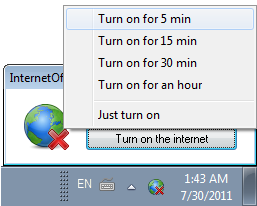
You can also try our new tool InternetOff. It allows you to quickly turn off\on your internet connection from the system tray. Fully freeware. But in beta state and 32 bit version only. Feel free to send us any comments

[attach]

Original address: https://www.donationcoder.com/forum/index.php?topic=25468.0