DonationCoder.com forum
 
Read-only archive. This is a static copy of the DonationCoder.com forum. Reading and searching work as before; logging in, posting and private messages do not.
Archive of 2026-10-21 · About this archive · Main site

Author Topic: Karen's Directory Printer - copy content of a directory to txt file or print it  (Read 16,043 times)

brotherS

  • Master of Good Ideas
  • Honorary Member
  • Joined in 2005
  • **
  • Posts: 2,261
Hi,

I couldn't find such a program quickly by searching the forums, so I used Google. I installed quite a few programs to try them, and the best one I found is Karen's Directory Printer. It was mentioned on the site before*, but with different descriptions.

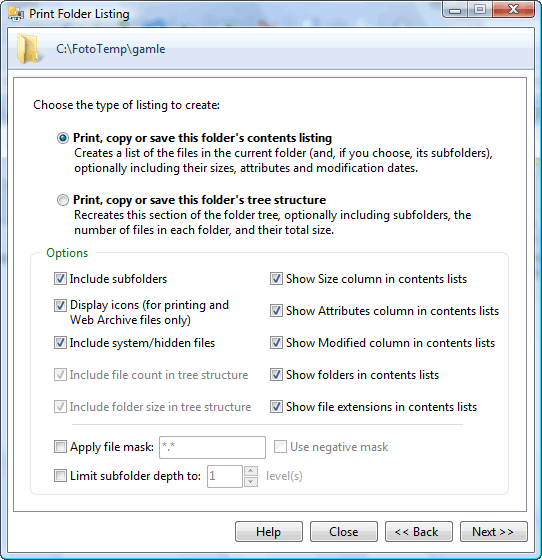
You can see a screenshot and a bit more info here: http://www.karenware.com/powertools/ptdirprn.asp

I like that it's free and quite flexible, and most features are intuitively usable. It offers Windows explorer (right-click on menu) integration and you can either print the results or save it to a .txt file.

Just wanted to let you know about this. :)


* http://www.donationcoder.com/forum/index.php?action=search2;search=Karen's+Directory+Printer
Thank you.
« Last Edit: January 22, 2011, 04:14 PM by brotherS »

Josh

  • Charter Honorary Member
  • Joined in 2005
  • ***
  • Posts: 3,411
    • Gathering Badge
    • Official Forum Clown
    • Coding Snacks
    • Plugin Coding Medal
    • Volunteers/Staff
    • Military Service Badge - US Army
    • Furry Fandom Badge - Furry Fandom
    • Linux User
Code
dir /s /b > output.txt

That does it too ;-)
Strength in Knowledge

brotherS

  • Master of Good Ideas
  • Honorary Member
  • Joined in 2005
  • **
  • Posts: 2,261
I know, but not with a pretty good GUI, ready-made formatting, and Windows explorer integration!  8)
Thank you.

skwire

  • I eat Coding Snacks for breakfast...
  • Global Moderator
  • Joined in 2005
  • *****
  • Posts: 5,297
    • Participated in NANY Challenge Seventeen Times
    • Coding Snacks
    • Superboy Coder
    • Cody Award
    • Volunteers/Staff
    • Gathering Badge
Karen (of Karenware) has been around forever and has some really nicely written freeware apps on her site.  Good stuff.  :Thmbsup:

daddydave

  • test
  • Supporting Member
  • Joined in 2008
  • **
  • Posts: 867
    • Participated in NANY Challenge Once
A bit off topic but that reminded me of something.

Back in the day (the 1980's), I remember reading in a magazine that it was a good idea to print a list of all the files on your computer and put them on the wall for reference. Imagine doing that today!
« Last Edit: January 22, 2011, 05:54 PM by daddydave »

ha14

  • Participant
  • Joined in 2010
  • *
  • Posts: 276
You can also subscribe to Karen newsletter as to say thanks for Karen's Directory Printer.

ther are some alternatives
File & Folder List Maker
http://www.pcpros2go.com/downloads/file_&_folder_list_maker.php

PrintFolder
http://no-nonsense-software.com/freeware/

The Html Directory 1.0
http://camtech2000.net/Pages/The_Html_Directory.html

brotherS

  • Master of Good Ideas
  • Honorary Member
  • Joined in 2005
  • **
  • Posts: 2,261
A bit off topic but that reminded me of something.

Back in the day (the 1980's), I remember reading in a magazine that it was a good idea to print a list of all the files on your computer and put them on the wall for reference. Imagine doing that today!

Ah yeah... the 80s... funny times. :)


ther are some alternatives

"Alternatives" is a big word for those... here's why:


File & Folder List Maker
http://www.pcpros2go.com/downloads/file_&_folder_list_maker.php

Can't be bothered to try - it's version 1.1 only, and "Last modified: 2008-03-09"


PrintFolder
http://no-nonsense-software.com/freeware/

I read in a review that it doesn't support subfolders (also, it looks very basic).


The Html Directory 1.0
http://camtech2000.net/Pages/The_Html_Directory.html

Html output *only* it seems.
Thank you.

rjbull

  • Charter Member
  • Joined in 2005
  • ***
  • Posts: 3,217
I use the DiskDirExtended plugin for Total Commander, quick and easy, but no fancy GUI  :)

Curt

  • Supporting Member
  • Joined in 2006
  • **
  • Posts: 7,565
CFi ShellToys:


[attachimg=#]


-----
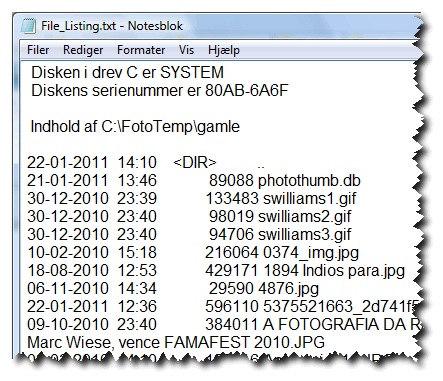
But normally I use a much faster solution: Right-click the folder and click "Create FileListing Text". HALF A SECOND later File_Listing.txt has been created and saved. End of story. Now where did I get this feature from? ?!


2011-01-22_225313.gif


(Notesblok = Notepad)(Indhold = Content)
« Last Edit: January 22, 2011, 10:13 PM by Curt »

PhilB66

  • Supporting Member
  • Joined in 2007
  • **
  • Posts: 1,522
A few more options :) :

1. getFolder (free, requires .net)
Cybernetnews review here

2. DirPrintAdv (Directory Printer is donationware)

3. Directory List & Print (Free and Pro Version

SKA

  • Charter Member
  • Joined in 2006
  • ***
  • Posts: 229
Curt: <Now where did I get this feature from? ?!>

Maybe from here:
http://www.theeldergeek.com/file_list_generator.htm

SKA

Renegade

  • Tell me something you don't know...
  • Charter Member
  • Joined in 2005
  • ***
  • Posts: 13,291
    • Participated in NANY Challenge Three Times
    • Furry Fandom Badge - Furry Fandom
    • Linux User
I posted a way to do this from your SendTo context menu:

http://renegademinds.com/TipsTricks/Dumpfileanddirectoryliststotextfiles/tabid/56/Default.aspx

This is basically it:

Quote
@dir %1 /A /S > c:\dirListing.txt
@echo Opening c:\dirListing.txt in Notepad (Close notepad to delete file)
@notepad c:\dirListing.txt
@echo Deleting c:\dirListing.txt
@del c:\dirListing.txt
@pause

Instructions are at the link above.
Slow Down Music - Where I commit thought crimes...

Freedom is the right to be wrong, not the right to do wrong. - John Diefenbaker

Curt

  • Supporting Member
  • Joined in 2006
  • **
  • Posts: 7,565
Curt: <Now where did I get this feature from? ?!>

Maybe from here:
http://www.theeldergeek.com/file_list_generator.htm

SKA

It sure is the same.  :up:

But I didn't get it from that page, because mine has a "_" and a different location (not "C/WINDOWS/filelisting.bat", so where is it?), so someone has altered it for me.

Renegade

  • Tell me something you don't know...
  • Charter Member
  • Joined in 2005
  • ***
  • Posts: 13,291
    • Participated in NANY Challenge Three Times
    • Furry Fandom Badge - Furry Fandom
    • Linux User
Curt: <Now where did I get this feature from? ?!>

Maybe from here:
http://www.theeldergeek.com/file_list_generator.htm

SKA

I think I like that better -- Need to go back and read again -- back to work...
Slow Down Music - Where I commit thought crimes...

Freedom is the right to be wrong, not the right to do wrong. - John Diefenbaker

Curt

  • Supporting Member
  • Joined in 2006
  • **
  • Posts: 7,565
[deleted] I read the wrong column
« Last Edit: January 23, 2011, 02:28 PM by Curt »

rjbull

  • Charter Member
  • Joined in 2005
  • ***
  • Posts: 3,217
You might want to cross-reference the thread Goodness! Is there NO Win utility to do "DIR /S/B C:\ZZZ\*.JPG > RESULT.TXT"?, specifically mouser's post LS - File List Generator (for Windows).  As LS is under 50k I've attached it below.

40hz

  • Supporting Member
  • Joined in 2007
  • **
  • Posts: 11,861

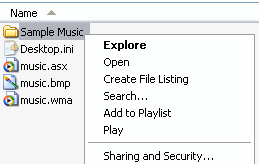
But normally I use a much faster solution: Right-click the folder and click "Create FileListing Text". HALF A SECOND later File_Listing.txt has been created and saved. End of story. Now where did I get this feature from? ?!

Possibly here?

[attach]
« Last Edit: January 24, 2011, 08:50 AM by 40hz »

J-Mac

  • Supporting Member
  • Joined in 2007
  • **
  • Posts: 2,918
Wow - Karen's Directory Printer is still around and working on the latest OS's? Cool. I am using other means currently but this one got me through many times in the past.  :)

Thanks!

Jim
"I am getting so tired of slitting the throats of people who say that I am a violent psychopath."

Original address: https://www.donationcoder.com/forum/index.php?topic=25368.0