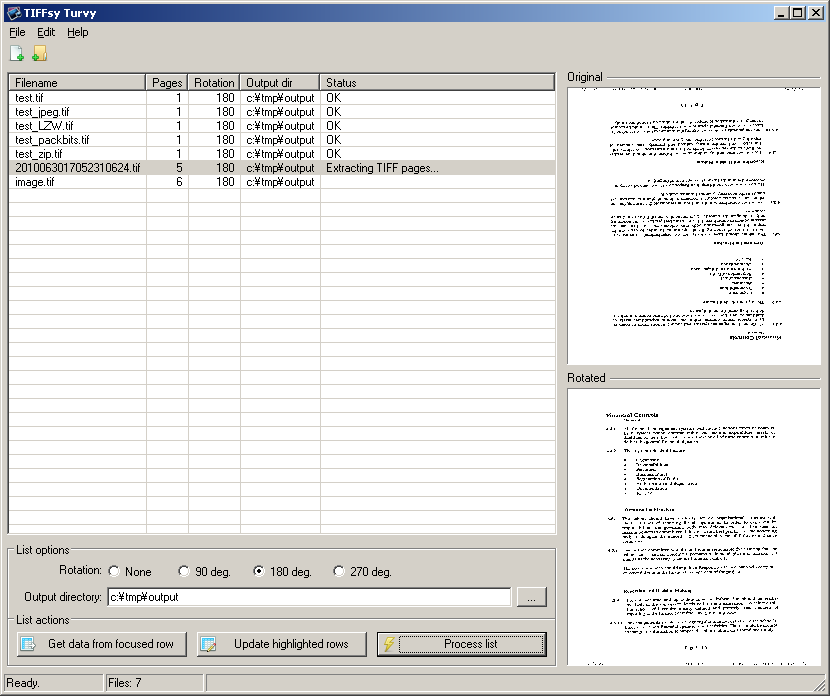
@deano: One thing I noticed in the sample file you sent me is that, not only is it vertically flipped, it's horizontally flipped as well. Are they all like this?


Give this a shot and see if it's what you had in mind. If so, I'll set up the typical webpage, write a help file and release it.
http://skwire.dcmembers.com/apps/tiffsy_turvy/TIFFsyTurvy.zip
(see attachment in previous post)


Love the name

Superb, it works! Many thanks. I love a simple app that does exactly what you need it to do
Just one thing; i clicked Help,About and the message box is empty. Presumably this would have the answers to these questions;
* What does Edit, Launch File do?
* What do the Get data... and Update highlighted... buttons do?


Superb, it works! Many thanks. I love a simple app that does exactly what you need it to do
Great. I'm glad it's working for you. =]Just one thing; i clicked Help,About and the message box is empty. Presumably this would have the answers to these questions;
* What does Edit, Launch File do?
* What do the Get data... and Update highlighted... buttons do?
Doh, forgot to take out the Edit, Launch entry. As for the other buttons:
- Get data from focused row -- This will populate the the radio button cluster and the output directory field below the listview with the data from the focused row.
- Update highlighted rows -- Let's say you just dropped a slew of TIFF files on the listview. Highlight them all, choose a rotation, set the output directory field and then click that button. ALL highlighted rows will be updated with your entered values. It's a quick way to set the rotation/output data for lots of rows.
Mucho thanks once again Skwire, I do believe that this will provide a genuine boost to my productivity. I'll drop you a donation as a token of my appreciation.
On a technical note would you be able to explain how you did it? Was it all autohotkey or something else? And would you have the source code? As I said way back at the top of this thread I am trying to learn how to create different kinds of programs on Windows and would like to make things like this for other people as well.


Mucho thanks once again Skwire, I do believe that this will provide a genuine boost to my productivity. I'll drop you a donation as a token of my appreciation.
You're welcome. I'm happy to help out.On a technical note would you be able to explain how you did it? Was it all autohotkey or something else? And would you have the source code? As I said way back at the top of this thread I am trying to learn how to create different kinds of programs on Windows and would like to make things like this for other people as well.
The interface is all AutoHotkey. The grunt work behind the scenes is done by convert.exe from the ImageMagick suite and tiffinfo.exe from the LibTIFF suite. I use convert.exe to do the rotation and converting from TIFF to JPG (using the "/rotate #" parameter). The tiffinfo.exe I use for determining how many pages are in the TIFF file.
AutoHotkey is superb for making front-ends that utilise commandline executables and/or DLL files. Initially, I had intended to use the GDI+ library to do it all but I couldn't find a way to get the number of pages in a TIFF file using it so I wrote it using IrfanView doing the image manipulation. However, I remembered that you wanted to use this at work and IrfanView's license doesn't allow that without paid registration. I then rewrote it using the current ImageMagick/LibTIFF method, hence the delay in getting it to you.
Does that help clear things up?


Website | Download
v1.0.2 - 2011-02-05
+ Added option to handle F Class TIFFs. Enable this option if your
resulting JPEG files appear to be squashed or stretched horizontally and
process the list again. (Thanks, H. Mechanic)
+ Added option to output straight to PDF instead of separate JPEG files.
* The default output directory for added files is now the same folder as the
original file. This can be changed using the 'Modify list data' section.
(Thanks, H. Mechanic)

I can't seem to grab this - the download stops about two-thirds of the way through?
Hm, looks like that server needs a kick in the butt (or a disk is failing). It's slow as mud through a coffee filter... from about 2 MB of 3.55 and stopped at 2.34 MB, first part was quite OK


I can't seem to grab this - the download stops about two-thirds of the way through?Hm, looks like that server needs a kick in the butt (or a disk is failing). It's slow as mud through a coffee filter... from about 2 MB of 3.55 and stopped at 2.34 MB, first part was quite OK
Seemed to work for me just now...
Original address: https://www.donationcoder.com/forum/index.php?topic=23266.0