I would like to try one list.
[...snipped...]
P.D. Please leave one option in the right menu to launch any application.
I'm sorry but I don't understand either of these.


 Topic: Shortcut Creator (Read 124,429 times)


I would like to try one list.
[...snipped...]
P.D. Please leave one option in the right menu to launch any application.
I would like to modificate the script CTRL+SHIFT+S to modify during the shortcut copy the comment in it.I intend to consider how this might be accomplished.
To follow the firefox addon for shortcutsThanks for the link. I intend to take a look.
http://forums.mozillazine.org/viewtopic.php?f=38&t=1917131
from Spins
I took a look and examined:To follow the firefox addon for shortcutsThanks for the link. I intend to take a look.
http://forums.mozillazine.org/viewtopic.php?f=38&t=1917131
The following possibilities have come up so far (neither implemented nor tested):I would like to modificate the script CTRL+SHIFT+S to modify during the shortcut copy the comment in it.I intend to consider how this might be accomplished.

I took a look and examined:To follow the firefox addon for shortcutsThanks for the link. I intend to take a look.
http://forums.mozillazine.org/viewtopic.php?f=38&t=1917131
- Tab Mix Plus
- Multirow Bookmarks Toolbar
but did not figure out anything relevant to the current situation.

IN the past I need environmental variables and have no utility because need to reiniate the system to take place.I use batch (.bat) files to set environment variables -- this way I do not need to restart my system (or log off and then on) to make adjustments.
set MYCOMMONPATH=Documents and Settings\JOSE\Escritorio
set ONE=C:\%MYCOMMONPATH%
set TWO=D:\%MYCOMMONPATH%
set THREE=F:\%MYCOMMONPATH%
set FOUR=I:\%MYCOMMONPATH%
set FIVE=M:\%MYCOMMONPATH%
set SIX=N:\%MYCOMMONPATH%
start CreateShortcutsIn.exe
[Settings]
; hotkey to bring up menu
Hotkey=^+c
; destination locations (numbered starting at 1) to choose from
; absolute path
1=C:\
; environment variable support
2=%TEMP%
; multiple locations, separate by |
3=C:\WINDOWS|C:\
; hotkey for location(s)
4=^+d::C:\Documents and Settings
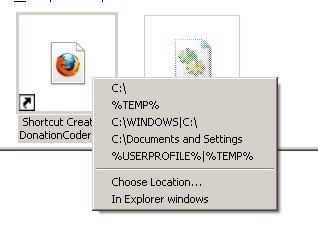
5=^+p::%ONE%|%TWO%|%THREE%|%FOUR%|%FIVE%|%SIX%I would like to modificate the script CTRL+SHIFT+S to modify during the shortcut copy the comment in it.If there are multiple destination folders, do you want to specify a comment for each destination separately, or should all destinations use the same comment?
The following possibilities have come up so far (neither implemented nor tested):Another idea is to use one of the lock keys (e.g. CapsLock, NumLock, ScrollLock) to toggle the behavior. I have tested this and it seems to work:
1. Provide two modes of operation -- one mode just creates shortcuts while the other one asks for a comment first (say via some dialog box) and then creates shortcuts. The mode might be toggled via a hotkey and a visual indication of which mode was currently active might be provided via different tray icons.
2. Modifier-based behavior difference. Configure CreateShortcutsIn to behave differently (as described in the previous possibility) depending on whether a particular modifier (e.g. Shift, Alt, Control, etc.) is held down when the menu item is invoked.
I would like to modificate the script CTRL+SHIFT+S to modify during the shortcut copy the comment in it.If there are multiple destination folders, do you want to specify a comment for each destination separately, or should all destinations use the same comment?
Please provide an example.
IN the past I need environmental variables and have no utility because need to reiniate the system to take place.I use batch (.bat) files to set environment variables -- this way I do not need to restart my system (or log off and then on) to make adjustments.
For example, I have done something similar to the following successfully:
1. Create a file named CreateShortcutsIn.bat in the same directory where CreateShortcutsIn.exe is located.
2. Put the following in the file named CreateShortcutsIn.bat:Quoteset MYCOMMONPATH=Documents and Settings\JOSE\Escritorio
set ONE=C:\%MYCOMMONPATH%
set TWO=D:\%MYCOMMONPATH%
set THREE=F:\%MYCOMMONPATH%
set FOUR=I:\%MYCOMMONPATH%
set FIVE=M:\%MYCOMMONPATH%
set SIX=N:\%MYCOMMONPATH%
start CreateShortcutsIn.exe
3. Put the following in CreateShortcutsIn.ini:Code: (ini)[Settings] ; hotkey to bring up menu Hotkey=^+c ; destination locations (numbered starting at 1) to choose from ; absolute path 1=C:\ ; environment variable support 2=%TEMP% ; multiple locations, separate by | 3=C:\WINDOWS|C:\ ; hotkey for location(s) 4=^+d::C:\Documents and Settings 5=^+p::%ONE%|%TWO%|%THREE%|%FOUR%|%FIVE%|%SIX%
4. Use CreateShortcutsIn.bat (the batch file) to start the program (e.g. double-click its icon).
Does that sort of thing work for you?
I don't think I understand yet.
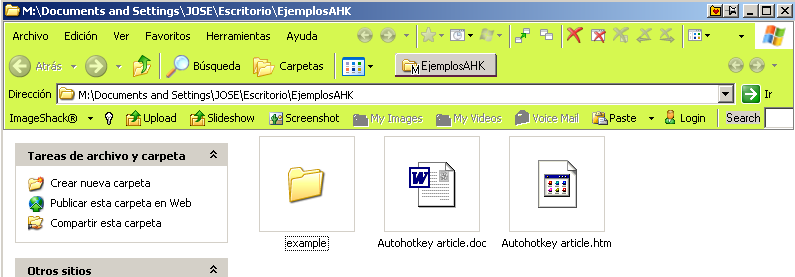
Is it that you want to be able to make shortcuts into all open Windows Explorer windows (except the one with files selected)? That might be possible.

http://ewemoa.dcmembers.com/tmp/CreateShortcutsIn.exe
Original address: https://www.donationcoder.com/forum/index.php?topic=22924.0